
Thread
Macintosh TV sound/TV tuner problems
I may be crazy, but I really wanted a Macintosh TV so I bought one on eBay. Paid more than I probably should have, but nowhere near the $600 range of the ones currently for sale. I guess it's kind of my new project machine. It has the black keyboard, black mouse, original credit card remote control, and original CD caddy.
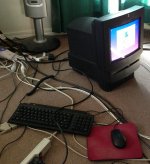
It's in fairly decent physical shape and it works, but it has some problems. The audio output doesn't get anywhere near loud enough (both from the speakers and the headphone jack). The TV tuner has trouble tuning all but a few low-numbered channels, and even the ones it can tune are very bad and pretty much unwatchable. I don't think there's any sound either, but that might just be the audio problem. Oh, and It makes terrible noises when first powering on and shutting off, like something is rattling. My guess is either the fan or the hard drive.
I cleaned off the motherboard and TV tuner board with Q-tips and 99% isopropyl. There was a dead PRAM battery which I removed, and luckily it didn't leak. Sadly it appears this machine used to live in a smoking environment given the yellow residue that was coming off. That's probably not the greatest sign, but the logic board looks to be in very good shape with no capacitor leakage, so I think it's going to be OK. Will definitely recap it at some point, and I'll definitely take pictures so we have a good capacitor placement reference for the Mac TV.
Here are my thoughts so far. I would appreciate any extra input!
About the audio output problem, I'm guessing it's something to do with the audio amplifier chips or something in that portion of the circuit...I believe that circuit is on the analog board, correct? Judging by what I found on another site about modding the Color Classic, it sounds like it. Maybe the analog board needs a good recapping job or replaced amplifier chips. I haven't opened it up to check the analog board yet, so I have no idea how nasty it looks there. I'm fairly terrified about getting close to the CRT and having to discharge it...
As for the TV tuner, I have no idea where to even begin. I checked to make sure the TV Setup control panel was configured for cable rather than antenna. I tried antenna mode, cable mode, and HRC cable mode -- none of them one work. The RCA composite video inputs work perfectly, so that makes me suspect the tuner board is at fault. I don't see anything that looks ugly such as capacitor leakage or burnt components on the TV tuner board. Looks like the majority of the TV tuning stuff is probably inside the big metal box (a tuner module?). It appears to be a Philips FS936E/F according to the label. I found a TV receiver that uses the same tuner and bought it on eBay, so if something's wrong inside the tuner module, I might be able to scavenge the part, do some desoldering, and replace it. Otherwise, I'm SOL -- nobody has the tuner board available from what I can tell.
Anyway, a new project! Yay!
i'm sure you have recapped anything with an electrolytic can cap right?
if not they all need to be changed.
:-D
maccaps.com
if not they all need to be changed.
:-D
maccaps.com
I haven't yet, but that's the plan! Especially the analog board...
There are also a bunch of tiny electrolytics on the TV tuner board.
There are also a bunch of tiny electrolytics on the TV tuner board.
Are you running a Digital to Analog converter box between your antenna and your Mac? Nearly all analog TV transmission is gone now so you'll really need a DA box to receive anything.
We still have analog cable out here in the boonies  plus my Nintendo's RF adapter that puts it on channel 3 or 4 shows the same problem.
I got the analog board out last night and I don't see anything too ugly on it, but I'll recap it while I have it out. And yes I was right, the audio amp chips are on the analog board.
plus my Nintendo's RF adapter that puts it on channel 3 or 4 shows the same problem.I got the analog board out last night and I don't see anything too ugly on it, but I'll recap it while I have it out. And yes I was right, the audio amp chips are on the analog board.
yeah but the audio , being quiet is totally bad caps.
Wow! Everything here is digital. In fact, if you have an analog TV, Comcast gives you a different D->A converter box. Yet they charge you more to leave the signal unmolested (a supplemental fee for "HDTV"). Go figure.We still have analog cable out here in the boonies
That said, I just use an antenna for OTA HDTV signal plus Netflix and Hulu Plus via cable modem. Comcast hates me.
Ha, nice. I think OTA here has finally converted to digital, but because we were on a repeater it wasn't subject to the same digital conversion date that the larger places had to abide by. So even after that conversion date, we were still on analog for a while.
As for cable, we have digital and HD channels too, but basic and most expanded basic channels are still analog. I imagine they will change that before long, so I want to get the tuner working before that happens
As for cable, we have digital and HD channels too, but basic and most expanded basic channels are still analog. I imagine they will change that before long, so I want to get the tuner working before that happens
Do you have time warner? if so thats why. Comcast is all digital just about everywhere. TWC is thinking about it, but still analog.
I'm on Charter. I'm pretty sure the change to all-digital for them is coming before long though. It doesn't really bother me that much...I have a TiVo with a CableCARD that can watch the digital channels and I love it.
As for the Macintosh TV, I'm waiting for an ESR meter to arrive. I know that measuring caps in-circuit is not a super great idea, but it sounds like an ESR meter can *sometimes* help find bad caps in-circuit depending on what else is in the circuit. There are a ton of caps on the analog board and I'm not in the mood to replace all of them unless I have to. I sure hope capacitors are the problem anyway.
As for the Macintosh TV, I'm waiting for an ESR meter to arrive. I know that measuring caps in-circuit is not a super great idea, but it sounds like an ESR meter can *sometimes* help find bad caps in-circuit depending on what else is in the circuit. There are a ton of caps on the analog board and I'm not in the mood to replace all of them unless I have to. I sure hope capacitors are the problem anyway.
Its most likely caps, but the analog board can come out of any of the LC/performa style body of the mac TV.
Thanks for the tip--I noticed that! In fact, the bottom of the board says it's an LC 520 analog board. I made a list of all the capacitor specs I could find on it. A few of the big ones are held down with plasticy stuff and I couldn't read them. Anyway I plan on contributing my picture with all of the cap specs listed, for the analog board, logic board, and TV tuner board.
Ill look in a box I have I may have one just lying around somewhere.
Awesome! If you happen to have one I would definitely be interested even if only for verification.
Um since secret chimp hasn't been on I do have a full newer lc575 if you want a whole unit. I just wanted an lc550 board for it to Mac a color classic II. But he has not been on.
Thanks for the offer, but I probably don't want to add another big CRT Mac to my collection I'll probably see what I can do with the original analog board first. It seems pretty much perfect except for the audio.
I'll probably see what I can do with the original analog board first. It seems pretty much perfect except for the audio.Never mind about trying to locate specific bad capacitors with an ESR meter-just do the whole lot. It always fixes quiet or strange sound output (I know from experciance-my Mac was screeching quietly, although it got progressively worse, and recapping did the job).
I've actually read that the humongous electrolytic caps are very rarely the problem and they're expensive, so I'm not going to replace them unless I absolutely have to.
Many (most?) of the smaller ones will definitely be getting replaced though, especially any that show a high ESR.
Many (most?) of the smaller ones will definitely be getting replaced though, especially any that show a high ESR.
Unfortunately the ESR meter didn't find anything off the charts bad. It's still possible that some of them have bad ESR though -- just they might have something else in circuit that makes them look good. I'm going to replace as many as I can, but I'm going to leave the big ones that are glued down alone unless I still have problems after the others are replaced.
My ESR meter is not good enough to measure the ESR of smaller capacitors either, so those will all be replaced. Time for a big Digi-Key order!
My ESR meter is not good enough to measure the ESR of smaller capacitors either, so those will all be replaced. Time for a big Digi-Key order!
As I work in the repair industry, its those humongous caps that when they DO fail, they do the most devastating damage. Blowing up transformers, etc...
Heh, I can only imagine how ugly it would be when the big ones fail!
I removed all the analog board capacitors except for the very biggest one today, so they are all being replaced aside from that one. Really glad I got that vacuum desoldering gun; it saved a TON of time. I started smelling that fishy smell when I removed a few of them...so yeah, some of them definitely had some leakage. None of them showed anything too crazy for ESR, but the fishy smell is a dead giveaway that they need replacement. I'll leave the logic board and TV tuner caps alone at first to see if the analog board ends up fixing the sound problem, but after that everything else is getting replaced too
I removed all the analog board capacitors except for the very biggest one today, so they are all being replaced aside from that one. Really glad I got that vacuum desoldering gun; it saved a TON of time. I started smelling that fishy smell when I removed a few of them...so yeah, some of them definitely had some leakage. None of them showed anything too crazy for ESR, but the fishy smell is a dead giveaway that they need replacement. I'll leave the logic board and TV tuner caps alone at first to see if the analog board ends up fixing the sound problem, but after that everything else is getting replaced too
What kind of capacitor? I can check my local parts store. Might have big, new ones for cheap.
Hey thanks for the offer! I'm actually not planning on replacing it, so no biggie. Thanks for offering to check though
It's a 330uF, 400V capacitor. Looks like it can be had on Digi-Key for about $5 or so. It won't be a huge deal to get it on Digi-Key if I do end up having to replace it. Thanks again though!
It's a 330uF, 400V capacitor. Looks like it can be had on Digi-Key for about $5 or so. It won't be a huge deal to get it on Digi-Key if I do end up having to replace it. Thanks again though!
The fan was filthy before I cleaned it, but the awful sound when it first powers on (and off) is the hard drive. It's the original 160 MB Quantum, the same type that is prone to having the "spins up, then spins down and doesn't work" problem like techknight described on his YouTube channel. As of now it still works, but judging by what I've seen, I can't rely on that hard drive to last much longer
Well, analog board recap didn't fix the faint sound. Logic board and TV tuner board coming next.
Luckily, my analog board recap doesn't appear to have hurt anything. The picture *might* be a little blurrier than it used to be, not totally sure. Does the analog board typically need adjustments after a recap?
Luckily, my analog board recap doesn't appear to have hurt anything. The picture *might* be a little blurrier than it used to be, not totally sure. Does the analog board typically need adjustments after a recap?
I can't see why it wouldn't need adjustments (essentially the new capacitors have a different capacitance to the old, failing ones, so most likely it will need adjusting).
BTW I would not say I would have ever described the sound of my late Quantam 160MB drive as "awful".
BTW I would not say I would have ever described the sound of my late Quantam 160MB drive as "awful".
Yeah, this is a weird sound I've never heard on other Quantums before.
Unfortunately I lifted some pads on the logic board last night when removing the old capacitors. One completely broke off. Fixable, but ugh. I think cutting the can off, removing the black insulator thing, and then removing each lead separately is the way to go on those things--NOT heating and lifting the sides alternately.
Unfortunately I lifted some pads on the logic board last night when removing the old capacitors. One completely broke off. Fixable, but ugh. I think cutting the can off, removing the black insulator thing, and then removing each lead separately is the way to go on those things--NOT heating and lifting the sides alternately.
Yeah I'm a twist off man my self. works like a champ.
If you would rather I take care of that for you, let me know.
i wouldn't mind earning some of that money I'v paid you back.
I'm Fast, and reasonably priced.
Charles
If you would rather I take care of that for you, let me know.
i wouldn't mind earning some of that money I'v paid you back.
I'm Fast, and reasonably priced.
Charles
Thanks man, I would like to finish this mistake up myself though I have several ideas and I found a place to hook onto to replace the missing pad.
I have several ideas and I found a place to hook onto to replace the missing pad.Update: I found where the lost pad was supposed to connect and ran a patch wire to a ceramic capacitor on the bottom of the board that connects to the same rail. I also just carefully re-soldered a new cap onto the lifted pads that were still connected. Probably should have epoxied them down first, but I'm too anxious to get this working!
The sound is nice and loud again. So yes, leaky caps on the logic board were causing the faint sound on this Mac TV.
Next up: recapping the TV tuner board to see if I can get TV tuning working again.
The sound is nice and loud again. So yes, leaky caps on the logic board were causing the faint sound on this Mac TV.
Next up: recapping the TV tuner board to see if I can get TV tuning working again.
I was able to recap the TV tuner board itself without problems (eww! ALL of the capacitors had leaked badly), but there's a little Sony daughterboard on it (covered with small electrolytic capacitors) that gave me some troubles and I lost a few pads on it -- my guess is the leaky caps didn't help matters. Luckily the Sony daughterboard is a part commonly used in many TVs, so I can just buy a new one if I can't salvage the existing one. If I can, I plan on adding a header so replacing it in the future won't require soldering.
The Sony board is an SBX1637A-01 and appears to be for the TV audio.
Right now I'm running the newly-recapped TV tuner board without the Sony daughterboard, and the TV tuner works perfectly after being recapped! Woohoo! I'm thinking as soon as I have the Sony board recapped and back in, the TV will have sound too. Can't wait to complete this! I'm super excited to be restoring this broken Macintosh TV to its former glory
Haha, hope these updates aren't getting too annoying! I was able to repair the sony sound board's missing pads and recap it. The TV sound is there now, but very very faint. I probably screwed something up along the way. My plan is to just buy a new sound board. That board has a TON of capacitors on it; it was really difficult to recap. I'm sad that it didn't work  But I'm not overly upset about it. Other sources online for TV repair said to just buy a new module and don't bother recapping it. I see why -- it's so jam-packed!
Replaced the Sony sound board, and added a socket (found some 0.070" pitch headers on Digi-Key) so if it has to be replaced in the future, no desoldering will be necessary.
The TV sound is alive again! Woohoo! Haven't tested the floppy or CD drive, but everything else is perfect aside from the nasty hard drive sound when it first spins up (and when it spins down). Anyway, awesome! Mission accomplished before analog cable is completely gone.
The TV sound is alive again! Woohoo! Haven't tested the floppy or CD drive, but everything else is perfect aside from the nasty hard drive sound when it first spins up (and when it spins down). Anyway, awesome! Mission accomplished before analog cable is completely gone.
When they make the switch you can still get OTA local channels with a $20 digital converter box.
Some of my local channels look as good (or better than) HD on cable when we had it.
Some of my local channels look as good (or better than) HD on cable when we had it.
That's true...also, bbraun told me there are devices that take composite and s-video inputs and turn them into analog TV channels. That would be interesting to try too.
Here's a video of the Mac TV in action:
Here's a video of the Mac TV in action:
That's a cool TV! Just a few questions though:
Why did it show the happy Mac twice?
Why was the clock not set (I assume there's no PRAM battery, but am I correct)?
Is the TV flicker due to changing channels, or is that how it looks when on one channel (I'm not talking about the strobing effect on all screens)?
Why are you using that remote, not the original (I guess that's not the original)?
Thanks!
Your first and second questions are actually related. Both happen because I don't have a PRAM battery installed. When a Mac with uninitialized PRAM first boots up, it's in 24-bit addressing mode. If you try to boot into System 7.6 with 24-bit addressing, it will chime and show the Happy Mac, and then it will put the Mac into 32-bit mode and reboot. So that's why you hear the second chime -- it's System 7.6 changing to 32-bit addressing. The clock was also not set because there's no PRAM battery. I don't know why the "clock not set" message immediately dismisses itself. Maybe it's special behavior in the Mac TV? Or do other computers do that too?
The flickering is definitely due to the CRT being filmed by my phone. I don't notice any blinking when I watch with my eyes.
The remote I'm using is the original remote. Newer systems with TV cards had a different style of remote which is also compatible with the Mac TV's remote, but the remote I have was the type Apple originally included with the Mac TV.
Clock not set happens on my 5400 series also. Sometimes its fast, sometimes not. I think sometimes its a disc access issue kinda like it had not loaded the control panel at the same rate during boot. Like the G3 accelerator changed the behavior even more.
Mine does that as well! I've often wondered why... :?: :?:
I'm not refering to the general flicker. There's a much slower "sweep" effect, repeating about once every 2 seconds, during the TV tuner demonstration. I couldn't quite tell if you were changing channels there or not.
Then that's a very modern-looking remote! It looked out-of-place with the Mac TV, so I assumed it was not the original.
That sweep is just occurring every time I change the channel. When you stay on a single channel it doesn't do that
Yeah, it is a pretty cool-looking remote! I think it can also control playing audio CDs, although I haven't tried that yet.
Yeah, it is a pretty cool-looking remote! I think it can also control playing audio CDs, although I haven't tried that yet.
It reminds me of when I used a 638CD with the tuner card as a bedroom TV for a few years. My TAM doesn't pick up any stations here at the office.
Faint sound is almost always the SMT electrolytics on the motherboard, those things are horrible. I would replace the ones in the tuner as well, there is a good chance that replacing ALL of the SMT lytics with tantalum or ceramic capacitors will resolve all of your problems.
I've also found that the large through-hole electrolytics rarely fail, only those that are in the output filters of the power supply. The big ones I only replace if they test marginal or bad, the smaller ones in the power supply and any surface mount electrolytics get replaced wholesale. It's not even worth troubleshooting until you do that.
I've also found that the large through-hole electrolytics rarely fail, only those that are in the output filters of the power supply. The big ones I only replace if they test marginal or bad, the smaller ones in the power supply and any surface mount electrolytics get replaced wholesale. It's not even worth troubleshooting until you do that.
Yep, that's exactly what it ended up being--bad SMT electrolytics on the logic board and tuner board. I don't think the analog board needed a recap at all, but I'm not upset about doing it. I smelled a fishy smell when removing some of the caps, so it was probably a good idea. Still need to fix the focus adjustment after the analog board recap though...picture is still slightly blurry.
I stuck with replacement electrolytics. I'm well aware it will have to be recapped again, and I'm OK with that.
I stuck with replacement electrolytics. I'm well aware it will have to be recapped again, and I'm OK with that.