
Thread
Compact Mac CRTs- Safe to touch and after how long?

http://www.soundonsound.com/sos/nov99/articles/applenotes.htm
yamaha ux256 (2000)
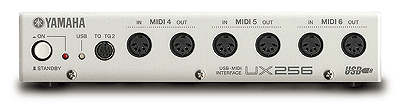
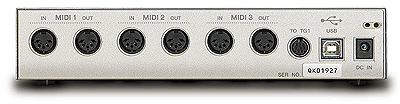
http://www.soundonsound.com/sos/nov00/articles/yamahaux256.htm
motu midi timepiece AV USB (2000)


* uses standard 120v powerlead connection
http://web.archive.org/web/20040409083220/http://www.motu.com/english/hardware/mtpav_usb/body.html
mac manual: http://cdn-data.motu.com/manuals/midi/MIDI_Timepiece_AV_USB_User_Guide_Mac.pdf
win manual: http://cdn-data.motu.com/manuals/midi/MIDI_Timepiece_AV_USB_User_Guide_Win.pdf
motu usb midi devices require Mac OS 8.6 or later
networking: http://www.motu.com/techsupport/technotes/document.2000-01-28.4413716217
this device can be networked,daisychained,used in conjunction with other nonUSB "timepiece" units but not "express" units
emagic amt8 (usb / mac rs422 serial / pc rs232 serial)
DRIVERS HERE: http://web.archive.org/web/20020603152527/http://www.emagic.de/english/support/download/toolsmac.html
http://www.soundonsound.com/sos/jan00/articles/emagicamt8.htm]http://www.soundonsound.com/sos/jan00/articles/emagicamt8.htm

http://www.soundonsound.com/sos/jan00/articles/emagicamt8.htm
emagic unitor8 mk II (2001)


http://medias.audiofanzine.com/images/normal/emagic-unitor-8-mkii-71462.jpg
http://www.digitalprosound.com/2001/06_jun/reviews/emagic1.htm
article: http://www.emusician.com/news/0766/emagic-unitor8-mkii/145026
DRIVERS HERE: http://web.archive.org/web/20020603152527/http://www.emagic.de/english/support/download/toolsmac.html
manual: http://www.advancedaudiorentals.com/docs/Unitor%208%20en.pdf
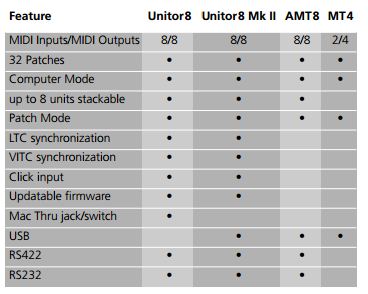
what are the differences between emagic midi interfaces?
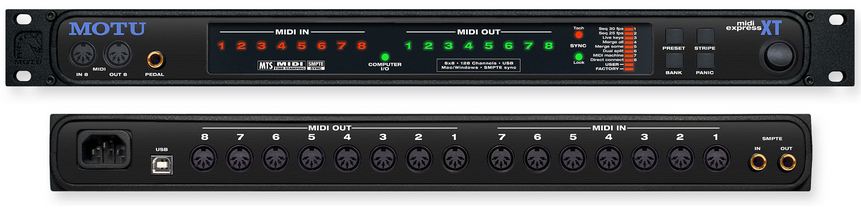
Motu Midi Express XT USB (2000) 2nd version connects via usb/mac serial, note that the original version connects via mac serial/parallel, parallel pc support dropped


http://web.archive.org/web/20000816175723/http://www.motu.com/english/hardware/xpressxt_usb/body.html
http://web.archive.org/web/20000823150221/http://www.motu.com/english/hardware/xpressxt_usb/features.html
manual: http://cdn-data.motu.com/manuals/midi/MIDI_Timepiece_AV_USB_User_Guide_Mac.pdf
motu usb midi devices require Mac OS 8.6 or later
Motu Midi Express XT USB (2011 2nd USB version re release)
motu midi express 128 (june 2003)


8in 9 out 128 channels
Compatibility - Mac OS9, Mac OS X and Windows Me/2000/XP
USB-Bus-powered from USB connection. No additional power necessary.
http://web.archive.org/web/20030628145524/http://motu.com/english/hardware/128/body.html
emagic mt4 (2000)

DRIVERS HERE: http://web.archive.org/web/20020603152527/http://www.emagic.de/english/support/download/toolsmac.html
http://www.soundonsound.com/sos/oct00/articles/emagic.htm]http://www.soundonsound.com/sos/oct00/articles/emagic.htm
Motu Fastlane USB (1999)
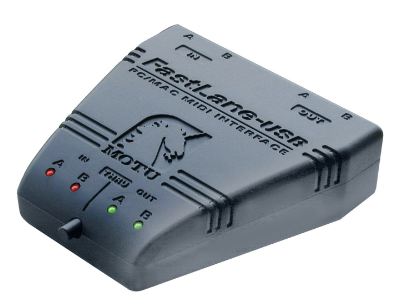
originally made to match the fruity imacs: http://web.archive.org/web/20000302053500/http://www.motu.com/english/hardware/fastlane_usb/index.html
http://cdn-data.motu.com/manuals/midi/FastLane-USB_User_Guide_Mac.pdf
http://www.motu.com/products/midi/fastlane_usb
motu micro express USB (2000)
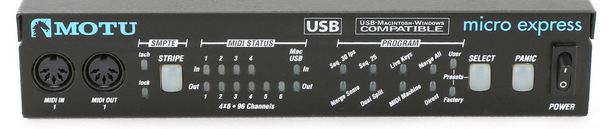
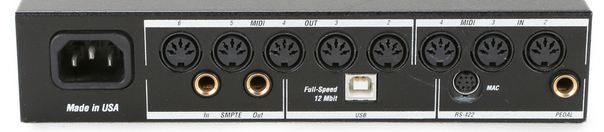
4 independent MIDI IN
6 independent MIDI OUT (9 actual MIDI OUT ports)
96 MIDI channels
http://web.archive.org/web/20000816175726/http://www.motu.com/english/hardware/micro_usb/body.html
manual: http://cdn-data.motu.com/manuals/midi/MOTU_USB_MIDI_Manual.pdf
motu micro lite (2003)
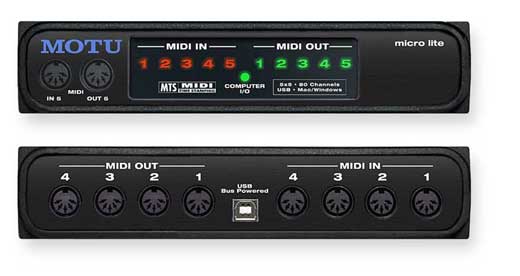
5 in 5 out
http://web.archive.org/web/20030622034757/http://motu.com/english/hardware/lite/body.html
manual: http://cdn-data.motu.com/manuals/midi/MOTU_USB_MIDI_Manual.pdf
roland um-550 (2002)
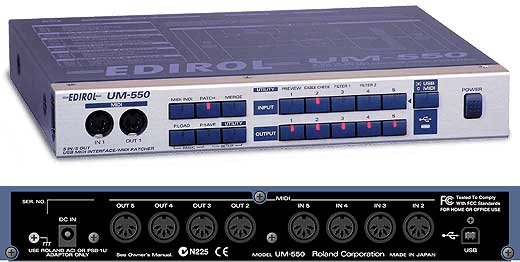
roland um-880 (2002)


http://www.roland.com/products/en/UM-880/]http://www.roland.com/products/en/UM-880/
http://www.soundonsound.com/sos/aug02/articles/edirolum880.asp
digidesign midi i/o (2002)

http://archive.digidesign.com/download/midiio/
http://akarchive.digidesign.com/support/docs/MIDI%20IO%20Guide.pdf
steinberg midex 3 (2001)

more info : http://www.soundonsound.com/sos/mar02/articles/steinbergmidex.asp
ftp://ftp.steinberg.net/Archives/Hardware/Midex_3/Mac/
roland um-1 (2000)

roland um-1s (2000)

roland um-2 (usb) (1999)
http://medias.audiofanzine.com/images/normal/roland-um-2-54388.jpg

roland um-2ex (2005)

roland um-3ex (2005)

driver: http://www.rolandus.com/support/eula/UM_3EX_Mac_OS_9.zip
roland um-4 (1999)

Steinberg Midex 8 (2001)

article: http://www.soundonsound.com/sos/may01/articles/steinbergmidex8.asp
driver: ftp://ftp.steinberg.net/Archives/Hardware/Midex_8/Mac/
manual: ftp://ftp.steinberg.net/Archives/Hardware/Midex_8/Midex8OperationManual.pdf
roland super mpu64 (usb)

Opcode midiport 96 (2000)
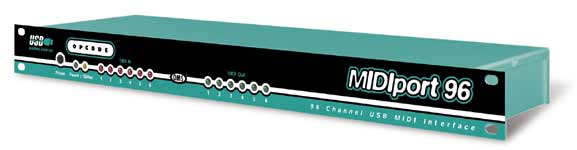
http://web.archive.org/web/20000914191329/http://www.opcode.com/products/midiport96/photo.shtml
Opcode Midiport 32 (2000)

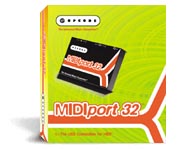
connects via usb | 2 in 2 out usb midi device, powered by usb (i think)
http://web.archive.org/web/20000817003358/http://www.opcode.com/products/midiport32/
http://www.sonosphere.com/Doug/Archives/2002/12/04/opcodeMIDIPortDrivers
http://www.ebay.com/itm/Opcode-Systems-MidiPort-32-USB-Midi-Interface-Lot-of-6-/181293612306?pt=US_Computer_Recording_Interfaces&hash=item2a35f0fd12
http://web.archive.org/web/20030622033324/http://motu.com/english/hardware/128/body.html
http://www.soundonsound.com/sos/1994_articles/mar94/motuexpress.html]http://www.soundonsound.com/sos/1994_articles/mar94/motuexpress.html
http://www.soundonsound.com/sos/nov99/articles/applenotes.htm
yamaha ux-16
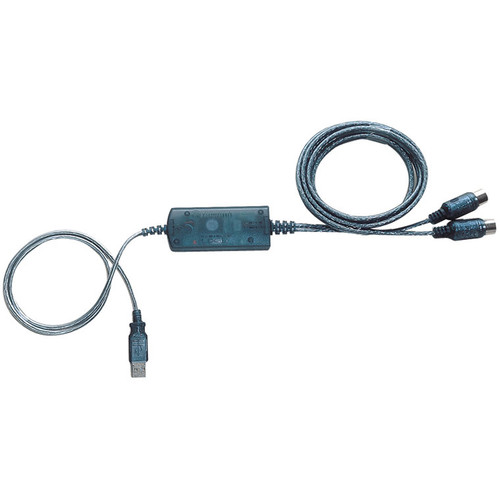
http://www.ebay.ca/sch/?_nkw=yamaha%20ux-16&clk_rvr_id=557844173809&mfe=search
theres surprisingly alot of these on ebay but all of them are around 50-55 dollars at least. too pricey
yamaha ux256 (2000)
http://www.soundonsound.com/sos/nov00/articles/yamahaux256.htm
motu midi timepiece AV USB (2000)
* uses standard 120v powerlead connection
http://web.archive.org/web/20040409083220/http://www.motu.com/english/hardware/mtpav_usb/body.html
mac manual: http://cdn-data.motu.com/manuals/midi/MIDI_Timepiece_AV_USB_User_Guide_Mac.pdf
win manual: http://cdn-data.motu.com/manuals/midi/MIDI_Timepiece_AV_USB_User_Guide_Win.pdf
motu usb midi devices require Mac OS 8.6 or later
networking: http://www.motu.com/techsupport/technotes/document.2000-01-28.4413716217
this device can be networked,daisychained,used in conjunction with other nonUSB "timepiece" units but not "express" units
emagic amt8 (usb / mac rs422 serial / pc rs232 serial)
DRIVERS HERE: http://web.archive.org/web/20020603152527/http://www.emagic.de/english/support/download/toolsmac.html
http://www.soundonsound.com/sos/jan00/articles/emagicamt8.htm]http://www.soundonsound.com/sos/jan00/articles/emagicamt8.htm
http://www.soundonsound.com/sos/jan00/articles/emagicamt8.htm
emagic unitor8 mk II (2001)
http://medias.audiofanzine.com/images/normal/emagic-unitor-8-mkii-71462.jpg
http://www.digitalprosound.com/2001/06_jun/reviews/emagic1.htm
article: http://www.emusician.com/news/0766/emagic-unitor8-mkii/145026
DRIVERS HERE: http://web.archive.org/web/20020603152527/http://www.emagic.de/english/support/download/toolsmac.html
manual: http://www.advancedaudiorentals.com/docs/Unitor%208%20en.pdf
what are the differences between emagic midi interfaces?
Motu Midi Express XT USB (2000) 2nd version connects via usb/mac serial, note that the original version connects via mac serial/parallel, parallel pc support dropped
http://web.archive.org/web/20000816175723/http://www.motu.com/english/hardware/xpressxt_usb/body.html
http://web.archive.org/web/20000823150221/http://www.motu.com/english/hardware/xpressxt_usb/features.html
manual: http://cdn-data.motu.com/manuals/midi/MIDI_Timepiece_AV_USB_User_Guide_Mac.pdf
motu usb midi devices require Mac OS 8.6 or later
Motu Midi Express XT USB (2011 2nd USB version re release)
motu midi express 128 (june 2003)
8in 9 out 128 channels
Compatibility - Mac OS9, Mac OS X and Windows Me/2000/XP
USB-Bus-powered from USB connection. No additional power necessary.
http://web.archive.org/web/20030628145524/http://motu.com/english/hardware/128/body.html
emagic mt4 (2000)
DRIVERS HERE: http://web.archive.org/web/20020603152527/http://www.emagic.de/english/support/download/toolsmac.html
http://www.soundonsound.com/sos/oct00/articles/emagic.htm]http://www.soundonsound.com/sos/oct00/articles/emagic.htm
Motu Fastlane USB (1999)
originally made to match the fruity imacs: http://web.archive.org/web/20000302053500/http://www.motu.com/english/hardware/fastlane_usb/index.html
http://cdn-data.motu.com/manuals/midi/FastLane-USB_User_Guide_Mac.pdf
http://www.motu.com/products/midi/fastlane_usb
motu micro express USB (2000)
4 independent MIDI IN
6 independent MIDI OUT (9 actual MIDI OUT ports)
96 MIDI channels
http://web.archive.org/web/20000816175726/http://www.motu.com/english/hardware/micro_usb/body.html
manual: http://cdn-data.motu.com/manuals/midi/MOTU_USB_MIDI_Manual.pdf
motu micro lite (2003)
5 in 5 out
http://web.archive.org/web/20030622034757/http://motu.com/english/hardware/lite/body.html
manual: http://cdn-data.motu.com/manuals/midi/MOTU_USB_MIDI_Manual.pdf
roland um-550 (2002)
roland um-880 (2002)
http://www.roland.com/products/en/UM-880/]http://www.roland.com/products/en/UM-880/
http://www.soundonsound.com/sos/aug02/articles/edirolum880.asp
digidesign midi i/o (2002)
http://archive.digidesign.com/download/midiio/
http://akarchive.digidesign.com/support/docs/MIDI%20IO%20Guide.pdf
steinberg midex 3 (2001)
more info : http://www.soundonsound.com/sos/mar02/articles/steinbergmidex.asp
ftp://ftp.steinberg.net/Archives/Hardware/Midex_3/Mac/
roland um-1 (2000)
roland um-1s (2000)
roland um-2 (usb) (1999)
http://medias.audiofanzine.com/images/normal/roland-um-2-54388.jpg
roland um-2ex (2005)
roland um-3ex (2005)
driver: http://www.rolandus.com/support/eula/UM_3EX_Mac_OS_9.zip
roland um-4 (1999)
Steinberg Midex 8 (2001)
article: http://www.soundonsound.com/sos/may01/articles/steinbergmidex8.asp
driver: ftp://ftp.steinberg.net/Archives/Hardware/Midex_8/Mac/
manual: ftp://ftp.steinberg.net/Archives/Hardware/Midex_8/Midex8OperationManual.pdf
roland super mpu64 (usb)
Quote
motu midi devices supported by os 9
miti timepiece AV (usb/serial) 8ch
miti timepiece AV (serial/parallel) 8ch
micro express (usb/serial) 4/6ch
micro express (serial/parallel) 4/6ch
pocket express (serial/parallel) 2/4ch
fastlane (usb) 2ch
fastlane (serial) 1/3ch
midi express xt (usb/serial) 8ch
midi express xt (serial/parallel) 8ch
micro lite (usb) 5/5ch
Opcode midiport 96 (2000)
http://web.archive.org/web/20000914191329/http://www.opcode.com/products/midiport96/photo.shtml
Opcode Midiport 32 (2000)
connects via usb | 2 in 2 out usb midi device, powered by usb (i think)
http://web.archive.org/web/20000817003358/http://www.opcode.com/products/midiport32/
http://www.sonosphere.com/Doug/Archives/2002/12/04/opcodeMIDIPortDrivers
http://www.ebay.com/itm/Opcode-Systems-MidiPort-32-USB-Midi-Interface-Lot-of-6-/181293612306?pt=US_Computer_Recording_Interfaces&hash=item2a35f0fd12
Quote
Opcode Systems, a division of Gibson, released it's MIDIport 32 USB MIDI interface for both Macintosh and Windows. Opcode's USB MIDI interfaces correctly handle the "random reboot" problem that can occur when multiple USB MIDI devices are used simultaneously. Without this Opcode-designed feature, USB devices may unpredictably reconfigure after the computer restarts, causing attached MIDI peripherals to move or disappear. Opcode's unique solution consistently tracks each USB MIDI interface and all related MIDI connections boot after boot, Mac or Windows. The MIDIport 32 is a robust MIDI interface for iMacs, blue G3 Macintoshes and USB-equipped Windows 98 PCs. And Newer Driver's are available online.
"Opcode invested significant engineering resources to tame USB and provide a complete MIDI solution for computer musicians." said Tom Sherman, Opcode's VP of Engineering. "The MIDIport 32 has been specially engineered, taking advantage of USB's high-speed connection to provide professional-quality MIDI timing. In addition, MIDIport 32 makes installation on Windows truly simple -- no IRQs, DMAs or I/O addresses -- plug it in and it works."
MIDIport 32 connects any MIDI (Musical Instrument Digital Interface) device, such as a synthesizer or drum machine, to a computer, allowing recording and playback with music software. Multiple MIDIport interfaces can be used on a single computer. MIDIport 32 has 2 MIDI ins and outs for 32 MIDI channels. It includes status LEDs for MIDI activity and is powered over USB requiring no external power supply. The package includes a six-foot USB cable and a CDROM of software drivers. The MIDIport 32 works with any OMS compatible Macintosh application such as Opcode's Studio Vision Pro, Vision DSP(tm)and MAX(tm) or Digidesign's Pro Tools(tm) software, and any Windows 98 compatible music software such as Opcode's Musicshop.
"This is Opcode's fourth USB product release in four months," commented Sherman. "Our experience in USB audio and MIDI is unparalleled in the industry and the result is another top quality USB product." Opcode recently released three USB audio interfaces: DATport, SONICport and SONICport Optical. Opcode has also announced a rackmount line of USB MIDI interfaces including the MIDIport 64(tm), MIDIport 12(tm) and STUDIOport(tm), a hybrid MIDI and audio interface. The US Manufacturers Suggested Retail Price of the MIDIport 32 is $149.95.
http://web.archive.org/web/20030622033324/http://motu.com/english/hardware/128/body.html
http://www.soundonsound.com/sos/1994_articles/mar94/motuexpress.html]http://www.soundonsound.com/sos/1994_articles/mar94/motuexpress.html
http://www.soundonsound.com/sos/nov99/articles/applenotes.htm
yamaha ux-16
http://www.ebay.ca/sch/?_nkw=yamaha%20ux-16&clk_rvr_id=557844173809&mfe=search
theres surprisingly alot of these on ebay but all of them are around 50-55 dollars at least. too pricey
I am currently restoring my 128K (which is throwing a RAM error), and I have the machine disassembled after months of it last being turned on. I was wondering if I could take out the PSU and CRT without needed to discharge anything.
Also: what are the "danger zones" on the CRT and PSU?
Thanks
Also: what are the "danger zones" on the CRT and PSU?
Thanks
If it hasn't been plugged in for many weeks, it's probably fine. The danger is the spot on the CRT after you remove the thick anode wire. People who forgets to discharge it may get a shock when touching that spot and drop the CRT, destroying it.
It should take a week for the caps and transformer to charge down without a bleeding resistor in the transformer. It should take about 10 minutes for the caps and transformer to charge down fully if it has a bleeder resistor in the transformer.
The head of the snake is at the metal clip inside the suction cup on the CRT, as this is where the 1-12 KV is at. Then there is the circuit around the transformer on the top of the circuit board which has a lower voltage but at a high amperage. When dealing with the Analog board, only hold it by the edges, and never touch the traces unless you are working on it and only after you discharge it.
Many early Macs like your 128K have transformers without a safety bleeder resistor. To discharge them, read: http://www.biwa.ne.jp/~shamada/fullmac/repairEng.html#DischargeCRT
The head of the snake is at the metal clip inside the suction cup on the CRT, as this is where the 1-12 KV is at. Then there is the circuit around the transformer on the top of the circuit board which has a lower voltage but at a high amperage. When dealing with the Analog board, only hold it by the edges, and never touch the traces unless you are working on it and only after you discharge it.
Many early Macs like your 128K have transformers without a safety bleeder resistor. To discharge them, read: http://www.biwa.ne.jp/~shamada/fullmac/repairEng.html#DischargeCRT
I just turn the brightness all the way up then unplug it (do not turn off). Seems to do a pretty good job. Either way the shock is more annoying than anything.
By "do not turn off", I guess you mean unplug it and turn it off, not JUST turn it off? Or does the position of the Power Switch actually matter when dealing with a compact mac?
By turning the brightness all the way up, and then yanking the power cord, you are removing the power source for that monitor, and hopefully sucking up any residual power. It seems to be the best way to drain as much excess power out of your compact mac as possible.
Just turning it off still leaves the mac energised, but by pulling the cord, it is an instant loss of power coupled with a high-draw device - the CRT.
Just turning it off still leaves the mac energised, but by pulling the cord, it is an instant loss of power coupled with a high-draw device - the CRT.

I add to this list the Steinberg USB2MIDI, which is basically a MIDIsport 2x2 in a different case — and in fact it can use the MIDIsport 2x2's drivers (both for OS 9 and OS X).
I have never discharged a compact Mac CRT with the procedure outlined in many service manuals, and have always played by a few basic rules:
--Classics and Classic IIs have a self-discharging CRT. If I need to yank a CRT from them, I usually wait only a few minutes.
--The same goes for most SEs and SE/30s, but some of the earlier ones don't self-discharge. If the analog board is a newer revision, I treat them like a Classic or Classic II. Otherwise, I use the Plus/earlier procedure.
--For early Macs, I will unplug the computer and let it sit for a week.
The trouble is, as others have said, the red anode cap. To play it safe, I never remove it with my bare hands. Instead, I use a small and very well-insulated pair of pliers to squeeze the clips together, prying it out. I have used this same method to re-attach the anode cap but usually will bare-hand it.
Over the years, I have done this procedure over 100 times on various compact Macs and have yet to have a problem with the removal or installation of the cap. I also haven't been shocked, so I must be doing something right (although, to be fair, I've worked on more Classics and SEs than anything).
For me, a bigger challenge these days is finding someone who will take bare CRTs to recycle. Currently, I have a pile of them and need to find a recycler who will accept them. (Before anyone calls me out for getting rid of Mac parts, please note all of these have some sort of issue--burn-in, scratches, or a cracked neck).
--Classics and Classic IIs have a self-discharging CRT. If I need to yank a CRT from them, I usually wait only a few minutes.
--The same goes for most SEs and SE/30s, but some of the earlier ones don't self-discharge. If the analog board is a newer revision, I treat them like a Classic or Classic II. Otherwise, I use the Plus/earlier procedure.
--For early Macs, I will unplug the computer and let it sit for a week.
The trouble is, as others have said, the red anode cap. To play it safe, I never remove it with my bare hands. Instead, I use a small and very well-insulated pair of pliers to squeeze the clips together, prying it out. I have used this same method to re-attach the anode cap but usually will bare-hand it.
Over the years, I have done this procedure over 100 times on various compact Macs and have yet to have a problem with the removal or installation of the cap. I also haven't been shocked, so I must be doing something right (although, to be fair, I've worked on more Classics and SEs than anything).
For me, a bigger challenge these days is finding someone who will take bare CRTs to recycle. Currently, I have a pile of them and need to find a recycler who will accept them. (Before anyone calls me out for getting rid of Mac parts, please note all of these have some sort of issue--burn-in, scratches, or a cracked neck).
Its a bit of a misnomer. The power switch is hooked directly in line with the power cord. Lol
I have the Midisport 8x8. It is great since there are drivers that span from OS9 using OMS (USB on a G3) up until my current OSX 10.8.5. I never was able to get the serial port to work under OS9 or 8.6.
This is a great thread. I've always been too chicken to even discharge a CRT. Had to do that in a Lisa and it was already discharged. I need to do this on a couple of other monitors (a PET 64 and another Lisa soon).
Thanks for asking this question.
Thanks for asking this question.
This looks like a long shot - a really long shot. I seriously doubt this will work properly…BUT, you never know…
There is no OS9 "MIDI over USB" driver. The standard class compliant protocols that exist today and are incorporated into your modern Macbook, iPad etc. did not exist back then. You are entirely dependent therefore, on FreeMIDI (since you're using DP) to recognize and communicate with the Beatstep over USB. The Mac USB Device Driver will "see" the Beatstep. It won't know what it is but it will probably pass data to it from DP if FreeMIDI recognizes the Beatstep as a MIDI device.
Without class compliant stuff in place, you're biggest worries are:
1. Will FreeMIDI even "see" this thing to begin with? And
2. Timing. Playing a sequence out from DP through the Beatstep to use its CV gates will be a breath-holding, fingers-crossed procedure.
The Beatstep is a modern device that is reliant on modern protocols to work - as I said, a long shot.
There is no OS9 "MIDI over USB" driver. The standard class compliant protocols that exist today and are incorporated into your modern Macbook, iPad etc. did not exist back then. You are entirely dependent therefore, on FreeMIDI (since you're using DP) to recognize and communicate with the Beatstep over USB. The Mac USB Device Driver will "see" the Beatstep. It won't know what it is but it will probably pass data to it from DP if FreeMIDI recognizes the Beatstep as a MIDI device.
Without class compliant stuff in place, you're biggest worries are:
1. Will FreeMIDI even "see" this thing to begin with? And
2. Timing. Playing a sequence out from DP through the Beatstep to use its CV gates will be a breath-holding, fingers-crossed procedure.
The Beatstep is a modern device that is reliant on modern protocols to work - as I said, a long shot.
Hi!
+1 device: Roland UM1-EX working fine in os9.2.2 (Not found on the list)
Official driver here:
http://www.roland.com/support/article/?q=downloads&p=UM-1EX
Regards,
Laszlo
In my mac os 9 do not installs drivers...(((
Don't kid your self on the shock danger of a charged CRT. It only takes 12V @ 4 amps is enough power to stop your heart, and that's nothing. P(ower) = V(oltage) * A(mperage), so if the Power remains the same but the voltage is in the 1,000V area, it take very little amperage to stop your heart.
The thing is, that shock has to go across your body (ie: across you chest) to stop your heart.
Getting shocked, there's an entrance point and exit point, and in many cases it's only in inches or fractions of an inch distance the shock travels through your body. But if your right hand gets shocked as the entrance point and your left hand is grounded and becomes an exit point because you're leaning on your desk against it or your feet as they are grounded to the floor to become another exit point, guess what? That shock just traveled through your body and across your chest, stopping your heart. And YOU CAN'T GIVE YOURSELF CPR!!!
Just because you got shocked hundreds of times by a charged CRT, like I have in the past, does not mean you are going to survive your next shock. Electricity is to be respected, and high voltage electricity is to be feared, neither are to be played with like some pet or toy because it will bite you severely. Enough to kill you if you are not careful.
Do not kid yourself into thinking that the CRT is discharged because you pulled the plug, because it is not. The caps are still charged, the transformer is still transforming, and one wrong slip of that anode chip onto you, and it will bite you. Its like a gun, if you find one, always assume that it is loaded.
Now I stated as to how long a CRT should discharge itself, about a week or so. It should be safe then, but I always discharge the anode cap against the screw when I remove it from the CRT. Better to be safe than sorry. Then I go do what I have to do in terms of repairs.
Last I heard, the movement of the Earth causes CRTs to be deathly dangerous to touch, even if left unplugged for a while. If you must work on a CRT, discharge it properly if you know how. Otherwise, take it to a TV repair shop and have them do it for you.
When I was dealing with potentially dangerous power, I've always used my right hand only and made sure my left hand and arm didn't touch anything. While I've never been zapped by the CRT (and I've worked on the huge projection TV that can have over 80,000v) I did get zapped by live 110v a few times and once 440v line. No injuries fortunately other than scared out of my wits.
Still if you're nervous, find someone who knows electronics and CRT, share beer and pizza and let him work on it.
Still if you're nervous, find someone who knows electronics and CRT, share beer and pizza and let him work on it.
Never take a classic Mac to a TV Repair Shop for monitor/crt work. 1) They will charge you an arm, a leg and your first born just to look at it. 2) Tell you that they have to special order parts which will come from Nowhereneccastan! 3) they do not know how to work on a Mac Classic Monitor, they are different from a typical CRT TV set like the Model T Ford is different like a Lexus Q80.
It is better to do it yourself or get a Mac Pro like Uniserver or TechKnight to help you out. Electricity is dangerous but if you respect it, it will respect you.
Also... the movement of the Earth has nothing to do with CRTs to be deathly to touch. Its the caps on the analog board still being charged when you turn it off and when something touches the CRT Anode Wire clip, electricity likes to go to the quickest path to ground - usually through your body if you're that unlucky.
P=VA does not apply with relation to human physiology. Increasing one does not mean you need less of the other to cause trouble. There are independent voltage and amperage thresholds you have to worry about before it becomes a problem with regard to cardiac depolarization.
...You're being facicious, correct?
Actually, the video circuitry in the Plus and earlier is nearly identical to early 9" B&W security monitors. So to say that it is analogous to a Lexus is stretching it quite a bit. It's more like a circuit someone found laying around and stole for use in the Mac (or used a reference circuit for the CRTs they had chosen).
I found a small stash of replacement Mac CRTs several years ago which were originally sold as service parts for security monitors. The attached circuit board is very similar to the Mac analog board.
I found a small stash of replacement Mac CRTs several years ago which were originally sold as service parts for security monitors. The attached circuit board is very similar to the Mac analog board.
Useful info trag. I'll file that one in the memory banks.
I have, and the schematics. it goes power cord, network line filters/suppressors, fuse, and power switch.
the power switch is ALWAYS in the line circuit on a compact. period....
the power switch is ALWAYS in the line circuit on a compact. period....
i always keep a small screwdriver and a alligator jumper handy… every time I power on an A/B, I don't care what it is really. I discharge it before I do anything, witch can get annoying when you are in the fixing stage, but its not worth the risk.
I used to be really scared of CRT tubes - I first encountered them with an old eMac I over clocked to keep alive and got really scared every time I went near it. Eventually I faced up to my fear and found its very easy. So long as you don't bodge it too much.
I made an 'earthing screwdriver' using an old ironing flex. I have stripped the live and nutral cables so only earth remains, connected to the earth pin on my plug. The cable is soldered to a long handle, flat head screwdriver, and the whole thing is wrapped in insulator tap from the handle to about 2 inches from the tip. When I use it I put on my wellies and workmans gloves and plug the cable straight into the wall socket. (I don't turn the socket on! Even though there's nothing connected to live or neutral, neither is there any reason to turn it on) I double check there's no part of me touching the Mac, and slide the screwdriver under the suction cup to discharge, usually I remove the cap with the screwdriver and discharge it again.
Once you've done it once, it's not much to worry about. It's ironic that to begin with we are all really scared of crt's so try to avoid them, when really we are working right next to a massive charged capacitor ready to discharge if we make a mistake. Actually making the crt safe is pretty straight forward and once you've done it you are infinitely safer than if you just tried to avoid it in the first place.
Don't forget basic electrical safety - unplug the Mac and flick the power switch a couple of times to drain the capacitors. Also do NOT wear a wrist strap or earth yourself at all until the crt is drained, then make sure you are earthed before touching components.
I made an 'earthing screwdriver' using an old ironing flex. I have stripped the live and nutral cables so only earth remains, connected to the earth pin on my plug. The cable is soldered to a long handle, flat head screwdriver, and the whole thing is wrapped in insulator tap from the handle to about 2 inches from the tip. When I use it I put on my wellies and workmans gloves and plug the cable straight into the wall socket. (I don't turn the socket on! Even though there's nothing connected to live or neutral, neither is there any reason to turn it on) I double check there's no part of me touching the Mac, and slide the screwdriver under the suction cup to discharge, usually I remove the cap with the screwdriver and discharge it again.
Once you've done it once, it's not much to worry about. It's ironic that to begin with we are all really scared of crt's so try to avoid them, when really we are working right next to a massive charged capacitor ready to discharge if we make a mistake. Actually making the crt safe is pretty straight forward and once you've done it you are infinitely safer than if you just tried to avoid it in the first place.
Don't forget basic electrical safety - unplug the Mac and flick the power switch a couple of times to drain the capacitors. Also do NOT wear a wrist strap or earth yourself at all until the crt is drained, then make sure you are earthed before touching components.
Does this also apply to newer Mac CRT's? I'm assuming by the time of a G3 AIO it'd still be self draining, correct?
As far as I'm aware they all need draining. I've worked on an eMac and iMac g3 and those the crt retain charge.
Easy way to be sure - when you turn it off and turn it back on, does the picture come straight back or does it slowly fade into existence as if you were turning it on with a dimmer switch? If it fades in the tube had been discharged and the picture did not return until the charge had built back up. To be safe discharge before use from under the sucker cup, discharge large capacitors and then make sure you are earthed through a wrist strap - it's good to get in the habit of taking as much care as possible. And again it's critical that you are not earthed before discharging. See my previous post.