
Thread
Microsoft Flight Simulator 4 Problems
Hi!
I've just gotten hold of Microsoft Flight Simulator 4 for Macintosh, and I'm running it on the emulator.
I'm using the mouse yoke option, where the plane is controlled by the mouse. The problem is that I can only move the mouse so far (i.e. to the edge of the screen), where it then becomes stuck, preventing me from moving the plane controls further in that direction.
I'm disappointed, as this game looks really cool!!!
Thanks,
onlyonemac
I've just gotten hold of Microsoft Flight Simulator 4 for Macintosh, and I'm running it on the emulator.
I'm using the mouse yoke option, where the plane is controlled by the mouse. The problem is that I can only move the mouse so far (i.e. to the edge of the screen), where it then becomes stuck, preventing me from moving the plane controls further in that direction.
I'm disappointed, as this game looks really cool!!!
Thanks,
onlyonemac
Hey bud, try this option:
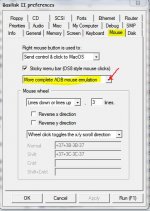
The Basilisk Manual (http://www.emaculation.com/b2manual/BasiliskII_Manual.pdf)
says that might help games, as some games need lowest level mouse control, such as Marathon.
The Basilisk Manual (http://www.emaculation.com/b2manual/BasiliskII_Manual.pdf)
says that might help games, as some games need lowest level mouse control, such as Marathon.
 .
.