

Thread
PowerBook 3 monitor setup?
Hi all,
At work I have a 3 monitor setup (MB Air screen + DVI display + USB Displaylink) and was wondering if there was a way to recreate that on a midrange PPC PowerBook (eg 2300/5300, 1400, 2400/3400).
I might be able to do it with 2 NuBus video cards in a Duo Dock II for the 2300. I have a Radius PowerView which could make it a possibility for my 68k PowerBooks and a VTBook which could make it happen for a PowerBook G4.
Is there some SCSI or PCMCIA solution for the PPC PowerBook era?
At work I have a 3 monitor setup (MB Air screen + DVI display + USB Displaylink) and was wondering if there was a way to recreate that on a midrange PPC PowerBook (eg 2300/5300, 1400, 2400/3400).
I might be able to do it with 2 NuBus video cards in a Duo Dock II for the 2300. I have a Radius PowerView which could make it a possibility for my 68k PowerBooks and a VTBook which could make it happen for a PowerBook G4.
Is there some SCSI or PCMCIA solution for the PPC PowerBook era?
The 3400c should do dual display + PCMCIA road rocket.
http://www.xlr8yourmac.com/PB_G3/rocket/
... expect performance and screen redraws to be painfully slow though with all this going on. You might find it better with a desktop setup + two nubus cards.
http://www.xlr8yourmac.com/PB_G3/rocket/
... expect performance and screen redraws to be painfully slow though with all this going on. You might find it better with a desktop setup + two nubus cards.
If you have two VidCards for the 2300c, you can disable the ROM in the Dock and run two displays off NuBus and have the LCD active as well. Two VidCards and the Dock Video would be better overall however.
MiniDock Video, LCD and SCSI Video also gives you three screens on the 2300c.
190, 5300 or 1400 with internal Vidcard, SCSI Video and the LCD would give you three screens as well.
MiniDock Video, LCD and SCSI Video also gives you three screens on the 2300c.
190, 5300 or 1400 with internal Vidcard, SCSI Video and the LCD would give you three screens as well.
I don't know if any of those system's video can drive the extreme resolution necessary for one of these, but a Matrox TripleHead2Go might work. You'd need to adapt to VGA, but it accepts VGA as the input from computer.
Or if you use the internal display as one, the DualHead2Go would work to add two more. (And it's more likely the onboard video on a 3400c would support that.)
Or if you use the internal display as one, the DualHead2Go would work to add two more. (And it's more likely the onboard video on a 3400c would support that.)
He already has the MB Air's LCD listed as one of the three at work, so having three identical displays doesn't seem to be a requirement,
However, the DuoDockII and a couple of pedestrian VidCards could run a trio of 15" or 17" KDS/Radius LCDs at 16" or maybe even 19" resolutions.
However, the DuoDockII and a couple of pedestrian VidCards could run a trio of 15" or 17" KDS/Radius LCDs at 16" or maybe even 19" resolutions.
Thanks for the replies everyone! I will try out the the 3 display option with my DuoDock.
With or without LCD?
4 with the PowerView?
4 with the PowerView?
Hmm. I was never able to get the PowerView to work with a PPC computer, the Control Pannel complained there was not enough ram. Maybe I have an extension conflict. I'll check it out again. 4 monitors would be interesting!
I'd go without the internal LCD for the dock, I think I have 2 nubus graphics card I could swap in. I've also got 3 VGA monitors available to use.
I'd go without the internal LCD for the dock, I think I have 2 nubus graphics card I could swap in. I've also got 3 VGA monitors available to use.
You could always run three Powerbooks :b&w:
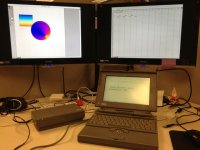
I brought a PowerBook 180 to work along with the radius PowerView and all the appropriate cables and was able to get three monitors to work together! The right monitor is driven by the PowerBooks onboard video display, at 832x624 resolution. The left monitor is driven by the SCSI PowerView at 800x600, both with a depth of 256 colors. I might bring my SCSI to ethernet adapter to see if I can get the internet on it.
Unfortunately the setup is kinda fickle, I can't seem to get the PowerBook to boot with both external displays, I have to boot with the SCSI display first, sleep the 180, then plug in the other display.
Unfortunately the setup is kinda fickle, I can't seem to get the PowerBook to boot with both external displays, I have to boot with the SCSI display first, sleep the 180, then plug in the other display.