
Thread
Presenting -- Classic Mac Networking Guide 3.0!
After three months of work (averaging about four hours per day), I'm pleased to present Classic Mac Networking, version 3.0.
It's been many hours of testing, writing, rewriting, rewriting again (like the Emergency Network Access Disks section has been rewritten at least twice), getting frustrated with the HTML W3C validator, and so forth.
I do believe that almost anybody in this "business" (???) should be able to learn a couple of things from the Guide, and that's what I wrote it for. A rather bad case of OCD led me to try to cover all the areas (like we know that pseudo-PPP dialup will work with eth0, but what about wlan0? Someone's gotta find out, just to be sure) and this means that this Guide should be useful for many individuals from here on out.
I can't say enough how much protocol7 means to me for the Netatalk section. Here's what I was originally going to say about Netatalk until he graciously provided his notes:
I hope you're able to find the time to wander over to the site and learn some things. In the meantime, I can entertain Q/A, additional help, (I'll be on IRC for the next 7 days) but first I have to take a drink...
It's been many hours of testing, writing, rewriting, rewriting again (like the Emergency Network Access Disks section has been rewritten at least twice), getting frustrated with the HTML W3C validator, and so forth.
I do believe that almost anybody in this "business" (???) should be able to learn a couple of things from the Guide, and that's what I wrote it for. A rather bad case of OCD led me to try to cover all the areas (like we know that pseudo-PPP dialup will work with eth0, but what about wlan0? Someone's gotta find out, just to be sure) and this means that this Guide should be useful for many individuals from here on out.
I can't say enough how much protocol7 means to me for the Netatalk section. Here's what I was originally going to say about Netatalk until he graciously provided his notes:
In contrast, the updated information has allowed me to write the Netatalk section with the amount of detail that should allow just about anybody who "can sort of figure it out" level of computing expertise to get it going, even if they've never used Linux before.
I hope you're able to find the time to wander over to the site and learn some things. In the meantime, I can entertain Q/A, additional help, (I'll be on IRC for the next 7 days) but first I have to take a drink...
Well there is a thread already stickied in the Compact Mac forum that is kind of like my changelog...
Really? By more "compatible", would that mean like doing that means it won't work with MacTCP users, or...? I would have never thought that, I might have to try it out. I do have a donor Windows XP system.
For PCs, PCMacLan is likely the best solution. It works with my Apple IIgs via a Shiva Fastpath 5 without a problem. I have also used DAVE to access Windows/SMB/CIFS file and printer shares under classic Mac OS.
The Apple II crowd came up with a pre-configured virtual machine (or Raspberry Pi) running netatalk 2.2.4 that supports net booting, with an obvious focus on the Apple IIgs. It should also be compatible with classic Macs. http://appleii.ivanx.com/a2server/
Personally I have always used Localtalk-to-Ethernet bridges when networking my classic Macs that lack Ethernet. It should be noted that the Shiva/Kinetics Fastpath series and the Cayman Systems GatorBox are the only two bridges that can properly route MacIP (TCP/IP over Localtalk) straight out of the box. The more commonly available Dayna adapters only route AppleTalk. If you have a Mac running the Localtalk Bridge Control Panel, I have heard rumors that running Open Transport on the machine allows it to route MacIP, otherwise there is IPNetRouter.
The Apple II crowd came up with a pre-configured virtual machine (or Raspberry Pi) running netatalk 2.2.4 that supports net booting, with an obvious focus on the Apple IIgs. It should also be compatible with classic Macs. http://appleii.ivanx.com/a2server/
Personally I have always used Localtalk-to-Ethernet bridges when networking my classic Macs that lack Ethernet. It should be noted that the Shiva/Kinetics Fastpath series and the Cayman Systems GatorBox are the only two bridges that can properly route MacIP (TCP/IP over Localtalk) straight out of the box. The more commonly available Dayna adapters only route AppleTalk. If you have a Mac running the Localtalk Bridge Control Panel, I have heard rumors that running Open Transport on the machine allows it to route MacIP, otherwise there is IPNetRouter.
Neat. I wonder if there's a way to convince them to remake one for classic macs, as I couldn't get 2.2.4 to work with ddp. A Raspberry Pi file server that serves out the SD card sounds great to me, but then so does a VM install too. ¯\_(ツ)_/¯
I also did a test run of sharing the Internet in OS X out via the Ethernet jack to an AFP bridge to see if I could get WAN access that way. No dice. The only way I know of is yes the real bridges, IPNetRouter, Apple Internet Router (although I'd need a manual to get it set up), LocalTalk Bridge (haven't tested if it allows WAN access), or something else.
I also did a test run of sharing the Internet in OS X out via the Ethernet jack to an AFP bridge to see if I could get WAN access that way. No dice. The only way I know of is yes the real bridges, IPNetRouter, Apple Internet Router (although I'd need a manual to get it set up), LocalTalk Bridge (haven't tested if it allows WAN access), or something else.
It's a bit hazy now. I think I was unable to connect to the SFM share with some systems, while I had no trouble with netatalk. It worked OK with System 7.5.3 anyway as I used it when I was installing Copland (you can see the Shared Folder on the desktop).
I had it running on my XP bootcamp partition as my PC was running Windows 7. Moving to netatalk made more sense for me as I had more stuff on the PC that could be shared out.
I could convert it to epub, but then I'm not so sure about updates. Actually I considered a CSS-free version for older computers and Internet Explorer, but then I canceled it. I have never written HTML before until this thing, and ePub isn't something I've messed with before either, especially since there are enlarged images and tables -- not sure if that will work right on most devices.
mcdermd has a nice arrangement where it's extremely easy to update it with just SFTP, I use FileZilla.
There isn't much more I'd need to update, other than if I get some breaking news about what a FastPath or Gatorbox can actually do (i.e. allow a Plus with System 7 to mount a 10.6 server, etc).
mcdermd has a nice arrangement where it's extremely easy to update it with just SFTP, I use FileZilla.
There isn't much more I'd need to update, other than if I get some breaking news about what a FastPath or Gatorbox can actually do (i.e. allow a Plus with System 7 to mount a 10.6 server, etc).
They are for the most part routers. Besides the ability to route TCP/IP, the Fastpath and Gatorbox can route DECNet. The Gatorbox had the ability to setup NFS shares as AFP shares. There was also a way to connect AppleShare printers to LPR too.
http://www.unix-ag.uni-kl.de/~pcfe/Gatorbox/
http://www.walshcomptech.com/fastpath5/
http://retro.icequake.net/fastpath/
Apparently the LocalTalk Bridge software can do the same thing if you have OT enabled on the host/bridge mac.
I don't have a "Beige G3" (or 10.6+) with 9.2, so if anybody would like to have a go at seeing if some old Mac with System 6 can mount a 10.6 Mac and access the internet, that'd be interesting to know. Those TCP/IP bridges are not easily found around.
I don't have a "Beige G3" (or 10.6+) with 9.2, so if anybody would like to have a go at seeing if some old Mac with System 6 can mount a 10.6 Mac and access the internet, that'd be interesting to know. Those TCP/IP bridges are not easily found around.
You won't be able to mount 10.6 shares on a System 6 Mac. You need a machine that supports AFP over TCP/IP ("AppleShare over IP") to connect to it. Apple gradually phased out support for the actual AppleTalk/Ethertalk network protocol in OS X. 10.4 was the first to drop AFP over Appletalk (both client and server) and printer support finally died in 10.6.
I don't see why it wouldn't work. The only difference is the AFP packets are carried via TCP/IP instead of AppleTalk. As long as the Localtalk-to-Ethernet bridge forwards TCP/IP packets between the networks its fine. However, it will NOT convert those TCP/IP-encapsulated AFP packets to Appletalk-encapsulated packets.
I'll run a test soon and see what it will do. Windows 2K Server and Netatalk I'll test alongside for a good idea of what it can/can't do, since an "ideal" classic mac setup would be something like an SE with accelerator, dual floppies & HDD with max ram, then something else more capable like a beige G3 for everything else.
Since I'm switching from physical macs to emulation for my classic mac fix. I've started to employ the same tricks I used to appletalk my PB180 to 10.5 server. and it works in sheep shaver! (running OS 7.6.1, because my OS 9 disk is 9.2.1 which is incompatible  )
)
this weekend I'm going to see if I can use that to make MacIP work for my plus... yeah I know I'm being all wacky, but hey, it's fun!
The sharepoint(vintage) on the desktop is coming from my 10.5 server machine in the basement.
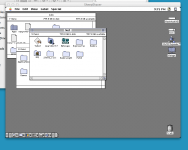
)this weekend I'm going to see if I can use that to make MacIP work for my plus... yeah I know I'm being all wacky, but hey, it's fun!
The sharepoint(vintage) on the desktop is coming from my 10.5 server machine in the basement.
Well, I doubt it'll work, but someone has to give it a shot...
In fact, half the Guide has been mainly trial and error. E.G. Can a Mac with a 800K compatible drive which can't read 400K MFS by reason of the SSW still write out a 400K MFS disk image? (yes) How do I get Netatalk to share out a share for Guests (the LCII I was using had no keyboard so I couldn't login as a user, and Linux doesn't like empty password fields) -- nobody mentions it anywhere? (shown) Can Rawrite or OmniFlop read a DC 4.2 disk image? (yes, but it won't be written correctly, so effectively, no) Can System 7 be installed by copying the installation media to folders and installing that way? (yes) ...and so on.
Some things just have to be tried, nothing else can be done.
I'll be releasing another update in a week or so, if it gets done on time. ;D
In fact, half the Guide has been mainly trial and error. E.G. Can a Mac with a 800K compatible drive which can't read 400K MFS by reason of the SSW still write out a 400K MFS disk image? (yes) How do I get Netatalk to share out a share for Guests (the LCII I was using had no keyboard so I couldn't login as a user, and Linux doesn't like empty password fields) -- nobody mentions it anywhere? (shown) Can Rawrite or OmniFlop read a DC 4.2 disk image? (yes, but it won't be written correctly, so effectively, no) Can System 7 be installed by copying the installation media to folders and installing that way? (yes) ...and so on.
Some things just have to be tried, nothing else can be done.
I'll be releasing another update in a week or so, if it gets done on time. ;D
Well I was going to try this out but the LCII died. No activity from the unit when powered up -- display turns on, but that's it. No HDD activity, FDD noise, gong, nothing.
Maybe someday I could give it a shot. Basically you have a [10.5 Mac]<->[LocalTalk Bridge Mac with 9.2]<->[Mac Plus or similar].
I use netatalk (2.2 series) extensively, so if you have any questions I'd be glad to try to help out. It's about the only thing that will work from system 3.3 through to the latest OSX.
To allow guest access, you need to enable the guest UAM module in afpd.conf. I use the following line in afpd.conf:
That allows guest (and only guest) access, and guests will have the privileges associated with the local user 'bbraun'.
The -transall just means both TCP and DDP (appletalk) access is allowed.
To allow guest access, you need to enable the guest UAM module in afpd.conf. I use the following line in afpd.conf:
Code:
- -transall -uamlist uams_guest.so -guestname bbraunThe -transall just means both TCP and DDP (appletalk) access is allowed.
I would appreciate your input on this matter:
The Raspberry Pi can be used as an Apple IIGS boot device/file server with A2SERVER project. It is indicated that they use Netatalk 2.2.4 for this purpose, which was the last release of the version 2 binary until just about a week or two ago they released 2.2.5. Anyways, I couldn't get ddp to work with it. I used a ./configure string just like in the Guide and after following the same steps, still wouldn't work with Systems earlier than 7.5.3 & OT 1.3 OR MacTCP systems.
Could you possibly investigate why? The A2BOOT server uses DDP as well, no idea what's going on. I sent him an email and got zilch back.
RE: Guests -- ahh, you see, but it's a little more complicated than that. You can't share out the home directory to a Guest user because of permissions. Here's the section from the Guide:
I'm not sure if that would work, I doubt it. Maybe if you didn't allow the dhx and dhx2 uams, which is kind of stupid, but oh well. I also tried using the options: limitsize to limit the volume reporting to 2GB, didn't seem to work either.
The Raspberry Pi can be used as an Apple IIGS boot device/file server with A2SERVER project. It is indicated that they use Netatalk 2.2.4 for this purpose, which was the last release of the version 2 binary until just about a week or two ago they released 2.2.5. Anyways, I couldn't get ddp to work with it. I used a ./configure string just like in the Guide and after following the same steps, still wouldn't work with Systems earlier than 7.5.3 & OT 1.3 OR MacTCP systems.
Could you possibly investigate why? The A2BOOT server uses DDP as well, no idea what's going on. I sent him an email and got zilch back.
RE: Guests -- ahh, you see, but it's a little more complicated than that. You can't share out the home directory to a Guest user because of permissions. Here's the section from the Guide:
As I was wrangling with this issue, I found that using the -guestname flag didn't seem to make a difference. Maybe there is if you can use something like this, if the user is "floe": -guestname floe
I'm not sure if that would work, I doubt it. Maybe if you didn't allow the dhx and dhx2 uams, which is kind of stupid, but oh well. I also tried using the options: limitsize to limit the volume reporting to 2GB, didn't seem to work either.
On my raspbian system, appletalk isn't configured. It's not compiled in, and not available as a module. netatalk uses the kernel's appletalk implementation, which in an "embedded" system like rpi could be seen as extraneous and left out. That'd probably require a kernel rebuild, or at the very least a module.
For the home directory issue, if you're using '~/ "Home Directory"' in your AppleVolumes.default file, then there might be an issue with guest access. However, if you create a share with the path to the home directory, and the -guestname the same as the owner of the home directory, there shouldn't be an issue. Something like:
AppleVolumes.default:
afpd.conf:
For the home directory issue, if you're using '~/ "Home Directory"' in your AppleVolumes.default file, then there might be an issue with guest access. However, if you create a share with the path to the home directory, and the -guestname the same as the owner of the home directory, there shouldn't be an issue. Something like:
AppleVolumes.default:
Code:
/home/floe "floe's Home Directory"
Code:
- -transall -uamlist uams_guest.so -guestname floeNever know until you try it. I'd have done it that night, but the plus is upstairs in the attic the door to which is in my son's bedroom.. he was asleep.
and yeah some things just need to be tried. if for no other reason than to see if it can be done. Like I know for a fact that you can run two Mac Pluses off a single SuperMac XP/20 |) Just don't boot them or try to access the drive at the same time. You will get an error and the drive will make some not nice sounds if you do. :lol:
Noted. I'll consider whether I should add it to the Guide or not (do you think I ought to?). Of course sharing ~/ out to *Anybody* is rather risky.
For the A2SERVER, they meant to use it with an AFP bridge like one of those Asanté series boxen. Believe it or not I actually got faster throughtput through one of those than LocalTalk direct.
The security of it is entirely situationally dependent, I think. Personally, my appletalk network is considered insecure to begin with, and the distinction between guest access and cleartext or twoway random for legacy access isn't enough to bother (and arguably less secure than guest), so I just give guest full privs and away I go. A school is probably different, corporate networks are different still. So, it's all up to the end user. I would argue that discussion about the security of legacy protocols and authentication mechanisms like this within the context of modern computing is splitting hairs, but ultimately everyone has to take responsibility for their own systems.
OK, I got A2SERVER working fine on a Powerbook 180c running System 7.1 via my Fastpath. By default Appletalk/DDP wasn't running out of the box for some reason. I had to type "a2server-setup" and go through the prompts to install stuff. I then typed "netatalk-router-off" and Appletalk/DDP sprung to life! If you already have a router on your network, try that and see what happens.
Disconnecting the Fastpath, I can type "netatalk-router-on" and Appletalk comes up, so I'm guessing out of the box it conflicts with the Fastpath bridging.
Disconnecting the Fastpath, I can type "netatalk-router-on" and Appletalk comes up, so I'm guessing out of the box it conflicts with the Fastpath bridging.
I sent him an email last week or two ago asking what was his ./configure string and setup stuff. As I mentioned earlier, no response. xx(
I have no problem using Netatalk 2.1.6, although if I could use 2.2.4/2.2.5 I would. One exceedingly interesting point is a line from my speed test:
Mac mini Netatalk 2.1.6 | Duo 2300cTB 7.6.1 | AFP over Ethernet | 437.7KB/sec, 3.50Mbps | 37.8KB/sec, 0.302Mbps Slow! |
If you look at the other speeds for AFP over Ethernet in the Data Transfer Rates section, it is abnormal to a rather high degree.
I have no problem using Netatalk 2.1.6, although if I could use 2.2.4/2.2.5 I would. One exceedingly interesting point is a line from my speed test:
Mac mini Netatalk 2.1.6 | Duo 2300cTB 7.6.1 | AFP over Ethernet | 437.7KB/sec, 3.50Mbps | 37.8KB/sec, 0.302Mbps Slow! |
If you look at the other speeds for AFP over Ethernet in the Data Transfer Rates section, it is abnormal to a rather high degree.
SO it looks like it is possible to get appletalk functionality out of sheepshaver, but it is unreliable and a mega PITA to set up.
I tried A2server on the intel mini. connected fine with the PB180 and Dayna Etherprint-T. But it seems the OS I had set up with the plus is not 100% ready for apple talk, I can see 'a2server' but get an error when I try to connect(says appletalk was not installed properly). However I have not been able to connect to that server via any modern mac that I own which definitely limits the usability at this point.
I tried A2server on the intel mini. connected fine with the PB180 and Dayna Etherprint-T. But it seems the OS I had set up with the plus is not 100% ready for apple talk, I can see 'a2server' but get an error when I try to connect(says appletalk was not installed properly). However I have not been able to connect to that server via any modern mac that I own which definitely limits the usability at this point.
The Chart basically tells us that that 10.6 is the last to work with OS 9.2.
Does anybody want to try out this? http://support.apple.com/kb/HT4700
I'd be interested to hear of the results. Pretty simple really, test if 10.7/10.8 can mount a OS 7.5.5 w/OT 1.3, 9, 9.1, and 9.2 system (each one in turn) and then test if OS 7.5.5 w/OT 1.3, 9, 9.1, and 9.2 can then mount the 10.7/10.8 share.
Does anybody want to try out this? http://support.apple.com/kb/HT4700
I'd be interested to hear of the results. Pretty simple really, test if 10.7/10.8 can mount a OS 7.5.5 w/OT 1.3, 9, 9.1, and 9.2 system (each one in turn) and then test if OS 7.5.5 w/OT 1.3, 9, 9.1, and 9.2 can then mount the 10.7/10.8 share.
actually, that will be very handy at work! Nice find. I'll try it this week, we have an older LaCie(7TB NAS) we store old files on, but LaCie dropped support for it under 10.7+ been using SMB, but there are file name issues that way, if I can get AFP access back that'll be perfect. (one of the reasons I've kept 10.6 on my workstation...)
Great. Anybody else would like to do a test run for me on that? The Guide only mentions it for reference, but I'm interested to know how it actually works. I can make a little table in AppleWorks later that I can use to help y'all understand what has to be done a little easier. :approve:
EDIT: Here it is:
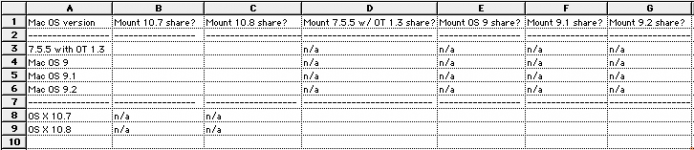
All you have to do is fill in yes or no for each appropriate field, and report any anomalies or unusuals. Shouldn't be that hard. I would do it but I don't have the hardware to do the OS 9.0/9.1 share, and I don't have 10.6, 10.7 or 10.8. (The Intel Mac mini I have maxes out at 10.6.)
Whosoever can do this will get credit for the new subsection for AFP for 10.7/10.8 . I may also need screenshots (like what I have up there already) on how to get the networking with AFP set up, so that all the steps are covered. Ideally we'd also verify that it works with Windows Server 2000/2003 Services for Macintosh but I have faith that it will work regardless, although three cool points, a bonus widget and a cookie are available to those who go that far. :b&w: Windows 2000 Server with SFM is actually fairly good, based on my testing. (2000 Server also has a unique feature to splice a file together from a separate resource fork and data fork into one file. Not sure if other Windows versions have this feature -- its done in the command line.)
EDIT: Here it is:
All you have to do is fill in yes or no for each appropriate field, and report any anomalies or unusuals. Shouldn't be that hard. I would do it but I don't have the hardware to do the OS 9.0/9.1 share, and I don't have 10.6, 10.7 or 10.8. (The Intel Mac mini I have maxes out at 10.6.)
Whosoever can do this will get credit for the new subsection for AFP for 10.7/10.8
. I may also need screenshots (like what I have up there already) on how to get the networking with AFP set up, so that all the steps are covered. Ideally we'd also verify that it works with Windows Server 2000/2003 Services for Macintosh but I have faith that it will work regardless, although three cool points, a bonus widget and a cookie are available to those who go that far. :b&w: Windows 2000 Server with SFM is actually fairly good, based on my testing. (2000 Server also has a unique feature to splice a file together from a separate resource fork and data fork into one file. Not sure if other Windows versions have this feature -- its done in the command line.)MacTCP on the SE/30 no mounting in either direction(that sounds moderately dirty). SE/30 does not 'see' the LaCie either... I recall my Plus with 6.0.8 and MacTCP(same setup that sees a2server now, but somehow my appletalk is messed up after a few years sitting in storage) could 'see' and mount the LaCie I had at home, but it was a different model, at home I once had a 'd2 Network drive,' the one at work is a '5big storage server'.
actually, the SE/30 doesn't see the older LaCie network disk either... hummm. maybe the settings are wrong. going to check that again right now, since I'm waiting for some other work to come in right now.
actually, the SE/30 doesn't see the older LaCie network disk either... hummm. maybe the settings are wrong. going to check that again right now, since I'm waiting for some other work to come in right now.
Yup... forgot, no PRAM battery = automatic resetting of appletalk to the printer port 
changed that and it does see the older LaCie drive no problem, getting stuck at the point it shows the available sharepoints, but that drive has like 25-30 separate share points so that may be the issue.
it does NOT see the newer LaCie drive nor my macbook. also after waiting for a few moments my macbook says it can't find a server running on the SE/30's IP address.
Appletalk version is 7.2 (as noted in the bottom left corner of the chooser)
changed that and it does see the older LaCie drive no problem, getting stuck at the point it shows the available sharepoints, but that drive has like 25-30 separate share points so that may be the issue.
it does NOT see the newer LaCie drive nor my macbook. also after waiting for a few moments my macbook says it can't find a server running on the SE/30's IP address.
Appletalk version is 7.2 (as noted in the bottom left corner of the chooser)
Thats a negative on 7.6.1 and OS 10.7, from the PB180 it says the afp server is incompatible on the macbook it says no server responded.
I found more interesting results using sheepshaver.
it does NOT see/connect to the Powerbook 180 nor the a2server. even using the IP address, says no server. BUT it does still connect fine to the 10.5server. Tried connecting to my intel mini(10. 8) , says it is an incompatible afp server... so it must require part of the host machines appletalk abilities to connect? Can't test more, 7.6.1/PB180 is as new a 'vintage' mac as I have and G4/OS 10.5 is as old of a 'modern' mac here.
I found more interesting results using sheepshaver.
it does NOT see/connect to the Powerbook 180 nor the a2server. even using the IP address, says no server. BUT it does still connect fine to the 10.5server. Tried connecting to my intel mini(10. 8) , says it is an incompatible afp server... so it must require part of the host machines appletalk abilities to connect? Can't test more, 7.6.1/PB180 is as new a 'vintage' mac as I have and G4/OS 10.5 is as old of a 'modern' mac here.
Righto
Could you also test 10.8 with 7.6.1 just to be sure with the "Legacy Mode"?
I'll mark off pre OS 9 systems, I figured that from the get-go because if you look at the Chart, 10.4 is right at the cut off. Anything higher and you need OS 9+. Didn't hurt to try 7.6.1, because you just never know. I've been surprised more than once on investigation procedures for the Guide.
Could you also test 10.8 with 7.6.1 just to be sure with the "Legacy Mode"?
I'll mark off pre OS 9 systems, I figured that from the get-go because if you look at the Chart, 10.4 is right at the cut off. Anything higher and you need OS 9+. Didn't hurt to try 7.6.1, because you just never know. I've been surprised more than once on investigation procedures for the Guide.
Yeah, definitely. I have to see how the rest of the week pans out and I'll give it a shot. It may be my last week to try(the 180 and EN/SC are on eBay).
Also, I forget if it was mentioned in the guide, but it would be good to mention 10.5 Server is a go with the setup I have on the PB180 so there is something the server version has that the 'regular' version of 10.5 does not... too bad it doesn't seem to work with anything less than Appleshare 3.8.3 (which is not compatible with 7.5.5, needs 7.6 IIRC) At least something added as a footnote...
Also, I forget if it was mentioned in the guide, but it would be good to mention 10.5 Server is a go with the setup I have on the PB180 so there is something the server version has that the 'regular' version of 10.5 does not... too bad it doesn't seem to work with anything less than Appleshare 3.8.3 (which is not compatible with 7.5.5, needs 7.6 IIRC) At least something added as a footnote...
In the footnotes, just below the Chart:
I'd love to cover OS X Server, but then I'd have to get Mac OS X Server 1.0, 10.0, 10.1, 10.2, 10.3, 10.4, 10.5, 10.6, 10.7, and 10.8. Then I'd have to get a Plus and then something that can run 7.6 through 9.2. Then run the tests on how to configure them and make them work, that would take at least a week straight.
Doh! Had this come up a couple of years ago, when I had versions 10.1 through 10.6 server... and a few more macs. All I have is 10.5 at home and 10.7 at work. I may have one last copy 10.2 server kicking around still, you can have it if I find it, don't think I have anything it runs on now. But generally if the consumer OS supported it, the server OS would too. only odd duck I've seen thus far is 10.5, Maybe because they left Appletalk in there for the printserver, some bits of file sharing were left too?
One thing I didn't try is the reverse, 10.5 server back to the PB180. I'll have to test that one before the PB is gone too.
One thing I didn't try is the reverse, 10.5 server back to the PB180. I'll have to test that one before the PB is gone too.
10.7 at work is the Server version?
What I could do is make a note in the 10.5 section (not in the Chart) that 7.6 with 3.8.3 will work with 10.5 Server. -shrugs- Not sure what that would do, as my OCD would kick in and I'd say "well what about 10.4 Server? 10.6 Server?" and so on.
Keep in mind, nearly every thing I talk about or discuss in procedure, I've done it myself just to make sure it works. (Most of the data from the Chart came from a healthy contribution of data from mcdermnd. I wouldn't have been able to do it myself without acquiring a few more machines, which would then be gathering dust). For example, I heard that afpfs-ng can mount AFP shares in Linux. Then I start to wonder: well, there's many kinds of AFP servers, starting with ASFS 2.0.1, then System 7. Can it mount those? (No.) How about Mac OS 7.6.1 with OT 1.3 and AS 3.8.3? (No.) Okay what about 9.2.2? (No.) OS X 10.2? (Yes, but it seemed to have trouble mounting the shares.) What about Windows 2K Server with SFM? (Same thing.)
I also heard about the pseudo-dialup network from this thread. Naturally, I had to try it out. For some reason 10.5 wouldn't work properly. No idea why. (I had tail -f /var/log/system.log running while I had it set up.) 10.4 worked fine. Ubuntu 10.04LTS did not. Ubuntu 9.10, after I fiddled around and put the connect-delay 5000 flag in, worked fine.
So it's imperative that we get it right, if we can, otherwise I'm inclined to only mention it in a passing reference, or not at all. I would ideally cover networking in a more expansive detail, covering SMB (Windows) and other stuff like SSH so it can be "the one, for all" -- but that would take too much time and there's plenty of adequate tutorials elsewhere.
What I could do is make a note in the 10.5 section (not in the Chart) that 7.6 with 3.8.3 will work with 10.5 Server. -shrugs- Not sure what that would do, as my OCD would kick in and I'd say "well what about 10.4 Server? 10.6 Server?" and so on.
Keep in mind, nearly every thing I talk about or discuss in procedure, I've done it myself just to make sure it works. (Most of the data from the Chart came from a healthy contribution of data from mcdermnd. I wouldn't have been able to do it myself without acquiring a few more machines, which would then be gathering dust). For example, I heard that afpfs-ng can mount AFP shares in Linux. Then I start to wonder: well, there's many kinds of AFP servers, starting with ASFS 2.0.1, then System 7. Can it mount those? (No.) How about Mac OS 7.6.1 with OT 1.3 and AS 3.8.3? (No.) Okay what about 9.2.2? (No.) OS X 10.2? (Yes, but it seemed to have trouble mounting the shares.) What about Windows 2K Server with SFM? (Same thing.)
I also heard about the pseudo-dialup network from this thread. Naturally, I had to try it out. For some reason 10.5 wouldn't work properly. No idea why. (I had tail -f /var/log/system.log running while I had it set up.) 10.4 worked fine. Ubuntu 10.04LTS did not. Ubuntu 9.10, after I fiddled around and put the connect-delay 5000 flag in, worked fine.
So it's imperative that we get it right, if we can, otherwise I'm inclined to only mention it in a passing reference, or not at all. I would ideally cover networking in a more expansive detail, covering SMB (Windows) and other stuff like SSH so it can be "the one, for all" -- but that would take too much time and there's plenty of adequate tutorials elsewhere.
True, but we don't want to lose that little tidbit of information either.
10.7 at work is the server version. running on 2011 mac mini. No way to test it now though, someone hit the BIN button on eBay late last night. So the 180 is in a medium flat rate box on its way to Illinois I did try reverse 10.5 server to 7.6.1 *early* this morning. that was a no go... forgot about trying 10.8 in legacy mode in all my running around this morning. sorry.
10.7 at work is the server version. running on 2011 mac mini. No way to test it now though, someone hit the BIN button on eBay late last night. So the 180 is in a medium flat rate box on its way to Illinois I did try reverse 10.5 server to 7.6.1 *early* this morning. that was a no go... forgot about trying 10.8 in legacy mode in all my running around this morning. sorry.
Modern as in 10.7/10.8, I tried connecting to a2server with smb, that doesn't work either. I'm down to just my plus with OS 6.0.8 and a dayna etherprint-T...
True, but we don't want to lose that little tidbit of information either.
10.7 at work is the server version. running on 2011 mac mini. No way to test it now though, someone hit the BIN button on eBay late last night. So the 180 is in a medium flat rate box on its way to Illinois I did try reverse 10.5 server to 7.6.1 *early* this morning. that was a no go... forgot about trying 10.8 in legacy mode in all my running around this morning. sorry.
10.7 at work is the server version. running on 2011 mac mini. No way to test it now though, someone hit the BIN button on eBay late last night. So the 180 is in a medium flat rate box on its way to Illinois I did try reverse 10.5 server to 7.6.1 *early* this morning. that was a no go... forgot about trying 10.8 in legacy mode in all my running around this morning. sorry.
Modern as in 10.7/10.8, I tried connecting to a2server with smb, that doesn't work either. I'm down to just my plus with OS 6.0.8 and a dayna etherprint-T...