
Thread
Mac 128k blown fuse on analog board
Hi everyone! I'm new to this forum and was hoping someone could help..
I recently acquired an original Mac 128k in good condition but unfortunately does not turn on. I found a bit of corrosion on some of the traces on the analog board which I have cleaned up. I also found the fuse was blown on the analog board and the fuse holders both fell apart when I removed the fuse. The capacitors all look good, no leaking or bulging. I have now replaced the fuse holders and fuse (1.6A 250V slow blow) but unfortunately the fuse blows as soon as I turn it on Is this the correct fuse? This is what I removed so assume is correct..
Any idea what component/s could be faulty that would cause the fuse to blow? Is it worth replacing all the capacitors on these analog boards even if they look good?
The original owner said the Mac worked when they last used it about 10 years ago! He said he thought it may just need a PRAM battery fitted as this was taken out. I remember reading somewhere that these Mac's can still turn on without PRAM battery fitted, but may be wrong..
Any help would be greatly appreciated!
I recently acquired an original Mac 128k in good condition but unfortunately does not turn on. I found a bit of corrosion on some of the traces on the analog board which I have cleaned up. I also found the fuse was blown on the analog board and the fuse holders both fell apart when I removed the fuse. The capacitors all look good, no leaking or bulging. I have now replaced the fuse holders and fuse (1.6A 250V slow blow) but unfortunately the fuse blows as soon as I turn it on
Is this the correct fuse? This is what I removed so assume is correct..Any idea what component/s could be faulty that would cause the fuse to blow? Is it worth replacing all the capacitors on these analog boards even if they look good?
The original owner said the Mac worked when they last used it about 10 years ago! He said he thought it may just need a PRAM battery fitted as this was taken out. I remember reading somewhere that these Mac's can still turn on without PRAM battery fitted, but may be wrong..
Any help would be greatly appreciated!
Caps are most likely bad, age does as much damage as use. Fly back transformer also drawing too much and blowing fuse.
Thanks for your reply. I will get all the caps replaced and see if this helps.
Is there any way I can test the fly back transformer for faults using a multimeter? If it is faulty any idea if they are repairable or still an available part?
Is there any way I can test the fly back transformer for faults using a multimeter? If it is faulty any idea if they are repairable or still an available part?
You can indeed do a basic test with an ohmmeter. See the Classic Mac Repair Guide for the details.
That said, the probability of the flyback being the problem is somewhat low. It's not zero, but the current-limiting circuits in the power supply should act to prevent drawing enough primary current to pop the fuse. Again using the ohmmeter, verify that the bridge rectifier and main filter capacitor aren't shorted. Ditto for the SCR. Do a careful visual inspection of the board (both sides) to see if there are any tell-tale signs of overheating that might be a clue.
That said, the probability of the flyback being the problem is somewhat low. It's not zero, but the current-limiting circuits in the power supply should act to prevent drawing enough primary current to pop the fuse. Again using the ohmmeter, verify that the bridge rectifier and main filter capacitor aren't shorted. Ditto for the SCR. Do a careful visual inspection of the board (both sides) to see if there are any tell-tale signs of overheating that might be a clue.
A fuse that blows instantly almost always means a shorted component on the primary side of the power supply. The most common is the chopper transistor which will be a power transistor or MOSFET on a heatsink near the big filter capacitors on the input side. It could also be a shorted main filter cap or a bad rectifier but the chopper is the first thing I'd check.
A fault on the output side will usually cause the power supply to shut down. Often there will be a soft chirping or ticking sound if you listen carefully, as the supply tries repeatedly to come up but shuts down. Some early switching power supplies, notably those used in the Apple II will whine audibly under this condition.
A fault on the output side will usually cause the power supply to shut down. Often there will be a soft chirping or ticking sound if you listen carefully, as the supply tries repeatedly to come up but shuts down. Some early switching power supplies, notably those used in the Apple II will whine audibly under this condition.
Yup, exactly. The "chopper" device in the classic macs is Q11 in the Repair Guide. The SCR often goes south along with Q11, which is why it's mentioned. But Q11 should definitely be checked, as you advise. Q9, too, is frequently a victim.
Thanks for all the advice on this. I will hopefully get a chance over the weekend to do more tests. Will update as soon as I have tested all the components & hopefully find the culprit!
Had another look at the board tonight and found two diodes shorting out in position CR24 & CR25 on bridge rectifier. Have replaced all four diodes CR22 - CR25 with part 1N4007.
Have also found CR20 and CR21 rectifiers are faulty. Have read the filter capacitors C24-C26 and C29-C31 are also weak spots. So will get all these replaced.
Is it best to replace all the capacitors on the analog board or just the filter caps? Hopefully this will solve the power issues..
Have also found CR20 and CR21 rectifiers are faulty. Have read the filter capacitors C24-C26 and C29-C31 are also weak spots. So will get all these replaced.
Is it best to replace all the capacitors on the analog board or just the filter caps? Hopefully this will solve the power issues..
Sounds like you've made a lot of progress -- congrats!
The only other cap I'd bother with on the analog board is C1. If the others look ok, you can probably leave them be. Once you get the thing to power up, you'll be in a better position to evaluate what other steps (if any) you need to take.
Keep going!
The only other cap I'd bother with on the analog board is C1. If the others look ok, you can probably leave them be. Once you get the thing to power up, you'll be in a better position to evaluate what other steps (if any) you need to take.
Keep going!
Great thank you! Will update on any progress..
Have now also replaced CR20 & CR21 rectifiers. Fuse no longer blows! But Mac doesn't turn on either Speaker is just making a clicking noise now. I have a C1 capacitor (part no ECWF2395JB) on order but I think there must be something else at fault as the current C1 cap does seem okay.
Speaker is just making a clicking noise now. I have a C1 capacitor (part no ECWF2395JB) on order but I think there must be something else at fault as the current C1 cap does seem okay.I am not sure where you are but I have an original analog board with CRT pulled from a dead motherboard unit if you need it. It has been tested with a 512 and a plus motherboard, but it is out of a 128.
Thank you very much for your offer - I'm based in the UK. It's really difficult to find replacement parts here in the UK, I guess parts are becoming scarce worldwide.
BTW is there an option to get an email when someone reply to a post?
BTW is there an option to get an email when someone reply to a post?
I think in the preferences for PM's and such you can receive emails. I get them, I probably set it up when I first signed on so I don't know exactly where in the settings.
The board is yours if you want it, but that little crt makes it twice as heavy, I could remove the yoke from it but you could weigh yours to see if trying to get this one is worth it for you. I am not using it and you are more than welcome to it. Last thing I sent over the water over there was expensive but its your call.
The board is yours if you want it, but that little crt makes it twice as heavy, I could remove the yoke from it but you could weigh yours to see if trying to get this one is worth it for you. I am not using it and you are more than welcome to it. Last thing I sent over the water over there was expensive but its your call.
That is very kind thank you. Will send you a PM.
Shipping a CRT overseas is going to be risky and expensive, but there is no reason you can't separate the board and the tube. I'm sure there are others here who could use a good tube for their compact Mac.
Clicking likely means the power supply is starting up and shutting down repeatedly. Look for shorted components on the secondary side, particularly the rectifier diodes on the outputs and the horizontal drive transistor in the monitor section.
Clicking likely means the power supply is starting up and shutting down repeatedly. Look for shorted components on the secondary side, particularly the rectifier diodes on the outputs and the horizontal drive transistor in the monitor section.
Yes probably wouldn't be worth shipping a CRT but the power supply would definitely help  I don't even know if the logic board and CRT are working till I can get this to turn on..
I won't give up yet! I will keep looking and will probably end up replacing every component on this board!
Could a faulty CRT or logic board prevent power supply turning on?
I don't even know if the logic board and CRT are working till I can get this to turn on..I won't give up yet! I will keep looking and will probably end up replacing every component on this board!
Could a faulty CRT or logic board prevent power supply turning on?
A fault in the logic board could. It's not common, but a shorted IC could cause the supply to shut down and tick like that. It would be extremely unlikely for a CRT to fail in such a way as to cause this. As long as the vacuum is intact, the tube is probably fine.
Don't do that -- use test equipment and logic to narrow down the suspects. Judicious use of an ohmmeter will get you very far, so you don't need very sophisticated equipment for the majority of problems.
Did you check the SCR, for example? It frequently is destroyed by other faults with the power supply. If you've fixed the original problem, but not replaced a shorted SCR, you'll get symptoms very similar to what you seem to be reporting.
Also, make sure that the voltage adjustment pot hasn't been turned to a high voltage setting. That, too, will trigger a periodic shutdown behavior. I recommend setting the pot to the minimum voltage setting to start. Viewed from the foil side of the analog board, that corresponds to a maximally clockwise position (the opposite of what one might expect).
Check for short circuits across any of the supplies.
The CRT is highly unlikely to be a source of this problem. However, do check the logic board. Once again, a simple ohmmeter check will be revealing.
Thanks for your suggestions. I only have a basic multimeter so can do some basic testing. Do you know where the SCR is on the power supply and any idea how I can test if this is faulty?
Also I replaced CR20 and CR21 rectifiers as they tested faulty with diode test in circuit. After replacing with new rectifiers they still show faulty with diode test, i.e. current passes both ways, but when removed from circuit they work correctly. Is this correct or is there a fault here?
Also I replaced CR20 and CR21 rectifiers as they tested faulty with diode test in circuit. After replacing with new rectifiers they still show faulty with diode test, i.e. current passes both ways, but when removed from circuit they work correctly. Is this correct or is there a fault here?
Have been testing around the rectifiers and wondering if the transformer T3 is faulty? Looks like a sticky residue on it and not sure if this is normal? Also how would I test if this is faulty?
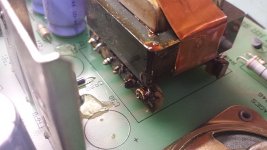
I don't know about the rectifier as they are all coated, but that huge open spot seems like its missing a big cap.
Yes I removed these caps to test out of circuit, they seem okay so will be putting them back..
He says that the speaker is clicking, not the power supply.
speaker is clicking because the voltage is pulsing. The power supply is tripping into overcurrent and restarting. there is an RC time constant that determines when it restarts.
Anyway, that could mean any one of the rails has been shorted, or low impedence to ground. ohm meter will tell this. I am thinking sweep circuit, maybe a shorted HOT, or floppy drive, something... could be anything.
and in rare cases, it could be a component on the primary chopper side causing false overcurrent or false start conditions, which I tend to lean more towards due to the fact that the recitifiers were shorted, could have been a lightning or a surge victim.
Anyway, that could mean any one of the rails has been shorted, or low impedence to ground. ohm meter will tell this. I am thinking sweep circuit, maybe a shorted HOT, or floppy drive, something... could be anything.
and in rare cases, it could be a component on the primary chopper side causing false overcurrent or false start conditions, which I tend to lean more towards due to the fact that the recitifiers were shorted, could have been a lightning or a surge victim.
Speaker has stopped the continuous clicking noise now. Have tested live power supply and found 170V on primary side of transformer and no voltage on any of secondary outputs. Also the speaker makes a click every now and then when testing voltage on primary side. Does this mean T3 transformer is faulty?
no. You are going to need technical troubleshooting skills and proper equipment to figure this out.
Okay thank you..
You are seeing 170 across the primary cap, so we'll assume that all is ok there for now. In general, testing of components should be done out of circuit because there can be many sneak paths that can confound measurements, as you've found. In-circuit testing is an iffy proposition. Interpreting the results correctly requires you to have studied the schematics carefully enough to understand what to expect. That's a lot of work.
The repair guide has a full schematic of the analog board, so use that to find the scr (it's a power device in a TO-220 package, so it's easy to spot). A basic test is all you can do with a multimeter, but that's still enough to find or preclude a shorted scr, at least. Measure between anode and cathode; it should read as an open circuit for both polarities. Also, between gate and cathode, you should observe standard diode-like behavior.
From your observation of clicking, I'm betting that the basic switcher core is at least healthy enough to try periodically to come up, but something is shorted across one or more supplies. The scr commonly sacrifices itself in the compacts, so I'm betting that it's at least part of the problem. If you find that it's shorted, don't stop troubleshooting and simply replace the scr. Do extra investigating to see if there's a reason it shorted (e.g, bad main switching transistor). If you only replace the scr without fixing the cause of its death, you'll just kill another one.
Well if you wanted to get frisky, you could pull each component and test them individually with a DMM, your sure to find it that way ;-) I know this sounds sarcastic, but theres been a few things I had repaired in the past that I had to do this, because hte failed component was manifesting itself hidden in other components. One example was an open zener that read fine in circuit as it was reading around it and not through it.
As far as SCRs go, I would check both Q8 and Q10.
As far as SCRs go, I would check both Q8 and Q10.
Have tested SCRs and they all tested okay. If I get time I may start testing each component individually out of circuit but I think repairing this has become beyond my expertise! I've spent far too many hours with this.. My brother-in-law is quite clued up in electronics so next time I see him I will ask him to take a look. I'm sure I've overlooked something simple and possibly related to original fault of shorted diodes. I hope that one day I can have this 128k running again! Thanks again for everyone's help with this
Sometimes there is no substitute for testing out of circuit, but you can check a lot of parts in place. If a diode shows a reasonable forward drop in one direction and nothing to speak of in the other then it's probably good. Transistors can be tested like a pair of end to end diodes from the B-E and B-C junction. It takes experience to know how to interpret the readings you get from some parts, but with each repair it gets a little easier.
I still remember when I first started working on CRT monitors. It was a struggle at first, but after a while they all started to look the same on the inside, and I started seeing the same 2-3 faults over and over. It got easier and easier to guess at the bad part with just a quick look at the symptoms.
I still remember when I first started working on CRT monitors. It was a struggle at first, but after a while they all started to look the same on the inside, and I started seeing the same 2-3 faults over and over. It got easier and easier to guess at the bad part with just a quick look at the symptoms.
I always hated the multisync monitors, especially sony because of thier extreme complexity.
For the most part they weren't really that bad to work on and had the same sort of faults as any other monitor. Bad capacitors, the occasional open resistor or shorted diode, blown HOT. Sometimes it was just a bad solder joint. Once I had a good multimeter and an ESR meter I had a pretty solid success rate.
The most interesting was the series of Viewsonic flat CRTs that all seemed to develop the same fault. They would come to me with a blown vertical output chip, replacing that and the fusible resistors feeding it would usually get it going again, only to fail a while later. I finally ended up tacking wires to one of the power supply outputs and using the monitor for a couple weeks with a bench multimeter connected until I finally caught the voltage creeping up. Some freeze spray found a bad opto-coupler in the power supply. It would work when cold, but eventually start to fade, causing the output to rise up until it got high enough to blow the vertical output. Once I figured that out, I must have fixed a dozen 17-22" Viewsonics with the same problem and never had one come back.
The problem I had with monitors, I would get them running again, just for them to scramble up and short the HOT after maybe an hour or more of operation. You knew when it was going to do it, as the screen would slowly get wider, then the picture would loose sync and the infamous squeek, tick-tick-tick-tick of the SMPS when the HOT goes short.
Replace the HOT, and it was good to go for anywhere up to another hour, to days... Never figured htat one out. It was a viewsonic if I remember correctly. I had an apple powermac 5300 do that too. would randomly short the HOT.
it was always the ones that shorted the HOT or had other random horizontal issues that drove me nuts. All the other stuff was easy.
I had an apple multiscan i think... 15" display I worked on long ago, that would pulse a bright raster with an image for the upper half the screen, then the lower half would be a bright squiggly center line almost question-mark like in striation, and almost to the burn-in point, and it would shut down. this would happen every 1 second. fire up, pulse raster, bright line, shutdown. Turned out to be a bad transistor in the pincussion circuit. Of all things, and it was on a seperate PCB near the flyback, seperate from the mainboard. (going from memory about 12 years ago, I was 15 at the time)
Replace the HOT, and it was good to go for anywhere up to another hour, to days... Never figured htat one out. It was a viewsonic if I remember correctly. I had an apple powermac 5300 do that too. would randomly short the HOT.
it was always the ones that shorted the HOT or had other random horizontal issues that drove me nuts. All the other stuff was easy.
I had an apple multiscan i think... 15" display I worked on long ago, that would pulse a bright raster with an image for the upper half the screen, then the lower half would be a bright squiggly center line almost question-mark like in striation, and almost to the burn-in point, and it would shut down. this would happen every 1 second. fire up, pulse raster, bright line, shutdown. Turned out to be a bad transistor in the pincussion circuit. Of all things, and it was on a seperate PCB near the flyback, seperate from the mainboard. (going from memory about 12 years ago, I was 15 at the time)
Macdrone has very kindly sent me a 110V analog board from the US. Was wondering if there is any easy way to covert this to accept 240V or would it be best to use with a step down transformer?
I've heard bad things about step-down transformers and old Macs
Didn't know about this. Do you know what bad things you heard? Would it be better to covert power supply to 240V?
From what I've heard, the old analogue boards don't tolerate the fluctuations that occur with cheaper/lower quality transformers very well and develop severe problems or burn out all together in short order. So, if you are going to use a step-down transformer, it has to be excellent quality with very tight tolerances, which is not cheap.
That could very well have been the same opto-coupler problem in the power supply that I saw on numerous PF series monitors. In those, the vertical output IC was the first to succumb to the over-voltage but it's entirely possible that a different monitor would blow the HOT instead.
Most of the time when I ran into chronic blown HOTs, it was bad capacitors causing weak horizontal drive. Either the drive level was too low or the waveform was ugly, either way the HOT would spend too much time in its linear region where it is acting like a resistor rather than switched fully on or off and the result is a tremendous amount of heat and a fried HOT.
The horizontal deflection circuit, traditionally combined with the HV circuit but frequently separated in multisync monitors, is a resonant tank with a great deal of current circulating around. Everything has to be just right or things get ugly really fast. A 150W bulb in series with B+ would often prevent the HOT from blowing up so you could run it long enough to see what was going on.
They make travel power plugs for American travelers. I am sure a 240 to 115 plug can be got for pretty inexpensive and then you will be all set. Just a suggestion. Will save a lot of work.
Paralel mentioned that he had heard of issues with step-down transformers so looking for a quality one at a decent price. I would prefer to convert the analog board to 240V but have no idea what parts would need replacing. I originally thought it would be a matter of just replacing the transformer on power supply circuit but perhaps this is not the case.
Yeah, when I was in the UK, I had a friend that collected vintage macs and he managed to blow out two 120v systems with cheap transformers. When we looked at the voltage/amperage, as well as the waveform, there were wide fluctuations in the transformers output. In some instances there were deviations of more than 20% from ideal, far worse than you would see in a US household with no major wiring issues. I would definitely use a quality transformer which lists its tolerances relative to ideal output.
You have to be careful. A lot of these travel converters are not transformers at all, but triac based circuits that work like a light dimmer with a fixed output. They are intended for purely resistive loads only and will usually fry electronics connected to them. Transformer based travel converters are normally only rated for about 50W, and they are undersized, providing very poor regulation. Larger autotransformers can be had and work well, but they are bulky and tend to be expensive.
You would have to look at the schematic or compare the 120V and 240V analog boards to see what the difference is. Many dual voltage switching power supplies use a 330VDC bus and the voltage is selected by jumpers that change the way the input rectifier/filter is wired. They use a full wave rectifier and a pair of filter capacitors in series to get 330VDC from 240VAC. For 120V, the rectifier is configured as a voltage doubler using only two of the four diodes and charges the series capacitors to 330VDC in alternating fashion. Look up Cockroft-Walton voltage multipliers for an example of how this works.
If the 120V version uses a single filter capacitor and 170VDC bus, the transformer is likely different, as is the main filter capacitor, but the differences are likely only on the primary side. You shouldn't need to replace the whole board though, the problem is likely something simple. For the record, in ~20 years of repairing this sort of stuff I have *never* seen a bad transformer in a switchmode power supply. They just don't fail, the electronics blow long before the transformer takes enough abuse to overheat.
What kind of fuse holder did you buy that fits?