

Thread
EtherWave Mac/PB Adapter and Classic Mac
I recenty bought a EtherWave Mac/PB Adapter and would like to connect my old school Mac's to the Internet. I have seen some posting that these devices support TCP/IP. Is there someone out there who has a manual? Or an idea how to do this?
I got it working for LocalTalk. Not easy because I first had to solder a cap out and change it!
This is the device:


http://atomictoasters.com/2010/12/guerrilla-networking-i-farallon-etherwave-for-macs/
I got it working for LocalTalk. Not easy because I first had to solder a cap out and change it!
This is the device:
http://atomictoasters.com/2010/12/guerrilla-networking-i-farallon-etherwave-for-macs/
Now that is an interesting question.
http://lowendmac.com/network/bridge.shtml
I am not sure myself. However, if you have a Mac that can boot OS X 10.2, and another than runs 10.3 or 10.4, you can find out pretty easily if they do. Either that adapter will work just like a regular AFP bridge or it will function like a FastPath 5 TCP/IP router, which I doubt but until I get reports that it does in fact then I'll remain skeptical.
You'll also need a driver for it. I'm not sure if it will work with OT systems -- you'll have to find out if that is the case.
http://lowendmac.com/network/bridge.shtml
I am not sure myself. However, if you have a Mac that can boot OS X 10.2, and another than runs 10.3 or 10.4, you can find out pretty easily if they do. Either that adapter will work just like a regular AFP bridge or it will function like a FastPath 5 TCP/IP router, which I doubt but until I get reports that it does in fact then I'll remain skeptical.
You'll also need a driver for it. I'm not sure if it will work with OT systems -- you'll have to find out if that is the case.
Check out this link for the drivers:
http://www.markyb.org/farallon-ethermac-se-driver-disk-version-2-2-1/
I've found that the Farallon EN install works for the majority of that era Farallon network hardware, including the etherwave. I've managed to get TCP/IP working on 7.1.1 and 7.5.3 - but it seems dependent on working PRAM. The driver will install an "Alternate Ethernet" adapter, use that for IP networking.
Hope it works!
Alex
http://www.markyb.org/farallon-ethermac-se-driver-disk-version-2-2-1/
I've found that the Farallon EN install works for the majority of that era Farallon network hardware, including the etherwave. I've managed to get TCP/IP working on 7.1.1 and 7.5.3 - but it seems dependent on working PRAM. The driver will install an "Alternate Ethernet" adapter, use that for IP networking.
Hope it works!
Alex
I use an Asante EN/SC adaptor myself but I'm sure this advice will work for the EtherWave
You first want to get a netgear 10mbps switch. This will take the information from your modern 100 mbps router and make it more compatible with the classic mac. So you would run ethernet cable from your modern router, to the netgear switch and then to the EtherWave.
After installing the drivers, you'll want to use MacTCP which you should have installed on the mac to then select Ethernet Built in, then manually set up the gateway settings for dhcp.
I've had good luck with MacTCP but you can also use Open Transport to just set TCP/IP settings to automatic.
You first want to get a netgear 10mbps switch. This will take the information from your modern 100 mbps router and make it more compatible with the classic mac. So you would run ethernet cable from your modern router, to the netgear switch and then to the EtherWave.
After installing the drivers, you'll want to use MacTCP which you should have installed on the mac to then select Ethernet Built in, then manually set up the gateway settings for dhcp.
I've had good luck with MacTCP but you can also use Open Transport to just set TCP/IP settings to automatic.
Have you been able to get it working? I've added references to this type of adapter in the Guide (it'll show up next minor update) but there doesn't seem to be many similar models on eBay, other than AAUI adapters *yawn*.
EDIT: I'd love to have one of those things around. Probably much, much better than a regular AFP bridge. Also: viewtopic.php?f=16&t=1428
EDIT: I'd love to have one of those things around. Probably much, much better than a regular AFP bridge. Also: viewtopic.php?f=16&t=1428
http://www.welovemacs.com/pn801a.html
appears to be the older version, although I cannot verify. (PN801)
HIs version is a PN840ADB
appears to be the older version, although I cannot verify. (PN801)
HIs version is a PN840ADB
Code:
Farallon uses external clocking in its EtherMac and EtherWave PowerBook adapters to push data through the serial port roughly three times faster than usual. This makes an excellent way to add an older PowerBook to an ethernet network. (BTW, these adapters do not support Open Transport.)I was looking for an article/post/blog/something that mentioned the difference between the Modem and Printer ports, saying something technical about one versus the other. I can't remember where it was and it's not in my bookmarks or history. Something to do about xfering data without as much interference from the CPU or thereabouts. Maybe it was a reference to something described in Inside Macintosh...dunno.
lucky... been watching eBay for one, just a bunch of AAUI adaptors BLAH.
Think one of those is the ticket to put my plus online, just for telnet really. but I don't even have a keyboard yet so I can wait to find one for a while yet
Think one of those is the ticket to put my plus online, just for telnet really. but I don't even have a keyboard yet so I can wait to find one for a while yet

Online with no keyboard over pseudo-PPP dial up.
And yes I saw all the AAUI adapters...made my heart sink. xx(
I downloaded the driver, but it is in a image format I cannot open. Could anyone change it to a format I can open on an Old Mac. I have Disk Copy 6.3 and it is not able to mount this image what is inside the zip...
Thanks for your help!
See attachment (zip file):
Farallon221.zip
Thanks for your help!
See attachment (zip file):
Farallon221.zip
Actually, it looks like this IMG file is badly damaged. My hackintosh running snow leopard, my Classic II running 7.1.1, nor my XP system could recognize it.
Sorry. I don't think that file is usable.
Sorry. I don't think that file is usable.
You may have seen this post: viewtopic.php?f=7&t=21226
Also this IIgs technote mentions the interrupt A as being special: http://www.umich.edu/~archive/apple2/technotes/tn/iigs/TN.IIGS.018
In practice, there is no difference, just two serial ports hanging off of the Zilog SCC. Apple just switches the communication mode to SDLC to whatever port Localtalk is being used on. The Etherwave likely uses the same transfer mode that Localtalk networking uses (230kbps) to achieve that breakneck speed. Out of the box the SCC is capable of 115kbps with standard RS-232 signaling, the real question is if the host machine can handle it as most aren't fast enough.
It really doesn't matter which port you use. Apple's software gives you the option to use either the printer port or the modem port for Localtalk. The same port flexibility exists on the slower Apple IIgs too.
Ok I found EN Card Installer 2.3. Installed it on a 7.5 System. ( Booted with extentions off).
Still no luck...
This is what I see when I run the diagnostic tool. It somehow sees the Etherwave Adapter ( I guess...)
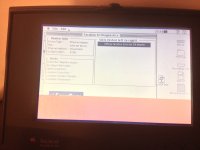
I see also two green lights and orange blinking.
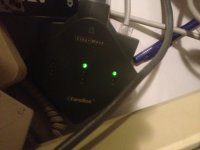
It doesn't show up in Network Control Panel and not in MacTCP..... What to try next?
Still no luck...
This is what I see when I run the diagnostic tool. It somehow sees the Etherwave Adapter ( I guess...)
I see also two green lights and orange blinking.
It doesn't show up in Network Control Panel and not in MacTCP..... What to try next?
I have one of these — disused and in a box somewhere or other — and once upon a time I did have it working. There is some small magic at play in the dongle itself that boots networking speed well beyond the ordinary limits of the localtalk/ modem port to which it connects. I don't think the increase was massive, but when the thing was new, it was enough to make the purchase seem worthwhile.
I do not think the EtherWave is compatible any form of Open Transport, and seem to recall that there are compatibility issues even with 7.5 (though that might just be the later iterations, i.e., 7.5.x). Maybe try under 7.1? I think I must have had it working on a Duo 280c running 7.1.
Some years ago, I posted on here and asked about the thing. The question got a very knowledgeable response (Gorgonops? Equill?). But that would probably have been before the crash, and the archive is not searchable.
I do not think the EtherWave is compatible any form of Open Transport, and seem to recall that there are compatibility issues even with 7.5 (though that might just be the later iterations, i.e., 7.5.x). Maybe try under 7.1? I think I must have had it working on a Duo 280c running 7.1.
Some years ago, I posted on here and asked about the thing. The question got a very knowledgeable response (Gorgonops? Equill?). But that would probably have been before the crash, and the archive is not searchable.
Mactjaap, I might be able to send you some files that will help with trying this adapter on 7.1.x. If you're interested, drop me a PM.
I put together a disk image with the latest version of the files you should need to run an Ethernet adapter on a PB 100 for System 7.1.x (with the exception of the actual Ethernet adapter drivers, since those are specific to the Ethernet adapter in question). I've tested all the enclosed files on 7.1.x personally and I know they absolutely work. You can either write the image to disk or mount it using Disk Copy. Either way should work. Hopefully you'll find it useful.
http://www.sendspace.com/file/dl0uum
http://www.sendspace.com/file/dl0uum
@Paralel
SUPER! I have downloaded the file and unpacked and will start testing tonight.
I will install EN Card Installer 2.3 on this system and hope it will work. I have my PowerBook on the adapter all the time (current) so I hope there is no PRAM issue.
SUPER! I have downloaded the file and unpacked and will start testing tonight.
I will install EN Card Installer 2.3 on this system and hope it will work. I have my PowerBook on the adapter all the time (current) so I hope there is no PRAM issue.

No succes..... I'm afraid that the EN Card Installer 2.3 is not the correct driver installer for a EtherWave.. The installer goes OK, but nothing changes.
There is no Alternative Ethernet or something like that installed. Only Localtalk.
That works.... but that is without the extra drivers. Also nothing in MacTCP.....
See screenshot
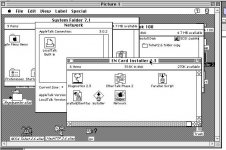
Any 2 cents???
According to the Farallon site in the Internet Archive, you do need a different driver than the driver for the Farallon Cards. This is the driver you need:
http://web.archive.org/web/20000516202245/http://www.farallon.com/support/software/download/pbadapinstalld.html
http://web.archive.org/web/20000516202245/http://www.farallon.com/support/software/download/pbadapinstalld.html
OK! This gives hope!
anyone who has this file?
FENI222.sit.hqx
anyone who has this file?
FENI222.sit.hqx
I have scoured the internets for you using Google and come up with nothing. Unless you can find someone here, LEM, or AppleFritter that has the driver, you are out to luck.
If you do happen to find it, please share it here so it can be preserved for anyone else that needs it in the future.
It's too bad they used FTP with Robots, if they had it inline with the webpage, being less than 1 MB, the Internet Archive would have just sucked it right up into the archive for indefinite preservation.
If you do happen to find it, please share it here so it can be preserved for anyone else that needs it in the future.
It's too bad they used FTP with Robots, if they had it inline with the webpage, being less than 1 MB, the Internet Archive would have just sucked it right up into the archive for indefinite preservation.
I did also some research and couldn't find the drivers too. Too bad!
I did some research in things which are available and found out that my installer EN Card Installer 2.3 is probably the right driver.
If you look at the proxim suppport (successors Farallon) site you can download a file called 59xv23.sit.hqx
http://proximtechnicalservice.com/support/farallon/cards/download/59xv23.sit.hqx
If you download it it is named FENI2.3.sit...so almost the same as FENI222.sit.hqx.
I have the feeling that it should work......
Also the installation goes without problems. Normally the installation disk will complain it the hardware is not on board...
So...please..please..please. If there are owners with a working EtherWave and with a driver disk....please help me to solve this mistery!
I would also love to try the file FENI222.sit.hqx. Maybe someone has downloaded it in the past?
I did some research in things which are available and found out that my installer EN Card Installer 2.3 is probably the right driver.
If you look at the proxim suppport (successors Farallon) site you can download a file called 59xv23.sit.hqx
http://proximtechnicalservice.com/support/farallon/cards/download/59xv23.sit.hqx
If you download it it is named FENI2.3.sit...so almost the same as FENI222.sit.hqx.
I have the feeling that it should work......
Also the installation goes without problems. Normally the installation disk will complain it the hardware is not on board...
So...please..please..please. If there are owners with a working EtherWave and with a driver disk....please help me to solve this mistery!
I would also love to try the file FENI222.sit.hqx. Maybe someone has downloaded it in the past?
had a look through my sources, would a file named "Farallon EtherWave 2.2.2.image.sit" be of use to anyone 
seems to fit what you guys are looking for
http://files.max1zzz.co.uk/drivers/Farallon%20EtherWave%202.2.2.image.sit
mounts fine on osx (after converting)
seems to fit what you guys are looking for
http://files.max1zzz.co.uk/drivers/Farallon%20EtherWave%202.2.2.image.sit
mounts fine on osx (after converting)
WOWWWWW GREAT! I start testing right away!
Web server is ...going down....have to test!
Web server is ...going down....have to test!
I'm not lucky.....
I put it on a 1.4 M disk ...called the disk Farallon EN Installer 2.2.2.. But it is complaining that:
"This is not the correct "Farallon EN Installer 2.2.2" disk. What I'm I doing wrong? It also doesn't install from an external hard disk...
I put it on a 1.4 M disk ...called the disk Farallon EN Installer 2.2.2.. But it is complaining that:
"This is not the correct "Farallon EN Installer 2.2.2" disk. What I'm I doing wrong? It also doesn't install from an external hard disk...
sorry to hear that, there must be some kind of disk check then
i'll see if i can get any luck with the installer tommrow (however i don't actually have one of these etherwave adapters)
Maybe someone here might be able to patch the check out?
i'll see if i can get any luck with the installer tommrow (however i don't actually have one of these etherwave adapters)
Maybe someone here might be able to patch the check out?
You shouldn't need the setup utility, you just need to drop the PB Adapter extension in the extensions folder. That should do it (this is assuming you want to run it in Ethernet mode"
No go!
I added the PB Adapter extension in the Extension folder and rebooted. Still no extra choice in the Network control panel or MacTCP. I guess I really need to do the setup......
My latest guess is that I need to put the Installer maybe in the root of the floppy disk??
If someone else has a good idea..please let me know!
I added the PB Adapter extension in the Extension folder and rebooted. Still no extra choice in the Network control panel or MacTCP. I guess I really need to do the setup......
My latest guess is that I need to put the Installer maybe in the root of the floppy disk??
If someone else has a good idea..please let me know!
BIG SUCCESS!!!!!
IT WORKS!!!
On advice from one of our members I used Shrinkwrap to mount the disk. Then, with Extentions off, I installed the drivers with success.
Now the PB Adapter can have a own IP adres from the normal Ethernet range I use in my house. So no macIPgw....
My PowerBook will be online tonight on:
http://mac.vanegten.com
Comming week I will make some screen shots to show how it works.
IT WORKS!!!
On advice from one of our members I used Shrinkwrap to mount the disk. Then, with Extentions off, I installed the drivers with success.
Now the PB Adapter can have a own IP adres from the normal Ethernet range I use in my house. So no macIPgw....
My PowerBook will be online tonight on:
http://mac.vanegten.com
Comming week I will make some screen shots to show how it works.
Dynamite, congrats! :approve:
I'll have to go upload that file to Mac GUI so a copy will be around in the future.
Sorry that that image from my site never worked out, and now my site is also offline :/
I'm glad that you got this sorted out!
I'm glad that you got this sorted out!
Why is this? What happened??
I hope you get it back soon (assuming you didn't take it down intentionally, of course).
c
p.s. Did you ever sell your Plus?
Yes the plus was sold :'(
also the site is down on purpose because I couldn't afford the renewals and the hosting :'( :'(
It's all good. I have backups of everything and eventually it will go up on a free host.
also the site is down on purpose because I couldn't afford the renewals and the hosting :'( :'(
It's all good. I have backups of everything and eventually it will go up on a free host.
Is it a personal, non-profit site? If so, send me a PM.
Tested it today on 7.1 and 7.5. Both install without any problems. I used Shrinkwrap on 7.5 and Diskcopy 6.3.3 on 7.1
Setup MacTCp as Ethernet Build-In and use an IP adress from the normal Ethernet range. I use as DNS my MacIPgw, which has a name server on board.
So in my setup the PowerBook has 192.168.62.209, the router / gateway 192.168.62.1 and my MacIPgw (nameserver) 192.168.62.10
So...yes a EtherWave adapter can work with MacTCP without any gateway. It behaves as an Ethernet card.
I'm glad that I could have tested this now!
Setup MacTCp as Ethernet Build-In and use an IP adress from the normal Ethernet range. I use as DNS my MacIPgw, which has a name server on board.
So in my setup the PowerBook has 192.168.62.209, the router / gateway 192.168.62.1 and my MacIPgw (nameserver) 192.168.62.10
So...yes a EtherWave adapter can work with MacTCP without any gateway. It behaves as an Ethernet card.
I'm glad that I could have tested this now!
To round it up.
I bought the EtherWave adapter in June 2013. I didn’t work. A red light was burning. When I opened it up I found out that one of the capacitors was getting much to warm. I replaced it and I had green lights all over!
When I connected it without any driver it worked like a normal hardware LocalBridge. You see the AppleTalk network, but cannot use it as an Alternative Ethernet card or switch to it in network or MacTCP control panel.
Thanks to all our community I got the drivers. Many thanks for that again. I will attach the image I used for this on this post.
The rest is simple. Just mount this disk and install the drivers on 7.1 or 7.5. Startup with Extentions Off (hold shift when booting).
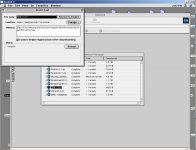
You see two images how the network control panel looks and the MacTCP control panel.
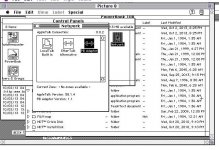
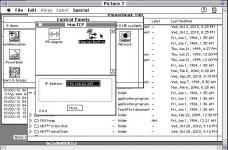
This is the image for the version 2.2.2.
FarallonEtherWave.zip
I bought the EtherWave adapter in June 2013. I didn’t work. A red light was burning. When I opened it up I found out that one of the capacitors was getting much to warm. I replaced it and I had green lights all over!
When I connected it without any driver it worked like a normal hardware LocalBridge. You see the AppleTalk network, but cannot use it as an Alternative Ethernet card or switch to it in network or MacTCP control panel.
Thanks to all our community I got the drivers. Many thanks for that again. I will attach the image I used for this on this post.
The rest is simple. Just mount this disk and install the drivers on 7.1 or 7.5. Startup with Extentions Off (hold shift when booting).
You see two images how the network control panel looks and the MacTCP control panel.
This is the image for the version 2.2.2.
FarallonEtherWave.zip
too bad these things dont show up anymore. and when they do, they go for high $$$ on ebay.
So that was the last stumbling block, running the installer with extensions turned off? With the extensions on it would give you that complaint about the disk not being an authentic disk?
I'm just glad that a copy of the installer is freely available again. That is going to be the major sticking point for anyone that wants to get one of these up and running.
I'm just glad that a copy of the installer is freely available again. That is going to be the major sticking point for anyone that wants to get one of these up and running.
No... the problem was that I copied the Installer files to a floppy. That didn't work.... Even with the correct floppy name.
I had to mount the disk image and install it from there.
And yes...then a successful installation is also only possible with extensions off.
The adapter is working fine now for several days. I noticed that the PowerBook and adapter work better under System 7.5 than under 7.1.
My web server responds even when screen is almost off and HD is off. It wakes up and serves a page.....
I had to mount the disk image and install it from there.
And yes...then a successful installation is also only possible with extensions off.
The adapter is working fine now for several days. I noticed that the PowerBook and adapter work better under System 7.5 than under 7.1.
My web server responds even when screen is almost off and HD is off. It wakes up and serves a page.....
I've noticed networking, in general, works better in 7.5. However, using OT 1.2.1 in 7.1.2P seems to work quite well, even if it uses 300-400k more RAM than MacTCP. However, having DHCP is indispensable.
If they could get Wi-Fi working on the PB500 series with a Rev-C PCMCIA card cage on 7.1.x, I'd be really interested, but it has not been possible, as far as I'm aware.
If they could get Wi-Fi working on the PB500 series with a Rev-C PCMCIA card cage on 7.1.x, I'd be really interested, but it has not been possible, as far as I'm aware.