
Thread
Almost had a working powerbook 150
I got a POS 150 off ebay for a few dollars as it didn't work, case cracked and busted. When It got here I plugged it in it booted but no screen. Swapped screen got flashing question mark. Traded hard drive from my non booting 150 and boom all good to go..... so I thought. Then I leave it plugged in, come back wont wake or boot, reset or anything else. I pull it apart and I see residue right below the old battery on the jedi board. I swap motherboards and it boots. So I am thinking great. I shut it down and come back and try and start back up nothing, swap the other board backlight blinks on then nothing. The 150 so far is my worst nemesis. Just nothing wants to play nice or be consistent. That jedi board really has nothing on it but that battery but whatever that battery does boy that motherboard pays the price for it. Oh well it was nice for a minute I guess. Wanted to say I had one but my give a crud factor is kinda taking a dive. Too many projects and not enough money flow or life gets in the way. Ill take a deep breath and find a battery for it and see if I can transfer it and maybe that will help.
yeah sometimes these vintage macs seem like more trouble then what they are worth 
your LC-II was mailed out like 2 days ago by the way. 12.48 OZ!!!!!!!!!!!!!!! just made first class i was stoked
your LC-II was mailed out like 2 days ago by the way. 12.48 OZ!!!!!!!!!!!!!!! just made first class i was stoked
Sweet, thx.
Many times if I let a recalcitrant PB stew for a while with AC adapter offline, it'll boot up fine when I flip the power strip switch on again. How many of the lil' buggers have you got in your 150 project stack?
< 20 minutes spent looking for a frappin' AC adapter later : >
. . . phew! Mine's still working, one day I'll get to the ADB, SD/internal 10bT hackage. Has anyone seen anything about the possibility of adapting an active matrix LCD from the 100 series for transplant into the 150? I've always wondered if that might work. Maybe the cable is the only thing that would need to be adapted?
That sounds distressingly familiar, you've got me hesitant to try to boot mine up now . . .
< 20 minutes spent looking for a frappin' AC adapter later :
>. . . phew! Mine's still working, one day I'll get to the ADB, SD/internal 10bT hackage. Has anyone seen anything about the possibility of adapting an active matrix LCD from the 100 series for transplant into the 150? I've always wondered if that might work. Maybe the cable is the only thing that would need to be adapted?
I have another one on the way. My first was DOA and an inspection of the logic board revealed a deep, black burnt spot. You may also want to be sure you are using the 17w "low power" adapter. I know that any adapter above 19w (like the 24w used with the 165c and 180c) will fry the board (which could be what happened to my first one).
My 150 (a gift from a friend's wife) works OK when it works, (once in awhile, for no rhyme or reason, it'll refuse to work and chirp at me, play death chimes, and go off. I got as far as determining that it was somehow caused by the RAM card, but I still don't know why.)
I also learned that the adapter for the RAM is kind of rare (?), which is fun.
It's a nice (if not somewhat limited) machine when it works!
This hobby seems to require lots of patience, because things sometimes never seem to work quite right unless you're constantly fiddling with it.
c
I also learned that the adapter for the RAM is kind of rare (?), which is fun.
It's a nice (if not somewhat limited) machine when it works!
This hobby seems to require lots of patience, because things sometimes never seem to work quite right unless you're constantly fiddling with it.
c
One I had only operated off the battery, I could hear it boot but it never displayed anything on the screen (backlight lit up).
sold the memory card, gave away the rest. Going to stick to the 180 and one day 180c. |)
sold the memory card, gave away the rest. Going to stick to the 180 and one day 180c. |)
Ya I have the original power adapter for it so hopefully that's not the issue. I did hit shut down and I am wondering if because the battery on the jedi board is bad if that's keeping it jacked up. So many if I think I am gonna call it a loss at the moment. Cant win them all.
Can anyone explain to me WHY this is the case? It's not WATTS that fries things, its AMPS driven by VOLTS. Are the Apple PSUs rated in watts because they do not have proper voltage regulation? That would seem to be incredibly poor design, if so.
It would cost very little to add overvoltage protection. Any DIY bench-top PSU will have it - eg ones that I use with interchangeable tips for the miscellany of PB/IB power sockets.
Rick
No idea but apple specifically mentions it here: http://support.apple.com/kb/TA32393?viewlocale=en_US
and the bad thing is, it defies all laws of electronics. How more wattage can damage the unit, whilst the logic board is only going to pull what it needs. Only explanation is piss poor design of either the brick, or the DC-DC circuits in the mainboard, by using the power supplies limit to regulate the consumption of the logic board.
The 150 I got today had bad liquid (mocha?) damage. Some icky looking components but after a light cleaning it's at least powering up the LCD backlight. I think I'm with macdrone - I'm going to end up owning a dozen 150s before I find one that actually works.
I can't believe this negligence in design problem never surfaced here before this. Did it come up over at 'fritter?
I pulled out the AC adapter I've been using. It came from an eBay seller who sold me a "working" PB100 without it. Now I know why it has "for the Quick Take" scrawled on the side in black magic marker. Hopefully, this one hasn't killed anything, I probably just need to find the adapter for my original PB100 and then likely re-caps for the Luggables and PB100s. 15V seems to run the 150 just fine, but I'm not using this adapter again until I hear from our electron pushers.
Model No: M5651 (APS-20U) = DC 7.5V x 2.0A = 15V
I pulled out the AC adapter I've been using. It came from an eBay seller who sold me a "working" PB100 without it. Now I know why it has "for the Quick Take" scrawled on the side in black magic marker. Hopefully, this one hasn't killed anything, I probably just need to find the adapter for my original PB100 and then likely re-caps for the Luggables and PB100s. 15V seems to run the 150 just fine, but I'm not using this adapter again until I hear from our electron pushers.
Model No: M5651 (APS-20U) = DC 7.5V x 2.0A = 15V
Isn't that 15W?
Oopsie! Still workin' on my coffee . . . xx(
Model No: M5651 (APS-20U) = DC 7.5V x 2.0A = 15W
How to convert amps to watts shuckled into the format intended:
V(V) x I(A) = P(W)
. . . still working on the coffee, but something doesn't quite add up:
Macintosh Portable Power Adapter = Model No: M5163 (SMP-10BB) = 7.5V x 1.5A = 11.5W :O
Is the 15W adapter for the Backlit Portable? :?: Mine's the original Luggable and the adapter's not even listed in the Apple table on mcd's link.
Model No: M5651 (APS-20U) = DC 7.5V x 2.0A = 15W
How to convert amps to watts shuckled into the format intended:
V(V) x I(A) = P(W)
. . . still working on the coffee, but something doesn't quite add up:
Macintosh Portable Power Adapter = Model No: M5163 (SMP-10BB) = 7.5V x 1.5A = 11.5W :O
Is the 15W adapter for the Backlit Portable? :?: Mine's the original Luggable and the adapter's not even listed in the Apple table on mcd's link.
I think it's time we develop a definitive guide to Apple's AC Adapters for all products . . .
. . . gotta find that dratted PB100 adapter now . . .
. . . I forgot all about the different Duo chargers for the three bat types. :I
p.s. waybackin' the dead Q&A Link on that page would probably be a good start.
p.p.s. Documenting the recalled AC adapters (bad tips) for the PowerBook 100 might be a good idea, if you find one without a black ring around the tip, DON'T use it!!!
. . . gotta find that dratted PB100 adapter now . . .
. . . I forgot all about the different Duo chargers for the three bat types. :I
p.s. waybackin' the dead Q&A Link on that page would probably be a good start.
p.p.s. Documenting the recalled AC adapters (bad tips) for the PowerBook 100 might be a good idea, if you find one without a black ring around the tip, DON'T use it!!!
Ok It is working again. The 150 is a strange bird. Don't replace the battery on the jedi board, don't remove the old one, don't leave it plugged in and omg don't pick shut down from the menu. It consistently boot both my motherboards each time so far. I am guessing its a power switch feature on the motherboard, even with removing the battery or putting a new one on the jedi board since it is remote to the motherboard seems to enhance the issue. like removing the cable and putting it back it trips the off switch and it sticks kind of thing. I know I maybe losing some people on this and I am over simplifying it but so far a full day of use that's what I am finding. I am going to try and just bridge the gap on my other jedi board and see if I can get the parts machine going, Its ugly and all broke but if it boots maybe I can help someone out with it.
15 watt adapter I have two working and one bad one that are all labeled powerbook ac adapter and low power powerbook ac adapter. Someone wrote on them 150 and 160 (one number on each). One says .35A input the other says .5A input. Both say 7.5V X 2.0A output. I hope that helps trash.
I'm not following - what did you have to do? Mine will not respond to the power button. If I press the reset button, the backlight comes on and it gives the chimes of death. Pressing the reset button again turns it off.
Power button? :?:
Apple Low-Power AC Adapter - Model No: ADP-17AB REV. A 7.5V x 2.0A = 15W
The first one's tip chipped and lit up the MoBo. All was replaced under an extended warranty arrangement.
So, I'm sitting here with three rope lumpen and not a single one spec'd at 17W for use with the PB150. :/
I think I've found my PB100's replacement AC Adapter:
Apple Low-Power AC Adapter - Model No: ADP-17AB REV. A 7.5V x 2.0A = 15W
The first one's tip chipped and lit up the MoBo. All was replaced under an extended warranty arrangement.
So, I'm sitting here with three rope lumpen and not a single one spec'd at 17W for use with the PB150. :/
All my 100 series books including the 150 turn on when plugged in, lid closed. Open and it will come on. Reset button always brings chimes, my suggestion is unplug Jedi board from motherboard, let it set a while overnight as to let any charge, static or otherwise disapate. Then plug in Top case and plug in power cord. If yours is t turning on use power button as the reset button just doesn't do what it does on the desktops. That's the luck I have had. When I am done using it I close all apps and then just unplug it. Again the shutdown option seems to lock it down hard.
Aha! THAT power button, looked more like a reset button to me. Never touch the stuff. I normally use an ADB KBD's Power Button, but . . . :
My 150 powers on when I flip the switch on the Power Strip, I'll have to try that "power switch" on the back of the 150 again . . .
. . . didn't seem to do anything when I tried it, so I've been ignoring it. :I
Found a great page for service manuals: http://www.tim.id.au/blog/tims-laptop-service-manuals/
My 150 powers on when I flip the switch on the Power Strip, I'll have to try that "power switch" on the back of the 150 again . . .
. . . didn't seem to do anything when I tried it, so I've been ignoring it. :I
Found a great page for service manuals: http://www.tim.id.au/blog/tims-laptop-service-manuals/
I just checked through the archived snatches I've made on the 'Bay and figured out that the M5651 (APS20U) was sent to me after the eBay'd "Working" PB150 arrived w/o an AC Adapter. It's the only one of the three that has an insert for the AC plug, so it's likely an international version.
I've condensed the 100 Series AC Adapter info in the Apple table into what I think is a clearer picture. If it's unclear or an error is spotted, please LMK. I think a special topic needs to be posted with all the relevant information for Apple products with this particular DC Jack on board.
That last warning appears to be at odds with the information about the PowerBook 100 being compatible with M4462, BTW. I'm thinking that the M4462 must have a proper power regulation implementation found lacking in earlier adapter designs.
What model power adapters are bundled with the PB150s the rest of you comrades have handy here in the barracks?
The replacement part for the PowerBook 150 AC Adapter is listed as 922-1117 in the Service Source, gotta check the rest . . .
edit: forgot the other wild card . . .
Macintosh Portable Power Adapter = Model No: M5163 (SMP-10BB) = 7.5V x 1.5A = 11.5W
. . . so I'm also wondering about the proposition:
IF [PB100 + M4462 = OK] THEN [Macintosh Portable(s) + M4462 = OK] :?:
I've condensed the 100 Series AC Adapter info in the Apple table into what I think is a clearer picture. If it's unclear or an error is spotted, please LMK. I think a special topic needs to be posted with all the relevant information for Apple products with this particular DC Jack on board.
Code:
table formatting:
____Model - rating - (shipped with) PowerBooks XXXXX - works with - XXXXX

|___M5240 - 15w - PowerBooks - 100, 140, 170
|
|___M5651 - 19W-PowerBooks - 145b, 160, 165, 180 - works with - 140, 145, 145b, 160, 165, 170, 180
|
|___M5652 - 24W - PowerBooks - 165c, 180c - works with - 140, 145, 145b, 160, 165, 165c, 170, 180, 180c
***** identified with 24 W on the AC adapter tip
|
V
Code:
|
\ ->Replacement for all three adapters above - M4662 - (?)V - (apparently) works with:
PowerBooks 100, 140, 145, 145b, 160, 165, 165c, 170, 180, 180c

WILD CARD - APS-17adp - 17W - PowerBook 150 - works with - 100, 150
***** Warning: Using an AC adapter that produces more than 19 W with a PowerBook 100 or 150
***** will damage the computer's logic board.What model power adapters are bundled with the PB150s the rest of you comrades have handy here in the barracks?
The replacement part for the PowerBook 150 AC Adapter is listed as 922-1117 in the Service Source, gotta check the rest . . .
edit: forgot the other wild card . . .
Macintosh Portable Power Adapter = Model No: M5163 (SMP-10BB) = 7.5V x 1.5A = 11.5W
. . . so I'm also wondering about the proposition:
IF [PB100 + M4462 = OK] THEN [Macintosh Portable(s) + M4462 = OK] :?:
What are the model numbers and the names on your three adapters? Pics of them would be great . . .
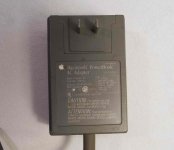
. . . found this one bundled with a 150 PartsBook on eBay. It's exactly the same, spec and all, as my M5651(APS-20U) I'll take some pics of my three later. I'd like to get a pic and 411 on every iteration of this adapter type into a stickied topic.
edit: found of one the same as mine as well . . .
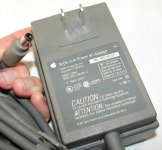
Nice shot of a Quicktake 150 w/AC Adapter. Can anyone sharpen & read it or supply the specs from your collection?
Those are exactly the two I still have. But that doesn't help as the one I took apart is gone. But they are just snapped together if there is no screw.
%*&@$@(#+ (inconvenient) page rollover! :
In that case, wouldn't it be great to know if either one of them is adequate/safe for use with the PowerBook 150!?!?! :lol:
They are both 15 watt and the one says low power so I would hope so.
Yeah, but the table says the 150 requires(?) a 17W adapter and it's conspicuously missing from the "works with list" of either one of the adapters we have . . .
. . . so . . . yeah . . . still want some feedback on this one from folks with matched 150/AC Adapter sets & the electron pushers. :-/
. . . so . . . yeah . . . still want some feedback on this one from folks with matched 150/AC Adapter sets & the electron pushers. :-/
Well that is weird, I guess I was missing that. How would you get 17 W? That would be 8.5 X 2.0A correct? That actually seems like an odd voltage.
Ok its confusing but Ill try and explain what I see. All the powerbooks seem to list wattage from 15 to 19 watts. Only issue is every single powerbook AC adapter listed all say 7.5 volts X 2.0A. For every model of 1XX powerbook of the square design. Even the one listed for 17 watt and 19 watt say 7.5V X 2.0A. As for safe under powering will usually not let a computer power on, so I guess that could be an issue but shouldn't hurt anything. Weird this had not been noticed or mentioned till now.
How to convert Amps to Watts
I(A) = P(W) / V(V)
I(A) = 17(W) / 7.5(V)
2.2666(A) for PowerBook 150 AC Adapter
2.533A = 19W @ 7.5V for the higher Wattage 100 Series PowerBooks
ISTR someone mentioning that the specs of some of Apple's AC adapters don't jibe with Ohm's Law . . . dunno, need input. mcd, you must have them all, what are the Amperage specs on the other model numbers?
I(A) = P(W) / V(V)
I(A) = 17(W) / 7.5(V)
2.2666(A) for PowerBook 150 AC Adapter
2.533A = 19W @ 7.5V for the higher Wattage 100 Series PowerBooks
I didn't see that anywhere in the table. I haven't got the 19W or 24W adapters to check the specs, do you have them?
ISTR someone mentioning that the specs of some of Apple's AC adapters don't jibe with Ohm's Law . . . dunno, need input. mcd, you must have them all, what are the Amperage specs on the other model numbers?
The Quicktake 100/150 uses the same M4662 AC Adapter as the Powerbook 165c/180c, I have one here with the box. Its a 24watt power supply 7.5v rated at 3A.
http://www.ebay.com/itm/281102652682
I also have the "Low Power" APS-17adp which is 7.5v rated at 2A. It works fine with my Powerbook 165. I highly doubt its different from the M5651, just a newer revision that came out after the 24w/3A M5652/M4662 adapters hit the scene. The "Low Power" terminology was likely needed after the higher amperage adapter was released to allow customers to identify it from the higher power adapters even though the 3A version had "24w" molded onto the DC jack.
http://www.ebay.com/itm/281102652682
I also have the "Low Power" APS-17adp which is 7.5v rated at 2A. It works fine with my Powerbook 165. I highly doubt its different from the M5651, just a newer revision that came out after the 24w/3A M5652/M4662 adapters hit the scene. The "Low Power" terminology was likely needed after the higher amperage adapter was released to allow customers to identify it from the higher power adapters even though the 3A version had "24w" molded onto the DC jack.
I wouldn't assume anything about these adapters. My guess is that the M5652 adapter lacks the overcurrent protection circuitry of the M4662 which makes that "universal" replacement usable across the entire 100 series, with the notable exception of the PB150 according to the linked chart.
I'm also wondering if the M4662 is safe to use with the Macintosh Portable. It's not listed as compatible, but the table is for PowerBooks, which excludes the luggable.
I'm also wondering if the M4662 is safe to use with the Macintosh Portable. It's not listed as compatible, but the table is for PowerBooks, which excludes the luggable.
I'm gathering from all the work that uniserver has done nothing but the original adapter should be used with the portable as the power management IC's were not made to power on from the power port. I did it until I called my battery in my portable non backlit but I won't chance it as he has a stack of bad boards with power management issues.
Weird that the 7.5 x 3.0A is for the 180. I have the 180 but not that cord, I use th low power ones I have. So am I hurting the power supply using it?
Weird that the 7.5 x 3.0A is for the 180. I have the 180 but not that cord, I use th low power ones I have. So am I hurting the power supply using it?
My guess is that the Portable, the 100 and 150 all share the same kind of issues with unregulated power supplies. It almost makes sense for the 100, but it doesn't make a whole lot of sense in the case of the 150 though, since it was the last of the 1XX series.
I found what looks like an inaccuracy in tht Apple Page. They have battery Model. No. M4654 (the one that came in my 150) listed as 2.9Ah in the footnote, but as 2.5Ah in both places it appears in the table.
Still waiting for some more info to appear. Meanwhile, I need to check the UM to see if running the 100 without a battery is verboten . . . Luggable UM as well.
I found what looks like an inaccuracy in tht Apple Page. They have battery Model. No. M4654 (the one that came in my 150) listed as 2.9Ah in the footnote, but as 2.5Ah in both places it appears in the table.
Still waiting for some more info to appear. Meanwhile, I need to check the UM to see if running the 100 without a battery is verboten . . . Luggable UM as well.
If you have a 180 and not the 180c, you should be fine with that adapter. The 180c and 165c will not boot with a 2A adapter and a flat battery as the TFT color screen pulls a lot more juice than the gray scale one.
I'm sure the luggable running on anything but battery is bad for the motherboard but as for the 100 I would guess without a floppy it would be fine in comparison as one they made them laptops they were sure to be plugged in and used as they even made non battery weights to fit in the battery slot. The portable was made to be a portable Mac not a portable laptop. It never caught on but that's what they said they were going for.
Nope, they made weight saving accessory compartments as replacements for the 190/5300's FDD and later the Pismo's FDD/Optical bay. Those are the ones with which I'm familiar anyway, I'll bet there are more, ISTR something about one for the 1400. One for each PB type after the 1xx series maybe? I've never heard of replacing the battery with one, unless you count the Pismo's second battery.
The PowerBook 100 is supposed to be the Luggable as slimmed down for Apple by Sony, no substantial changes were made to the overall spec from what I gather. That's why I want to check what those two User Manuals have to say about running off AC Adapter without a battery in circuit.
The PowerBook 100 is supposed to be the Luggable as slimmed down for Apple by Sony, no substantial changes were made to the overall spec from what I gather. That's why I want to check what those two User Manuals have to say about running off AC Adapter without a battery in circuit.
You can check but the luggable board is huge in comparison, and the battery is 6 volts and pushes a full size HDD and full size floppy drive, with full size keyboard and trackball, in comparison the 1XX series is a 7 volt battery and it didn't last as long as the "portable battery operated Macintosh computer". So with all things voltage not being equal between the portable and 100 I wouldn't think power management is either.