
Thread
Quadra 950 ... Mostly Dead
Not all dead. MOSTLY dead. Looking for a clue here ...
I picked up a Quadra 950 last week and it game me half the chimes of death on the first boot. I removed four of the memory modules and it started booting normally so I figured it was good.
I took it apart today to give it a thorough cleaning as it was really filthy inside (giant dust bunnies). I put everything back together and now I get the second half of the chimes of death after the RAM check.I removed everything from the logic board except four 1 MB sticks of RAM and the power supply (no RAM, no VRAM SIMMs, no SCSI or floppy cables, no cards, no PRAM battery). All I get is a normal "bong" followed by the RAM check followed by the second half of the death chimes.
Any ideas? Is it checking VRAM next? SCSI chain?
I picked up a Quadra 950 last week and it game me half the chimes of death on the first boot. I removed four of the memory modules and it started booting normally so I figured it was good.
I took it apart today to give it a thorough cleaning as it was really filthy inside (giant dust bunnies). I put everything back together and now I get the second half of the chimes of death after the RAM check.I removed everything from the logic board except four 1 MB sticks of RAM and the power supply (no RAM, no VRAM SIMMs, no SCSI or floppy cables, no cards, no PRAM battery). All I get is a normal "bong" followed by the RAM check followed by the second half of the death chimes.
Any ideas? Is it checking VRAM next? SCSI chain?
Can a 950 boot with just four MB?
It does it with any brand or amount of RAM. It seems like it's passing the RAM tests. It shows a plain, grey screen without any sad/happy Mac and without a notched upper left corner. Without any RAM installed, I get the expected "bong" plus a full "death chime" and a black screen.
There are no electrolytic caps on the logic board so I don't think there is an issue there.
There are no electrolytic caps on the logic board so I don't think there is an issue there.
all right, breast-feeding! lol
oh... at 8 years old lol... haha.
http://www.youtube.com/watch?v=fxv6R9fUO74&list=FL2olURenU-oW2m04cnayXoQ
oh... at 8 years old lol... haha.
http://www.youtube.com/watch?v=fxv6R9fUO74&list=FL2olURenU-oW2m04cnayXoQ
at any point do you ever get video?
have your tried to boot it with a video card?
Rom? i wonder if there is a issue with rom?
http://support.apple.com/kb/TA34817?viewlocale=en_US&locale=en_US
i suppose it does have a rom slot.
have your tried to boot it with a video card?
Rom? i wonder if there is a issue with rom?
http://support.apple.com/kb/TA34817?viewlocale=en_US&locale=en_US
i suppose it does have a rom slot.
Yes, as I said, it goes to grey screen then the half-chime of death. No mouse pointer. No rounded let corner.
No, I have not tried a video card.
The ROMs are soldered.
After removing two pairs of RAM, it did boot the three or four times I tried it last week. The half-chime happened on the first boot attempt after bringing it home and now at every attempt after cleaning.
No, I have not tried a video card.
The ROMs are soldered.
After removing two pairs of RAM, it did boot the three or four times I tried it last week. The half-chime happened on the first boot attempt after bringing it home and now at every attempt after cleaning.
have you tried the hair dryer trick?
Sorry buddy but i think you got taken by that little old lady at the garage sale
also did you check the rails to see if they are outputting proper voltages?
3.3 / 5 /12 ?
might be hunks o crud in the psu?
Sorry buddy but i think you got taken by that little old lady at the garage sale
also did you check the rails to see if they are outputting proper voltages?
3.3 / 5 /12 ?
might be hunks o crud in the psu?
check the SCSI chain termination, etc...
If i remember those units required internal termination and ive seen that play havok.
Try flexing the PCB, all it takes is a hairline crack in one of the Vias.
If i remember those units required internal termination and ive seen that play havok.
Try flexing the PCB, all it takes is a hairline crack in one of the Vias.
I tried without the SCSI ribbon connected at all and also with the ribbon plugged in with only the stock terminator attached so I'm not sure it could be a SCSI termination issue. Also, if it was a termination issue, I would assume that the boot would hang instead of giving death chimes. But I'll look again.
The video comes to grey screen, so I would think the video subsystem is okay.
What if the SCSI chip was bad? NuBus?
It may come down to getting out the loupe and making my eyeballs hurt.
The video comes to grey screen, so I would think the video subsystem is okay.
What if the SCSI chip was bad? NuBus?
It may come down to getting out the loupe and making my eyeballs hurt.
acutely its doing the similar thing right now as that Macintosh SE board i sent you was doing.
humm i never thought to check the scsi chip.......
humm i never thought to check the scsi chip.......
Whatever it is, it went from sketchy to bad when I pulled the logic board from the machine.
Update:
With the onboard video, I get a bong, then grey screen, then a flash of SCSI activity and immediately the half-chimes-of-death
With a Radius NuBus card installed, I get a bong, then grey screen with the Radius splash, then a flash of SCSI activity and immediately the half-chimes-of-death
Never a happy or a sad Mac. Never any floppy activity. Never any keyboard response.
So, can I assume that this means that RAM, video and NuBus are all working correctly? Is it down to SCSI since it dies just as it accesses the disk? I've tried a couple of different disks and they all behave the same. The failure happens regardless of whether there is anything connected to the SCSI bus or not.
With the onboard video, I get a bong, then grey screen, then a flash of SCSI activity and immediately the half-chimes-of-death
With a Radius NuBus card installed, I get a bong, then grey screen with the Radius splash, then a flash of SCSI activity and immediately the half-chimes-of-death
Never a happy or a sad Mac. Never any floppy activity. Never any keyboard response.
So, can I assume that this means that RAM, video and NuBus are all working correctly? Is it down to SCSI since it dies just as it accesses the disk? I've tried a couple of different disks and they all behave the same. The failure happens regardless of whether there is anything connected to the SCSI bus or not.
Gray screen off the video port is a very good sign, but doesn't really mean the video is working properly. The Radius splash screen is right off the card's ROM and the card probably only needs power to plaster it on a working CRT, so NuBus power check is good, but it doesn't really mean more than that AFAIK.
Battery's good?
Is there SCSI voodoo goin' on with the empty, second SCSI Bus? Can you boot from that one with an internal terminator on the first one?
Battery's good?
Is there SCSI voodoo goin' on with the empty, second SCSI Bus? Can you boot from that one with an internal terminator on the first one?
I second checking termination on the scsi bus. Between the hard disk, cble and if you have a terminator you can put on the scsi port that wouldn't hurt either. My 140 powerbook would give me no sad or happy mac or even a chime with a spinning but dead hard disk. As soon as I pulled the hard drive bam happy mac. I have some working nubus video cards if you need one. My Rasters would pop up a splash and give a weird green hue screen after and then die so just beware of them.
Good Luck
Good Luck
Well, all of those bases were already covered -
NuBus video works so we know the NuBus is alright
I have tried with a good 3.6V battery and without a battery
I tried the primary internal SCSI with:
- a single hard drive and stock terminator on the last position
- a single hard drive and no terminator
- no ribbon, no hard drive, no terminator
- ribbon and terminator but no hard drive.
I also tried with a drive on the secondary internal SCSI and all of the above with an external CD with a terminator. I think the SCSI is okay because all three ping the SCSI devices before the chimes of doom.
The floppy never makes a move. There is a voltage regulator at U89 that's getting hot to the touch. When I remove it, the internal video stops working.
NuBus video works so we know the NuBus is alright
I have tried with a good 3.6V battery and without a battery
I tried the primary internal SCSI with:
- a single hard drive and stock terminator on the last position
- a single hard drive and no terminator
- no ribbon, no hard drive, no terminator
- ribbon and terminator but no hard drive.
I also tried with a drive on the secondary internal SCSI and all of the above with an external CD with a terminator. I think the SCSI is okay because all three ping the SCSI devices before the chimes of doom.
The floppy never makes a move. There is a voltage regulator at U89 that's getting hot to the touch. When I remove it, the internal video stops working.
So your 950 now does what both of mine do but instead of resetting or dropping the video with the brief disk activity yours completely crashes and burns.
Have you fed it a bootable floppy yet with no SCSI devices attached? In my case that would cause a flawless boot.
Have you fed it a bootable floppy yet with no SCSI devices attached? In my case that would cause a flawless boot.
I have an untested 950 motherboard if you want it. As I did not have a case and the power connection is almost proprietary it wasn't worth steal bay prices. Its yours if you want it. No processor on it as of course it had an FPU and I had something it would fit into. The guy mentioned the board worked when pulled it weird he removed it from the case. Kind of been a desk ornament for the past year, kinda dusty but all yours if you need it.
He said nothing at all from the floppy.
Just in case you skipped over that part.
Just in case you skipped over that part.
After the RAM tests come a series of other tests: SCC, VIAs, VRAM, Egret, PRAM, SCSI, and SONIC ethernet tests. Unfortunately it could be failing in any of these and there's not really a good way to differentiate.
On kind of a long shot, do you see anything on the Modem port if you connect at 9600 8n2?
There is a good chance the ROM knows what is failing, and can tell you over the Modem port, IF you can kick it into the right mode. There is a chance it's doing that automatically in this case. If not, the only way I know to force it into diagnostic mode is to ground the PA0 pin of VIA1. Unfortunately I don't have a 950 or even a high res picture of a logic board to help with that.
On kind of a long shot, do you see anything on the Modem port if you connect at 9600 8n2?
There is a good chance the ROM knows what is failing, and can tell you over the Modem port, IF you can kick it into the right mode. There is a chance it's doing that automatically in this case. If not, the only way I know to force it into diagnostic mode is to ground the PA0 pin of VIA1. Unfortunately I don't have a 950 or even a high res picture of a logic board to help with that.
Very nice to know, bbraun. I'll have a look when I am back at it tomorrow. Just to be clear, I'd be putting a null modem cable between the 950 and my machine running terminal emulation. Set the connection to 9600 with 8 bits, no parity and TWO stop bits? I should see some sort of diagnostics sent over the serial cable?
Macdrone: thanks! I'll shoot you a PM
EDIT: Perfect - thanks for the tip, bbraun. I found your page outlining the diagnostic mode:
http://mac68k.info/wiki/display/mac68k/Diagnostic+Mode
Macdrone: thanks! I'll shoot you a PM
EDIT: Perfect - thanks for the tip, bbraun. I found your page outlining the diagnostic mode:
http://mac68k.info/wiki/display/mac68k/Diagnostic+Mode
Great, glad you found it. I'm pretty sure it's a null modem connection, and it's using 2 stop bits. A client set to 1 stop bit might still show most of it though.
wow, the more i learn about these apple machines, the more i appreciate them.
i think that is a very nifty feature.
i think that is a very nifty feature.
Dylan can you please post screen shots i really want to see what the output says.
Sure. I'll try and get some time to have it setup tomorrow.
last ditch effort: hook a drive up that has its own termination power, and enable it along with its termination.
Well, Diag mode is interesting but without some sort of doc on the specifics, I'm not quite sure what to do with it. Here's what I did. Lines I typed are [in brackets]:
Version info:
Size Memory:
Data Bus Test:
Mod3 RAM Test:
Address Line Test:
ROM checksum:
RevMod3 RAM Test:
Extra RAM Test:
ModInv RAM Test:
Size video RAM:
Code:
*APPLE*876543210000*
*APPLE*876543210000*
*APPLE*876543210000*
*APPLE*876543210000*
[*S]
*S
Code:
[*V]
STM Version 2.1, Scott Smyers
CTE Version 1.5.1
ROM Version 7C 17F2
*V
Code:
[*A]
*A
[*T000000010000]
*ERROR**T
[*R]
00FFFFD40000*R
Code:
[*A]
*A
[*T000100010000]
*ERROR**T
[*R]
6E0708970000*R
Code:
[*A]
*A
[*T000200010000]
*ERROR**T
[*R]
FFF7BFFF0000*R
Code:
[*A]
*A
[*T000300010000]
*APPLE*00007FF40A00*
*APPLE*00007FF40A00*
*APPLE*00007FF40A00*
*APPLE*00007FF40A00*
[*S]
*S
Code:
[*A]
*A
[*T000400010000]
*T
[*R]
000000000000*R
Code:
[*A]
*A
[*T000500010000]
*ERROR**T
[*R]
FFFFFFFB0000*R
Code:
[*A]
*A
[*T000600010000]
*ERROR**T
[*R]
080700160000*R
Code:
[*A]
*A
[*T000700010000]
*APPLE*000025C40100*
*APPLE*000025C40100*
*APPLE*000025C40100*
*APPLE*000025C40100*
[*S]
*S
Code:
[*A]
*A
[*T000800010000]
*ERROR**T
[*R]
FFFFFFFF0000*RNice! Was the machine already in diagnostic mode, or did you have to do something to get it there?
Can you try to do the following:
*N008400010000
Then *R to get the return code.
This will run "non-critical" test 0x84 one time. I believe there are tests 0x84 through 0xA0 here, but some might be missing for specific machines. So if the above command seems to work, try running the other ones and seeing what happens.
Can you try to do the following:
*N008400010000
Then *R to get the return code.
This will run "non-critical" test 0x84 one time. I believe there are tests 0x84 through 0xA0 here, but some might be missing for specific machines. So if the above command seems to work, try running the other ones and seeing what happens.
I had to ground pin 2 of U44 (pin2 has a trace that runs to an edge connector J1 that conveniently has a ground point also).
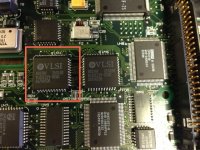
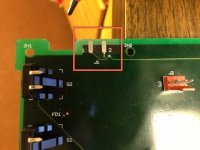
I attached my MacBook to the Quadra 950's modem port with a Keyspan serial to USB adapter and used screen to access it via terminal
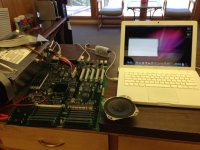
I attached my MacBook to the Quadra 950's modem port with a Keyspan serial to USB adapter and used screen to access it via terminal
Code:
screen /dev/ttyUSB28x1d1P1.1 9800 8N2A lot of FFFFFFFF0000's and a few that came up with a "?" as a response
Code:
0x84 = 000000000000*R
0x85 = 000000000000*R
0x86 = 000000000000*R
0x87 = 000000000000*R
0x88 = *ERROR*  FFFFFFFF0000*R
0x89 = 000000000000*R
0x8A = *ERROR*  FFFFFFFF0000*R
0x8B = *ERROR*  FFFFFFFF0000*R
0x8C = *ERROR*  FFFFFFFF0000*R
0x8D = *ERROR*  FFFFFFFF0000*R
0x8E = *ERROR*  FFFFFFFF0000*R
0x8F = *ERROR*  FFFFFFFF0000*R
0x90 = *ERROR*  FFFFFFFF0000*R
0x91 = *ERROR*  FFFFFFFF0000*R
0x92 = *ERROR*  FFFFFFFF0000*R
0x93 = *ERROR*  FFFFFFFF0000*R
0x94 = 000000000000*R
0x95 = *ERROR*  00B080000000*R
0x96 = *ERROR* FFFFFFFF0000*R
0x97 = 000000000000*R
0x98 = *ERROR* FFFFFFFF0000*R
0x99 = *ERROR* FFFFFFFF0000*R
0x9A = *ERROR* 020004030000*R
0x9B = ?
0x9C = ?
0x9D = *ERROR* FFFFFFFF0000*R
0x9E = ?
0x9F = ?
0xA0 = ?Nice! I'm going through the code, there's no real documentation on this AFAIK, so it's a bit time consuming to decode.
Here's my analysis of the tests as I understand them so far:
0x84-0x86 are SCC tests.
0x87 is a VIA test
0x88 is a general SCSI test
0x89 is Sound
0x8A is PRAM
0x8B is RBV
0x8C is SWIM
0x8D is FPU
0x8E is PGC (parity generator)
0x8F-0x90 is FMC (fast memory controller)
0x91-92 is OSS
0x94 is Egret (aka adb and other stuff)
0x95 more sound
0x96 CLUT
0x97 VRAM
0x9A 53C96 SCSI chip
0x9B-0D is SONIC
The first 4 bytes, or 8 hex digits, represents the status code of the test, and the second 2 bytes or 4 hex digits represents the number of test loops remaining (if multiple loops are specified, the test may exit early if an error is encountered).
0xFFFFFFFF or -1 seems to indicate the test was skipped for some reason. For instance the RBV test gets skipped because the machine doesn't have RBV. The SCSI test may have been skipped because it has the newer SCSI chip covered in a different test. I'm not sure why the individual tests would be skipped at the moment.
So that leaves 0x95 and 0x9A as tests that ran and failed.
0x95 is a sound test. the 0xB there indicates it detected the chip correctly. The 0x8 indicates a problem with recording audio. Perhaps it wants a looped cable between audio out and in to perform the test. I'm not really sure. But I'm not entirely concerned about this one.
0x9A is the 53C96 SCSI chip, and sounds related to your problems. It looks like the SCSI test needs a terminator installed to work correctly. Could you try rerunning that one with a terminator installed on each of the 2 SCSI busses? If not, just testing and moving the terminator between the two, to see if the code changes might work.
Here's my analysis of the tests as I understand them so far:
0x84-0x86 are SCC tests.
0x87 is a VIA test
0x88 is a general SCSI test
0x89 is Sound
0x8A is PRAM
0x8B is RBV
0x8C is SWIM
0x8D is FPU
0x8E is PGC (parity generator)
0x8F-0x90 is FMC (fast memory controller)
0x91-92 is OSS
0x94 is Egret (aka adb and other stuff)
0x95 more sound
0x96 CLUT
0x97 VRAM
0x9A 53C96 SCSI chip
0x9B-0D is SONIC
The first 4 bytes, or 8 hex digits, represents the status code of the test, and the second 2 bytes or 4 hex digits represents the number of test loops remaining (if multiple loops are specified, the test may exit early if an error is encountered).
0xFFFFFFFF or -1 seems to indicate the test was skipped for some reason. For instance the RBV test gets skipped because the machine doesn't have RBV. The SCSI test may have been skipped because it has the newer SCSI chip covered in a different test. I'm not sure why the individual tests would be skipped at the moment.
So that leaves 0x95 and 0x9A as tests that ran and failed.
0x95 is a sound test. the 0xB there indicates it detected the chip correctly. The 0x8 indicates a problem with recording audio. Perhaps it wants a looped cable between audio out and in to perform the test. I'm not really sure. But I'm not entirely concerned about this one.
0x9A is the 53C96 SCSI chip, and sounds related to your problems. It looks like the SCSI test needs a terminator installed to work correctly. Could you try rerunning that one with a terminator installed on each of the 2 SCSI busses? If not, just testing and moving the terminator between the two, to see if the code changes might work.
/so you jumnper J - 1 + 2 together and that enables diagnostic output over serial?
With:
Yep. Jump J1's 1 + 2 and it enables output over serial.
how nice of apple to make it so convenient.
As best I can tell, the leading 0x02 indicates this was a problem with the high byte of the 53C96's transfer count register.
From the 53C96 datasheet, the transfer count register is for DMA operations where you specify the number of bytes in a DMA transfer. The test loops, starting at 0 and incrementing by 5 until it reaches the maximum value, 0xFFFF. It puts the incrementing value into the config register, issues a DMA NOP command which should load the count into the register for reading. It then reads back the value and compares it.
The 0x02 says the problem was with the high byte, and the bottom word contains the actual and expected values. So 020002010000 indicates the expected value was 2, and the actual read value was 1. Since the high byte is the one with the problem, and it wasn't expecting 0, that implies to me that it made it through the first 255 count without error, and only had problems when it started onto the high byte.
I don't believe this would have been affected by the terminator situation, so it's possible it's just giving random values and that's the problem. Could you try running the test a couple times in a row with the same terminator configuration (doesn't matter what it is so long as it remains the same for the tests)?
This also indicates the problem is encountered on the first of the two SCSI busses. The same failure on the 2nd SCSI bus should have produced the error 0x8200... Since the test terminates on error, it never tested the 2nd SCSI bus, so we don't really have any information one way or another on that one.
Conclusions are a bit hard to draw. The data sheet documents the conditions under which the transfer count gets decremented, and notes there could be spurious signals. But since it is apparently making it through the first byte of the counter without problems, that seems less likely to me. If it's not external signaling causing the counter to decrement, that probably means the chip is bad I think.
From the 53C96 datasheet, the transfer count register is for DMA operations where you specify the number of bytes in a DMA transfer. The test loops, starting at 0 and incrementing by 5 until it reaches the maximum value, 0xFFFF. It puts the incrementing value into the config register, issues a DMA NOP command which should load the count into the register for reading. It then reads back the value and compares it.
The 0x02 says the problem was with the high byte, and the bottom word contains the actual and expected values. So 020002010000 indicates the expected value was 2, and the actual read value was 1. Since the high byte is the one with the problem, and it wasn't expecting 0, that implies to me that it made it through the first 255 count without error, and only had problems when it started onto the high byte.
I don't believe this would have been affected by the terminator situation, so it's possible it's just giving random values and that's the problem. Could you try running the test a couple times in a row with the same terminator configuration (doesn't matter what it is so long as it remains the same for the tests)?
This also indicates the problem is encountered on the first of the two SCSI busses. The same failure on the 2nd SCSI bus should have produced the error 0x8200... Since the test terminates on error, it never tested the 2nd SCSI bus, so we don't really have any information one way or another on that one.
Conclusions are a bit hard to draw. The data sheet documents the conditions under which the transfer count gets decremented, and notes there could be spurious signals. But since it is apparently making it through the first byte of the counter without problems, that seems less likely to me. If it's not external signaling causing the counter to decrement, that probably means the chip is bad I think.
Yes the same test over and over gives different results:
I guess I should be checking all the connections to that chip before I go floating one off an old Centris board.
Code:
*ERROR**N
020003020000*R
*ERROR**N
020003020000*R
*ERROR**N
020003020000*R
*ERROR**N
020004030000*R
*ERROR**N
020001000000*R
*ERROR**N
020001000000*R
*ERROR**N
020001000000*R
*ERROR**N
020002010000*R
*ERROR**N
020001000000*R
*ERROR**N
020004030000*RYeah, with it varying on the MSB like that, I can't really think of anything else but the actual scsi controller for bus1. :/
screw the diagnostics, just fly by the seat of your pants and float a new one on that bad boy! :-D
either the IC is bad, or there is noise on the bus. And that can be EITHER side of the bus, internal system bus, or external bus.
but it sounds like the chip itself is bad, or the decoupling capacitor on that IC is bad.
but it sounds like the chip itself is bad, or the decoupling capacitor on that IC is bad.
The IC is fine - I swapped it with the same results. All of the capacitors are tantalum or ceramic (no electrolytics) and none look burnt.
It's times like this I wish I had schematics.
It's times like this I wish I had schematics.
it doesnt matter if it looks burnt or not. it can still be open ;-)
You have a bus problem. either one of the ASICs is bad, or the decoupling/termination on the bus interconnect is bad.
Look at the datasheet of the IC, from there you can find out what the address/data lines are. and see if they tie together between the two SCSI ICs (they should), and see if they tie to any other IC. the chip selection should be done by the chip enable which i wouldn't worry about that.
if your having failure from one IC, and not the other. measure the address/data connection between both, they should be in parallel and the chip/output enable selection lines should be the only thing that differentiate the two on the main bus.
You have a bus problem. either one of the ASICs is bad, or the decoupling/termination on the bus interconnect is bad.
Look at the datasheet of the IC, from there you can find out what the address/data lines are. and see if they tie together between the two SCSI ICs (they should), and see if they tie to any other IC. the chip selection should be done by the chip enable which i wouldn't worry about that.
if your having failure from one IC, and not the other. measure the address/data connection between both, they should be in parallel and the chip/output enable selection lines should be the only thing that differentiate the two on the main bus.
Does anyone know how to achieve this "diagnostic test" on a Quadra 840?
Also, is it possible to connect it to another old Mac with serial ports, like, say, a Beige G3 running OS X 10.1 (for Terminal), and do the tests without an adapter?
It looks quite interesting, and I hope it allows you to get the board working!
c
Also, is it possible to connect it to another old Mac with serial ports, like, say, a Beige G3 running OS X 10.1 (for Terminal), and do the tests without an adapter?
It looks quite interesting, and I hope it allows you to get the board working!
c
You could use zterm or any other terminal emulator you can read from the serial port on. I used Terminal because it was already there on my 10.6 MacBook. just remember to set it to 9600 baud, 8 bits, no party and 2 stop bits.
As bbraun said, check which is the PA0 pin of your VIA1 chip (mine was pin 2). Use a continuity tester to see if it goes to an edge connection on the logic board that you can send to ground. If not, you may try grounding it from the chip itself.
As bbraun said, check which is the PA0 pin of your VIA1 chip (mine was pin 2). Use a continuity tester to see if it goes to an edge connection on the logic board that you can send to ground. If not, you may try grounding it from the chip itself.
OK, so I can probably figure out where VIA1 is, but how do I determine its PA0 pin?
c
c
Look up the datasheet online.
I don't get continuity on the address or data lines between the chips themselves, only the Vss lines.
that woudl tell me that either they are buffered independantly (using 74 series logic, or an ASIC), or they are on completely separate databusses (i doubt it)
I'm traveling for a couple days, so I apologize for the infrequency of my posts.
The test is loading the loop count, then issuing a DMA NOP command to load the count and read it back. Since the DMA is a NOP, there should have been no bytes DMA'd, so the count should be the same. The DACK/ and/or ACKO/ lines of the 53C96 will decrement the count. These aren't 68040 signals, so I'm going to guess they go to the memory controller.
The part I'm still hung up on is it's supposedly the high byte of the 2 byte count. Since it increments by 5, and none of the expected values reported by the error code are multiples of 5, this makes some sense. At least it indicates to me I'm not confusing the LSB and MSB failure codes. The 0x03 test case is a FIFO reset error, and doesn't have the expected/actual value codes, so I don't think I'm off by one on the test code.
The count is also loaded 8bits at a time, so it shouldn't even be a problem with the higher data lines. It's using the same data lines to load both the high and low bytes.
So, if it is a DACK/ or ACKO/ signal problem, I'm at a loss as to why it seems to only be happening when the count gets fairly high.
The test is loading the loop count, then issuing a DMA NOP command to load the count and read it back. Since the DMA is a NOP, there should have been no bytes DMA'd, so the count should be the same. The DACK/ and/or ACKO/ lines of the 53C96 will decrement the count. These aren't 68040 signals, so I'm going to guess they go to the memory controller.
The part I'm still hung up on is it's supposedly the high byte of the 2 byte count. Since it increments by 5, and none of the expected values reported by the error code are multiples of 5, this makes some sense. At least it indicates to me I'm not confusing the LSB and MSB failure codes. The 0x03 test case is a FIFO reset error, and doesn't have the expected/actual value codes, so I don't think I'm off by one on the test code.
The count is also loaded 8bits at a time, so it shouldn't even be a problem with the higher data lines. It's using the same data lines to load both the high and low bytes.
So, if it is a DACK/ or ACKO/ signal problem, I'm at a loss as to why it seems to only be happening when the count gets fairly high.
maybe a bus controller? glu? DMA controller?
Here is your not so cheap, but easy way out:
http://www.ebay.com/itm/Vintage-Apple-System-Board-Macintosh-QUADRA-950-P-N-820-0331-/271231491962?pt=US_Vintage_Computers_Mainframes&hash=item3f26a81f7a
http://www.ebay.com/itm/Vintage-Apple-System-Board-Macintosh-QUADRA-950-P-N-820-0331-/271231491962?pt=US_Vintage_Computers_Mainframes&hash=item3f26a81f7a
Here's a cheaper one:
http://www.ebay.com/itm/Quadra-950-motherboard-/200946975310?pt=US_Vintage_Computing_Parts_Accessories&hash=item2ec95f824e
$36 with free shipping.
c
EDIT: Mistake: $36 BIN (not $38), $25 starting bid.
http://www.ebay.com/itm/Quadra-950-motherboard-/200946975310?pt=US_Vintage_Computing_Parts_Accessories&hash=item2ec95f824e
$36 with free shipping.
c
EDIT: Mistake: $36 BIN (not $38), $25 starting bid.
Thanks guys but macdrone has me covered for a backup plan.
Maybe so, but its nice to keep the options open JUST in case