

Thread
Takimoto's finding
HI all!
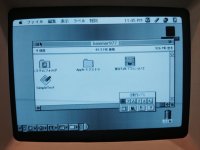
I'v been watching SE/30 on Japanese Yahoo! auction and I had bought some.I want to share my latest finding.I found 4 SE/30's listed by same shop.2 of them,the shop said they show ? icon,other 2,the shop said can't power up.but on the pictures they got video board.Japanese bidder prefers known working SE/30,but I went one with video card.I won one about $80 with shipping.When I got it,I found it got Micron Xceed Video Card 24bit version and Twin Spark Adapter in it! Somehow Xceed came without Grayscale Adapter.But I already got SE/30 with Xceed Grayscale so I replaced video card and checked.It works fine.
And looked closely the adapter,It was not Stratus product but Diimo.
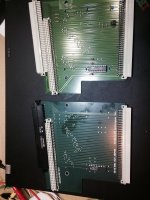
(lighter one is Stratus)
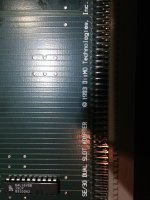
I haven't heard of adapter from Diimo looks so like Stratus.Stratus says we can put Diimo card on Twin Spark Adapter.so I think we can say they are compatible.but I must make sure.
I'v been watching SE/30 on Japanese Yahoo! auction and I had bought some.I want to share my latest finding.I found 4 SE/30's listed by same shop.2 of them,the shop said they show ? icon,other 2,the shop said can't power up.but on the pictures they got video board.Japanese bidder prefers known working SE/30,but I went one with video card.I won one about $80 with shipping.When I got it,I found it got Micron Xceed Video Card 24bit version and Twin Spark Adapter in it! Somehow Xceed came without Grayscale Adapter.But I already got SE/30 with Xceed Grayscale so I replaced video card and checked.It works fine.
And looked closely the adapter,It was not Stratus product but Diimo.
(lighter one is Stratus)
I haven't heard of adapter from Diimo looks so like Stratus.Stratus says we can put Diimo card on Twin Spark Adapter.so I think we can say they are compatible.but I must make sure.
So you install 2 GB of ram and OS 9. Then you go to about this mac and you see that hey the system recognizes that there is 2GB of ram!!! And you get all excited until you notice that Mac OS takes up 512-540 MB (give or take)
This is not new I know. DieHard pointed the out to me and directed me towards this discussion
http://macos9lives.com/smforum/index.php?topic=2101.msg10905#msg10905
I've posted elsewhere some theory's I had while examining memory.
So using an iBook with 320 MB of ram I found that the system heap and stack along with some rom space and some other system stuff sits at the bottom of ram (starting at or around address 00002800). Once the process manager starts it claims the rest of the memory for it's heap except for a little bit at the top which it is allocated for it's stack.
For those of you who don't know, the heap is the working memory where your data is stored and the stack is the memory where the actually executable code is stored. Because os 9 does not have protected memory you can write apps that pretty much read anything. With protected memory apps are usually given a virtual address space so it thinks it starts at address 0 the os then translate that to physical addresses. The heap for the app is then marked as non-executable though on some systems you can override that ins some creative ways.
Back on track though. So when the system boots it get's the ram size information from Open Firmware. The memory manager I believe starts before the process manager (don't quote me on that as I haven't confirmed this yet). So the os is fully aware at this point of the 2 GB installed. Depending on which starts first will be where the ram get's allocated to the process manager. When about this mac shows that MacOS takes 540 MB it's actually not really true.
Looking at the heaps and stack allocations, the system files are still only taking 30-40 or whatever your system uses depending on extensions and what not.
For MacOS memory usage (which is not handled by the process manager) it takes the total ram installed and subtracts what is allocated to the process manager, and assumes what is left is allocated to the system.
So that is where the number comes from.
So poking around with MacsBug you can look at what is in the ram above 1.5 gb. Guys what there is nothing (no surprise there). It's all initialized to zero.
So next step is to write a program to put data into memory addresses above the 1.GB limit.
Then use MacsBug to verify it is there. If that works then it tells us that the memory is addressable and the potential of some sort of ram disk up there is possible (though not necessarily easy in any way).
Just thought I'd share this bit of info.
This is not new I know. DieHard pointed the out to me and directed me towards this discussion
http://macos9lives.com/smforum/index.php?topic=2101.msg10905#msg10905
I've posted elsewhere some theory's I had while examining memory.
So using an iBook with 320 MB of ram I found that the system heap and stack along with some rom space and some other system stuff sits at the bottom of ram (starting at or around address 00002800). Once the process manager starts it claims the rest of the memory for it's heap except for a little bit at the top which it is allocated for it's stack.
For those of you who don't know, the heap is the working memory where your data is stored and the stack is the memory where the actually executable code is stored. Because os 9 does not have protected memory you can write apps that pretty much read anything. With protected memory apps are usually given a virtual address space so it thinks it starts at address 0 the os then translate that to physical addresses. The heap for the app is then marked as non-executable though on some systems you can override that ins some creative ways.
Back on track though. So when the system boots it get's the ram size information from Open Firmware. The memory manager I believe starts before the process manager (don't quote me on that as I haven't confirmed this yet). So the os is fully aware at this point of the 2 GB installed. Depending on which starts first will be where the ram get's allocated to the process manager. When about this mac shows that MacOS takes 540 MB it's actually not really true.
Looking at the heaps and stack allocations, the system files are still only taking 30-40 or whatever your system uses depending on extensions and what not.
For MacOS memory usage (which is not handled by the process manager) it takes the total ram installed and subtracts what is allocated to the process manager, and assumes what is left is allocated to the system.
So that is where the number comes from.
So poking around with MacsBug you can look at what is in the ram above 1.5 gb. Guys what there is nothing (no surprise there). It's all initialized to zero.
So next step is to write a program to put data into memory addresses above the 1.GB limit.
Then use MacsBug to verify it is there. If that works then it tells us that the memory is addressable and the potential of some sort of ram disk up there is possible (though not necessarily easy in any way).
Just thought I'd share this bit of info.
Congratulations Takihito (omedetou?)! in case you didn't know, one fellow on this site sold a micron xceed recently for almost $2000. Take good care of it. It is most prized.
Wow, that's one hell of a conquest.
Envious. Ill never have enough money for one but Im drooling over the greyscale goodness just hearing about them. Would love a Dimmo accelerator also but thats sweet.
Oddly enough, there is a fellow on eBay by the name of ArtMix (he who makes the Stratos) who is selling the double-adaptor for the SE/30 along with a Diimo Turbo040 for the very unfriendly price of USD600. Just type in Daystar Turbo040 in www.ebay.com and it will turn up. Much as I want grayscale on my SE/30, I am not willing to pay more than USD100 for it.
So after further investigation I've discovered a few things.
The reason the test app I wrote couldn't access the empty ram above 1.5 GB was due to the MMU.
I'm going to over simplify this a bit but I'm going to hit the pertinent parts.
Open Firmware Starts the machine and initialized a bunch of hardware.
The device tree defines the ram sockets and provides info as to what is installed in each socket. This is why you see 2 GB in about this mac.
This is also why apple profiler shows the correct amount of ram in each slot.
Next the rom is loaded and starts initializing a bunch of stuff.
The first thing that starts is the resource manager, then a bunch of other stuff get's initialized.
Then a simple memory manager get's started. This initializes the stack for the system components (this is what's sitting in the lower part of ram).
Now the last few things that happen during boot right before the finder is launched is where our issue starts to happen. Once extensions are all loaded the last thing that happens is the process manager is started. The simple memory manager from earlier calculates what has been allocated for the various system components and the system stack and heap and all that fun stuff. And then at the top of all that stuff is the start of ram allocated to the process manager. When the process manager get's loaded what ever loads it is setting it's limit to 1.5 gb - the system heap and stack. The process manager then starts it's own memory manager for allocating space to other apps with in it's heap. When the MMU is setup it maps the physical ram address to the virtual addresses. So virtual address 0x00000000 is physical address 0x00000000 of ram. The MMU's mapping end's the virtual ram address space at 1.5 gb which is why access above that is limited or not available. Where ever the MMU get's initialized during and after rom boot is the location of the code that needs to be patched.
This is why the access violation errors get thrown in my test program.
Okay so that's a bit rambly. But the point is when the heap get's allocated for the process manager is when the 1.5 gb limit is being set so it starts to narrow down the search and what needs to be modified to get this limit raised.
I also found another interesting tidbit in working through this. There is something mapped in the upper part of ram near the 4GB mark. This would be the absolute physical limit and as the MMU's in these machines are 32bit there will be no way to go above that. I'm suspecting that the stuff up by the 4gb limit are the address to the hardware registers (the ports and address of the graphics card for example).
I'll stop rambling now.
The reason the test app I wrote couldn't access the empty ram above 1.5 GB was due to the MMU.
I'm going to over simplify this a bit but I'm going to hit the pertinent parts.
Open Firmware Starts the machine and initialized a bunch of hardware.
The device tree defines the ram sockets and provides info as to what is installed in each socket. This is why you see 2 GB in about this mac.
This is also why apple profiler shows the correct amount of ram in each slot.
Next the rom is loaded and starts initializing a bunch of stuff.
The first thing that starts is the resource manager, then a bunch of other stuff get's initialized.
Then a simple memory manager get's started. This initializes the stack for the system components (this is what's sitting in the lower part of ram).
Now the last few things that happen during boot right before the finder is launched is where our issue starts to happen. Once extensions are all loaded the last thing that happens is the process manager is started. The simple memory manager from earlier calculates what has been allocated for the various system components and the system stack and heap and all that fun stuff. And then at the top of all that stuff is the start of ram allocated to the process manager. When the process manager get's loaded what ever loads it is setting it's limit to 1.5 gb - the system heap and stack. The process manager then starts it's own memory manager for allocating space to other apps with in it's heap. When the MMU is setup it maps the physical ram address to the virtual addresses. So virtual address 0x00000000 is physical address 0x00000000 of ram. The MMU's mapping end's the virtual ram address space at 1.5 gb which is why access above that is limited or not available. Where ever the MMU get's initialized during and after rom boot is the location of the code that needs to be patched.
This is why the access violation errors get thrown in my test program.
Okay so that's a bit rambly. But the point is when the heap get's allocated for the process manager is when the 1.5 gb limit is being set so it starts to narrow down the search and what needs to be modified to get this limit raised.
I also found another interesting tidbit in working through this. There is something mapped in the upper part of ram near the 4GB mark. This would be the absolute physical limit and as the MMU's in these machines are 32bit there will be no way to go above that. I'm suspecting that the stuff up by the 4gb limit are the address to the hardware registers (the ports and address of the graphics card for example).
I'll stop rambling now.
Aligatou (Thank you) ArmorAlley.I don't know Xceed once costed $2000.but I knew items around SE/30 cost more in US than in Japan.
In Japan,price of SE/30 is getting higher,but still cheeper than eBay.and accelerators or video cards are still left cheeper than eBay...I feel hot collectors are fading from Japan...
In Japan,price of SE/30 is getting higher,but still cheeper than eBay.and accelerators or video cards are still left cheeper than eBay...I feel hot collectors are fading from Japan...
Thank you olePigeon and Macdrone.I was extremely lucky.
Yes indeed!! 
ArmorAlley,I know Artmix and he is offering his product at very expensive price.I think it is because he is targeting very slim market in Japan.But $600 for Adapter and 040....
So I've been studying the CPU registers that control the MMU (memory management unit).
So the Block Address Translation tables are pointed to by CPU registers. These control the mapping of the addresses from what applications see to physical hardware address. They are only accessible from code executing in the Supervisory context of the processor (usually this is the os) and the guest process (user programs) as some access to this. Not all OS's use the guest process for running applications though. This might actually be the case with the Mac OS as that is usually needed to provide protected memory (which will all know is non-existent in OS 9) but I really don't know right now the reality of this. At a minimum I can read most of those. So next step is reading in these tables and seeing what's mapped where and this will give a more definitive idea of what is located where in memory.
One small kill joy though. The PPC spec that explains the MMU registers does have some notes about 64bit cpu's (the G5). So some of the Opcodes for accessing the registers are explicitly not supported on 64bit cpus even if the cpu is running in 32 bit mode. In OS X the memory management routines probably account for this which is why on the G5 you could have more than 4GB of ram in a 32bit os. OS 9 probably did depend on some if not all of these 32bit only opcodes and registers. So we now have two major hardware roadblocks to overcome if there is ever any hope of G5 support. 1. the mmu opcodes/registers and 2. the UniNorth 3 bridge.
Also in looking through this I looked more at the PVR and PIR registers. (these are the Processor ID and Processor Version).
The cpu upgrades that update open firmware through nvram scripts to get newer g4 cpus working, are modifying these.
So now that I know the registers I can find where Mac OS checks those registers. Then it should help in looking for the list of values the register is compared against to update that to get more cpu's support with out nvram scripts or changing values in open firmware.
So the Block Address Translation tables are pointed to by CPU registers. These control the mapping of the addresses from what applications see to physical hardware address. They are only accessible from code executing in the Supervisory context of the processor (usually this is the os) and the guest process (user programs) as some access to this. Not all OS's use the guest process for running applications though. This might actually be the case with the Mac OS as that is usually needed to provide protected memory (which will all know is non-existent in OS 9) but I really don't know right now the reality of this. At a minimum I can read most of those. So next step is reading in these tables and seeing what's mapped where and this will give a more definitive idea of what is located where in memory.
One small kill joy though. The PPC spec that explains the MMU registers does have some notes about 64bit cpu's (the G5). So some of the Opcodes for accessing the registers are explicitly not supported on 64bit cpus even if the cpu is running in 32 bit mode. In OS X the memory management routines probably account for this which is why on the G5 you could have more than 4GB of ram in a 32bit os. OS 9 probably did depend on some if not all of these 32bit only opcodes and registers. So we now have two major hardware roadblocks to overcome if there is ever any hope of G5 support. 1. the mmu opcodes/registers and 2. the UniNorth 3 bridge.
Also in looking through this I looked more at the PVR and PIR registers. (these are the Processor ID and Processor Version).
The cpu upgrades that update open firmware through nvram scripts to get newer g4 cpus working, are modifying these.
So now that I know the registers I can find where Mac OS checks those registers. Then it should help in looking for the list of values the register is compared against to update that to get more cpu's support with out nvram scripts or changing values in open firmware.
I live for these updates on the progress, and appreciate all the details
Thanks...

Thanks. I'm starting to get to the point where it is shifting from theoretical to actual. I'm definitely running into things that I have a hard time understanding the reasoning for, which make's it a little hard to explain. But man this is getting to be real fun.
Hi Takimoto,
Sorry for getting your name wrong in my first post. Japan is a Mac-loving country and you are lucky to be there. When I lived there, I made monthly visits to Sofmap (and the tune [1] is still in my head, decades later...) to see what was going secondhand. I was very happy to get a 10-month-old Performa 6400 and monitor for 10-man-yen (100,000 yen or about the fifth the price of it new, if I remember it correctly).
Nihongo de anatakata ni kaite subeki de arimasu no de, takusan wasuremashita. Mukashi mukashi nihongo de hanasemashita...
mata ne,
aa
[1]
Sorry for getting your name wrong in my first post. Japan is a Mac-loving country and you are lucky to be there. When I lived there, I made monthly visits to Sofmap (and the tune [1] is still in my head, decades later...) to see what was going secondhand. I was very happy to get a 10-month-old Performa 6400 and monitor for 10-man-yen (100,000 yen or about the fifth the price of it new, if I remember it correctly).
Nihongo de anatakata ni kaite subeki de arimasu no de, takusan wasuremashita. Mukashi mukashi nihongo de hanasemashita...
mata ne,
aa
[1]
Good find, as far as I can tell.  I'd already be happy with a working SE/30. |)
I'd already be happy with a working SE/30. |) ArmorAlley,
there is no problem.it will be bit hard to take Japanese name in.I remember Sofmap song too.for those who dosen't know Sofmap,Sofmap is retailer sells new/secondhand hardware/software.The movie ArmorAlley attached may be sexy game shop of Sofmap.
This song is played in every Sofmap,It's nice-tempo,simple-word and short-loop makes this hard to forget.
there is no problem.it will be bit hard to take Japanese name in.I remember Sofmap song too.for those who dosen't know Sofmap,Sofmap is retailer sells new/secondhand hardware/software.The movie ArmorAlley attached may be sexy game shop of Sofmap.
This song is played in every Sofmap,It's nice-tempo,simple-word and short-loop makes this hard to forget.
XBHS1997,
I haven't mentioned about other part of this SE/30.It was listed as no-powerup,but logic board and power supply unit is OK.very happy about it!.
I haven't mentioned about other part of this SE/30.It was listed as no-powerup,but logic board and power supply unit is OK.very happy about it!.