

Thread
Powerbook 540c LCD, Can It Run In Grayscale Mode?
Since the 540 monitor I got is bunk, I was curious if the 540c can run in grayscale mode, and if so, how many shades of grey. Seems like that would be a be good second choice for a monitor if it can run in grayscale mode. It is active matrix, so that's a plus.
maceffects said that he has 2
did you check with him?
did you check with him?
Nope. I figured it was probably general knowledge here, just something that I don't happen to know.
All PowerBook 5xx series logic boards are the same, as such, if you're going from a 540 display to a 540c display, you'll get a pleasant surprise - COLOUR! As with any colour Mac, you can also switch it to greyscale if you want.
Sounds good.
ill follow up with maceffects.. maybe his 2 540's do not have any T.V.
I should fire up my 540c , Switch it to greyscale and see how many shades of grey its capable of...
So the consensus is that you could install a "C" Screen in your 540, (with the proper corresponding display cable) leave it in grey scale, and just pretend its an authentic fully working 540 lol?
I can just picture you on the couch -Dark- (rocking back and forth) with one of those plastered half crazy grins, GreyScale LCD Glow on your face, saying weeeeeee I'v got a real grey scale Five-four-deeeee
With Blow apart parts to 520c's/540c's and Tunnel vision screens littered all over the floor.
lol
So the consensus is that you could install a "C" Screen in your 540, (with the proper corresponding display cable) leave it in grey scale, and just pretend its an authentic fully working 540 lol?
I can just picture you on the couch -Dark- (rocking back and forth) with one of those plastered half crazy grins, GreyScale LCD Glow on your face, saying weeeeeee I'v got a real grey scale Five-four-deeeee
With Blow apart parts to 520c's/540c's and Tunnel vision screens littered all over the floor.
lol
If you could, it would be appreciated.
Pretty much. I don't want to play screen roulette with the 540's being so flaky. Plus, 540c screens seem to be easier to come by. Although the one I found on eBay today, the seller is a jerk. He had the screen listed for $61, I made him an offer of $41, and he rejected the offer, no counter offer, removed the OBO from the listing and bumped the price to $95, and that's without the proper data cable. Good luck getting that for a used screen with no data cable, buddy.
Grayscale seems to top out at 256/8bit running under the Monitors Control Panel/Mac OS Drivers. I'm wondering if RadiusWare will drive one of their cards in grayscale @ 16bit?
Running the Portrait Display in 24bit color would be an interesting experiment as well.
Running the Portrait Display in 24bit color would be an interesting experiment as well.
Radiusware? Never heard of it.
RadiusWare is the proprietary Driver/Control Panel environment for Radius Video Cards and the name of the software for running the Radius Rocket in accelerator mode.
Interesting. Well, if I manage to get my hands on a 540c LCD, it's worth a shot, assuming I can locate the software.
RGB video cards (with very rare exceptions) use six (original VGA) or eight (most things since the early 90's) bit D/A converters. Since a "shade of grey" is composed of an equal intensity of all three color elements the number of shades of gray you get is limited to the granularity of the D/A converters, IE, 8 bit, IE, "256 greys". (Monochrome CRT monitors use a single intensity feed connected to one of the three converters, while a color monitor displaying greys, again, needs to lock all three D/As together.) In principle you could get more shades of grey if instead of feeding a grayscale monitor conventionally you combined the outputs of all three D/As via a resistor network (or some other method) but you'd have to write a custom driver to make a sensible grayscale palette out of it.
One thing I'm mildly curious about is how many greys the Powerbook 540-era can actually display. I have an old TFT-screen'ed 486 laptop that has a very pretty display but it actually only has a 12 bit interface, which means it's only really capable of doing 16 shades of grey. (It looks fine under most circumstances because the video controller does some interpolation to keep things from getting "washed out" but you can reveal the truth by writing an appropriate BASIC program.)
That's a really good point. I wonder how many levels of grayscale it can actually display. It might say 256, but I wonder if it really is.
I know the panel is capable of displaying 15-bit color (5.5.5.0.1) or 16-bit color (5.6.5.0.0) at the reduced resolution of 640x400 on the Powerbook 540c. Don't know what that means for grayscale. If it is true 16-bit, and they use the green channel to display grayscale, it would be 64 shades of gray. 15-bits would be 32 shades of gray. If the panel is only 12-bits, like the one in your example, there would be only 16 shades of gray. Worst case scenario, if the 16-bit color is nothing but dithered 256 shades, then it would only be capable of displaying 8 shades of gray since 256 colors, using the green bits, only displays 8 shades.
I find this very interesting. For anyone that has a 540c, if you could check to see how it displays 256, 64, 32, 16, and 8 gray gradations, I'd be rather interested in the results. As soon as one can see obvious banding, dithering, etc... it has exceeded the ability of the screen to display that many shades.
I know the panel is capable of displaying 15-bit color (5.5.5.0.1) or 16-bit color (5.6.5.0.0) at the reduced resolution of 640x400 on the Powerbook 540c. Don't know what that means for grayscale. If it is true 16-bit, and they use the green channel to display grayscale, it would be 64 shades of gray. 15-bits would be 32 shades of gray. If the panel is only 12-bits, like the one in your example, there would be only 16 shades of gray. Worst case scenario, if the 16-bit color is nothing but dithered 256 shades, then it would only be capable of displaying 8 shades of gray since 256 colors, using the green bits, only displays 8 shades.
I find this very interesting. For anyone that has a 540c, if you could check to see how it displays 256, 64, 32, 16, and 8 gray gradations, I'd be rather interested in the results. As soon as one can see obvious banding, dithering, etc... it has exceeded the ability of the screen to display that many shades.
I'd be pretty surprised if it can actually do a true according-to-Hoyle 256 grays. Until recently there were probably more laptops shipped with 18 bit (IE, six bit per channel, IE, "64 greys") LCDs than 24 bit displays. Someone even tried to sue Apple over it..
Not that it really matters. The human eye has to work to tell the difference between six and eight bit grey, and even 4 bit grey can look pretty good. (far better than 4 bit color.)
Not that it really matters. The human eye has to work to tell the difference between six and eight bit grey, and even 4 bit grey can look pretty good. (far better than 4 bit color.)
Very true. I'd almost forgotten about that. It is probably a 12-bit panel, making it no better than the Powerbook 520 at displaying grayscale, except it's active matrix.
I guess that makes the screens on the grayscale 540's that much more rare, displaying true 64 shades of gray. It must have been an expensive grayscale panel at the time.
If I can get my hands on a panel, it will be interesting to see if I can find a program that can give me the lowdown on the panels actual capabilities.
I guess that makes the screens on the grayscale 540's that much more rare, displaying true 64 shades of gray. It must have been an expensive grayscale panel at the time.
If I can get my hands on a panel, it will be interesting to see if I can find a program that can give me the lowdown on the panels actual capabilities.
520
Grayscale (16 Grays)
Passive
520c
Color (256 Colors)
Passive
540
Grayscale (16 Grays)
Active
540c
Color (256 Colors)
Active
http://support.apple.com/kb/TA21582?viewlocale=en_US&locale=en_US
Grayscale (16 Grays)
Passive
520c
Color (256 Colors)
Passive
540
Grayscale (16 Grays)
Active
540c
Color (256 Colors)
Active
http://support.apple.com/kb/TA21582?viewlocale=en_US&locale=en_US
Yeah, I wouldn't trust that page all that much. It also says the 540 is 16 shades of gray, when this says it isn't:
http://support.apple.com/kb/sp162
This page says the internal display of a 540c can do 16-bit @ 640x400:
http://support.apple.com/kb/sp163
http://support.apple.com/kb/sp162
This page says the internal display of a 540c can do 16-bit @ 640x400:
http://support.apple.com/kb/sp163
It was undoubtably expensive, but the color active matrix panels were even more expensive, requiring 3x as many pixels for the same resolution. I remember it was pretty much a given that an active matrix screen would have at least one dead/stuck pixel, usually 2 or 3. It was that or live with the ghosting and poor contrast of a passive matrix screen. We really have been spoiled by modern TFT panels with vivid, pristine displays and they're dirt cheap. You can buy a whole brand new laptop these days for a fraction the price of the TFT panel alone in the late 90s.
I remember buying an AOS 15" TFT Computer Monitor (VGA), From newegg for 379.00
back 12-13 years ago.
I bought a big 19" Gateway LCD screen from Micro Center a few years later for 239.00 thinking that was a deal of a lifetime.
my dad is still using it to this day.
back 12-13 years ago.
I bought a big 19" Gateway LCD screen from Micro Center a few years later for 239.00 thinking that was a deal of a lifetime.
my dad is still using it to this day.
This isn't the definitive, because the model # is one digit off, but if you Google for the datasheet for the Sharp color LCD panel's part number listed in the parallel thread to this you'll find one for a panel that appears to be identical and that datasheet says it's 12 bit (4 bits per channel) color. It's also worth noting that the "Service Source" hardware manual for the 500 series repeats that "16 greys" claim.
On the flip side, the "Developer Note" for the 500 series has a confusing section talking about the CLUT's 16 bit color mode and explains how they've especially optimized yadda yadda blaw blaw blaw so the video system will avoid attempting to display certain colors which don't render properly on the LCD, with that the end result is that the passive color displays can show a range of "about 4000" colors, while the range for the TFT displays is "around 24,000".
(Unfortunately the manual doesn't actually have the pinout of the LCD connector so we can't count data pins.)
In any case, fretting about exactly how many greys an 18 year old laptop does or does not display is probably a little silly in the grand scheme of things.
On the flip side, the "Developer Note" for the 500 series has a confusing section talking about the CLUT's 16 bit color mode and explains how they've especially optimized yadda yadda blaw blaw blaw so the video system will avoid attempting to display certain colors which don't render properly on the LCD, with that the end result is that the passive color displays can show a range of "about 4000" colors, while the range for the TFT displays is "around 24,000".
That latter number is bigger than 12 bits, which implies that even *if* the LCD's interface is only 12 bit the video hardware may do some sort of time-based multiplexing/dithering to increase the available color range (resulting in the "flicker"?). Perhaps that's the source of the "64 grey" claim, *or* perhaps whoever typed that up confused something between the LCD's capabilities and the external video port. (15/16 bit "highcolor" DACs, which is what the developer note says the CLUT is part of, usually only had 6 bit DACs.) All we really know is the video hardware *logically* supports "256 greys".
(Unfortunately the manual doesn't actually have the pinout of the LCD connector so we can't count data pins.)
In any case, fretting about exactly how many greys an 18 year old laptop does or does not display is probably a little silly in the grand scheme of things.
It's almost worth starting "The Grayscale Thread" in Peripherals for this discussion!
I've heard it said that the human eye can't distinguish more than 256 shades of gray, but I've often wondered about that. Is it possible to define 512 distinct gradations of gray in a 24bit color graphic? If so, it would be interesting to do that and check it against a matching 256 level grayscale chart in the top half of a comparison file. Looking for a difference in the banding between top and bottom halves of the graphic might prove informative.
I've heard it said that the human eye can't distinguish more than 256 shades of gray, but I've often wondered about that. Is it possible to define 512 distinct gradations of gray in a 24bit color graphic? If so, it would be interesting to do that and check it against a matching 256 level grayscale chart in the top half of a comparison file. Looking for a difference in the banding between top and bottom halves of the graphic might prove informative.
If the CLUT is capable of 32,768, then it's 15 bit, meaning there are 32 shades of gray at most. Assuming it is most likely a 12-bit panel, it can only truly show 16, so it puts it on par with the 520, just being active matrix. The active matrix part along makes it worthwhile. This passive matrix stuff is driving me nuts.
Not true greys, no. You could certainly make an image that included the 256 real greys alongside another 256 shades in which the color values for RGB are not exactly the same. (IE, in addition to using #000000 through #FFFFFF you could add some arbitrary stripes where you subtract 1 from one of the RGB channels, IE, #FEFFFF.) But by definition those extra "greys" will actually be subtly "sepia toned". WHICH IS CHEATING.
They do sell video cards and monitors capable of 30 bit color now, so if you really want 1024 true greys you can have it. A setup to do it will run you around three grand. I have to admit I'm sort of curious if a double-blind test between one of those systems and an "equally high quality" IPS panel+24 bit card would really show that humans can tell the difference between 16 million and one billion colors.
The misleading part is the resolution of the CLUT doesn't necessarily tell you the resolution of the DACs. ***Using a CLUT for 15 bit color is actually unusual... (*** EDIT: Rest of this thought deleted. Glancing again at the piece of the manual I quoted I see the CLUT in this Powerbook doesn't do 15 bit indexed color, its palette register is 8 bits long. Derp. In my defence, the verbage of the service manual is nonstandard, since it says "CLUT" to refer to what in a VGA card would be the entire "RAMDAC", of which the CLUT is only a part, aka, the palette register. Anyway...) All PC "highcolor" VGA cards that did 15 or 16 bit color, aka, "Thousands of colors" in Mac terminology, still had *at least* six bit ADCs in their RAMDACs, they just couldn't use the entire range when in the highcolor mode. (Which leads to the odd situation that you could actually have more true grays running in an 8 bit grayscale mode than you could in "thousands of colors" mode, because, as you note, the effective grayscale resolution is only 5 bit in "thousands of colors" but it's six or 8 bit in the indexed mode.)
But, again, DAC only applies to the external monitor port on a Powerbook. Given the evidence I'd wager that the color LCD in the 540c could do 16 "real genuine according to Hoyle" greys, but when you have it set for grayscale it just might use dithering to fake a higher number. IF someone has the part number for the greyscale LCD they should Google it and see if they can find a datasheet. It's worth a shot.
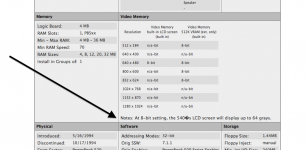
so does this mean they are telling a fib?
Its to the external video for 8 bit. n/a for built in display.
Hard to say. If the panel is 6-bit, and the CLUT can use 6 of the 8 bits in the register in grayscale mode, it is possible it could display 64 shades of gray.
I don't think we'll ever know, since there are literally no search results returned for the part number of the 540 LCD.
Every now and then, I get a hankering for one of those huge Planar medical grayscale LCDs they use for displaying X-ray images. You can pick them up cheap, but alas they require a matching proprietary video card to drive them. Some ridiculous resolution like 2300x1600 @ 23" and presumably better than average gray distinction.
Interesting thought. I wonder if the "driver" side of things could be taken care of in one of the FPGA/CPLD based panel driver boards from Chinese ebay sellers.
180 in 16 greyscale
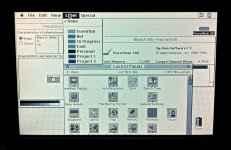
540c in 256 greyscale
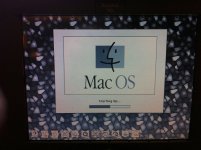
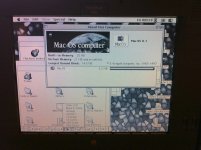
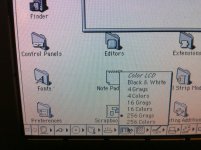
540c in 256 greyscale
I'd say it def. looks better than 16, so it's a toss up between 32 and 64.
I reinstalled the 540 panel in the 520, and in Control Panel > Monitor > Options it actually says "640x480, 64 grays" so that footnote on the specifications page is correct. Apparently the LCD in the 540 is a true 6-bit panel.
What does it say under Control Panel > Monitor > Options for the 540c?
What does it say under Control Panel > Monitor > Options for the 540c?
The "Driver" issues would actually be OS and application related. Let's say that you were to, via whatever method, modify a video card so it supported something ridonkulous like 24 bit grayscale. (Most accurate way I can think of, assuming we're going oldschool and trying to do this with an analog monitor output, would be to make a board that had three very-high-speed 8 bit analog-to-digital converters on one side and a single 24 bit DAC on the other, connected to the single input on a true monochrome monitor. Digitize the incoming RGB signals into three bytes of data, stack them up, and use that on the output side as a single 24 bit value. Easy Peasy, relatively, The simplest method would be to simply use a different value resistor on each RGB line to combine them into one signal; see the comment below as to why from a practical standpoint the results would probably be indistinguishable.) The problem now is that you'll have to describe to the OS that it should treat its 24 bit framebuffer as grayscale, IE, use the three bytes that were RGB into a linear set of luminosity values instead of three sets of luminosity+chroma; if you simply keep working with 24 bit images as 24 bit color you might be able to display some pretty pictures but they won't make a lick of sense if you view them on a normal machine. "Deep Color" support (IE, support for 30/36/48 bit color depths) has been in Windows for a few years but googling seems to indicate it's *not* really in OS X yet. (Oddly there *was* apparently a 30 bit deep color card made by Radius for Macs in the 90's that was supported by PhotoShop.). I have no idea if "Deep Color" support comes along with an understanding of extended grayscale only images, but it would seem to be a prerequisite for really making use of a deeper grayscale framebuffer.
Of course, one thing to think about is if you were doing this analog is the peak-to-peak voltage swing for a VGA (color or grayscale) monitor is only 0.7 volts. Even at 10-bit resolution the difference between two adjacently-shaded grayscale pixels is probably less than the voltage swings you'd get in the cable from, say, ripple from nearby AC feeds or the computer's power supply. 16 or 24 bit would be ludicrous overkill.
That doesn't actually surprise me. 6 bit grey resolution was what Mono VGA was capable of, it would make sense they'd manufacture panels that support it.
I'm sure with the color display the control panel says "256 greys". I would just wager that in practice they're dithered, not true.
What's interesting about this is that it means that the CLUT register is capable of either 256 colors (3.3.2.0.0), or, at a minimum, a 6-bit linear grayscale value (6.0.0). Considering grayscale values larger than a single color channel are possible in the register, technically, it should be possible for it to output true 256 grayscale values, with a true 8-bit grayscale panel attached to it. Of course, at that time, the most one ever saw was 6-bit panels. However, it would be fun to find a true 8-bit grayscale panel and see if the CLUT could drive it at the full 8-bit range. The OS is capable of handling 256 grays, so I don't see why not. A fun little hack to try. Unfortunately, far beyond my capabilities.
Testing the Toshiba panel for the 540c in Grayscale mode, it can display 27 distinct shades (Black, White & 25 shades of gray inbetween). This means it should be capable of displaying 19683 colors @ 640x400. So, Apple's estimate of 24000 isn't too far off. Since it can clearly display more than 16 shades, it must be a 15-bit panel. Really quite good for that time period.
So, the 540 panel is indeed superior to the color panels in displaying grayscale, since it is capable true 64 grayscale. However, this makes the 540c superior to any of the 4-bit grayscale panels.
Unfortunately, the 540 panels suffer from terminal tunnel vision, as do all grayscale active matrix panels of that time period.
I'd be interested in someone with a Sharp 540c panel testing the grayscale gradients in grayscale mode. Since the colors on the Sharp panel appear more vibrant, I expect it is capable of displaying the full 32 shades of gray.
So, the 540 panel is indeed superior to the color panels in displaying grayscale, since it is capable true 64 grayscale. However, this makes the 540c superior to any of the 4-bit grayscale panels.
Unfortunately, the 540 panels suffer from terminal tunnel vision, as do all grayscale active matrix panels of that time period.
I'd be interested in someone with a Sharp 540c panel testing the grayscale gradients in grayscale mode. Since the colors on the Sharp panel appear more vibrant, I expect it is capable of displaying the full 32 shades of gray.
It would be fantastic if mcdermd could do this quick test because I know for sure he has 540c's with both Tosh and Sharp Panels.
So maybe the people that purchased the 540 over the 540c might not been all about $$ savings, maybe they might of needed that screen for some B&W Desktop Publishing? Maybe the 540 was more expensive then that 540c< at the time?
So maybe the people that purchased the 540 over the 540c might not been all about $$ savings, maybe they might of needed that screen for some B&W Desktop Publishing? Maybe the 540 was more expensive then that 540c< at the time?
If it can do 32 shades, that would mean the Toshiba can display less colors, but has a finer dot pitch, whereas the Sharp can display more colors, but has a more coarse dot pitch.
Personally, I'd go for dot pitch. A coarse dot pitch drives me nuts.
Personally, I'd go for dot pitch. A coarse dot pitch drives me nuts.
There's also other one other reason - power efficiency. With a greyscale active matrix display, sitting outside, you can turn the backlight all the way off and still see what you're doing. Not quite the case with a colour display, or a passive matrix.