
Thread
Intel iMac from work...
Well, dad's work. One of his clients are giving it away because they're finished with it apparantly.
Mom says it's a waste of space (but then she says that about every computer except the main one), and dad says it'll be good for "learning to use a Mac".
I'm looking forward to trying to program the thing, but currently it looks like it's not coming. And if it does it'll be mom's computer anyway.
Thoughts?
Thanks,
onlyonemac
Mom says it's a waste of space (but then she says that about every computer except the main one), and dad says it'll be good for "learning to use a Mac".
I'm looking forward to trying to program the thing, but currently it looks like it's not coming. And if it does it'll be mom's computer anyway.
Thoughts?
Thanks,
onlyonemac
You said it's intel and it's free, so it's very much still useable for sure. Make sure to point your mom it's easier, safer to use compared to PC's. It's compact, nice looking, decorative. As well make the point that you'll get to learn more programming, possible future career even.
You'll have to change your username  Congrats.
Uhm... hearty conditional congratulations on the thing you may or may not be receiving?
And may not be permitted to use anyway?
Keep us posted, I suppose.
Keep us posted, I suppose.
Well it's not available for a few weeks still.
Why is your mother so restrictive of your hobby, anyway?
It doesn't seem like she's being entitrely reasonable about it, from what you've said.
Anyway, please let us know how it goes.
c
It doesn't seem like she's being entitrely reasonable about it, from what you've said.
Anyway, please let us know how it goes.
c
To be fair to the mother, young hobbyists that have a fairly big and intensive hobby are often placing a strain on some resource that they aren't aware of, and/or are acting in a way that the parents didn't originally predict.
My parents got a lot more "cool" with it once I started speaking with them about why the systems were interesting, and helping to develop a limit on it, like, "I'll use this particular space for it, and if I want something new that doesn't fit, I'll toss it out to make room."
I think one of the biggest factors in re PAF (parental approval factor) back in the day really was the notion that because these things were so cheap and plentiful at the time, it wasn't uncommon that somebody would come back with a carload of stuff for like $20, and most parents don't want their kids' things spilling over into public spaces. (Although I've also learnt that that particular bit is extremely dependent on the individual family, and I have a friend whose kids' rooms are for homework and sleeping, and they do everything else together in a family room/den.
My parents got a lot more "cool" with it once I started speaking with them about why the systems were interesting, and helping to develop a limit on it, like, "I'll use this particular space for it, and if I want something new that doesn't fit, I'll toss it out to make room."
I think one of the biggest factors in re PAF (parental approval factor) back in the day really was the notion that because these things were so cheap and plentiful at the time, it wasn't uncommon that somebody would come back with a carload of stuff for like $20, and most parents don't want their kids' things spilling over into public spaces. (Although I've also learnt that that particular bit is extremely dependent on the individual family, and I have a friend whose kids' rooms are for homework and sleeping, and they do everything else together in a family room/den.
I must have been really lucky. Both mom and dad were highly approving of my hobby. Mom would nag about the clutter, but she supported it otherwise.They both realized that learning computer stuff is more valuable than a whole plethora of other things I could have been doing. Not to mention it kept me happy in a time that I was pretty depressed overall. (When the hobby began 10+ years ago)
I learned more experimenting and repairing these old computers than I did in most of my High School classes. (Not joking. HS was so easy, I could get B+ on tests without even studying in most classes, excluding Science and Math)
Not to mention, keeping my interest alive in these things set me on a good career path. I have moved from wanting to be an Electronics Engineer over to Computer Science. Programming is now more interesting to me, and the career prospects are better. EE seems like something that's being increasingly outsourced outside of top-secret work (which I dont want to do).
Its unfortunate that your Mom is so dis-supportive of your hobby - its not like you have tons of equipment like I do. It may seem strange and foreign to people. "Why do you collect that old crap?"
But to put it another way, there are much more unproductive things you could be spending your time doing. Your Dad seems to be more open to the idea of the hobby. Ah, family-unit politics.
Post in nutshell - Interest in Computers is good. Its a healthy hobby *(if you dont hoard)

I suppose Parental Approval is a unifying factor most of us have had to or still have to deal with in our lives.
I learned more experimenting and repairing these old computers than I did in most of my High School classes. (Not joking. HS was so easy, I could get B+ on tests without even studying in most classes, excluding Science and Math)
Not to mention, keeping my interest alive in these things set me on a good career path. I have moved from wanting to be an Electronics Engineer over to Computer Science. Programming is now more interesting to me, and the career prospects are better. EE seems like something that's being increasingly outsourced outside of top-secret work (which I dont want to do).
Its unfortunate that your Mom is so dis-supportive of your hobby - its not like you have tons of equipment like I do. It may seem strange and foreign to people. "Why do you collect that old crap?"
But to put it another way, there are much more unproductive things you could be spending your time doing. Your Dad seems to be more open to the idea of the hobby. Ah, family-unit politics.
Post in nutshell - Interest in Computers is good. Its a healthy hobby *(if you dont hoard)
I suppose Parental Approval is a unifying factor most of us have had to or still have to deal with in our lives.
I just want to say that this is the smartest thing I've heard all day. Yes, it takes up room but these are good skills to gain along with an having and interest in the roots of home computing. While it's probably not the greatest investment, it's tangible and is much better than your money "going up in smoke" or going "down the drain" so-to-speak
.Your parents deserve praise, in my book.
I agree entirely. I wouldn't be where I am today had it not been for my parents encouraging my insatiable curiosity for all things computer/networking growing up.
The iMac in question is probably a few years old, but hopefully not too old. So, here are ten ideas for convincing your mother to let you have that iMac (helpfully avoiding all reference to teen-aged obsessions with Facebook, etc):
1. You can get a recent, free version of XCode onto the thing and tinker with programming for OSX, which is a bridge into programming for Unix generally. Since Unix is what runs the web and much of the world, thar be jobs there. Also very useful in science, business, government, industry....
2. You can get a recent, free version of XCode onto the thing and quite possibly actually learn to program for iOS. Maybe even for iOS7 if the iMac is new enough.
3. Registration as a developer is free (and needed for the XCode download), so it will not cost you or her a bean.
4. Sign up for Code Academy (free) and let her see you working at it.
5. It seems not to take too, too much stratospheric know-how to get a basic iOS app published. You might make a few quid.
6. In the (probable) event that you made no money, you could still use the fact that you had done it as fodder for your applications for uni. If you wanted to study medicine (say), rather than Computer Science, it would still help you stand out from the crowd — which is precisely what you want to do if you apply for highly competitive places at uni. Admissions officers are interested in more than just grades. Harness that geekiness and use it constructively!
7. Get her to think that a household iMac will channel some of the energies recently spent on the little LC (something that she frankly knows will never again be useful in the real world) into something that might actually come in useful in the real world.
8. Remind her (politics permitting) of how Bill Gates advised Blair to enable more UK schools to teach kids programming.
9. Promise her that you will clean up your room and eliminate the "floordrobe" situation in future. Bribery is always a solid plan where recalcitrant parents are concerned. Create a "floordrobe" crisis to advance this devious plan if necessary.
10. Get your father on your side. Mind you, it looks like he already is on your side. I think you are probably set.
1. You can get a recent, free version of XCode onto the thing and tinker with programming for OSX, which is a bridge into programming for Unix generally. Since Unix is what runs the web and much of the world, thar be jobs there. Also very useful in science, business, government, industry....
2. You can get a recent, free version of XCode onto the thing and quite possibly actually learn to program for iOS. Maybe even for iOS7 if the iMac is new enough.
3. Registration as a developer is free (and needed for the XCode download), so it will not cost you or her a bean.
4. Sign up for Code Academy (free) and let her see you working at it.
5. It seems not to take too, too much stratospheric know-how to get a basic iOS app published. You might make a few quid.
6. In the (probable) event that you made no money, you could still use the fact that you had done it as fodder for your applications for uni. If you wanted to study medicine (say), rather than Computer Science, it would still help you stand out from the crowd — which is precisely what you want to do if you apply for highly competitive places at uni. Admissions officers are interested in more than just grades. Harness that geekiness and use it constructively!
7. Get her to think that a household iMac will channel some of the energies recently spent on the little LC (something that she frankly knows will never again be useful in the real world) into something that might actually come in useful in the real world.
8. Remind her (politics permitting) of how Bill Gates advised Blair to enable more UK schools to teach kids programming.
9. Promise her that you will clean up your room and eliminate the "floordrobe" situation in future. Bribery is always a solid plan where recalcitrant parents are concerned. Create a "floordrobe" crisis to advance this devious plan if necessary.
10. Get your father on your side. Mind you, it looks like he already is on your side. I think you are probably set.
If you really want to code on it, just tell your mom that it would be good for your future (it seems like you might want to become a software engineer, correct?).
My parents were really against collecting vintage Macs as they thought it would just be a waste of space too, until they realized that eventually I would like to become a hardware engineer (and perhaps get a job at our favorite fruit company , one can dream right?). After I started working on my own computers they let me start working on theirs, mainly SSD and RAM upgrades. Then came the big order; fix the MacBook my mom had gotten. A local computer shop luckily had spare MacBooks they were parting out, so they let me scavenge for parts out of one until I had everything I needed. I got it all fixed. The owner was so impressed, I was offered a job as a Mac Technician.
Point of the story is; everyone starts somewhere, this iMac could be the starting point of a great career for you.
My parents were really against collecting vintage Macs as they thought it would just be a waste of space too, until they realized that eventually I would like to become a hardware engineer (and perhaps get a job at our favorite fruit company
, one can dream right?). After I started working on my own computers they let me start working on theirs, mainly SSD and RAM upgrades. Then came the big order; fix the MacBook my mom had gotten. A local computer shop luckily had spare MacBooks they were parting out, so they let me scavenge for parts out of one until I had everything I needed. I got it all fixed. The owner was so impressed, I was offered a job as a Mac Technician.Point of the story is; everyone starts somewhere, this iMac could be the starting point of a great career for you.
I've actually got my career in mind already, so that's out of the question.
Real point of the story is, if I didn't make this clear enough before, that I don't actually want it. I don't like intel Macs. 68k is the way to go!
On the other hand I can't resist any free computers. So much for dad endlessly coming home from the tip and saying "Oh I saw someone had a laptop/desktop/ATARI (I actually want one, you know) at the tip today". If only we had space for all of this...
Real point of the story is, if I didn't make this clear enough before, that I don't actually want it. I don't like intel Macs. 68k is the way to go!
On the other hand I can't resist any free computers. So much for dad endlessly coming home from the tip and saying "Oh I saw someone had a laptop/desktop/ATARI (I actually want one, you know) at the tip today". If only we had space for all of this...
I think you're way too odd, OOM. It's like you're grasping for some geeky hipster title where you only use 68k Macs.
It's nice to focus on 68k Macs for your hobbying, but it's always a good idea to have a modern system to use for accessing the web, etc. It's reasonable for this system to be a Mac, although that really is up to your preference. A surprising-but-good number of people on the forum have linux desktops, for example. (And, Intel-based Mac hardware can run Windows 7/8 and linux pretty well.)
I cannot imagine a single good reason why a person would consciously limit themselves to only using 68k Macs, but whatever. They were obsolete long before you were even born and doing so makes YOU obsolete. Once you get out in the world on your own you will quickly find that you MUST upgrade your skills if you want any sort of job or career - in any field - not just technology. Unless of course you are planning a move to the wilderness to live a nomadic lifestyle and die at age 39 of dysentery. Good luck.
lulz.
I can't say i find it that odd that he only wants 68k macs, for a while i insisted i would not have a mac newer than a PPC, but eventually the limitations changed my mind (that and my parents offered to buy me a macbook - i couldn't turn that down)
And if it wasn't for the fact i was a complete mac fanboy when i was younger i would probably of just got a pc and would still not have any intels.
And if it wasn't for the fact i was a complete mac fanboy when i was younger i would probably of just got a pc and would still not have any intels.
Dysentery!

I really think it can be valuable to only want to collect 68k Macs, and to be honest if it weren't for the fact that OP seems to like the web reasonably well, doing productive work on an old computer isn't inherently bad. (Although, there are always gotchas and if the "work" computer is new enough, but still old, there are obviously security risks in doing so.)
Although, it is worth noting that regardless of the computers, reasonable precaution and doing things like keeping backups of your working files and having access to spare parts (or money to buy them if you don't already have them on hand) is great, nay, necessary.
The other thing is that while 68k Macs are interesting, the web does change and web sites can change at any point in time, possibly becoming more difficult than they already are for an old Mac to view.
Also, I'm with mcdermd on the thoughts about 68k Mac protohipsterism that I see from a lot of the 68kMLA's youngest members. It is nice to see the enthusiasm, but somewhat hilarious to see how it plays out in people who feel nostaligia for a way of life that existed before they did.
I suppose it's like a computerized versions of one of those living history museums. But you probably didn't hitch up the wagon train to get to the history museum.
Although, it is worth noting that regardless of the computers, reasonable precaution and doing things like keeping backups of your working files and having access to spare parts (or money to buy them if you don't already have them on hand) is great, nay, necessary.
The other thing is that while 68k Macs are interesting, the web does change and web sites can change at any point in time, possibly becoming more difficult than they already are for an old Mac to view.
Also, I'm with mcdermd on the thoughts about 68k Mac protohipsterism that I see from a lot of the 68kMLA's youngest members. It is nice to see the enthusiasm, but somewhat hilarious to see how it plays out in people who feel nostaligia for a way of life that existed before they did.
I suppose it's like a computerized versions of one of those living history museums. But you probably didn't hitch up the wagon train to get to the history museum.
I'm glad we both have the same pirated copy of Oregon Trail...
On my, we have hipsters now. How funny.
We've got two PCs as well. One's a familly machine; the other's the old familly machine which has become mine recently.
My one's got Linux on it as well now |) .
At the risk of ruining something that looks good, does it have modern linux that gets security patches on it?
Sorry, no.
Why not? There really is no reason not to run a current linux distro, and keep up with patches. After all, Linux is cost free.
While security issues are not as great on Linux, its still extremely unwise not to keep up with patches...
While security issues are not as great on Linux, its still extremely unwise not to keep up with patches...
xx( It hurts.
My PC won't run a newer version.
And besides, what has this to do with an iMac?
And besides, what has this to do with an iMac?
I have run (then-2009) current versions of Ubuntu on Pentium 3 rigs at 800mhz with 256mb RAM fine. Recently tried Mint on a machine with a 1.4ghz Pentium M and 512mb RAM and it also went well.
It doesnt have anything to do with the iMac, but it does have to do with poor computer security practices. But like I said, its less of a problem with Linux than Windows. Still, recent linux distros handle SO much better than the older temperamental ones. Vast strides in UI, audio layer, video drivers, etc have been made in the past 4 years.
It doesnt have anything to do with the iMac, but it does have to do with poor computer security practices. But like I said, its less of a problem with Linux than Windows. Still, recent linux distros handle SO much better than the older temperamental ones. Vast strides in UI, audio layer, video drivers, etc have been made in the past 4 years.
Then you're smoking something funny, or your PC is nowhere near modern - I run Windows 8 and 64-bit Debian perfectly fine on a Pentium D - that's a CPU from 2006 and I'm using it today fine. (of course, I'll get a new one soon, but this is usable)
Other than one very specific semi-exception based on a bug in the silicon, which I've actually run into with my old Dell D600, most CPUs going all the way back to the mid-late 1990s are technically capable of running a modern Linux distribution (assuming you have sufficient RAM and other resources, obviously). It's de rigueur these days to compile with flags that require 686/PAE or later, so yes, if your computer dates before the latest 1990's it *might* be a minor hassle to run something that still gets updates, but there are exceptions; some of the "lightweight" distributions like vanilla Debian and Slackware will still install on a 486. Only if you have an original, genuine, 80386DX/SX or a really oddball/ancient clone chip are you genuinely out of luck. (The latest versions of GCC dropped 386 code generation a while ago, and Linux 3.8 has expunged support for those first 32 bit chips from the kernel tree; apparently restricting to the 486 and later removes the need for a bunch of special-case cruft.)
So "my computer is too old" is a pretty lousy excuse. Is the real problem your "limited broadband" makes you afraid to spend your bandwidth quota on downloading an iso and applying security updates? (With some broadband quotas that almost qualifies as a "legitimate" worry in a "wow, there's no way to win" sort of way.)
So "my computer is too old" is a pretty lousy excuse. Is the real problem your "limited broadband" makes you afraid to spend your bandwidth quota on downloading an iso and applying security updates? (With some broadband quotas that almost qualifies as a "legitimate" worry in a "wow, there's no way to win" sort of way.)
The real problem is this:
I am using an old PC from around 2002 with a 300-something MHz processor and 225 MB of RAM. It came with XP SP1 on it.
In addition, I'm trying to cram a Wubi installation onto an already-packed 38 GB hard drive.
That is the problem.
I am using an old PC from around 2002 with a 300-something MHz processor and 225 MB of RAM. It came with XP SP1 on it.
In addition, I'm trying to cram a Wubi installation onto an already-packed 38 GB hard drive.
That is the problem.
You have too many problems:
300 Mhz? In 2002? The Mhz race was on by then, you would have had a P3/P4 with 1 Ghz+. (The P4 would have had it for inflated numbers, but it'd be fastish.) That's P2 level Mhz.
Wubi? No, no, no. Get rid of that and install a MODERN (8.04 left LTS) Linux distro. Debian does fine on my machines with ~500 Mhz and 512 MB RAM. (Upgrade that RAM too. DDR isn't as common, but it is easy to find.)
If you expect to be able to use that machine though, you're on crack. Any browser you can reasonably use for the modern web will bring ANY P4 class to it's knees as soon as you touch any JS-using site.
tl;dr: holy heck get that iMac, it's better than the junker you have
This. Could you even buy a 300Mhz CPU in 2002? That's not just PII level Mhz, that's *first generation* (late 1997 through 1998) 66mhz FSB PII. Even the lowly Celeron was over the 1Ghz mark by 2002. What precisely is the CPU in your box?
I second this as well. It's harder to install than Ubuntu but it still works "acceptably" on a 200mhz Pentium with 128MB of *slooow* RAM. (based on fairly recent experience. Note of course that's booting up and displaying basic pages in Firefox with "NoScript" installed. You ain't watching YouTubes on it.) Or, heck, if you insist Lubuntu will probably work better than an old version of Xubuntu running from Wubi.
Really though, back to the bigger issue: I have no idea what the used computer market is like in the UK, but I've tossed a number of computers more powerful than what you claim to have into electronic waste recycling over the last few years, and sold others (laptops) at garage sales for $10-$20 each. (Essentially charity there, it was totally not worth my time slapping Xubuntu on them but hopefully the buyers got some use out of the systems.) Do you need someone to give you a nickel?

That and they basically give away P4s by now - if you're lucky, you might get a Prescott, and while a bit slow, it's still capable and runs 64-bit OSes fine.
Replace the PC with the Mac. Its an Intel machine, meaning if you wanted, you could run Windows on it via Boot Camp or a VM. Depending on the graphics card, you might even be able to run Windows 8.
Not much left to say except that IPalindromeI and Gorgonops are completely correct. Debian will do well on a low-reosurce system, and if you were looking to increase your linux leetness anyway, just run it console only. You'll save desk space by getting rid of a mouse and using screen will let you tile your applications, or just run them one at a time in separate panes that you switch between. (Sort of like iOS or System 6.)
In addition, using a very simple text processing application like vi or nano/pico might be even better for your writing, and then later on you can connect to the machine using ftp, samba, or preferably sftp to pull the text file off and put it into a graphical application on any other computer you own.
Other nice things you can do with debian include installing telnetd or sshd so you can remotely access it from a Mac or another computer and then run the whole thing headless, if you want. (Although sometimes sitting down at the console of a console-only machine is exciting, and since you are the resident hipster of the site, it's certainly worth noting that this is an experience you might find valuable.)
You can do e-mail with alpine, twitter with perl and ttytter, you could go to m.facebook.com in links or lynx2 (or was it links2 and lynx? I can never remember, I'm sure somebody will fill in this detail with correct information, and I thank them in advance) and read RSS feeds with canto and use finch for instant messaging.
Console computing is actually really exciting and to be honest, is one of the biggest and most exciting reasons (for me) to use something other than a Macintosh with Mac OS X or a Windows PC with Windows 7/8.
As it was said above, in some places it basically rains better computers. I'll mirror what gorgonops said and mention that I have myself (and I routinely see people do even today) given away much more powerful computers than the one you've listed. I gave a friend a 2.8GHz P4 Northwood with at least a gig or two of ram and a new hard disk, as well as a monitor/keyboard/mouse, and another friend a Core2 E7400 system with a discrete graphics card and dual mirrored hard disks (on the Mac side of things, this would be a system that qualifies to run Mavericks by the way, I think 2009 is the equivalent model-year iMac to this system) along with a few laptops and of course some of my oldest ThinkPads routinely get brought to the local electronics recycling places if I can't find a use or justify having them around.
If you looked, you'd be able to find better hardware, and really, if even gorgonops is telling you that you need better hardware, then it's advice that you should probably not take lightly. Computing tasks change over time and unfortunately today that means sometimes operating systems, web browsers, and other everyday things get bigger as well. To put it simply, a computer like the one you describe (which really, I'll reiterate it again, sounds like a decked system from about 1996 or 1997, nearly twenty years old) just can't keep up.
This isn't cars where efficiency and performance progress peaked industrywide in the 1960s or 1970s and the only new things are safety features. This is computers where you can now outperform entire '90s datacenters in a single laptop.
The good news is that BeOS/Zeta/Haiku or even something like OpenSTEP might run on that 300MHz machine as a toy machine if you should pick up better hardware for your daily use.
In addition, using a very simple text processing application like vi or nano/pico might be even better for your writing, and then later on you can connect to the machine using ftp, samba, or preferably sftp to pull the text file off and put it into a graphical application on any other computer you own.
Other nice things you can do with debian include installing telnetd or sshd so you can remotely access it from a Mac or another computer and then run the whole thing headless, if you want. (Although sometimes sitting down at the console of a console-only machine is exciting, and since you are the resident hipster of the site, it's certainly worth noting that this is an experience you might find valuable.)
You can do e-mail with alpine, twitter with perl and ttytter, you could go to m.facebook.com in links or lynx2 (or was it links2 and lynx? I can never remember, I'm sure somebody will fill in this detail with correct information, and I thank them in advance) and read RSS feeds with canto and use finch for instant messaging.
Console computing is actually really exciting and to be honest, is one of the biggest and most exciting reasons (for me) to use something other than a Macintosh with Mac OS X or a Windows PC with Windows 7/8.
As it was said above, in some places it basically rains better computers. I'll mirror what gorgonops said and mention that I have myself (and I routinely see people do even today) given away much more powerful computers than the one you've listed. I gave a friend a 2.8GHz P4 Northwood with at least a gig or two of ram and a new hard disk, as well as a monitor/keyboard/mouse, and another friend a Core2 E7400 system with a discrete graphics card and dual mirrored hard disks (on the Mac side of things, this would be a system that qualifies to run Mavericks by the way, I think 2009 is the equivalent model-year iMac to this system) along with a few laptops and of course some of my oldest ThinkPads routinely get brought to the local electronics recycling places if I can't find a use or justify having them around.
If you looked, you'd be able to find better hardware, and really, if even gorgonops is telling you that you need better hardware, then it's advice that you should probably not take lightly. Computing tasks change over time and unfortunately today that means sometimes operating systems, web browsers, and other everyday things get bigger as well. To put it simply, a computer like the one you describe (which really, I'll reiterate it again, sounds like a decked system from about 1996 or 1997, nearly twenty years old) just can't keep up.
This isn't cars where efficiency and performance progress peaked industrywide in the 1960s or 1970s and the only new things are safety features. This is computers where you can now outperform entire '90s datacenters in a single laptop.
The good news is that BeOS/Zeta/Haiku or even something like OpenSTEP might run on that 300MHz machine as a toy machine if you should pick up better hardware for your daily use.
When I drop down to a terminal, this is what I use:
So yeah, those are great. Also heard good about hnb, etc.
- elinks: Most robust modern console browser. Some people like w3m better, and links2, while older does framebuffer graphics!
- vim: Emacs must die. (Actually, I'm cool with it, but it's bloaty and too complex, so I use mg for the emacs times)
- tmux: Windowing system that's nice - also does detachment! You have no excuses to run screen.
- cmus: Good easy to use music player.
- smuxi: spoilers, I contributed code to this, so I use this instead of irssi. A lot like Quassel.
- mutt: Alpine feels clunky.
- mcabber: A bit clunky, but adequate and does OTR!
So yeah, those are great. Also heard good about hnb, etc.
You can detach from Screen by using ctrl+A,then-d, or just closing your ssh session and using screen -raAd (or whatever particular set of switches you prefer) on your next system.
I have heard a lot of people like tmux a lot though.
Console is definitely like graphical in that there are a lot of choices available.
One other thing that the OP may consider to maximise the performance of a 300MHz system is to compile gentoo: http://www.gentoo.org/main/en/where.xml
I have heard a lot of people like tmux a lot though.
Console is definitely like graphical in that there are a lot of choices available.
One other thing that the OP may consider to maximise the performance of a 300MHz system is to compile gentoo: http://www.gentoo.org/main/en/where.xml
He'll be waiting a bit though, especially if he wants anything that matters! I build the kernel on my Pentium D and it took 30 minutes, with barely any modules. I can't see that on 300 Mhz. Personally, I'd suggest OpenBSD - it's small, fast, and secure - well suited if he wants to learn servering.
You can do the same in tmux: Ctrl+B (instead of A) and d, and then tmux attach.
You can do the same in tmux: Ctrl+B (instead of A) and d, and then tmux attach.
I have two P4 systems of about that caliber that are sitting in the garage waiting either for a garage sale or to be carted down to Weirdstuff just to get them out of my life, and a third that I'll probably hold onto for a little longer because it's a really nice machine (A small form-factor Optiplex GX280 with a 915 chipset and a nice quiet cooling system) and I sort of hate to just toss it. (But see below for the "test" as to why I'm not actually using it; it failed to meet that criteria when the thing expected of it was to play flash games on pbskids.org. Just a wee bit too slow.)
The thing that really needs to be understood by the OP here is that from a corporate accounting standpoint it's pretty typical for a computer to be "worthless", IE, it's on the books with an asset value of "Zero", after only three or four years. That's how people end up with these things for free, or nearly so. And:
Heh. As much as I defend the right of someone to use an oddball or ancient computer because it's their hobby, (and occasionally express some ire with a certain company which has this tendency to be a bit aggressive when it comes to "forced obsolescence"), I also acknowledge that if you want/need a computer to just do its job without forcing the user to jump through hoops then you have to draw some realistic lines in the sand as to what caliber of a machine will suffice. Where exactly that line lies is certainly subjective, but assuming using the web is a priority at all and we're talking about x86 hardware running "mainstream" applications (IE, a heavyweight HTML5 browser like Firefox/Chrome/IE/Safari with the option of Flash support and capable of video playback with today's common codecs) the bottom end of acceptable is squarely in the fastest Pentium 4/Pentium M - early Core Duo ballpark; IE, a mainstream (not bottom-end) 2005 to 2008-ish machine. That's just the way it is. You can get by with less, but my criteria is based on this idea:
You're putting together a computer for someone to browse the web with. You don't know exactly what that person will be doing, but you can guess that they'll be doing the usual FaceFriend/YabberTube/FarmVole-type-web-and-Flash-games rigmarole. (And that they probably *won't* be playing 3D games or production-grade Photoshopping.) And, here's the critical part, you don't want them to be constantly calling you and asking you why their computer fell over when they just clicked on something.
Pick a computer that fits that description for your production non-hobby machine. Life it too short not to, and it's not like it's hard to achieve it. Doing a quick search of "sold listings" on ebay.co.uk shows it's pretty trivial to get a Core Duo 2 Dell Optiplex. a good corporate-grade computer that will probably continue to pass the "minimum acceptable" bar for a couple more years, for 40-50 pounds. (Probably *from* someone that got it for free, or nearly so, from a big corporation.)
Feh. I guess the OP's "Oh, pity me, I'll never be able to afford a new floppy drive for my Mac, let alone a computer" act is getting a little old. If he's genuinely destitute I'm sorry, but it sort of reads more to me like there's a prioritization problem at work here.
Bleah.
Processor: AMD Athlon XP.Speed: The new one from 2004 just makes it to the 1 GHz mark.
Wubi: Because I wanted to keep Windows without repartitioning.
Try again. The first desktop Athlons marketed as "Athlon XP" debuted in late 2001 with a 1.33Ghz clocked version, the "1500+", as the slowest model. The last Windows gaming PC I ever built I put together sometime around May 2001 with the 1.33Ghz version of the XP's "Thunderbird" predecessor... and thus I know exactly how fast a machine like that is, and if that's what you have I don't actually pity you that much. You could use more RAM but a 1.33Ghz Athlon is still way faster than a 2008 NetBook and should navigate the web semi-competently. Seriously, where did this "300mhz" come from? If your machine is from 2004 and using an Athlon XP it would be pretty likely to have a "3000+" model number, which would be clocked over 2Ghz. (And would compare pretty well with a late Pentium M/Core Solo-equipped computer.)
If you really did have an AMD machine with a 300Mhz CPU it'd have to be a K6 or K6-2 from late 1998-1999.
Repartitioning is not hard - it takes a minute to do.
Also, regular Ubuntu will NOT run too terribly well on that machine anyways. Either install Ubuntu from the mini.iso/Server or get Debian and install a small desktop like Xfce/install without a desktop and built from the bottom up
Also, regular Ubuntu will NOT run too terribly well on that machine anyways. Either install Ubuntu from the mini.iso/Server or get Debian and install a small desktop like Xfce/install without a desktop and built from the bottom up
I second that. My mom had an HP Pavilion tower that came equipped with an AMD Athlon processor (labelled 3000+ on the front label). Here's a picture of the tower with the specs up front:
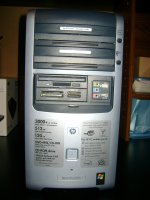
A friend had a computer that looked exactly like that, but it had a Pentium 4 instead clocked at 3GHz.
Just to add, if you really do have an AMD machine from almost 2005, it shouldn't be too hard to add like a gig of ram to that thing and put in a not-dying hard disk(1) and have regular, modern Ubuntu or Xubuntu perform pretty well on there. I don't know if I'd put so much money into a machine like that as to get a SATA card if you don't already have one, but that's just because you can get late Pentium4s and Ds and early-mid generation Core2 desktops for not much more and those will be faster in every single way by probably a factor of two or so.
I absolutely second the suggestion that you look for an old OptiPlex 520/620 or 745 or greater. The 280 was a nice machine but the 520/620 and netburst-based 745s have better cooling. The 745 in particular can also run a Core2Quad q6600/6700 and up to eight gigs of ram. You can also put current PCI Express graphics cards in them. That particular config is a reasonably good base for the next few years if you're really into the "computing on the absolute lowest budget possible" thing.
(1) Just statistically, after eight years there's a pretty good chance the disk is dead or that even if it's not dead, replacing it with a new one will improve performance a whole heck of a lot.
I absolutely second the suggestion that you look for an old OptiPlex 520/620 or 745 or greater. The 280 was a nice machine but the 520/620 and netburst-based 745s have better cooling. The 745 in particular can also run a Core2Quad q6600/6700 and up to eight gigs of ram. You can also put current PCI Express graphics cards in them. That particular config is a reasonably good base for the next few years if you're really into the "computing on the absolute lowest budget possible" thing.
(1) Just statistically, after eight years there's a pretty good chance the disk is dead or that even if it's not dead, replacing it with a new one will improve performance a whole heck of a lot.