

Thread
DIY ADC to VGA lead
I was wanting to run dual displays on my PowerMac G4, but unwilling to spend £30 on the adapter to turn the ADC port into something more useful. This cludgy mess is what I came up with  - it does work though! I used the connector from an EVC cable which I got on eBay for £2.50, but removed the original shroud from the plug so it would fit in the socket.


- it does work though! I used the connector from an EVC cable which I got on eBay for £2.50, but removed the original shroud from the plug so it would fit in the socket.
The analog signals used by VGA are present on the ADC socket. The problem folks usually run into, is that almost none of the ADC<=>DVI adapters propagate those analog signals the DVI analog pins.
So a combination of ADC > ADC/DVI adapter > DVI/VGA adapter usually does not work.
It should be relatively trivial to open up an ADC/DVI adapter and connect up the analog pins at both ends properly.
So a combination of ADC > ADC/DVI adapter > DVI/VGA adapter usually does not work.
It should be relatively trivial to open up an ADC/DVI adapter and connect up the analog pins at both ends properly.
It's just 6 extra pins for
LED, 25V, 25V, USB Data +, USB Data -,USB Return
same pins after that but different orientation.
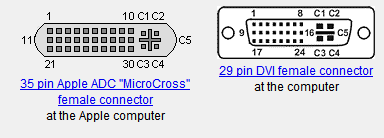
source:
http://pinouts.ru/Video/apple_adc_pinout.shtml
http://pinouts.ru/Video/dvi_pinout.shtml
LED, 25V, 25V, USB Data +, USB Data -,USB Return
same pins after that but different orientation.
source:
http://pinouts.ru/Video/apple_adc_pinout.shtml
http://pinouts.ru/Video/dvi_pinout.shtml
