
Thread
Decked out Apple IIgs vs. Decked out PLUS
It's late 1986 and you are at a computer convention.
You happened to register in the raffle.
You Win!!!
Your Choice is a brand new:
Decked out IIgs, Fully loaded as possible from apple
Box of brand new software, Printer Color Image Writer the whole deal!
Or A
Plus, Fully loaded as possible from apple
Box of brand new software, Printer Color Image Writer the whole deal!
You can only choose one.
What one might it be?


You happened to register in the raffle.
You Win!!!
Your Choice is a brand new:
Decked out IIgs, Fully loaded as possible from apple
Box of brand new software, Printer Color Image Writer the whole deal!
Or A
Plus, Fully loaded as possible from apple
Box of brand new software, Printer Color Image Writer the whole deal!
You can only choose one.
What one might it be?
Back then, it would've been the gs for me.
But, then again, I was in 4th grade at the time, and my school didn't have any Macs, instead a bunch of //e's. One of which sorta became "mine" when we'd go to use the computer lab. A machine that essentially was identical to my current //e, except unenhanced, and an aftermarket half-height second floppy drive. Also didn't have the RamWorks II.
-J
But, then again, I was in 4th grade at the time, and my school didn't have any Macs, instead a bunch of //e's. One of which sorta became "mine" when we'd go to use the computer lab. A machine that essentially was identical to my current //e, except unenhanced, and an aftermarket half-height second floppy drive. Also didn't have the RamWorks II.
-J
I would have chose the IIgs at the time. It was backwards compatible with all the software out at the time and was color. Since I knew nothing about hard drives and computers really it had the wow factor.
Tough call.
In 1986 I had a Sinclair Spectrum. My uncle did fairly well im business and bought a Mac Plus with the huge 20mb external hd. To get to play with the Macs graphic interface was just awsome. I would probably have chosen the Mac Plus. Atleast before 1987, when the Amiga arrived.
In 1986 I had a Sinclair Spectrum. My uncle did fairly well im business and bought a Mac Plus with the huge 20mb external hd. To get to play with the Macs graphic interface was just awsome. I would probably have chosen the Mac Plus. Atleast before 1987, when the Amiga arrived.
Color was such a big deal at that time, I think the IIgs would have won out for me because of that!
My answer would be different if today I could go back in time as my current self and make that choice -- There is a special place in my heart for compact macs, much more than any Apple II. "Today-me" would definitely go for the Plus.
My answer would be different if today I could go back in time as my current self and make that choice -- There is a special place in my heart for compact macs, much more than any Apple II. "Today-me" would definitely go for the Plus.
Does the GS have the might-as-well-be Mac GUI- GS/OS on it? The Woz edition IIgs I had 18 years ago had that. With the color and look alike GS/OS, I'd probably go with the IIgs.
Plus, hands down.
In 1986 I had the aging C-64 with wireless joysticks and 15" Trinitron TV for playing Red Baron. I'd already made the decision to pass on the Laser 128 for A2-ness and the Commodore 128 for CPM. Instead, by '86 I'd purchased the Tandy 1000SX/13"(?) CGA Monitor & had bolted training wheels up to it for the stock Basic and Lotus Framework install.
In 1986 Fontographer had already been released and was in use as the first PostScript illustration program up on Madison Avenue. Since I was in the sign and display business at the time, I was all over that like stink on poo. [} ] ]'>
] ]'>
Of course, I was already a little over 30 with the rug rat underfoot at the time.
In 1986 I had the aging C-64 with wireless joysticks and 15" Trinitron TV for playing Red Baron. I'd already made the decision to pass on the Laser 128 for A2-ness and the Commodore 128 for CPM. Instead, by '86 I'd purchased the Tandy 1000SX/13"(?) CGA Monitor & had bolted training wheels up to it for the stock Basic and Lotus Framework install.
In 1986 Fontographer had already been released and was in use as the first PostScript illustration program up on Madison Avenue. Since I was in the sign and display business at the time, I was all over that like stink on poo. [}
] ]'>Of course, I was already a little over 30 with the rug rat underfoot at the time.
Decked out IIgs, after all the OS is more modern than classic MacOS. 
^Cool video.
-J
-J
@ NJRoadfan - it was about the apps, not the OS, especially back in 1986 before all wound up being developed for Windows.
nice vid nj.
that is a killer setup you have there
the HD in that enclosure must be a quantum.
that is a killer setup you have there
the HD in that enclosure must be a quantum.
Depends how much I knew about either system at the time,
but I think seeing them side by side,
IIGS for me.
Color on the screen, larger screen, and the color printing? Yes.
When I was younger, black/white (based on TV sets) meant boring to me.
Even if it was a green phosphorus screen, I'd take it.
but I think seeing them side by side,
IIGS for me.
Color on the screen, larger screen, and the color printing? Yes.
When I was younger, black/white (based on TV sets) meant boring to me.
Even if it was a green phosphorus screen, I'd take it.
I'll go back to playing Shufflepuck Cafe..... in color.@ NJRoadfan - it was about the apps, not the OS, especially back in 1986 before all wound up being developed for Windows.
The Apple IIgs out of the box was compatible with 8-bit Apple II programs, so long time favorites like VisiCalc and Appleworks were still in use (the latter saw updates into the late 90s-early 00s). There were IIgs specific apps like Appleworks GS. In terms of content creation, most of the 16-bit era programs like Deluxe Paint were ported to the system. Plus you got stuff like Music Construction Set on the audio side.
This thread reminds me of when I was (*mumblemumble* old) back in 1986, whatever general interest computer magazine the family was subscribed to at the time (I honestly can't remember, it may have been "Compute!") ran a contest where the winner could pick between either a Mac Plus with an external hard drive or an IBM PC/AT of some configuration with a hard disk and a color monitor, I don't know if it was CGA or EGA. I'm pretty certain if the family had won back then we would have chosen the AT but I probably would have lobbied for the Mac at least a little just out of curiosity; Macs were "exotic" out in the sticks back then.
(Realistically the AT would have been the "correct" choice for a number of reasons but if we had won it it probably would have been repeatedly gutted and upgraded with new motherboards well into the mid 90's, as happened to the boat-anchor AT clone we ended up with a year or two later.)
Tell the truth I was pretty anti-Apple II at the time, so if I'd won the contest described here back then I would have been pretty tempted to pick the Plus over the IIgs simply out of spite. When I was in elementary school it was the rich kids who owned Apple IIs and if your school had Apples in the computer lab, which most did, they'd lord their ability to take disks home over the other kids. (You really had to love how the teachers were so willing to run off pirate copies of the lab software for those jerks...)
(The secondary schools the area, however, mostly had PC clones. Way to be consistent guys, but another argument for the PC/AT!)
(Realistically the AT would have been the "correct" choice for a number of reasons but if we had won it it probably would have been repeatedly gutted and upgraded with new motherboards well into the mid 90's, as happened to the boat-anchor AT clone we ended up with a year or two later.)
Tell the truth I was pretty anti-Apple II at the time, so if I'd won the contest described here back then I would have been pretty tempted to pick the Plus over the IIgs simply out of spite. When I was in elementary school it was the rich kids who owned Apple IIs and if your school had Apples in the computer lab, which most did, they'd lord their ability to take disks home over the other kids. (You really had to love how the teachers were so willing to run off pirate copies of the lab software for those jerks...)
(The secondary schools the area, however, mostly had PC clones. Way to be consistent guys, but another argument for the PC/AT!)
njroadfan, you should get the other model System Saver. It has 2 slots for your 3.5" drives so you can tuck the System Saver + 2 floppies under the monitor.
That unit was called the "Conserver" from Applied Engineering.
http://apple2online.com/web_documents/ae_conserver_brochure.pdf
They aren't all that common, unlike the System Saver GS.
http://apple2online.com/web_documents/ae_conserver_brochure.pdf
They aren't all that common, unlike the System Saver GS.
1986? The GS, for sure. Although if late 1987, and offered the same choice, I'd go with the Plus - by that point, the Macintosh being the winner was more clear. In 1986, the GS made it appear that the Apple II line still had quite a life left in it.
Apple IIgs all the way. Our school got these new prior to the LC's and I though they were just the coolest thing.
TONS of cool games for these plus color and sweet sound.
Not to bit of a fan of single color displays or black and white. Just my pref.
Still have yet to get my hands on a IIgs for my collection.
TONS of cool games for these plus color and sweet sound.
Not to bit of a fan of single color displays or black and white. Just my pref.
Still have yet to get my hands on a IIgs for my collection.
Apple IIgs for sure. It had the color, the much larger software base as well expansion possibilities, even back in the day, getting IIgs specific cards/software would mean ordering them abroad, as IIgs was not even sold in Finland. In same catelogory the Amiga 1000/500 had that market seqment owned quite nicely. I can't remember what the schools had generally but ours had atleast some CP/M machines and i'd assume some basic model PC's.
Amiga models kicked those PC's h a r d with the specs and the price.
Amiga models kicked those PC's h a r d with the specs and the price.
In late '86, I was using an old Timex Sinclair 2068, and I lusted after Macintosh products. Other than the Apple IIe computers we used in high school, I knew little about Apple II computers, other than how to program them in Basic. So probably would have gone for the Mac.
If I hadn't already seen comps done on the Mac in printout from LaserWriters and Lino output, using them for projection patternmaking and screen printing, I likely would have been tempted by the IIgs as well. I liberated one on the sidewalk near the shop later on, pretty cool hardware.
I'm still using the KBD from that one! :approve:
I'm still using the KBD from that one! :approve:
Would the Plus have actually had a hard drive?
No hard drive with either, I would have chosen the IIGS, might still today.
Hard drive with the Plus, I probably would have chosen a Plus.
Although, back then I would have only been interested in games, so the IIGS would probably have won out.
Tough call, did I flip flop enough?
No hard drive with either, I would have chosen the IIGS, might still today.
Hard drive with the Plus, I probably would have chosen a Plus.
Although, back then I would have only been interested in games, so the IIGS would probably have won out.
Tough call, did I flip flop enough?
@NJRoadFan
Do you also boot from the CFFA card?
I am curious how the speed compares between the HD and your SCSI card.
I finally acquired a SCSI card for an Apple II, but it's just the standard model Apple SCSI, not the high speed model.
Do you also boot from the CFFA card?
I am curious how the speed compares between the HD and your SCSI card.
I finally acquired a SCSI card for an Apple II, but it's just the standard model Apple SCSI, not the high speed model.
I have done informal benchmarks between the CFFA3000 and my RamFAST Rev. D SCSI card with the stock 256k cache. Keep in mind that this was done before the latest CFFA3000 firmware with improved access times.
Boot up time from power-on to desktop.
CFFA3000 (no DMA support available): 44 seconds
RamFAST (DMA Off): 41 seconds
RamFAST (DMA On): 38 seconds
The RamFAST lives up to its name, even though its connected to an old, slow Apple 40SC external hard drive. Its most noticeable when closing Finder windows (at least on a machine with a TWGS running at 12.5Mhz with 32k cache). You get a pause when the CFFA3000 writes the FINDER.DATA file information before closing the window, while it instantly closes on the SCSI drives. CFFA volumes take a second to mount when returning to Finder, while the RamFAST volumes mount instantly. Part of it is DMA and part of it is aggressive caching. Chances are you won't notice any speed difference anyway if you are running a stock 2.8Mhz IIgs.
If it wasn't bottlenecked by an 8bit 1Mhz bus, the RamFAST is likely faster than Apple's built in SCSI implementations.
Boot up time from power-on to desktop.
CFFA3000 (no DMA support available): 44 seconds
RamFAST (DMA Off): 41 seconds
RamFAST (DMA On): 38 seconds
The RamFAST lives up to its name, even though its connected to an old, slow Apple 40SC external hard drive. Its most noticeable when closing Finder windows (at least on a machine with a TWGS running at 12.5Mhz with 32k cache). You get a pause when the CFFA3000 writes the FINDER.DATA file information before closing the window, while it instantly closes on the SCSI drives. CFFA volumes take a second to mount when returning to Finder, while the RamFAST volumes mount instantly. Part of it is DMA and part of it is aggressive caching. Chances are you won't notice any speed difference anyway if you are running a stock 2.8Mhz IIgs.
If it wasn't bottlenecked by an 8bit 1Mhz bus, the RamFAST is likely faster than Apple's built in SCSI implementations.
Interesting for sure. Was that with a Compact Flash card, or does it not matter USB vs compact flash?
Do you think the performance of your SCSI card would improve with a faster drive?
If I'm not mistaken you have the fastest accelerator and the fastest SCSI card made for the IIGS right?
I am looking forward to using mine with an actual SCSI drive.
Do you think the performance of your SCSI card would improve with a faster drive?
If I'm not mistaken you have the fastest accelerator and the fastest SCSI card made for the IIGS right?
I am looking forward to using mine with an actual SCSI drive.
The RamFAST is the fastest SCSI card for the Apple II. The Transwarp GS could run up to 16Mhz, but that requires modification and a better power supply. The law of diminishing returns kicks in though, so any speed boost over 12Mhz would be negligible. Performance of the card likely won't improve much with a faster hard drive. The Apple II bus is the bottleneck. Speed of CF vs. USB doesn't make a difference, both are so much faster compared to the host system. The CFFA3000 has more processing power than the IIgs its in!
If I were where I am now [HS Senior] in 1986 I'd be accustomed to Apple II software, so that and color would send me to the IIgs. Luckily I now have both and don't have to make a choice.
I just sold a TS1000 last month.
that's how i got hooked, ZX81 with 1k memory, (original from Timex 1000)
as for choice, me i would take the IIgs, never had or touched a plus went from the IIgs to IIfx
as for choice, me i would take the IIgs, never had or touched a plus went from the IIgs to IIfx
Gotta love how you could peel the keyboard off a ZX81/TS1000 like a sticker. Best use I ever found for one was as a source of a spare Z-80 when the one in my Tandy 4P went *poof*.
There you go ZX80 replica -> http://www.ebay.com/itm/ZX80-Replica-Kit-/151179082155?pt=US_Vintage_Computers_Mainframes&hash=item2332f9b9ab :lol:
is that what these things are?
there was piles of em.
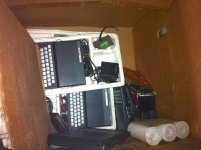
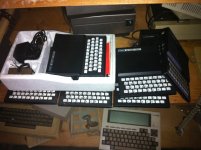
there was piles of em.
Yup.
ZX-81s/TS-1000s were like cockroaches for a while, crawling out of the woodwork when you least expected it. Sometime around 1990 a friend of the family was given a box of three of them (two of one and one of the other models, I *think* the TS-1000s outnumbered the ZX-81s) because someone they knew heard "Oh, you don't have a computer at home? But your kid (then about five) needs to learn computers!" and thought they were helping by donating them. I was asked for help to set up their "new" computer, and upon seeing what they were given I volunteered to trade them an IBM XT I got at the government surplus depot for... what was it, $15? for the lot. No kid deserves to have a Timex Sinclair inflicted on them.
In addition to being a good source of Z-80s they did indeed make excellent doorstops.
In addition to being a good source of Z-80s they did indeed make excellent doorstops.
good i am glad i didn't go to alot of trouble to get em.
A close second for worthless is the Commodore Plus/4. If anyone wants one in the box, I have one for you.
Ah the ZX81 wasn't all that bad, very affordable when it came out (even cheaper if you built it yourself) and great for learning BASIC. But a ZX81 in 1990...
Actually neither was the Plus4, especially with a proper graphical operating system running on it in the form of GEOS (once the 3rd most popular OS in the world by sales).
Well basically you can fun with pretty much any old piece of junk if you're into that
Actually neither was the Plus4, especially with a proper graphical operating system running on it in the form of GEOS (once the 3rd most popular OS in the world by sales).
Well basically you can fun with pretty much any old piece of junk if you're into that
Im interested in a Plus 4, looking for a 16 too...
Uniserver, did you grab any of those? I think both the sinclair and the Plus were pretty much only used with tape drives.
That kit is interesting, but for that much money I think I would pay the extra and build an Apple 1 clone.
yeah the keyboard of the ZX81 was the first thing to go, i replaced it with a keyboard of a mainframe workstation where i re-wired the individual keys,
then built a wooden enclosure for the keyboard where the whole ZX81 board fitted under, like a VIC-20 / Comodore 64 type.
i might still have it somewhere at my parent's place with all my other childhood stuff
then built a wooden enclosure for the keyboard where the whole ZX81 board fitted under, like a VIC-20 / Comodore 64 type.
i might still have it somewhere at my parent's place with all my other childhood stuff
That would be pretty cool to see.
I have 2 of then I think. I can't remember of they are the same model or not.
I need to hook up an old TV and see of they still work.
I have 2 of then I think. I can't remember of they are the same model or not.
I need to hook up an old TV and see of they still work.
the second mod was to remove the RF modulator and hooked it bypassing the tuner on the TV for better picture, and i could then also simulate different monitor colors, amber (yellow), green, black on white and reverse.
i also ended up getting a 16K expansion.
that's the one i learned my programming skills, when i got bored of the limitations, that's when i switched to a IIe clone (could not afford a real one)
i also ended up getting a 16K expansion.
that's the one i learned my programming skills, when i got bored of the limitations, that's when i switched to a IIe clone (could not afford a real one)
It's strange how common they seem to be to this day. There's almost always at least one on the local Craigslist. (Either stand alone, or in the pile when someone's selling off their Commodore collection.) Commodore must have made a lot of the things, impressive given what a spectacular flop they were.
I remember playing around with a COCO2, i think it was in-between my c64 and 286, it seemed like a pretty good computer.
I think it had dos 3.3.
http://starringthecomputer.com/computer.html?c=179
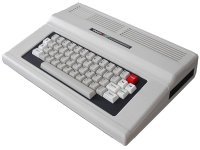
I think it had dos 3.3.
http://starringthecomputer.com/computer.html?c=179
Are you sure it wasn't a Tandy 1000 EX:

Or 1000 HX?:

The CoCo didn't run "DOS". (Well, at least not MS-DOS.) It was a Motorola 6809-based 8-bit system that normally ran its built-in Microsoft BASIC-based environment. (There were several alternative OSes available for it, including the more-than-vaguely UNIX-ish OS-9 from Microware Systems.) The 1000EX/HX were sorta-mostly-PC compatible systems packaged in the odd home computer-shaped console case and had a few unique features, like a stripped down version of DOS in ROM they could boot from instead of a floppy.
I would love to find a broken EX/HX and cram a Mini-ITX-style motherboard into one.
I remember it had a floppy drive, and would boot up to a command prompt, and I think if you typed in ver it said ms dos 3.0 or 3.3.
The guy who i got the thing from was very computer savvy i remember.
The guy who i got the thing from was very computer savvy i remember.
Well, this is what a Color Computer 2 looks like when it boots up:

And "VER" returns:
?SN ERROR
(Happen to have MESS with a CoCo ROM handy.) So, yeah, almost certainly a 1000EX/HX. Or a *really* impressive casemod. (A CoCo 2 would be hard to fit a Mini-ITX motherboard into, let alone the guts of any 80's PC clone.)
And "VER" returns:
?SN ERROR
(Happen to have MESS with a CoCo ROM handy.) So, yeah, almost certainly a 1000EX/HX. Or a *really* impressive casemod. (A CoCo 2 would be hard to fit a Mini-ITX motherboard into, let alone the guts of any 80's PC clone.)
what happens when you want to list whats on the floppy disk?
Dir?
Dir?
Was the computer you remember capable of displaying lowercase letters? A Coco can't.
(And yes, the command for getting a directory in disk color basic happens to be "DIR", but the drive names are numbers, not letters like ms-dos, and most other commands are different. My first two computers were members of the Tandy CoCo family, so I'm pretty darn sure the machine you remember wasn't one.)
(And yes, the command for getting a directory in disk color basic happens to be "DIR", but the drive names are numbers, not letters like ms-dos, and most other commands are different. My first two computers were members of the Tandy CoCo family, so I'm pretty darn sure the machine you remember wasn't one.)
Oh then DIR?
Yes, I do not remember case being an option.
i remember the upper part of the case was not screwed, it was just sitting there.
Sometimes the color would get strange, he had some kind of mod to the video circuit, use some temporary spring loaded test clip things, but in a permanent way. You had to give it a little wiggle on occasion.
I remember asking the kid, why his dad did this? he said, I'm sure it was some kind of imporvment.
Yes, I do not remember case being an option.
i remember the upper part of the case was not screwed, it was just sitting there.
Sometimes the color would get strange, he had some kind of mod to the video circuit, use some temporary spring loaded test clip things, but in a permanent way. You had to give it a little wiggle on occasion.
I remember asking the kid, why his dad did this? he said, I'm sure it was some kind of imporvment.
You said yourself this thing ran MS-DOS. A TANDY COLOR COMPUTER 2 DOESN'T.
lol now that you are getting all hissy about it
The floppy drive must of had DOS, (Disk Operating System) ?? yes?
ok its all coming back to me now!!!
i got it!
It ran windows 95, and pretty darn good i might add!!
The floppy drive must of had DOS, (Disk Operating System) ?? yes?
ok its all coming back to me now!!!
i got it!
It ran windows 95, and pretty darn good i might add!!
*snicker* Hey, whatever. If you treasure the memory of the time you met a magical kid from the future who's dad somehow hacked a Tandy CoCo to run an OS for a completely different in almost every possible way computer who am I to take that from you? Maybe he crammed a flux capacitor in there while he was at it.
Ya know what? In all seriousness...
Was there version 3 or 3.3 of basic? maybe? i took, that VER + under lic from Microsoft and drew my own conclusion?
I hear those flux capacitors are pretty fantastic. but in order for it to work properly the computer has to travel at 88mph.
yeah i did treasure that memory but my heart will go on.
Was there version 3 or 3.3 of basic? maybe? i took, that VER + under lic from Microsoft and drew my own conclusion?
I hear those flux capacitors are pretty fantastic. but in order for it to work properly the computer has to travel at 88mph.
yeah i did treasure that memory but my heart will go on.
A coco usually *wasn't* booted from a "dos" disk. The ROM-resident basic (the ROM was in the disk controller pak, a plastic box about the size of an 8-track tape that plugged into the cartridge slot on the side, where the black door is) contained a rudimentary set of disk management commands. BASIC versions varied from 1.0 to 1.2.
Maybe you're confusing two different sets of memories in your head. (The kid had a hacked with CoCo and you just don't really remember anything much about how it worked specifically. Honestly. .. the CoCo would not have made much of an impression on a kid with a c64. The 6809 in them is one of the best 8-bit CPUs of the era and it had a good BASIC, but the graphics and other features were frankly crummy compared to most of the competition. They're the sort of thing engineers and Ham Radio nuts appreciated.)
Maybe you're confusing two different sets of memories in your head. (The kid had a hacked with CoCo and you just don't really remember anything much about how it worked specifically. Honestly. .. the CoCo would not have made much of an impression on a kid with a c64. The 6809 in them is one of the best 8-bit CPUs of the era and it had a good BASIC, but the graphics and other features were frankly crummy compared to most of the competition. They're the sort of thing engineers and Ham Radio nuts appreciated.)
ah yeah you are correct.
Here is what i remember about it though.
The kid would call it Trash 80 and it didn't make sense to me.
Because that COCO2 I had seemed like a good working, solid machine.
I remember, I was able to type in some basic programs from a magazine.
Run them, and then save em onto floppy. It was straight forward…
I do know that i liked it more then the c64.
but the gap between the C64 and the 286 was narrow, so my coco2 experience was short.
but the memory was fond!
The next thing I remember of computer importance was discovering SMARTDRV.EXE Woha!
I was in heaven! And that's the way it is. :-D
Or was it that it was pleasing to use, for these guys because it was familiar due to it being a derivative of the 6800
http://en.wikipedia.org/wiki/Motorola_6800
And when these guys where in college getting their fancy degrees, They were around systems using the 6800 or the PDP-11 etc. ?
Here is what i remember about it though.
The kid would call it Trash 80 and it didn't make sense to me.
Because that COCO2 I had seemed like a good working, solid machine.
I remember, I was able to type in some basic programs from a magazine.
Run them, and then save em onto floppy. It was straight forward…
I do know that i liked it more then the c64.
but the gap between the C64 and the 286 was narrow, so my coco2 experience was short.
but the memory was fond!
The next thing I remember of computer importance was discovering SMARTDRV.EXE Woha!
I was in heaven! And that's the way it is. :-D
Or was it that it was pleasing to use, for these guys because it was familiar due to it being a derivative of the 6800
http://en.wikipedia.org/wiki/Motorola_6800
And when these guys where in college getting their fancy degrees, They were around systems using the 6800 or the PDP-11 etc. ?
The major attraction of the CoCo compared to a C64, other than some esoterica related to the CPU, was that for programming/problem solving it was a much more "straighforward" machine. The Achilles heel of the C64 was that despite having nifty graphics and sound hardware the BASIC interpreter was *exactly the same version* as that used in a 1978 Commodore PET and thereby supported *none* of it. (If you wanted to make pretty pictures and noises from BASIC you had to learn how to POKE bits straight into the video memory and the VIC-II and SID chips.) The CoCo's graphics and sound hardware were much less impressive but they were easy to use, with BASIC commands to directly plot points, draw lines and shapes, etc.
The TRS-80 line used pretty vanilla hardware and in general the machines were not great choices for people that wanted a computer mostly to play video games. But the machines were well documented, widely available through a channel that "geeks" used to frequent (Radio Shack in the 70's-early 80's was a much different place than the zombie it is today), and the "vanilla-ishness" of their hardware made them easy for a person with the right skills to hack/customize/expand in nonstandard ways. The Apple II these days gets all the kudos for being "open" (history's written by the winners, after all) but there are parts of it that *are* proprietary (Tandys used bog-standard Shugart-interface disk drives for instance, not hacked mechanisms like Apple) and Apple IIs were *much* more expensive than the TRS-80s generally were. It was natural that the line attracted "cheapskate techy"-types.
(When the cheap Commodores like the VIC-20 and C64 came along they sort of shared the "cheap hackable niche" with the low-end Tandys, but I think it's fair to say there were subtle differences in the sort of person they appealed to. With their fancier-but-harder-to-access graphics the Commodores attracted "computer hackers" while the Tandy camp appealed to people who were out to solve technical problems that happen to involve computer hacking. If that makes any sense.)
The deal with the 6809 was it was essentially the only 8 bit CPU that *really* supported modular, relocatable code without resorting to ugly hacks, and was considered to have an "elegant" instruction set. (Although it shared DNA with the 6800 it was *not* binary compatible with it and was basically better in every possible way; by comparison the competing Z-80 was a binary-compatible upgrade to the Intel 8080 with its extra registers and features "tacked on", which made its instruction set rather haphazard.) It offered *far* superior code density than the 6502 (the 6502 also had some onerous limitations relating to things like the size of the stack), and it had a multiply instruction, practically unknown amongst 8-bit CPUs. In short, there were things about it that appealed to computer science types.
Practically speaking the 6809 didn't give the CoCo any earth-shattering abilities beyond the reach of other home computers (as noted, the tradeoff in the CoCo's case for the nicer CPU was some pretty drab graphics hardware which at best could be charitably described as being about as good as the original Apple II's) but, you know, in the "mine is better than yours" pissing contests that inevitably broke out between the various home computer partisans it's pretty much *the* thing it had going for it.
Obscure trivia point, which you probably saw when you read the article, was that the Mac was originally slated to be based on the 6809. The 6809 is in fact arguably almost as "powerful" as the 68000 by some measures but it is ultimately hamstrung by its 64k native address space. Other obscure point was that, again, because of the 6809's ability to support modular code there *were* a number of "supermicros" (that SWTPC system you picked up in Florida is one) which used it to ran various "Unix-like" operating systems like UniFlex and OS-9. (There were multitasking OSes for the Z-80 and other CPUs as well, like MP/M, but they're in a number of ways less sophisticated.) The CoCo could actually run some stripped-down versions of these OSes, although that was really a niche thing in the CoCo community (I'd be *really* surprised if that kid or his dad was doing it), at least until the CoCo3 came along with the paged memory and 80 column screen hardware sufficient to make it worthwhile... but by that time the writing was clearly on the wall for the CoCo anyway.
At one point Radio Shack had a "trade in any computer for $200 off a CoCo(2? 3?)" deal going. This was at the same time you could buy a TS-1000 in a bubble pack at the drug store for $50. Radio Shack was inundated with little black wedges. The Tandy offices in Dallas supposedly used them for door stops.
Funny you say that as I mostly remember the Timex Sinclair from a display on an end cap at the local drug store. It was next to the case full of Atari 2600 cartridges.
It's kind of sad, but in a way you could consider those $60 cheap-*ss Android tablets they sell at drugstores these days the spiritual successor of the TS-1000. I guess it says something about just how far technology has come that for about the same price you get some number of GB of flash storage, a full-color screen, a CPU clocked *at minimum* around 200 times faster, wireless networking... but the end result still sucks compared to what you'd get if you just sucked it up and ponied up twice the price for the "real thing".
yeah those very cheap android tabs… They sorta kinda work. but not really ….
They sorta kinda work. but not really ….I even see Kindle Fire HDs and Samsung Galaxys on display with various "Process X is not responding. Would you like to Close it?" errors on them. Granted, they are 10x better than the POS, cheap, generic Chinese tabs but crashiness isn't limited to the bottom rung.
so basically Android = Crap ?
The thing with android is if your not running AOSP, (Basically Stock android), the experience is going to differ from device to device as each version of android is recompiled with all the manfacturer modifications and junkware. For example, Samsungs version is touchwiz and its pure garbage. Install a nice clean AOSP/Cyanogen copy on there and its blazing fast, less bloated, better response, and much more stable.
So long as you have a tab that you CAN load a vanilla Android onto, that's good advice.
*eyeroll*
Imagine if instead of IOS being locked up tight in Apple's little vaults it was open source enough that any schmo could download it and compile it. (Copies made that way wouldn't have the "Apple Seal of Approval", but it would be *legal*. Google has something like a "stamp of approval" for android devices as a prerequisite for bundling the Google Play store application on the device, but it's not something a manufacturer legally has to do.) So then imagine some fly-by-night bottom-feeding electronics sweatshop in China downloaded the IOS code, minimally hacked it so it would run (well, at least boot) on the *very cheapest* ARM SoC they could find, paired it with the cheapest touchscreen that week (in many cases a resistive model, the same tech found in 2002-vintage PocketPCs/PalmPilots), shoved it in a shoddy plastic case with a knockoff battery that's good for about an hour, and shoved it out the door with ZERO testing. Do you think that device at $60 would work as well as an iPad Mini? Probably not, right? Would the fact it existed at all then mean "IOS == Crap"? Clearly it would according to your logic.
(It does demonstrate, I suppose, that an Android purchaser needs to exercise a bit more common sense than an iDevice buyer, at least so far as asking themselves: "Gee, the brand name one is $200 while this one from a company who's name is a random collection of letters and box is covered with nonsensical Engrish phrases is only $60. Should I *REALLY* buy the cheap one? How hard could making one of these things really be?" before they pony up the money. There's the cost of freedom for you.)
Anyway, Google "ipad apps crash". It's not like applications don't blow up on IOS.
haha
I was just kidding. -- it was kind of an inside joke between me and dylan.
I'm sure if you have a tablet that costs the same amount as an ipad, android os works out just fine..
The Software is only as good as the hardware.
Dylan sent me this lot of off brand (rma returned defective) tablets with android on em.
And they work somewhat…
I have been going through them right now, trying to swap parts to make some solid ones, for xmas presents.
I'v always liked android every sense the T-moble G1.
However, my iPhones have mostly treated me pretty good. ( so far )
I was just kidding. -- it was kind of an inside joke between me and dylan.
I'm sure if you have a tablet that costs the same amount as an ipad, android os works out just fine..
The Software is only as good as the hardware.
Dylan sent me this lot of off brand (rma returned defective) tablets with android on em.
And they work somewhat…
I have been going through them right now, trying to swap parts to make some solid ones, for xmas presents.
I'v always liked android every sense the T-moble G1.
However, my iPhones have mostly treated me pretty good. ( so far )
The difference is iOS tends to silently crash. The app closes or freezes. Android will happily tell you that it's puked on itself. I don't quite know which I prefer.
For myself, I prefer to be told about the crash. But for any user who may call me as a result of the crash, I prefer the silence. A software crash may well be a one-time fluke occurrence, but many end-users are easily unsettled by an error message and will get worried, panic, etc... An app just closing itself is an annoyance, but the user knows what to do: re-launch and move on. If it persists, then ask for help.
I always lean toward knowing WTF happened verses not, but I suppose the reverse is certainly possible. The nice thing about getting a message is *sometimes* if you get said message and Google with the right magic words it you'll find a solution to the problem, while if it just goes "blink" and the application/device dies/reboots you'll have nothing.
(In particular I managed to fix a problem related to the calendar blowing up on my old HTC Incredible with some creative Googling of the "process X puked" message; HTC's official solution to the problem was to reset the phone to factory settings and restore, which seems to be the suggested solution for a lot of iPhone/iPad problems.)
That said, I can't remember the last time I had a background process wedge and die on any of my Android devices... (Wait, no, I stand corrected. Totally forgot about the freaking Facebook widget. *sigh*) The web browser on my Samsung tablet does like to nuke itself occasionally (I dunno, once a week? depending on how many tabs I have open), but it's rarely been a problem since it's good at restoring windows after a crash. Is what it is, I guess.
(In particular I managed to fix a problem related to the calendar blowing up on my old HTC Incredible with some creative Googling of the "process X puked" message; HTC's official solution to the problem was to reset the phone to factory settings and restore, which seems to be the suggested solution for a lot of iPhone/iPad problems.)
That said, I can't remember the last time I had a background process wedge and die on any of my Android devices... (Wait, no, I stand corrected. Totally forgot about the freaking Facebook widget. *sigh*) The web browser on my Samsung tablet does like to nuke itself occasionally (I dunno, once a week? depending on how many tabs I have open), but it's rarely been a problem since it's good at restoring windows after a crash. Is what it is, I guess.
I saw this one last weekend:
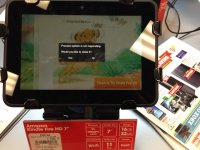
Wow, that's an impressively vague error message, I'll give you that. (Never seen that before; it's apparently a generic "the Dalvik Java VM interpreter is wetting its bed" message and the best/most likely cure for it is to force it to purge its bytecode cache. Oddly it seems like the majority of hits on it are from people running rooted/development ROM versions or Kindle Fires. Maybe that says something about Kindle's "improvements" to base Android...)
With droid, only way you get anything is if your connected via the ADB drivers via usb debugging, and have LogCat connected. Logcat tells you the "bluescreen-like" info.
Sucks, but thats the way it is.
Sucks, but thats the way it is.