
Thread
HELP! Noob Building a Parallel Port ROM HackStation . . .
. . . as if I didn't already have enough on my plate, now I'm trying hack a PC together for Mac ROM burning playtime! :
So far so good, almost. I had snagged an ATX MoBo on eBay a couple or three years back. I figured the very heatsink would come in handy even if nothing else worked, though it was purported to be good, IIRC. I have to search for the info on it here a/o pull what I've got together all apart and just read the friggin' board if it's not something basic I'm doing wrong.
I installed a new, when I bought it, unused 500W ATX PSU and plugged it in.
I hooked up the secondary exhaust fan in the case.
I located the power switch header by trial and error and powered it up.
No drives of any kind installed, just testing for RAM check, BIOS setup, etc.
Hooked it up to the Mutisync Trinitron, plugged in a wireless USB mouse nubbin and a wired USB KBD.
Hit the switch again . . . nothing but the noise of all the fans running, bopkes on the CRT. :-/
Anyway, it has PCI 1, PCIe X 1 and PCIe X 16 slots as well as a slot for a riser that I don't remember having.
A board with that kind of I/O shouldn't need a Floppy to poll in order to boot should it?
Could the missing riser card be the problem? :?:
I'll be hooking up PS/2 peripherals for a second try while waiting for feedback.
I haven't built a PC from scratch since the 386SX and CorelDraw box were waiting for the release of Windows 3.0.
TIA, gang,
jt
So far so good, almost. I had snagged an ATX MoBo on eBay a couple or three years back. I figured the very
heatsink would come in handy even if nothing else worked, though it was purported to be good, IIRC. I have to search for the info on it here a/o pull what I've got together all apart and just read the friggin' board if it's not something basic I'm doing wrong.I installed a new, when I bought it, unused 500W ATX PSU and plugged it in.
I hooked up the secondary exhaust fan in the case.
I located the power switch header by trial and error and powered it up.
No drives of any kind installed, just testing for RAM check, BIOS setup, etc.
Hooked it up to the Mutisync Trinitron, plugged in a wireless USB mouse nubbin and a wired USB KBD.
Hit the switch again . . . nothing but the noise of all the fans running, bopkes on the CRT. :-/
Anyway, it has PCI 1, PCIe X 1 and PCIe X 16 slots as well as a slot for a riser that I don't remember having.
A board with that kind of I/O shouldn't need a Floppy to poll in order to boot should it?
Could the missing riser card be the problem? :?:
I'll be hooking up PS/2 peripherals for a second try while waiting for feedback.
I haven't built a PC from scratch since the 386SX and CorelDraw box were waiting for the release of Windows 3.0.
TIA, gang,
jt
I would say it is more that random ebay-pulls are not very builder-friendly, but that is a different argument for a different time.
Did you plug in the 12v 4pin or 8pin power connector generally near the CPU socket?
I might also double check standoff positions on the motherboard tray to make sure there are no extras poking at the board from behind.
And do try to find a manual if the front panel header info is not shown on the PCB.
It is also sometimes helpful to have model numbers of parts you are playing with if you are going to be asking for help.
Did you plug in the 12v 4pin or 8pin power connector generally near the CPU socket?
I might also double check standoff positions on the motherboard tray to make sure there are no extras poking at the board from behind.
And do try to find a manual if the front panel header info is not shown on the PCB.
It is also sometimes helpful to have model numbers of parts you are playing with if you are going to be asking for help.
Yep, part numbers coming up along with a search for the manual. That was to be the next step, but I was out of time.
Had to see the grlf, it can't all be fun and games with the Macs, or frustration with PCs ya know! [] ]'>
There's a ton of crap I can't read printed on the mobo, so it's coming out in a few minutes for a photo-op on the copy stand.
I was hoping it was just going to be something simple, like the empty eight lug power socket near the CPU you just mentioned. I'll assume that's where the two four pin headers on the PSU harness ought to have been inserted.
Like I said: I'manoob! :I
Had to see the grlf, it can't all be fun and games with the Macs, or frustration with PCs ya know! [
] ]'>There's a ton of crap I can't read printed on the mobo, so it's coming out in a few minutes for a photo-op on the copy stand.
I was hoping it was just going to be something simple, like the empty eight lug power socket near the CPU you just mentioned. I'll assume that's where the two four pin headers on the PSU harness ought to have been inserted.
Like I said: I'manoob! :I
Grab one of the Pentium era Toshiba Satellites, slap on Windows 95 and hang your hardware off the parallel or serial port. Same thing I do for my Willem station and you are assured full compatibility and it's small. No need building a whole desktop.
Boxes of parts and time I've got, money I don't ATM, so I'm assaulting the objective with what I've got . . . on several fronts. [}] ]'>
It needs to be Win98, '95 is too old to run the burner. I've used 98 before, it's as solid a rock as I've used running windows and I've got a license for it.
Piccies are up! [] ]'>
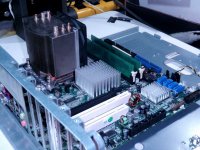
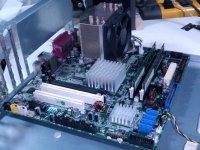
MoBo verbiage:
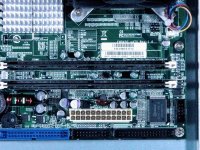
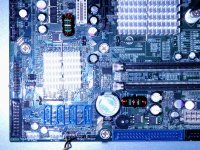
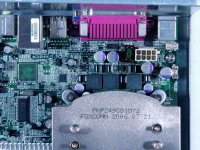
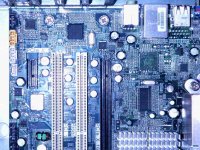
I'll link to the full size shots after I upload them on iFrog.
Does anyone have a clue as to what this might be? I'm googling for info in the AM. |)
] ]'>It needs to be Win98, '95 is too old to run the burner. I've used 98 before, it's as solid a rock as I've used running windows and I've got a license for it.
Piccies are up! [
] ]'>MoBo verbiage:
I'll link to the full size shots after I upload them on iFrog.
Does anyone have a clue as to what this might be? I'm googling for info in the AM. |)
DISK BOOT FAILURE, INSERT SYSTEM DISK AND PRESS ENTER.
Muahahahahahaaaaaaaaaaaaaaa!!!!!!!!!!!!!!!!!!!!!!!!!!!!!!!! :lol:
I gave up on the unknown quantity with the cool heatsink and weird slots I've never had cards for and dug through the MoBo Box. I came up with one that needed the spare old style power cord adapter, but it's happy as heck with the four lug CPU power cable. It has one AGP and three PCI slots, USB AND FireWire, IDE AND SATA, so I can't ask for much more out of a spare/castoff MoBo box.
It fires right up, the fans slow down, it thinks for a while and then tosses that lovely greeting across the CRT. Heck, it even powers down when I push the power button again.
Now I can look for that dratted Win95 HDD in the AM. [] ]'>
< decides he might just as well insall a DVD and see what this thing makes of an old ubuntu CD [}] ]'> >
Muahahahahahaaaaaaaaaaaaaaa!!!!!!!!!!!!!!!!!!!!!!!!!!!!!!!! :lol:
I gave up on the unknown quantity with the cool heatsink and weird slots I've never had cards for and dug through the MoBo Box. I came up with one that needed the spare old style power cord adapter, but it's happy as heck with the four lug CPU power cable. It has one AGP and three PCI slots, USB AND FireWire, IDE AND SATA, so I can't ask for much more out of a spare/castoff MoBo box.
It fires right up, the fans slow down, it thinks for a while and then tosses that lovely greeting across the CRT. Heck, it even powers down when I push the power button again.
Now I can look for that dratted Win95 HDD in the AM. [
] ]'>< decides he might just as well insall a DVD and see what this thing makes of an old ubuntu CD [}
] ]'> >Well, it's booting to the account login for XP installed on a Presario I gutted. I'm in the process of chopping the poor Presario down as an assorted drive stack/card reader/hub/breakout box for the NetBooks, so it doesn't really need this drive any longer. [}] ]'>
ISTR reading something about removing a password to use a Windows install while leaving the user account data encrypted? There's even mention of password resetting on the MoBo. Any help freeing up XP temporarily would be nice. This is a bit newer MoBo than the Presario's so XP should work out fine. I can just wait until next payday as well, has anyone got an XP retail package they wanna let go for cheap or trade goods?
It's off to the Trading Post in the AM!
] ]'>ISTR reading something about removing a password to use a Windows install while leaving the user account data encrypted? There's even mention of password resetting on the MoBo. Any help freeing up XP temporarily would be nice. This is a bit newer MoBo than the Presario's so XP should work out fine. I can just wait until next payday as well, has anyone got an XP retail package they wanna let go for cheap or trade goods?
It's off to the Trading Post in the AM!
Did you already find this PDF about the motherboard?
http://www.daito-me.com/product/maker/Radisys/Endura%20EM945G.pdf
It's only showing support for XP + later.
http://www.daito-me.com/product/maker/Radisys/Endura%20EM945G.pdf
It's only showing support for XP + later.
Didn't know that about windows, I've never done this kind of thing before, I've only really run 3.0/3.1 and '98. I did use XP for about six weeks on HP_Mini before it did a spectacular crash and burn. After a week long horror story working with HP's offshore tech support trying to get it back upl using the restore CD and elevating the case all the way back to California, it still wouldn't work. I'd been booting it off a full-on ubuntu desktop CD during that week, so I installed the NetBook remix and haven't had a problem with ubuntu for four and a half years running now.
Doing a clean install of '98 or XP is the third thing on my list for this setup. Those two bookend OS support for the ROM burner. This morning I'm reinstalling this MoBo in a more civilized case that even has a front bezel and everything! This is quite likely the case from which I'd removed this MoBo and the MIA Win95 HDD. *****
I'll be setting up one of the removable drive bays to make swapping HDDs a snap in my search for the fabled Win95 drive. This week I'll be installing ubuntu on another drive the carrier instead of messing around with XP password avoidance or Win95 for anything other than diagnostics and possible future gameplay. I don't expect ubuntu to run very quickly, if at all, on this board, but it may give me a chance to play around with the new removable SCSI drive bays. A fast SCSI II controller came with my Nikon CoolScan and one of the collection of little Ultra SCSI server drives and adapters should make that interesting. I've got an AGP VidCard or two and a stack of dual-head PCI VidCards to test as well.
This may becoming a fairly palatable way to introduce a black sheep WinPC ROM hacking station into the still growing Mac fold.
***** I've liberated three extra wide (front panel on the right) cases to match the stack Radius 8100/xxx front bezels I bought from macmetex. This wild one is slated to become a PEx sleeper in 81/110 clothing when and if I get the ROM SIMM a comrade is working on to boot my board. The first case I got is already halfway to becoming a wild, internally illuminated, clear cased Radius 81/110 ubuntu GIMPbox. The generic clone I'll be installing this board in will be the wildest hack of the three if all works out. When finished, these three and the actual 81/110/G3 will be the supports for the first two levels of a future Radius display/workstation . . .
. . . one day, Finagle willing. ;D
Doing a clean install of '98 or XP is the third thing on my list for this setup. Those two bookend OS support for the ROM burner. This morning I'm reinstalling this MoBo in a more civilized case that even has a front bezel and everything! This is quite likely the case from which I'd removed this MoBo and the MIA Win95 HDD. *****
I'll be setting up one of the removable drive bays to make swapping HDDs a snap in my search for the fabled Win95 drive. This week I'll be installing ubuntu on another drive the carrier instead of messing around with XP password avoidance or Win95 for anything other than diagnostics and possible future gameplay. I don't expect ubuntu to run very quickly, if at all, on this board, but it may give me a chance to play around with the new removable SCSI drive bays. A fast SCSI II controller came with my Nikon CoolScan and one of the collection of little Ultra SCSI server drives and adapters should make that interesting. I've got an AGP VidCard or two and a stack of dual-head PCI VidCards to test as well.
This may becoming a fairly palatable way to introduce a black sheep WinPC ROM hacking station into the still growing Mac fold.
***** I've liberated three extra wide (front panel on the right) cases to match the stack Radius 8100/xxx front bezels I bought from macmetex. This wild one is slated to become a PEx sleeper in 81/110 clothing when and if I get the ROM SIMM a comrade is working on to boot my board. The first case I got is already halfway to becoming a wild, internally illuminated, clear cased Radius 81/110 ubuntu GIMPbox. The generic clone I'll be installing this board in will be the wildest hack of the three if all works out. When finished, these three and the actual 81/110/G3 will be the supports for the first two levels of a future Radius display/workstation . . .
. . . one day, Finagle willing. ;D
Nope, VERY interesting, thanks much for searching that out for me! :approve:
I've got thae alternate board up and runningalready, so bringing this crazy looking thing back to life will be another project! Now that I think about it, this crazy board may have to be the one for all the above playtime. I just realized that the alternate might only be up to running Win98 acceptably. It does boot into XP though. I only NEED it to run the ROM burner so dog slow XP may be just fine for that, gotta figure out what the alternate board actually is first of all.
Pics coming up during the case swap, so we'll see!
Before you install an OS be aware of the limitations of accessing low level hardware directly. From Win2000 on most hardware can't be accessed directly unless you want to write a device driver. So if you want to program the parallel port, use something like Win98 or you will need to get a 3rd party utility to allow access to LPT1 (the parallel port).
For my Win2000 machines I use the trial version of NTPort (http://www.zealsoftstudio.com/ntport/index.html. The only reason why I'm suggesting this is because I have used it and I know it works.
Happy days in Win98/DOS though, real easy to quickly write some I/O stuff in QBasic
Also my favourite resource for interfacing the parallel port is: http://retired.beyondlogic.org/spp/parallel.htm. Retired!
For my Win2000 machines I use the trial version of NTPort (http://www.zealsoftstudio.com/ntport/index.html. The only reason why I'm suggesting this is because I have used it and I know it works.
Happy days in Win98/DOS though, real easy to quickly write some I/O stuff in QBasic
Also my favourite resource for interfacing the parallel port is: http://retired.beyondlogic.org/spp/parallel.htm. Retired!
Dunno, it's something that costs less for someone to buy outright and have sent to me from China rather than mail his real one back and forth, so I'm not lookin' a gift horse in the mouth.
It's cool, I've got one generic WinBox with all the ports and slots I really need up and running with zero funds spent, leads on all the documentation for that crazy eBay MoBo and I finally had a chance to spend some quality time poking around inside the BEAST from Tekelec.
I also learned a bunch of crap I'd missed out on over the years in the process.
In my book that's a great deal all around. :approve:
It's cool, I've got one generic WinBox with all the ports and slots I really need up and running with zero funds spent, leads on all the documentation for that crazy eBay MoBo and I finally had a chance to spend some quality time poking around inside the BEAST from Tekelec.
I also learned a bunch of crap I'd missed out on over the years in the process.
In my book that's a great deal all around. :approve:
DLPortIO works for windows XP/Vista/7 32-bit.
I have a sivava-willem eeprom burner, and my machine is running Windows 7 X64. Which, nothing that supports a parallel port via a driver will run on any x64 OS.
I did manage to find a driver that works as dlportio/winio.sys for x64, so i got my willem sivava programmer going on win7 x64.
I have a sivava-willem eeprom burner, and my machine is running Windows 7 X64. Which, nothing that supports a parallel port via a driver will run on any x64 OS.
I did manage to find a driver that works as dlportio/winio.sys for x64, so i got my willem sivava programmer going on win7 x64.
AHA! So the upper limit of OS support for the Burner makes sense. I wonder what the difference was between that aweful Win'95 release and the '98 bugfix for that earlier POS-OS to create the lower end OS support cutoff?
I'm leaning more toward trying to run '98 on the BEAST from Tekelec than XP on the board that's up and running now. Does '98 run on ATX/USB/FireWire/AGP/SATA/Gigabit architecture X86?
I'm leaning more toward trying to run '98 on the BEAST from Tekelec than XP on the board that's up and running now. Does '98 run on ATX/USB/FireWire/AGP/SATA/Gigabit architecture X86?
Thanks, CelGen.
Well, I've narrowed the alternate board down to two possibilities, first here it is . . .
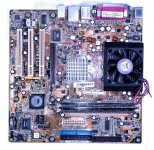
. . . and the possibilities, this . . . A7V8X-LA (Kelut)
. . . and this . . . A7V8X-LA (Kamet 2)
. . . and here's one on eBay, sans proc: COMPAQ HP PAVILION A7V8X-LA 5187-4913 MOTHERBOARD + I/O Shield
It's not a big surprise that the "Pavilion Drive" worked on this one at all! :lol:
I found another drive in the alternate case for the re-installation, here's hoping it's the functioning, password free Win95 drive! :approve:
It looks like '98 is out for this one, but XP is doable, if a stretch.
It sounds to me like this board is pretty much the dim-witted, evil X86 cousin of my dearly departed QS'02.
http://www.overclockersclub.com/reviews/asusa7v8x/
How well can XP run on a machine of this vintage?
Well, I've narrowed the alternate board down to two possibilities, first here it is . . .
. . . and the possibilities, this . . . A7V8X-LA (Kelut)
. . . and this . . . A7V8X-LA (Kamet 2)
. . . and here's one on eBay, sans proc: COMPAQ HP PAVILION A7V8X-LA 5187-4913 MOTHERBOARD + I/O Shield
It's not a big surprise that the "Pavilion Drive" worked on this one at all! :lol:
I found another drive in the alternate case for the re-installation, here's hoping it's the functioning, password free Win95 drive! :approve:
It looks like '98 is out for this one, but XP is doable, if a stretch.
I sure hope this is the right Manual: http://dlcdnet.asus.com/pub/ASUS/mb/socka/kt400/a7v8x-x/e1198_a7v8x-x.pdf
It sounds to me like this board is pretty much the dim-witted, evil X86 cousin of my dearly departed QS'02.
http://www.overclockersclub.com/reviews/asusa7v8x/
How well can XP run on a machine of this vintage?
Maybe not too badly, it appears to have an AMD Athlon XP 3000+ on a 400MHz front side bus . . .
. . . and the RAM appears to have been maxed out at 2GB. ;D
There's no Win'95 install on this HDD, there's apparently a kubuntu install askin' for a password . . .
. . . to the desktop of someone named Trash80! 8-o
I have not one single clue as to how that might have gotten onto this machine. :?:
. . . and the RAM appears to have been maxed out at 2GB. ;D
There's no Win'95 install on this HDD, there's apparently a kubuntu install askin' for a password . . .
. . . to the desktop of someone named Trash80! 8-o
I have not one single clue as to how that might have gotten onto this machine. :?:
Crapdoodle! I've got more MoBos I can try setting up for Win'98 in that case. But this only has to run XP just well enough to run the ROM Burner. I've no intention to use a Windows Box for anything by that.
I emphatically refuse to deal with anything between '98 and XP. I've left 7 on HP_Maxi only because it's too much trouble to get ubuntu set up to run the 3g modem. It's a dedicated Browser/PDF machine, I use OpenOffice only rarely for simple spreadsheets an Notepad for the occasional .TXT assembly for import into to my very happy little OS9 world.
I've got three more PC-133 boards for taking a run at Win'98 if the (Lunchbox) BEAST from Tekelec isn't up to it:
My last resort is a cute cute little board: AGP, four PCI, three ISA slots and a PII CPU Card. It says 650B REV 1.2
Second choice is an ABIT-KT7: AGP, six PCI, one ISA and a CPO socket with which I'm unfamiliar.
The next one to go into testing seems to be a winner, Intel Desktop Board D815EEA2 / D815EPEA2
The specs I found has a Win98/WinME boot time performance chart: intel/tualatin/mobo.shtml
I think I have time to try this one before work, update soon . . .
. . . comments/suggestions will be much appreciated. :approve:
I emphatically refuse to deal with anything between '98 and XP. I've left 7 on HP_Maxi only because it's too much trouble to get ubuntu set up to run the 3g modem. It's a dedicated Browser/PDF machine, I use OpenOffice only rarely for simple spreadsheets an Notepad for the occasional .TXT assembly for import into to my very happy little OS9 world.
I've got three more PC-133 boards for taking a run at Win'98 if the (Lunchbox) BEAST from Tekelec isn't up to it:
My last resort is a cute cute little board: AGP, four PCI, three ISA slots and a PII CPU Card. It says 650B REV 1.2
Second choice is an ABIT-KT7: AGP, six PCI, one ISA and a CPO socket with which I'm unfamiliar.
The next one to go into testing seems to be a winner, Intel Desktop Board D815EEA2 / D815EPEA2
The specs I found has a Win98/WinME boot time performance chart: intel/tualatin/mobo.shtml
I think I have time to try this one before work, update soon . . .
. . . comments/suggestions will be much appreciated. :approve:
That sounds really familiar. I think my last Windows gaming rig may have been this exact board. Had it fitted with a 1.33Ghz Tbird and used the ISA slot for my scanner. (Until I ended up with a free Adaptec 2940, that is.) It'll run Windows 98, but it'll be sort of a bear to get going. (You'll need the chipset drivers from VIA/ABIT, and be *very careful* to install them in the right order.)
(Edit: Yeah, looked it up, that's it exactly. It's a good board... but I would recommend Windows XP for it. 98 was pain and a half. I mostly ran Windows 2000 on mine. Also, if yours has the "RAID" feature with the HPT370 chip I recommend *not* using it, either use the native IDE ports or use the HPT ports in just "plain disk" mode.)
I would probably pick this over the ABIT, only because the drivers for an Intel 815 will probably be easier to find and better written than the ones for the ABIT board.
You know, Trash, if you get *really* desperate I have a couple VIA C3 mini-ITX motherboards in (beat-up) micro cases. (They use a 12V wall wart for power.) I'm planning to set up one, coincidentally enough, to drive my new EPROM burner which requires *DOS*, but maybe I could part with one. I don't know if Windows 98 drivers for those exist, however.
I'd also note that there's much more reasonable options: You could get a USB Parallel doohickey and run 98/XP in a VM on your netbook. If you're persistent about building you can get a 2006-2009 era Core 2 mobo with a Parallel port, or just get any modern motherboard and slap a PCI Parallel car in.
Point being, you're making this more problematic and complex than needed.
Point being, you're making this more problematic and complex than needed.
For the record, USB->Parallel doohickies rarely if ever work for driving things like EPROM burners. They do *not* support the sort of manual bit-flipping on the port that those things require. (They're hardwired to drive *printers* and make a parallel printer look like a USB interfaced one. The EPROM burner software expects the parallel port to be an 8 bit hardware port at address 0x378/0x3BC/0x278 to which it can directly shove and read bits.)
Of course, there *are* those "straight from China" EPROM burners that sell for only $50 or so and *do* work with USB, so the point is still somewhat valid. (The only reason I'm bothering futzing with my old DOS driven one is it supports a few obscure old-style EPROMs that newer ones often don't, like the 2532, which happens to be useful for what I want an EPROM burner for.)
@ IPalindromeI: Thanks, those are great suggestions, but like I've said, I've got some boxes of neat junk saved up from cool PC case acquisitions and random curbside recycling projects. Lack of money and the experience necessary to do any kind of VM setup for this project preclude your far more sensible approach to the objective.
I've also got a couple of sensible approaches up my sleeve, but they cost money and this is a freebie campaign. Besides, Digital Junkyard Wars is way more my style! [}] ]'> I'm having a blast doing this that way as well. Putting Macs into quirky old PC boxen I've done already. Finding and populating PC Boxes that match my stack of Radius Clone front plates is an ongoing campaign and this little skirmish fits right in with the overall war plan. [] ]'>
@ g: I'm pretty sure that's the kind of burner that's headed my way, but HP_Maxi is out of spec being Win 7 and there's just no freakin' way XP will ever again touch HP_Mini. I've already done the repetitive head-desk thing for a full week trying to do that re-install and ubuntu rocks on that cute little sucker, thank you very much!
From the suggestions/information I've gotten so far for going the used XP Box approach, that's out of the question from a monetary standpoint.
I really need to get some PCB pattern digiflage fatigues for Digital Junkyard Wars, but austerity budget it is for a bit . . .
. . . I can't even afford that uber-cool Radius Color work smock oP found for me ATM. :-/
I've also got a couple of sensible approaches up my sleeve, but they cost money and this is a freebie campaign. Besides, Digital Junkyard Wars is way more my style! [}
] ]'> I'm having a blast doing this that way as well. Putting Macs into quirky old PC boxen I've done already. Finding and populating PC Boxes that match my stack of Radius Clone front plates is an ongoing campaign and this little skirmish fits right in with the overall war plan. [] ]'>@ g: I'm pretty sure that's the kind of burner that's headed my way, but HP_Maxi is out of spec being Win 7 and there's just no freakin' way XP will ever again touch HP_Mini. I've already done the repetitive head-desk thing for a full week trying to do that re-install and ubuntu rocks on that cute little sucker, thank you very much!
From the suggestions/information I've gotten so far for going the used XP Box approach, that's out of the question from a monetary standpoint.
I really need to get some PCB pattern digiflage fatigues for Digital Junkyard Wars, but austerity budget it is for a bit . . .
. . . I can't even afford that uber-cool Radius Color work smock oP found for me ATM. :-/
 )] ]'>
"Honey, I blew up the DIMMs."
In this latest event in the saga of the elusive Parallel Port ROM HackStation i've managed to pull off a real boob noob event. I grabbed a couple of sticks that looked right to me in my befuddled stupor and they seemed to click into place correctly . . . but they were missing that extra divot on the PC-133 I should have been using. When I didn't here the usual two beeps and it didn't boot to setup as usual and didn't power back down from the front panel switch I flipped the switch on the PSU and removed a pair of very hot 1GB DDR sticks. OOPSIE!!!!!
When I pulled them out I also noticed that the taller of the PC-133 DIMMs wasn't completely seated completely, dunno if I knocked it loose installing or removing the (very likely ruined) 1GB DDR DIMMS or if it had been that way since I pulled the MoBo out of the anti-static bag.
I now get a near boot without the intervening beeps or winding up in the CMOS Setup.
PXE-E61: Media test failure, check cable error
PXE-MOF: Exiting Intel PXE ROM
Boot Failure: System Halted
IIRC, beeps in POST are usually bad, so am I better or worse off than before that BIG@$$ boo-boo?
Time to crack Upgrading and Repairing PCs 13th EDITION . . .
. . . and/or can somebody give me an answer to that offhand? :?:
In this latest event in the saga of the elusive Parallel Port ROM HackStation i've managed to pull off a real boob noob event. I grabbed a couple of sticks that looked right to me in my befuddled stupor and they seemed to click into place correctly . . . but they were missing that extra divot on the PC-133 I should have been using. When I didn't here the usual two beeps and it didn't boot to setup as usual and didn't power back down from the front panel switch I flipped the switch on the PSU and removed a pair of very hot 1GB DDR sticks. OOPSIE!!!!!
When I pulled them out I also noticed that the taller of the PC-133 DIMMs wasn't completely seated completely, dunno if I knocked it loose installing or removing the (very likely ruined) 1GB DDR DIMMS or if it had been that way since I pulled the MoBo out of the anti-static bag.
I now get a near boot without the intervening beeps or winding up in the CMOS Setup.
PXE-E61: Media test failure, check cable error
PXE-MOF: Exiting Intel PXE ROM
Boot Failure: System Halted
IIRC, beeps in POST are usually bad, so am I better or worse off than before that BIG@$$ boo-boo?
Time to crack Upgrading and Repairing PCs 13th EDITION . . .
. . . and/or can somebody give me an answer to that offhand? :?:
Well, it's time to head for work again, but the "change but one thing at a time" theory has been paying off thus far. CD's up and running, Zip100 is second on the hardware install/test checklist, maxed 512MB PC-133 DIMM from the QS'02 is next. Most recently, the Ultra SCSI Controller, high quality terminated cable, Cheap@$$ Chinese SCA Adapter and one of my hoard of 2.5" U160 SCA drives is purring along happily, but unformatted.
Meanwhile, on the OS front, I tried the ubuntu NetBook 9.10 Remix CD and it popped right up ready to rock. So I tried the 10.10 Desktop CD that HP_Mini loved so much while XP was down and out for the count. As halfway expected, it took so long to come up that I just killed the power.
After the aforementioned hardware evolutions and probably installing a Floppy as well, it's OS playtime again. It's probably not gonna work and even if it does it'll likely be dog slow, but I'll give the Remix a shot at that cute little SCA drive . . .
. . . while I stand by with a fire extinguisher. :O
Meanwhile, on the OS front, I tried the ubuntu NetBook 9.10 Remix CD and it popped right up ready to rock. So I tried the 10.10 Desktop CD that HP_Mini loved so much while XP was down and out for the count. As halfway expected, it took so long to come up that I just killed the power.
After the aforementioned hardware evolutions and probably installing a Floppy as well, it's OS playtime again. It's probably not gonna work and even if it does it'll likely be dog slow, but I'll give the Remix a shot at that cute little SCA drive . . .
. . . while I stand by with a fire extinguisher. :O
jt, I've been down this road already....
I have an old Needham EMP-30 chip programmer with parallel port and software which will run on, at the latest, Win XP -- maybe Win 7, XP mode.
http://www.ebay.com/itm/NE-Needham-Electornics-EMP-30-Device-Programmer-Flash-ROM-Writer-with-Module-/400530945439?pt=LH_DefaultDomain_0&hash=item5d4181359f
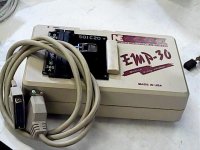
Did you ever buy one of those Dell D430s?
http://www.ebay.com/itm/LOT-OF-10-DELL-LATITUDE-D430-LAPTOP-CORE-2-DUO-1-33GHz-2GB-WIRELESS-/221312861917?pt=Laptops_Nov05&hash=item33874646dd
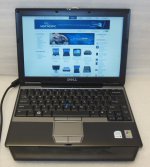
They have a docking station available:
http://www.ebay.com/itm/350664716706?ssPageName=STRK:MEWAX:IT&_trksid=p3984.m1423.l2649
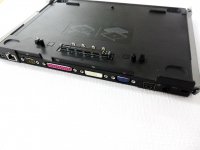
which includes a parallel port.
It works great with my old programmer. Probably works fine with others. And for a bonus, OSX can be nicely hacked onto this model of laptop.
That way you can have a nice compact laptop to drive your chip programmer, which doesn't take up much space and when it's not booted into Windows, it's about like a Macbook Air 13".
My chip programmer is the whole reason I bought a Dell Latitude D430 in the first place.
The only bad thing about it is the 1.8" ZIF IDE hard drive. If you buy one without a drive, have the hard drive solution figured out first. The 240GB Toshiba MK2431 has pretty well dried up. It got down to about $70 and then seems to have been discontinued. Sigh. Now it's up around $250. It's cheaper to get a 1.8" IDE to MSATA adapter and a 240 GB MSATA SSD now. Much better performance too, I imagine, but putting $200 into these old laptops seems kind of silly.
Incidentally, the parallel port on the docking station for the Latitude E4300 will also work, but the E4300 doesn't take OSX, so it is purely a Windows machine if you go that route. Almost twice as fast in the CPU though.
I think all those images will expire in 6 months. Is there a way to capture them to the forum space?
I have an old Needham EMP-30 chip programmer with parallel port and software which will run on, at the latest, Win XP -- maybe Win 7, XP mode.
http://www.ebay.com/itm/NE-Needham-Electornics-EMP-30-Device-Programmer-Flash-ROM-Writer-with-Module-/400530945439?pt=LH_DefaultDomain_0&hash=item5d4181359f
Did you ever buy one of those Dell D430s?
http://www.ebay.com/itm/LOT-OF-10-DELL-LATITUDE-D430-LAPTOP-CORE-2-DUO-1-33GHz-2GB-WIRELESS-/221312861917?pt=Laptops_Nov05&hash=item33874646dd
They have a docking station available:
http://www.ebay.com/itm/350664716706?ssPageName=STRK:MEWAX:IT&_trksid=p3984.m1423.l2649
which includes a parallel port.
It works great with my old programmer. Probably works fine with others. And for a bonus, OSX can be nicely hacked onto this model of laptop.
That way you can have a nice compact laptop to drive your chip programmer, which doesn't take up much space and when it's not booted into Windows, it's about like a Macbook Air 13".
My chip programmer is the whole reason I bought a Dell Latitude D430 in the first place.
The only bad thing about it is the 1.8" ZIF IDE hard drive. If you buy one without a drive, have the hard drive solution figured out first. The 240GB Toshiba MK2431 has pretty well dried up. It got down to about $70 and then seems to have been discontinued. Sigh. Now it's up around $250. It's cheaper to get a 1.8" IDE to MSATA adapter and a 240 GB MSATA SSD now. Much better performance too, I imagine, but putting $200 into these old laptops seems kind of silly.
Incidentally, the parallel port on the docking station for the Latitude E4300 will also work, but the E4300 doesn't take OSX, so it is purely a Windows machine if you go that route. Almost twice as fast in the CPU though.
I think all those images will expire in 6 months. Is there a way to capture them to the forum space?
Yep, if an image on eBay doesn't say all rights reserved, it's pretty much fair game for fair use. Folks watermark their auction shots and use hosting services (that don't really protect the images very well anyway) so lazy/less reputable sellers won't misuse their shots in any way. Just right-click & save image as to local disk and then upload it as any other attachment. If it's for documentation/educational use, not commercial use, that'd be fair use.
You're outside your edit window so I've done it for you. :beige:
. . . and nope, I never got one, I was going to let the grlf try OSX out on one, but she just went ahead and bought herself the bigger Air. After working in the industry at IBM and then Lenovo on ThinkPads and this last piece of Lenovo schlock for over 25 years, she's kissed off Windows for good and EVAH!!!! She L_O_V_E_S her Air and I think it's pretty cool too. That TrackPad is no rodent, but for using a laptop where it warms you lap, it seems more than just workable and certainly not dreadful.
My Digital Junkyard War is taking a very small toll on me, but I'm making steady progress and learning a bunch of new crap I'll likely not need to employ again, but learning is its own reward in my surreal little world. It's FUN!!!!! [] ]'> Everyone needs to remember that this is a zero sum campaign. All hardware must be built up from what I have on hand and be able to run whatever ROM Burner is sent my way. I can probably afford to buy '98, but not XP and there's no way in hades that I'm gonna fiddle-whatever with yet another version of Redmond schiznit in between, it just ain't gonna happen.
This P-III Intel board is looking better and better. At lunch I hooked up a 1.44MB FDD and nothing croaked, but it wasn't happy with the Zip100 I tried next, so I'm swapping that out tonight and will hopefully be maxing out the RAM as well.
Once more into the breach! :rambo:
You're outside your edit window so I've done it for you. :beige:
. . . and nope, I never got one, I was going to let the grlf try OSX out on one, but she just went ahead and bought herself the bigger Air. After working in the industry at IBM and then Lenovo on ThinkPads and this last piece of Lenovo schlock for over 25 years, she's kissed off Windows for good and EVAH!!!! She L_O_V_E_S her Air and I think it's pretty cool too. That TrackPad is no rodent, but for using a laptop where it warms you lap, it seems more than just workable and certainly not dreadful.
My Digital Junkyard War is taking a very small toll on me, but I'm making steady progress and learning a bunch of new crap I'll likely not need to employ again, but learning is its own reward in my surreal little world. It's FUN!!!!! [
] ]'> Everyone needs to remember that this is a zero sum campaign. All hardware must be built up from what I have on hand and be able to run whatever ROM Burner is sent my way. I can probably afford to buy '98, but not XP and there's no way in hades that I'm gonna fiddle-whatever with yet another version of Redmond schiznit in between, it just ain't gonna happen.This P-III Intel board is looking better and better. At lunch I hooked up a 1.44MB FDD and nothing croaked, but it wasn't happy with the Zip100 I tried next, so I'm swapping that out tonight and will hopefully be maxing out the RAM as well.
Once more into the breach! :rambo:
New (just out of the bag anyway) Iomega Zip100 replacement for the original NEC and the TEAC FDD installed where there wasn't one both seem to be getting along fine with the rest of the hardware. The 9.10 Remix CD is testing the (maxed out) 512MB PC-133 DIMM from the comatose QS'02. Memtest86 v.2.11 is 31% complete with no errors so far.
I'm off for a couple of days, so I might just let 'er rip in the AM. Watching the Remix CD try to install itself on that cute lil' Ultra160 while I drink my morning coffee is sounding good!
Feels good! ;D
I'm off for a couple of days, so I might just let 'er rip in the AM. Watching the Remix CD try to install itself on that cute lil' Ultra160 while I drink my morning coffee is sounding good!
Feels good! ;D
It's officially a computer! :b&w:
Well . . . maybe it's almost a computer. :-/
Ram test made it through pass one without any errors so I quit it and tried the the Remix install.
It got to step 4 of the install where partitioning is supposed to happen, but all options were grayed out.
Quit the install and figured I'd try booting it up. Surprise!!! It got the desktop with partial functionality so I knocked off for the night.
Fiddled a bit with the partial desktop and then tried the installer again while the coffee was dripping, same results.
Checked out the install options/help sections and found a SCSI controller setup.
Figured I'd pull the controller to see which one it is or which one it emulates after I wake up.
Ran the Disk error check and it passed while I was posting this update.
Warmed up the coffee and will scout controller ID when I'm a bit more awake.
Flanking attack on install routine to commence on second coffee warmup.
That is all.
Well . . . maybe it's almost a computer. :-/
Ram test made it through pass one without any errors so I quit it and tried the the Remix install.
It got to step 4 of the install where partitioning is supposed to happen, but all options were grayed out.
Quit the install and figured I'd try booting it up. Surprise!!! It got the desktop with partial functionality so I knocked off for the night.
Fiddled a bit with the partial desktop and then tried the installer again while the coffee was dripping, same results.
Checked out the install options/help sections and found a SCSI controller setup.
Figured I'd pull the controller to see which one it is or which one it emulates after I wake up.
Ran the Disk error check and it passed while I was posting this update.
Warmed up the coffee and will scout controller ID when I'm a bit more awake.
Flanking attack on install routine to commence on second coffee warmup.
That is all.
I'm not surprised you're having SCSI issues if you're using the Ubuntu Notebook Remix installer. In fact, I sort of have a vague memory in general about Ubuntu needing you to use the "Alternate/Server" installation images if you're using SCSI? (Hrm, googled it and found a number of threads that basically imply that the SCSI drivers are there on normal Ubuntu CDs but the installer is sort of borked and *sometimes* adding some kernel switches fixes it. This seems to be a problem unique to Ubuntu, Debian and other distributions don't have it.)
Not to lecture or anything, but of course if you actually want Linux on there for reals (instead of just to test the hardware) I'd definitely recommend using a newer version of Ubuntu than 9.10. 9.10 is *old*, wasn't an LTS release, and therefore isn't being updated anymore. (Heck, I ran into an annoying "surprise" recently on a machine with a 10.10 install on it after pulling it out of a box; all the repositories I've tried have pulled their update directories for versions that old so it's not even straightforwardly possible to step it up to a current release by upgrading through the intermediate versions. There a manual procedure I could *try* to force it up to 12.04 but it's likely enough to end in failure that the better bet is to just reinstall it from a disk.) Xubuntu 12.04 LTS would probably work okay on a 1Ghz Pentium III.
Of course, if the ultimate goal is Windows you'll probably want to wait until *after* you've installed Windows to install your "permanent" Linux as a dual-boot. It's technically *possible* to set up Linux first but it's agony.
Not to lecture or anything, but of course if you actually want Linux on there for reals (instead of just to test the hardware) I'd definitely recommend using a newer version of Ubuntu than 9.10. 9.10 is *old*, wasn't an LTS release, and therefore isn't being updated anymore. (Heck, I ran into an annoying "surprise" recently on a machine with a 10.10 install on it after pulling it out of a box; all the repositories I've tried have pulled their update directories for versions that old so it's not even straightforwardly possible to step it up to a current release by upgrading through the intermediate versions. There a manual procedure I could *try* to force it up to 12.04 but it's likely enough to end in failure that the better bet is to just reinstall it from a disk.) Xubuntu 12.04 LTS would probably work okay on a 1Ghz Pentium III.
Of course, if the ultimate goal is Windows you'll probably want to wait until *after* you've installed Windows to install your "permanent" Linux as a dual-boot. It's technically *possible* to set up Linux first but it's agony.
Great info, thanks for all your help, EudiG!
The 10.10 installer CD can't mount /dev/loop0 on something or other . . .
. . . typing in "help" yields a paragraph of friggin' Linux Boffin Greek to me. :-/
I'll try the SCSI controller ID/setup now, I've had almost enough coffee to play with hardware in non-borkage mode.
Alternate attacks:
Locate an IDE drive to nuke with the Remix installer.
Check all the notebooks for my Kubuntu password.
Snag a '98 install setup on eBay or in the TP.
Will Linux even dual boot with '98? :?:
Linux on one of the SCA drivelets is for "Real Computer Mode." I figured I'd just install '98 on second drivelet so I can swap it in for ROM burner playtime.
We'll see how it plays out, for now it's Linux playtime until I can place my grubby little paws upon a Win98 install CD. }
The 10.10 installer CD can't mount /dev/loop0 on something or other . . .
. . . typing in "help" yields a paragraph of friggin' Linux Boffin Greek to me. :-/
I'll try the SCSI controller ID/setup now, I've had almost enough coffee to play with hardware in non-borkage mode.
Alternate attacks:
Locate an IDE drive to nuke with the Remix installer.
Check all the notebooks for my Kubuntu password.
Snag a '98 install setup on eBay or in the TP.
Will Linux even dual boot with '98? :?:
Linux on one of the SCA drivelets is for "Real Computer Mode." I figured I'd just install '98 on second drivelet so I can swap it in for ROM burner playtime.
We'll see how it plays out, for now it's Linux playtime until I can place my grubby little paws upon a Win98 install CD. }
I'll look through my pile of CDs when I get a chance, I *might* have a 98 install CD with a key stuck in it. If I find it's all yours. (No guarantees, I've chucked a lot of stuff over the last few years.)
Easy Peasy. Just partition the drive when you install 98 to not use all of it. (Somewhere between 2 to 8 GB or so is more than enough for Windows 98.) Then run a linux installer, it should detect the Windows installation and offer to add it to the GRUB boot menu when you set that up. (Or, heck, even if you do give the whole drive to Windows initially most Linux installers are capable of resizing the partition to make room.) It gets complicated to do Linux first because even if you partition your drive correctly to leave space for the Windows install to go in Windows will want to blow away the MBR boot record on the hard disk and replace it with its own, thereby wiping out GRUB. To fix that you'd have to boot a Linux rescue CD, re-run the GRUB setup, deal with that screaming thing again, etc.
Note of course I mean *real* dual boot, not a Wubi install. Don't go there.
If you install an *NT* based system (not 98) then it's technically *possible* to install GRUB to the Linux /boot partition (which has to be a "primary" partition) and fiddle around with the NT boot manager to boot it that way instead of letting GRUB run the show, but it's substantial additional pain for zero gain. It's almost always best to just let the Microsoft OS think it's alone at install time and add Linux after the fact so Windows won't have to worry its pretty little head about it.
Cool beans, thanks much for the info and especially that contingent offer!
I pulled the Ultra SCSI Card and it's an adaptec AHA-2940W-2940UW next up is smackin' it back into the slot and a check to see if the Remix installer can deal with it.
Since I have absolutely no clue as to what the H-e-double toothpicks a friggin' Wubi might be, no worries there mate!
I pulled the Ultra SCSI Card and it's an adaptec AHA-2940W-2940UW next up is smackin' it back into the slot and a check to see if the Remix installer can deal with it.
Since I have absolutely no clue as to what the H-e-double toothpicks a friggin' Wubi might be, no worries there mate!
Kismat! :O The adaptek card wasn't on the list, so I decided to look for my 1996 InfoMagic LINUX TOOLBOX and found all my notes and the printed out docs, but no media, go figure. But hidden inside the supersizes Zip Loc file folder, concealed within that pile of printed docs, I found some great Linux article tearsheets from NEWSWEEK and PC Computing magazines.
Hidden next the tearsheets was the the Zip-Loc bag containing the complete 1999 debian GNU Linux package . . .
. . . the same version I gave up on due to SCSI Controller Card incompatibility back in the day . . . :lol:
. . . and now to find my copy of O'REILLY'S Learning DEBIAN.GNU lINUX
Hidden next the tearsheets was the the Zip-Loc bag containing the complete 1999 debian GNU Linux package . . .
. . . the same version I gave up on due to SCSI Controller Card incompatibility back in the day . . . :lol:
. . . and now to find my copy of O'REILLY'S Learning DEBIAN.GNU lINUX
That really surprises me, the 2940 was a dirt common card.
Maybe this would fix the problem? (It sounds like there's some motherboard incompatibility... thing?, maybe? that crops up with that card? I used a 2940UW in my AMD Tbird box (the one built using that K7 motherboard you mentioned having) and it always worked flawlessly for everything I asked it to do. Granted, the one thing it never was was the boot drive. (I used it to drive the scanner and to do weird hackery with drives from non-PC systems.)
Another reference to the same bug?
Gotta research those links you posted for me, thanks again.
Meanwhile, one of these *&^@%*#$ PC cases tried to bite a chunk out of my leg this morning, so I've buttoned them all up. They're lined up in the closet again waiting for me to determine which one of the Western Digitals to nuke with WD's EZ-Install software. Floppy(s) and Manual were found in the, you guessed it, Zip-Loc file folder with the remnants of the HDD box and the manual for my ACARD ATA-133 controller as a nice surprise.
If I set up a Western Digital for DOS/Win, should the Remix installer be able to deal with the formatted HDD?
If not, I can just reformat again and chuck the sucker into the Lunchbox for eventual Win98 installation. I'd like to keep Ankylosaurus my P-III ROMhacker all Ultra-SCSI with dedicated drivelets for ubuntu and Win98. The freakin' cable is about a yard long and with a MOLEX extension, drive swapping will be made a snap by hackin' a drive sled and blank bezel setup.
Dunno, it's all up in the air, at least I know that both Ankylosaurus and the lunchbox BEAST are ready to rock and roll. :approve:
I've got a bunch of Documentation to read before I get together enough shekels to buy a PSU for Megalodon, that first attempt at a Parallel Port build. The PSU I have has four and six contact CPU power plugs, but that hugemongous dead fish has an eight socket CPU power maw.
Meanwhile, one of these *&^@%*#$ PC cases tried to bite a chunk out of my leg this morning, so I've buttoned them all up. They're lined up in the closet again waiting for me to determine which one of the Western Digitals to nuke with WD's EZ-Install software. Floppy(s) and Manual were found in the, you guessed it, Zip-Loc file folder with the remnants of the HDD box and the manual for my ACARD ATA-133 controller as a nice surprise.
If I set up a Western Digital for DOS/Win, should the Remix installer be able to deal with the formatted HDD?
If not, I can just reformat again and chuck the sucker into the Lunchbox for eventual Win98 installation. I'd like to keep Ankylosaurus my P-III ROMhacker all Ultra-SCSI with dedicated drivelets for ubuntu and Win98. The freakin' cable is about a yard long and with a MOLEX extension, drive swapping will be made a snap by hackin' a drive sled and blank bezel setup.
Dunno, it's all up in the air, at least I know that both Ankylosaurus and the lunchbox BEAST are ready to rock and roll. :approve:
I've got a bunch of Documentation to read before I get together enough shekels to buy a PSU for Megalodon, that first attempt at a Parallel Port build. The PSU I have has four and six contact CPU power plugs, but that hugemongous dead fish has an eight socket CPU power maw.
While Megalosaurus awaits the arrival of the mother of all PSUs, and that Big@$$ case now sits empty, I think I'll take a whack at setting up the A7VBX-LA board.

From the product number on the hacked up backplane of the chassis, what I've been calling the "Pavilion" appears to be a Compaq Presario SR1000Z. It turns out it's the Kelut-GL6E version of the board an its Presario's specs look pretty good.
This info implies that I can even run Win98 on this board, that should really fly! ;D
Am I correct in thinking the ubuntu 10.10 desktop install CD might be happier with this board? :?:
From the product number on the hacked up backplane of the chassis, what I've been calling the "Pavilion" appears to be a Compaq Presario SR1000Z. It turns out it's the Kelut-GL6E version of the board an its Presario's specs look pretty good.
This info implies that I can even run Win98 on this board, that should really fly! ;D
Am I correct in thinking the ubuntu 10.10 desktop install CD might be happier with this board? :?:
If you have access to a CD burner you *really* should download a 12.4 LTS .iso and burn it. It is scheduled to keep receiving as late as 2017. (Or if you don't like the new Ubuntu desktop go with xubuntu 12.4, it's good until the end of 2015. ("Main" Ubuntu releases are on a 5 year LTS cycles, that doesn't necessarily apply to the alternate versions.)
The burner I've got, but the problem I've had with the newer revs of ubuntu is that they appear to require the computer to be online during installation. That's an insurmountable problem until I upgrade my droid and the contract to 8GB of Data shared between eight(?) different devices. Right now I've got only 5GB on HP-Maxi and 2GB on the current droid under the expired contracts.
IIRC I was trying to install a more current rev on the AtomicNetTop.
It's testbed testing time with the standalone 10.10 CD for now.
IIRC I was trying to install a more current rev on the AtomicNetTop.
It's testbed testing time with the standalone 10.10 CD for now.
No, they don't. It's recommended you do so for the sake of security and if you need any blobs like Flash or the proprietary Nvidia driver, but the base system is on disc.
If you use a netinstall disc, you will need a network connection - Ubuntu hides these away from the download page though.
If you use a netinstall disc, you will need a network connection - Ubuntu hides these away from the download page though.
Hey jt,
Want me to burn a few different Ubuntu versions to DVD and send them over? Free?
I've been using LUbuntu which looks and feels like an older windows version, but is really snappy and completely up-to-date. I installed it for a family member, and besides "All of my programs have different icons", they haven't had any problems getting used to it.
I figure I could help out though, as I have a few different *.ISO's sitting around already, so they're already through the pipeline.
Want me to burn a few different Ubuntu versions to DVD and send them over? Free?
I've been using LUbuntu which looks and feels like an older windows version, but is really snappy and completely up-to-date. I installed it for a family member, and besides "All of my programs have different icons", they haven't had any problems getting used to it.
I figure I could help out though, as I have a few different *.ISO's sitting around already, so they're already through the pipeline.
Well, I got a lot of cleaning, organizing and re-stuffing of a few toys back into their respective project boxen . . .
. . . so it was time to drag other stuff out and start the cycle all over again! [] ]'>
I'm in wait for it to get hereto try it mode because I ordered a tiny-bitty-bit-o-Win98 stuff for this project on payday.In celebration of the announcement that we'd be getting our quarterly bonus again, I figured I'd spend a little bit of it ahead of time for just for safekeeping . . .
. . . wouldn't wanna wind up wasting it all on food, shelter, gas or the like!
Anyhoo, I figured I'd try to fire up what I'd identified as a Kelut board and got it all put together nice and neat in the case from which I'd torn that crazy RadySys ENDURA EM945G P4 beast with the 2U cooling tower for want of a monster PSU. When I looked for the DIMMs for it I realized they were the two I'd tried to set fire to by halfway installing them in the Intel board . . . FEH! [ !] !]'>
I figured, what the heck and tried it anyway . . . it's silent and does nothing . . .
. . . but just once I got it to do the Award BIOS POST test smelly cat song:
Repeating (endless loop) - Memory error - Check for improperly seated or missing memory.
According to the 18 page User Manual, I've brazed a MaxMem config:
Are PC3200 & PC2700 1GB DDR400 really the same, compatible or just plain wrong for the Kelut board?
All is not lost, Dimetrodon (Kelut) is coming out of the case, back into its anti-static bag, back in the MoBo box and it's AtomicNetTop playtime! [] ]'>
. . . so it was time to drag other stuff out and start the cycle all over again! [
] ]'>I'm in wait for it to get hereto try it mode because I ordered a tiny-bitty-bit-o-Win98 stuff for this project on payday.In celebration of the announcement that we'd be getting our quarterly bonus again, I figured I'd spend a little bit of it ahead of time for just for safekeeping . . .
. . . wouldn't wanna wind up wasting it all on food, shelter, gas or the like!
Anyhoo, I figured I'd try to fire up what I'd identified as a Kelut board and got it all put together nice and neat in the case from which I'd torn that crazy RadySys ENDURA EM945G P4 beast with the 2U cooling tower for want of a monster PSU. When I looked for the DIMMs for it I realized they were the two I'd tried to set fire to by halfway installing them in the Intel board . . . FEH! [
!] !]'>I figured, what the heck and tried it anyway . . . it's silent and does nothing . . .
. . . but just once I got it to do the Award BIOS POST test smelly cat song:
Repeating (endless loop) - Memory error - Check for improperly seated or missing memory.
According to the 18 page User Manual, I've brazed a MaxMem config:
I'm not going to find this in any of may Macs, am I? Gotta head to the TP or cough up a few more PaPal $imoleon$
Are PC3200 & PC2700 1GB DDR400 really the same, compatible or just plain wrong for the Kelut board?
All is not lost, Dimetrodon (Kelut) is coming out of the case, back into its anti-static bag, back in the MoBo box and it's AtomicNetTop playtime! [
] ]'>I've had a lot of fun sittin' on the dock of the 'Bay waitin' for the Win98 CD to sail in, but playtime has been fun and productive:
It may be a case of overkill, maybe not, but the aTOMICnETtOP™ is underneath the desk set up on the bedroom KVM Switch along with Pismo500 and HP_Maxi. Just gotta fab a nice padded footrest for the front/corner as it transforms my knee to an ergonomically correct elbow rest cum chinrest. As is, it feels better than the "Snow White" serrated edge of that LaserWriter cart was before I switched to an optically correct angled flight deck for landing the chair in front of the 20" 1200x1600 LCD Pivot. It doesn't even try to trip me up or savage my shin when I walk past it without pushing it back in! [] ]'>

Now I find myself in the curious situation of digging up a PCI ATA/ATAPI card just to run the DVD and Zip Drives! [:O] ]'>
If you look underneath the wires in the top bay, you can just see the pretty little purple Sonnet Tempo Bridge adapting that ATA drive to the SATA port of the MoBo . . .
. . . never figured on setting the Atom board up in a Vanilla Clone case (with IDE/ATAPI peripherals) but still, DuOh! [:I] ]'>
^Dimetrodon (that ASUS A7V8X-LA/2GB MaxMem config of Char-Broiled DIMMs) didn't have much need for its case until I find or acquire some RAM that's more on the rare side, so I figured the Atom board needed some exercise. I always figured on fitting it out with a USB FDD, but really now!
It's running ubuntu NetBook Remix 9.10 ATM . . . I wonder if this thing will run Win98? [] ]'>
p.s. Win98 finally made landfall and I wrassle'd with it until 4AM, but that is another story . . .
It may be a case of overkill, maybe not, but the aTOMICnETtOP™ is underneath the desk set up on the bedroom KVM Switch along with Pismo500 and HP_Maxi. Just gotta fab a nice padded footrest for the front/corner as it transforms my knee to an ergonomically correct elbow rest cum chinrest. As is, it feels better than the "Snow White" serrated edge of that LaserWriter cart was before I switched to an optically correct angled flight deck for landing the chair in front of the 20" 1200x1600 LCD Pivot. It doesn't even try to trip me up or savage my shin when I walk past it without pushing it back in! [
] ]'>Now I find myself in the curious situation of digging up a PCI ATA/ATAPI card just to run the DVD and Zip Drives! [:O] ]'>
If you look underneath the wires in the top bay, you can just see the pretty little purple Sonnet Tempo Bridge adapting that ATA drive to the SATA port of the MoBo . . .
. . . never figured on setting the Atom board up in a Vanilla Clone case (with IDE/ATAPI peripherals) but still, DuOh! [:I] ]'>
^Dimetrodon (that ASUS A7V8X-LA/2GB MaxMem config of Char-Broiled DIMMs) didn't have much need for its case until I find or acquire some RAM that's more on the rare side, so I figured the Atom board needed some exercise. I always figured on fitting it out with a USB FDD, but really now!
It's running ubuntu NetBook Remix 9.10 ATM . . . I wonder if this thing will run Win98? [
] ]'>p.s. Win98 finally made landfall and I wrassle'd with it until 4AM, but that is another story . . .
Win98 came in last week and on the first night of my staycation I fought with it until 4AM when it decided to work . . .
. . . sort of. :
I figured out some buggies Saturday and found some updated drivers for it yesterday. Today the I/O has decided the "I" part ain't working after I tried to install a Zip Drive.
. . . sort of. :
I figured out some buggies Saturday and found some updated drivers for it yesterday. Today the I/O has decided the "I" part ain't working after I tried to install a Zip Drive.
So, what's up?
Win98SE is running on the Intel Desktop Board D815EEA2 / D815EPEA2 that g recommended. manual.pdf
It's in the infamous PixelPusher can and looks just about the way I'd want a WindowsBox to, now that needs require one to be on the bench.
Unfortunately/fortunately I appear to have stepped all over the Win95 install on that MIA HDD. Apparently I'll be someone we'll call JD for a while. Running Microsoft Windows98 from Microsoft Press turned out to be rather disappointing when I pulled it out. Not only is is not really 5lbs (3.5lbs and yes I weighed it out of curiosity) it's probably the only Manual I didn't scrawl the Key on the inside front cover.
I've deleted all the personal stuff and did a clean sweep of every non-essential desktop shortcut, especially that hateful Internet Exploder icon.
It's in the infamous PixelPusher can and looks just about the way I'd want a WindowsBox to, now that needs require one to be on the bench.
Unfortunately/fortunately I appear to have stepped all over the Win95 install on that MIA HDD. Apparently I'll be someone we'll call JD for a while. Running Microsoft Windows98 from Microsoft Press turned out to be rather disappointing when I pulled it out. Not only is is not really 5lbs (3.5lbs and yes I weighed it out of curiosity) it's probably the only Manual I didn't scrawl the Key on the inside front cover.
I've deleted all the personal stuff and did a clean sweep of every non-essential desktop shortcut, especially that hateful Internet Exploder icon.
Windows 98SE is a must on a late Socket 370 board. On a clean install you need the Intel INF tool to setup important stuff first.
Install the INF Drivers First: https://downloadcenter.intel.com/Detail_Desc.aspx?agr=Y&DwnldID=8178&ProdId=816&lang=eng&OSVersion=Windows%2098%20*&DownloadType=Software%20Archives
Optionally Install the IDE drivers: https://downloadcenter.intel.com/Detail_Desc.aspx?agr=Y&DwnldID=5471&lang=eng
After that you can throw on drivers for video, NIC, etc.
Install the INF Drivers First: https://downloadcenter.intel.com/Detail_Desc.aspx?agr=Y&DwnldID=8178&ProdId=816&lang=eng&OSVersion=Windows%2098%20*&DownloadType=Software%20Archives
Optionally Install the IDE drivers: https://downloadcenter.intel.com/Detail_Desc.aspx?agr=Y&DwnldID=5471&lang=eng
After that you can throw on drivers for video, NIC, etc.
Thanks for all the help, the DVD and Zip are up and at 'em thanks to your advice. I'd never bothered to check, the DVD was jumpered for cable select.
On a humorous note, I remembered to plug the FDD power connector to the Zip, that's standard procedure, even if the cables look funny after all this time. However, I've been dinking around in the IIsi, the Quadras and NuBus PPCs so much and for so long that I forgot all about plugging that same power connector into the FDD! [:O] ]'> Not that I'll ever actually use the evil little thing until I make the emergency boot disk.
On a humorous note, I remembered to plug the FDD power connector to the Zip, that's standard procedure, even if the cables look funny after all this time. However, I've been dinking around in the IIsi, the Quadras and NuBus PPCs so much and for so long that I forgot all about plugging that same power connector into the FDD! [:O] ]'> Not that I'll ever actually use the evil little thing until I make the emergency boot disk.

Vista had DreamScene (or LagInducer) which let you play a video file as your wallpaper...
I think it was scrapped in one of the service packs.
Hey actually, in Windows 98, since it's got the web embedded on the desktop, you can set an animated gif as the wallpaper with Active Desktop enabled.
I think it was scrapped in one of the service packs.
Hey actually, in Windows 98, since it's got the web embedded on the desktop, you can set an animated gif as the wallpaper with Active Desktop enabled.
OMFG, that would be so cool, but I'm keeping this as bare bones as it gets . . . on the Win98 dinosaur. [}] ]'>
I just swapped the CD-ROM from the AtomicNetBot™ (it's in that big Honking Mid-Tower under the desk, which is just an awful thing to happen to a cute lil' Atom NetTop Board) with the DVD from Ankylosaurus because I have no idea what a PIII would be doing with a DVD-ROM, though both were in the case with the neat Optical Media Storage draw in between. This is definitely the case from which the PIII board waspulled, I used to call it Dimetrodon, but that doesn't fit, that critter is so ancient it's not even a dinosaur. It has the PIII sticker right next to the WinXP sticker. [] ]'>
Gotta love it, the PIII box now has the has the best board I have aside from the AMD VISION in HP_Maxi, it has all the modern bells and whistles for I/O and I just slapped an IDE Card in there to run the desktop DVD and a Zip250, go figure!
It's starting to look like one of my hacks though wires hanging off the front and back, looping around and back in and the craziest I/O setup yet. [] ]'>
Gotta fire 'em both back up to see what I've borken, but I think that can wait for tomorrow, maybe it's time for some pocorn & a movie!
] ]'>I just swapped the CD-ROM from the AtomicNetBot™ (it's in that big Honking Mid-Tower under the desk, which is just an awful thing to happen to a cute lil' Atom NetTop Board) with the DVD from Ankylosaurus because I have no idea what a PIII would be doing with a DVD-ROM, though both were in the case with the neat Optical Media Storage draw in between. This is definitely the case from which the PIII board waspulled, I used to call it Dimetrodon, but that doesn't fit, that critter is so ancient it's not even a dinosaur. It has the PIII sticker right next to the WinXP sticker. [
] ]'>Gotta love it, the PIII box now has the has the best board I have aside from the AMD VISION in HP_Maxi, it has all the modern bells and whistles for I/O and I just slapped an IDE Card in there to run the desktop DVD and a Zip250, go figure!
It's starting to look like one of my hacks though wires hanging off the front and back, looping around and back in and the craziest I/O setup yet. [
] ]'>Gotta fire 'em both back up to see what I've borken, but I think that can wait for tomorrow, maybe it's time for some pocorn & a movie!
The AomiccNetBot™ lives! [] ]'> I had to swap out the cable for the DVD-ROM, but the Zip250 wotked like a charm the first time around. With the new cable, the board tried to play a movie, it needs somethingorother, nopro though, this is just a fun project, who could take this seriously?
I haven't got a SATA drive, so I snagged the Sonnet Tempo Bridge and the ATOM board has been booting just fine off that, but it was stuck in a full size case with full size I/O just sitting there. I've got a few of those Wall Wart combos with the SATA IDE<->USB2 doohickies, but I figured that was too iffy and too much junk in the case. I NEVER thought of using a PCI ATA card in its onliest slot before yesterday, but it's working like a charm. I've got some Dual head VidCards for that slot so I can run three monitors at once just for the heck of it, but cheap, reliable (and free) I/O works just fine for me for the time being.
I'm still working on a two or three possibilities for the tiny ATOM board, but meanwhile I can play with ubuntu on the main workstation KVM setup.
Tomorrow morning I get to finish putting the PIII back together and testing it again, meanwhile . . . :sleepy: zzzzzzzzzzzzzzzzzzzzz
] ]'> I had to swap out the cable for the DVD-ROM, but the Zip250 wotked like a charm the first time around. With the new cable, the board tried to play a movie, it needs somethingorother, nopro though, this is just a fun project, who could take this seriously?I haven't got a SATA drive, so I snagged the Sonnet Tempo Bridge and the ATOM board has been booting just fine off that, but it was stuck in a full size case with full size I/O just sitting there. I've got a few of those Wall Wart combos with the SATA IDE<->USB2 doohickies, but I figured that was too iffy and too much junk in the case. I NEVER thought of using a PCI ATA card in its onliest slot before yesterday, but it's working like a charm. I've got some Dual head VidCards for that slot so I can run three monitors at once just for the heck of it, but cheap, reliable (and free) I/O works just fine for me for the time being.
I'm still working on a two or three possibilities for the tiny ATOM board, but meanwhile I can play with ubuntu on the main workstation KVM setup.
Tomorrow morning I get to finish putting the PIII back together and testing it again, meanwhile . . . :sleepy: zzzzzzzzzzzzzzzzzzzzz
It's pedantic to point this out I'm sure but despite it's little plastic avatar regularly appearing in sets of dinosaur figures Dimetrodon wasn't a dinosaur, it was in fact a very distant cousin/ancestor of mammals, and predated the first according-to-Hoyle dinosaurs by 40-60 million years..
(Coincidentally my hostname convention for naming computers was/is in fact based on extinct animals, and I'd usually name PowerPC-based machines running *nix after synapsid/therapsid (mammal-like) reptiles... which lead to horrors like having to memorize how to spell "Estemmenosuchus".)
Anyone who has never read Ball Four really ought to do so. For those of you who have, this case is the tractor.
_____________________________________________________________________________
I bought a pair of USB/FireWire/SATA/AV I/O units for the ubuntuGIMPbox™ and have used half of one of them for that hack so far. I still had the second one and I'd modified black plastic chassis for some reason or other, but I forgot why and I figured I needed one . . .
. . . so it's in here.
I also bought a DVD/RW for that same unfinished hack, but the bezel was black, nothing else was gonna match anyway . . .
. . . so it's in there.
I bought a SunBlade150 off craigslist and it had this kissy-faced doohickey in it. Somebody here explained to me just what it was and was used to do, but it was so utterly useless I've managed to forget everything about it. If I EVER try to get the sucker to work, it ain't gonna be in no Sun Box . . .
. . . so it's in there.

In my trips to pick up various crud for the GIMPer, I ran across a lot of cool stuff. I bought a pair of backplane plates with eSATA, Molex and some other power connector and it looked like the pair of PTOs might be useful. I had one left over . . .
. . . so it's in there.

I spent $50 ea. on a pair of SCSI adapted IDE Zip 250s on eBay and tried one on my Macs, it worked great until I tried to dismount the Zip . . .
. . . so it's in there.

The SCSI Zip250s have conversion PCBs with power/connector adaptation units bolted up to the bottom of the Zip and extending well past the back of the Zip case, making thema bit too deep for a 3.5" bay. So they came in nice 5.25" chassis/bezel adapters. I already had that very cool purple Sonnet Bridge Card with a built in activity LED, but it had no header. So it was backwards and the cables were already hanging out the front of the case. B@$$ackwards like that I could see the activity light . . and that empty Zip bay adapter was sitting right there on the bench . . .
. . . so it's in there.
So after all that, this little side project for the case intended to house the ASUS board that used the two special DIMMs . . . that I par-boiled, is finally starting to come together!
It kinda almost looks like one of my hacks . . . [] ]'>

. . . from the front . . .

. . . and the back!
But mostly unfinished, heh!
Now just what shall we do with all that boring beige in between? [}] ]'>
_____________________________________________________________________________
I bought a pair of USB/FireWire/SATA/AV I/O units for the ubuntuGIMPbox™ and have used half of one of them for that hack so far. I still had the second one and I'd modified black plastic chassis for some reason or other, but I forgot why and I figured I needed one . . .
. . . so it's in here.
I also bought a DVD/RW for that same unfinished hack, but the bezel was black, nothing else was gonna match anyway . . .
. . . so it's in there.
I bought a SunBlade150 off craigslist and it had this kissy-faced doohickey in it. Somebody here explained to me just what it was and was used to do, but it was so utterly useless I've managed to forget everything about it. If I EVER try to get the sucker to work, it ain't gonna be in no Sun Box . . .
. . . so it's in there.
In my trips to pick up various crud for the GIMPer, I ran across a lot of cool stuff. I bought a pair of backplane plates with eSATA, Molex and some other power connector and it looked like the pair of PTOs might be useful. I had one left over . . .
. . . so it's in there.
I spent $50 ea. on a pair of SCSI adapted IDE Zip 250s on eBay and tried one on my Macs, it worked great until I tried to dismount the Zip . . .
. . . so it's in there.
The SCSI Zip250s have conversion PCBs with power/connector adaptation units bolted up to the bottom of the Zip and extending well past the back of the Zip case, making thema bit too deep for a 3.5" bay. So they came in nice 5.25" chassis/bezel adapters. I already had that very cool purple Sonnet Bridge Card with a built in activity LED, but it had no header. So it was backwards and the cables were already hanging out the front of the case. B@$$ackwards like that I could see the activity light . . and that empty Zip bay adapter was sitting right there on the bench . . .
. . . so it's in there.
So after all that, this little side project for the case intended to house the ASUS board that used the two special DIMMs . . . that I par-boiled, is finally starting to come together!
It kinda almost looks like one of my hacks . . . [
] ]'>. . . from the front . . .
. . . and the back!
But mostly unfinished, heh!
Now just what shall we do with all that boring beige in between? [}
] ]'>So far just line in/out/mic are plugged into the backplane. USB is live along with the card readers. If I wanted to waste one of my two Tempo Trios on a box with USB2, I could have the FireWire400 piped into the front port, but somehow I don't think I'll really be needing it . . .
. . . and I'm sure don't need USB1.
It's the D525MW Dual Core ATOM Board my sweetie bought as a birthday gift two and a half years ago. I thought I could get it up and running with with the 5GB SSD PCIe Mini Card I first stuck in there, but that hasn't worked out yet.
It's finally up, I've been known to procrastinate a bit. :-/
Video has to wait for an easily OSXintoshable board/proc to get really inexpensive. By then it'll already be passe, which is how I like doing things with technology. The guys on the bleeding edge of technology are the ones lying crumpled on the ground with the arrows sticking out the front side, the bullet holes in the back and shod or unshod hoofprints all over . . .
. . . depending on which side is winning. :lol:
. . . and I'm sure don't need USB1.
It's the D525MW Dual Core ATOM Board my sweetie bought as a birthday gift two and a half years ago. I thought I could get it up and running with with the 5GB SSD PCIe Mini Card I first stuck in there, but that hasn't worked out yet.
It's finally up, I've been known to procrastinate a bit. :-/
Video has to wait for an easily OSXintoshable board/proc to get really inexpensive. By then it'll already be passe, which is how I like doing things with technology. The guys on the bleeding edge of technology are the ones lying crumpled on the ground with the arrows sticking out the front side, the bullet holes in the back and shod or unshod hoofprints all over . . .
. . . depending on which side is winning. :lol: