
Thread
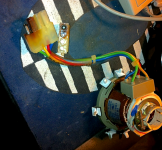
Anyone ever seen this happen to the DEF yoke connector? 128K
I am now swapping good parts for bad parts in non working 128k/512k A/B's
I was able to fix this one one, the issue was this Deflection Yoke Connector fried.
I wonder how this would happen? maybe it came loose?
Yeah, this is mentioned on page 103 of Larry Pina's book. I also had an analog board with that kind of damage, but not as severe.
Pina says this happens when C1 shorts, sending high current through pin 4 of the J1 connector. Solution: replace C1 and possibly L2, as well as the connector.
Pina says this happens when C1 shorts, sending high current through pin 4 of the J1 connector. Solution: replace C1 and possibly L2, as well as the connector.
thanks man! i already installed another yoke and soldered on a good connector to the AB and as of right now the AB is now working.
however to keep this new connection from frying, I should definitely check C1 its a big one if i remember correctly.
however to keep this new connection from frying, I should definitely check C1 its a big one if i remember correctly.
Let us know what you use for a C1 replacement. As I recall, it's one of those big, high frequency, bi-polar guys.
i will let you know.
will get to it soon.
will get to it soon.
I would almost ALWAYS use a mylar film/orange drop cap in a deflection circuit. But thats just me.
Hey there, I know I'm a little bit late to the thread, but I had this same problem and my C1 cap looks fine. Sometimes my 512k makes a prolonged buzzing noise when the J1 connector is plugged in, other times it seems to boot like normal except the screen is dark. Any thoughts?
Did you measure the resistance through C1, or just do a visual check? Maybe it's failed even though it looks OK to the eye.
I just did a visual check for leaks/bulging. What's weird is that I used to be able to slap it a little bit to get video (hinting at a loose solder connection) but now no amount of slapping will bring anything on the screen.
Even if C1 is good, the charring on the connector could cause this as it doesn't make proper contact. I guess the high frequency signal could cause the buzzing noise. Replacing the wiring harness would probably be a good idea. I have the same problem with a Plus even with a new C1 cap.
Yeah, I'm going to try and scrape off some of the charred black bits and try to see if I can get the screen to work. What I'm wondering is what could have caused the meltdown in the first place? If the melting is caused by the C1 shorting, wouldn't that happen again?
Melting/charring/heat is caused by high current flowing through a high resistance. The resistance of the contact increased, causing it to heat up.
Why the resistance increases? Well bad connection mostly. Either the solder joint, or the metal pin itself starting to oxidize/corrode, This creates a higher resistance. The yoke still wants to consume the same amount of energy so the "resistor" begins to burn off heat.
Best solution: Cut off the yoke connector, unsolder the jack from the board and just direct-solder the yoke into place. Or, replace the connector if they can still be found.
Why the resistance increases? Well bad connection mostly. Either the solder joint, or the metal pin itself starting to oxidize/corrode, This creates a higher resistance. The yoke still wants to consume the same amount of energy so the "resistor" begins to burn off heat.
Best solution: Cut off the yoke connector, unsolder the jack from the board and just direct-solder the yoke into place. Or, replace the connector if they can still be found.
Thanks for the advice! So you're saying that most compact mac's J1 connectors can just start melting over time?
Depends on oxidation, the crusty solder joints, and the mileage on it. In theory, Yes... I fixed alot of these burned connectors in other electronics, like on power supplies for TVs, i have even seen ATX connectors do this.
I've seen this a few times, the worst case being on an SE/30 I took apart well over a decade ago. In Macs, it really doesn't seem to be that common; I've taken apart countless compacts and most of them still look OK, even if they had faulty analog boards. I believe the SE/30 I had was used heavily, as it was already in very poor shape by 1999 when I got it.
Ok so I cut off the J1 connector and replaced it with another one, I resoldered the other end of the J1 connector (as well as C1) and tried turning it on. All I get now is either a loud "BUUUUU" humming noise, or a booting beep and that humming noise. The screen still doesn't turn on. What do you guys think?
How about a recording of the noise? Is it a "flup flup flup" sound perhaps?
No, it's more of a "BNNNNNNNN" that goes continuously. I think it's coming from the actual CRT. Anyways, I just slapped the thing and I saw a flash of the "?" Screen. Also something new: when I slap the side, it sometimes restarts the computer and I get the startup bong but still no screen. Any clue why?
Ha! Something even weirder just happened: for some reason when I bend the analog board, the screen returns to normal! When I stop bending it (towards the side wall) it goes back to black! Any thoughts?
more bad solder joints.
Your a wild man

Yeah, be careful there, high voltages and all that.
That's good news that you saw a flash when you slapped it. I would suggest reflowing the solder joints on the pins for the other analog board connectors. It's only like 20 spots to do them all.
That's good news that you saw a flash when you slapped it. I would suggest reflowing the solder joints on the pins for the other analog board connectors. It's only like 20 spots to do them all.
Great news! I was doing some bend testing to see what area I needed to resolder, when I brush the J4 connector and the screen flickers on! So I resolder the J4 connector pins and viola! It works! That little bastard was hiding in plain sight!
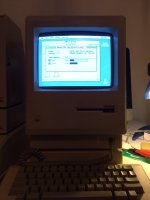
On another note, while peeking around inside, I noticed that the motherboard had a daughterboard installed on top of it. This must explain why my 512k is able to recognize the HD20 that came with it! I don't know what kind of voodoo magic is going on with that expansion board, but it somehow turned the computer into a 1024k 512ke! Super wierd because normally M0001w's aren't compatible with HD20s...
On another note, while peeking around inside, I noticed that the motherboard had a daughterboard installed on top of it. This must explain why my 512k is able to recognize the HD20 that came with it! I don't know what kind of voodoo magic is going on with that expansion board, but it somehow turned the computer into a 1024k 512ke! Super wierd because normally M0001w's aren't compatible with HD20s...
By the way here's proof
Congratulations! I had a very similar thing happen to the analog board on a Plus a little while ago: viewtopic.php?f=3&t=22279
That daughter board probably has the 128K ROM (from the Mac 512Ke and Mac Plus), which includes SCSI support. I had one of those a few years ago - I think it plugged into the ROM sockets or had a CPU clip... I can't remember now.
That daughter board probably has the 128K ROM (from the Mac 512Ke and Mac Plus), which includes SCSI support. I had one of those a few years ago - I think it plugged into the ROM sockets or had a CPU clip... I can't remember now.
SORRY i have been so busy. Cool man! i knew you were going to figure it out. nothing stops a go get-r.
Haha thanks! I really is satisfying to finally fix something you put so much time into.