
Thread
Apple IIe Enhanced RAM Error Help!
Hi there! I was wondering if anyone could help me with this particularly pesky problem of mine:
So I just recently got an Apple //e off of eBay and was super excited as it came with loads of software and stuff. After cosmetically cleaning it I decided to test and see if the Duodisk it came with worked. I hooked everything up, the computer made a startup beep and the Duodisk did it's clacky thing and the drive indicator light came on. After cleaning the Duodisk I inserted a ProDos floppy into the drive. The computer then displayed the ProDos splash screen and then went to "Relocation/Configuration Error" and the drive turned off.
I ran a self test (solid apple + control + reset) and I was met with a message saying "RAM 00000001"
I repeated this process several times, and the result is always the same. I am assuming this means one of the RAM chips is broken, but I have no idea which one.
If anyone could help me get this computer up and running I'd greatly appreciate it!
So I just recently got an Apple //e off of eBay and was super excited as it came with loads of software and stuff. After cosmetically cleaning it I decided to test and see if the Duodisk it came with worked. I hooked everything up, the computer made a startup beep and the Duodisk did it's clacky thing and the drive indicator light came on. After cleaning the Duodisk I inserted a ProDos floppy into the drive. The computer then displayed the ProDos splash screen and then went to "Relocation/Configuration Error" and the drive turned off.
I ran a self test (solid apple + control + reset) and I was met with a message saying "RAM 00000001"
I repeated this process several times, and the result is always the same. I am assuming this means one of the RAM chips is broken, but I have no idea which one.
If anyone could help me get this computer up and running I'd greatly appreciate it!
if there is a 64k / 80 column card try pulling that first then see if it still does it.
I've pulled all cards and it still says the exact same thing every time.
Ok, so, yeah, it's a motherboard issue. I'd examine the RAM chips and see if any look suspect... AFAIK, the 4164 chips may still be available new.
-J
-J
if you get lucky, the RAM is socketed, so just pull it and replace. If it's soldered... well, it could get painful.
I've thoroughly looked at all the RAM chips and even cleaned them a little with some alcohol and scrubbing. It doesn't seem like any of them are suspect cosmetically. And yeah, they are all soldered...
What would really help at this point I guess is to find out which RAM chip (f6-f13 I think) the "RAM 00000001" error is referring to.
If you buy one chip you can "piggy back" it one chip at a time and test and the problem should go away then you can replace.
That sounds like a really cool idea! I have an Applied Engineering RAMWORKS III that came with the computer, it's all socketed so could I pull a chip from there to test with? Also, how exactly do you "piggy back?"
I think the RAMWorks card uses 41256s. Do you have a stock 64k Aux RAM card lying around with socketed RAM?
does that piggybacking acutely work?
It looks like my RAM chips are 4264, while my RAMWORKS card has all 6342s.
I checked one 128 upgrade and it worked, I'm sure the IIe should also. Or at least cause a different issue on the correct bad chip.
I think I might try piggybacking a 4265 once I can get my hands on one. Can a 4165 replace a 4265?
they're all variations of 4164 (64kb x 1) ram chip.
So are you saying I can piggyback one of my 6342s on one of the 4264s?
actually, I've never seen or heard of a 6342 (nor can I find a datasheet for it.) so at the risk of offending, are you sure you read the numbers correctly?
Haha no worries, I'm probably wrong. Here is a picture of the RAM on the cards.
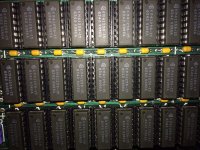
Those would be 41256 chips.
-J
-J
Are those piggybackable with my soldered 4265s?
I don't think so. They're a different capacity chip... I'd try to source a Revision B //e board. RAM chips are socketed. Swap over your ROM chips and CPU, then use that instead.
-J
-J
Wouldn't it be a lot cheaper to just replace the faulty RAM?
If you're good with a soldering iron, probably. However, considering how the machines are getting harder to find, it might be a good idea to have an extra board anyway.
-J
-J
I was going to suggest picking up a 64k Aux RAM card with socketed RAM to harvest parts, but a casual glance on fleaBay seem to suggest sellers are all under the influence of illicit substance...
Interesting question: if piggybacking really does work, why don't those will little soldering skill simply attach a ram chip on top of the broken one?
I think I have one that I could donate to the cause.
Re: the illicit substance, it's the "SteveJobsIsDead" substance. Everything skyrocketed when he passed away.
-J
Who needs drugs when you have the effects of the Reality Distortion Field? 
http://www.youtube.com/watch?v=X0GmhtPxyKM
like Michael Jackson, made way more in sales after he passed.

like Michael Jackson, made way more in sales after he passed.
That would work. You'd want to do a little bit of soldering on all the pins to be sure they didn't let go over time. But if you're in there, fixin' stuff... why not do it right and put in a socket? Besides, one failed. Likely others will follow. If you fix one - you might as well fix them all.
The only reason I would think to do this is if either that person has no soldering experience and/or wants to keep the board historically accurate but still be able to use it. As for that 64k RAM card, do those chips really work with my system? I'd be forever grateful for the help if they do!
Hey guys, I just wanted to say that the problem has been solved. I guessed RAM 00000001 was actually F6, so I went ahead and replaced that chip with one I got at a local electronics supply shop. I'm very lucky that they had an ample stock of 4264's! I took out (somewhat jankily) the old RAM chip and installed the socketed new one. After days of cleaning every part imaginable, I finally got the "SYSTEM OK!". Thank you guys for all you're help and offers to send me parts, I really appreciate it. To celebrate, I made a little video of the first floppy I tested out: an old UP-TIME floppy disk magazine that happened to include an 8-bit jukebox! You can check it out here :
Yay... Congrats on getting the old beast fixed.
-J
-J
Yeah! It feels good to not have screwed it up permanently AND fixed it to full working glory! Thanks again for all the help.
great job!
cool youtube videos!
cool youtube videos!