
Thread
A nice SE/30, /w Options :-)
Mcdermd hooked me up. - memberlist.php?mode=viewprofile&u=6241
This SE/30 has stuff in if from other members too!
max1zzz - memberlist.php?mode=viewprofile&u=21831
he made some super kick butt terminated SCA to 50 pin scsi adaptors for me!
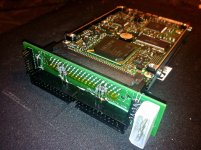
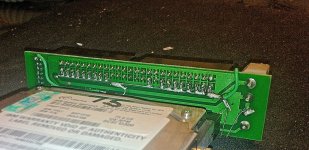
Not only does this thing look nice but the inside has a bunch of cool features.
- Ceramic Cpu
- 32 megs of ram - i was able to find ( 8) 4meg simms!!
- AUI/TB-2 Mac Con NIC
- First class cap job by mcdermd!
- Dougg3s Hacked ROM, Enabling all kinds of really great features! including booting Systems7 + Apps, all from ROM!!. memberlist.php?mode=viewprofile&u=14318
- And to top it off with a fresh Pram battery.
It has a brand new Analog board, its literally sparkling shiny.
Freshly Cleaned/ Greased Superdrive Sony 2mb
73gb 10,000 RPM SCA Hard Drive
like brand new CRT
What more could you ask for from a SE/30?
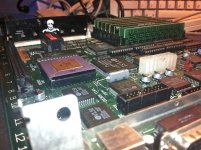
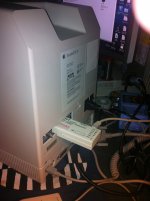
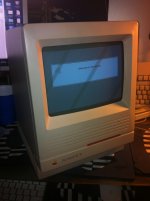
This SE/30 has stuff in if from other members too!
max1zzz - memberlist.php?mode=viewprofile&u=21831
he made some super kick butt terminated SCA to 50 pin scsi adaptors for me!
Not only does this thing look nice but the inside has a bunch of cool features.
- Ceramic Cpu
- 32 megs of ram - i was able to find ( 8) 4meg simms!!
- AUI/TB-2 Mac Con NIC
- First class cap job by mcdermd!
- Dougg3s Hacked ROM, Enabling all kinds of really great features! including booting Systems7 + Apps, all from ROM!!. memberlist.php?mode=viewprofile&u=14318
- And to top it off with a fresh Pram battery.
It has a brand new Analog board, its literally sparkling shiny.
Freshly Cleaned/ Greased Superdrive Sony 2mb
73gb 10,000 RPM SCA Hard Drive
like brand new CRT
What more could you ask for from a SE/30?
A little update.
the mac con card that was in my IIsi died… it may of happened at one point from me installing the ribbon cable backwards.
Either way it doesn't get an ip no matter what i do… even if i set a manual ip it just says host is down in the pings.
the FPU part of the card still works… and the Pass through part should also still work maybe… just the network part is DEAD..
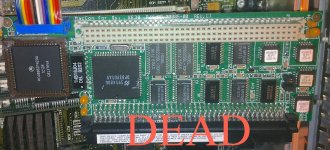
So i swapped the 10bt faceplate from the not working IIsi NIC
with the working NIC in the SE/30. All is working fine with the SE/30.
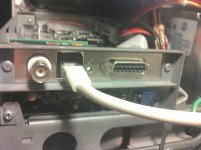
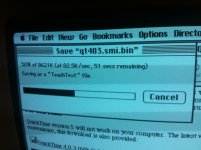
Also here is a picture of the inside of the se/30.
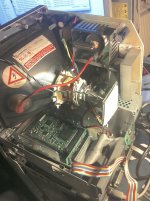
So if anyone has an extra one of those cards let me know.. I could even send you this one, still would make a nice FPU add on and riser.
id like to get the IIsi going as well… i want to do the Radius ? pivot video card thing… would love to get some better resolution over 640x480! + NIC.
the mac con card that was in my IIsi died… it may of happened at one point from me installing the ribbon cable backwards.
Either way it doesn't get an ip no matter what i do… even if i set a manual ip it just says host is down in the pings.
the FPU part of the card still works… and the Pass through part should also still work maybe… just the network part is DEAD..
So i swapped the 10bt faceplate from the not working IIsi NIC
with the working NIC in the SE/30. All is working fine with the SE/30.
Also here is a picture of the inside of the se/30.
So if anyone has an extra one of those cards let me know.. I could even send you this one, still would make a nice FPU add on and riser.
id like to get the IIsi going as well… i want to do the Radius ? pivot video card thing… would love to get some better resolution over 640x480! + NIC.
I stupidly reversed the cable direction on a MacCon SE/30 once. It fried it the same as yours.
Sorry about the dead Mac Con card. If you're left with a spare faceplate for the back panel, I'd be interested in it. I need some way to mount my custom Radius Color Pivot cable in my IIsi, and the video connector fits perfectly into the thicknet opening in the Mac Con's faceplate.
Hey there, I do have a working BNC / AUI faceplate that i am not using right now.
I am going to try and find a replacement NIC for my IIsi.
I'll let you know soon, if i cant get together anything its definitely up for grabs.
Were there more NIC options available for the IIsi over the SE/30?
Or was pretty much any NIC that would work for the IIsi would work in the SE/30 as well?
I am going to try and find a replacement NIC for my IIsi.
I'll let you know soon, if i cant get together anything its definitely up for grabs.
Were there more NIC options available for the IIsi over the SE/30?
Or was pretty much any NIC that would work for the IIsi would work in the SE/30 as well?
The PDS NICs are interchangeable between SE/30 and IIsi it seems -- but the IIsi has the possibility of the NuBus adapter for its PDS, which opens the door to lots of (much cheaper) NuBus NICs on that side. The SE/30 necessarily has to use a PDS NIC or a SCSI Ethernet adapter.
awesome , anyone wanna sell me a Nubus adaptor for the IIsi?… Trag sold me a couple super COOL 10/100 Nubus ethernet cards!
replace the thb16j04?
is that like a borns filter type thing?
is that something you came up with … or is this a known thing to blow once you hook up the cable backwards ?
is that something you came up with … or is this a known thing to blow once you hook up the cable backwards ?
could it be something that is just needed for the BNC, and maybe no needed for the AUI,
looks like there is a THB16J04, on the BNC/AUI ADAPTOR plate, maybe i could steal that one, because i am not using BNC anyways.
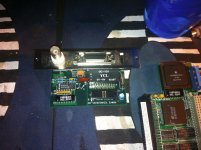
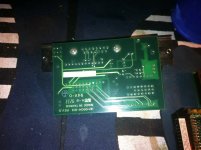
looks like there is a THB16J04, on the BNC/AUI ADAPTOR plate, maybe i could steal that one, because i am not using BNC anyways.
No no, thats the isolation transformer that physically isolates the network interface from the chip.
I think there was another thread on this chip failure and replacing getting a NIC back online. If you plug the cable in backwards, it likely kills those isolators. If it killed the main IC, then the ethernet driver would never see the card.
It appears both the AUI card has the same isolator as the main ethernet card.
This chip is used for ALL interfacing, it physically isolates the network interfaces from the main controller IC. Why they do this? I dunno. maybe impedance reasons, maybe lightning reasons, I dunno. But if it openes up, then you cant see any networks.
Here I linked a datasheet you can use to measure in ohms the devices. if one of the transformers is open then youll know it.
http://www.datasheetarchive.com/dlmain/Datasheets-9/DSA-162411.pdf
Also when you plug a cable in backwards, Does it kill the plate? or does it kill the card? or does it kill both? If its one or the other, You know where to look.
I think there was another thread on this chip failure and replacing getting a NIC back online. If you plug the cable in backwards, it likely kills those isolators. If it killed the main IC, then the ethernet driver would never see the card.
It appears both the AUI card has the same isolator as the main ethernet card.
This chip is used for ALL interfacing, it physically isolates the network interfaces from the main controller IC. Why they do this? I dunno. maybe impedance reasons, maybe lightning reasons, I dunno. But if it openes up, then you cant see any networks.
Here I linked a datasheet you can use to measure in ohms the devices. if one of the transformers is open then youll know it.
http://www.datasheetarchive.com/dlmain/Datasheets-9/DSA-162411.pdf
Also when you plug a cable in backwards, Does it kill the plate? or does it kill the card? or does it kill both? If its one or the other, You know where to look.
the plate works with the other working card… so looks like it pops the card.
gotcha well let me fire up the heat gun swap the chips around and see what happens.. thanks for shedding some light on this subject!
gotcha well let me fire up the heat gun swap the chips around and see what happens.. thanks for shedding some light on this subject!
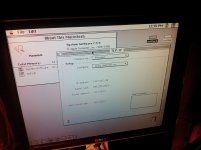
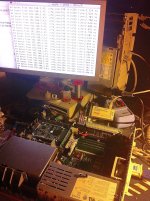
I did swap that out,
And it does now work too!
but i'm thinking the problem was my 29mhz OverClock was too aggressive.
after i changed the delta THB16J04, it still would not grab an IP.
So i figured i would change IIsi's for giggles and this one is bone stock speed 20mhz
and sure enough it works fine.
Classic mac looks odd on an LCD. lol.
For future reference, look at the datasheet and use its pinouts to test the windings for opens before you pop and replace
For future reference, look at the datasheet and use its pinouts to test the windings for opens before you pop and replace
i like to shot gun… keeps life interesting.
You've never run Sheepshaver or Basilisk on a modern PC/laptop ?
The reason to do it is that the Ethernet specification explicitly calls for 60 seconds of isolation protection to 1500Vrms @ 50-60Hz.
Now all the SE/30 needs is a Micron Xceed video card with the grayscale adapter.
i'd love one, but chances are pretty slim i will ever get my hands on one Never ran sheepshaver before. And Last time I regularly used Basilisk was with an XP machine with a CRT. Now I run Win7 X64 with an LCD and basilisk is unstable with it, looks odd, and none of the network options work, such as appletalk over ethernet, CDROM, etc..You've never run Sheepshaver or Basilisk on a modern PC/laptop ?
Its nice to have a se/30 that all is working good, W/o any spaghetti ran all over it.
It just seems lately that most of the SE/30's I'm Capping, they also need wires ran, for the video rom… the 0-7 data lines vram to mux… Scsi to glue… I mean its ok. Gotta do, What ya gotta do, to make em work… but its like we're scrapping the bottom with these SE/30 boards these days.
I acutely own 4 dead prefectly re-capped SE/30 boards.
3 of them were exchanges from customers.
Couldn't get these ones going in a reasonable amount of time, after the re-cap.
1 was a se/30 I got from ebay, that had a slight battery explosion.
So time will tell, The 3 exchanges are off to genie_mac, (I sent them home to ireland). Well not exactly home that would be in CORK he said lol...
and i guess there is a big difference between his town and the folks from Cork But anyways close enough for me… I think genie_mac is good at what he does! He is nice to look at these for me.
It just seems lately that most of the SE/30's I'm Capping, they also need wires ran, for the video rom… the 0-7 data lines vram to mux… Scsi to glue… I mean its ok. Gotta do, What ya gotta do, to make em work… but its like we're scrapping the bottom with these SE/30 boards these days.
I acutely own 4 dead prefectly re-capped SE/30 boards.
3 of them were exchanges from customers.
Couldn't get these ones going in a reasonable amount of time, after the re-cap.
1 was a se/30 I got from ebay, that had a slight battery explosion.
So time will tell, The 3 exchanges are off to genie_mac, (I sent them home to ireland). Well not exactly home that would be in CORK he said lol...
and i guess there is a big difference between his town and the folks from Cork
But anyways close enough for me… I think genie_mac is good at what he does! He is nice to look at these for me.Looks like an early x-mas present for me so
And thanks for the roses but don't get your hopes up too much, like. Might have to drive down to Cork like and see if I can find the guy that build them. And ask him, like, why didn't you take more care with those via's?
And thanks for the roses but don't get your hopes up too much, like. Might have to drive down to Cork like and see if I can find the guy that build them. And ask him, like, why didn't you take more care with those via's?
ya better not, Like. He might knock ya in the mellon, Like
It could be worse..... like Amiga 4000 motherboards with battery and capacitor juice all over them.
So - what is the "correct" way? I have a MacCon card with an AAUI only faceplate. I got it loose and so I don't know that the cable is plugged correctly on either end.
Looking at the solder side of the board on the NIC, one of the pins is screened with a square around one of the pins in the four corners, so I assume this is pin #1. On the blue connector for the cable, there is an arrow shape molded into the connector that also points to one of the corner pins, so I assume that that is also pin #1, and so should correspond to the "square" pin on the card.
On the AAUI daughterboard, there is no easily ID'd pin #1, so not sure which direction that should go.
If anyone can enlighten me to the correct orientation, I would appreciate it. If anyone has an RJ-45 daughterboard they can part with, that would be appreciated as well, though an AAUI dongle shouldn't be too hard to find.
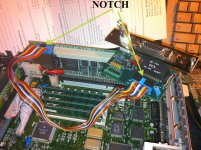
Well, that's all fine if you have notches
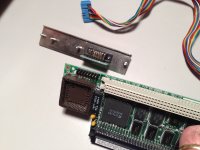
That's, kind of cool… at least i know that port right off the card is just a plain AUI port.
when attaching the cable to the card… the notch on the cable has to be facing upwards. Now on the AUI side… not sure.
I fix a lot of stuff for people… One of the things I do is take some pictures before I tear it apart. This has saved my bacon several times!!!!
----
if you look closely the pins are labeled on the AUI port.
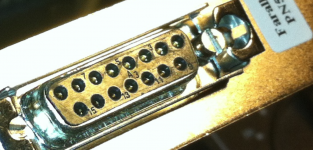
looks like brown is pin 1
witch looks like all my notched cables… Floppy and SCSI too.. IDE… pin one is the last wire on the right hand side.
so you know where pin one is on the AUI.. so match it up.
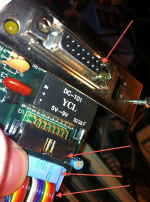
when attaching the cable to the card… the notch on the cable has to be facing upwards. Now on the AUI side… not sure.
I fix a lot of stuff for people… One of the things I do is take some pictures before I tear it apart. This has saved my bacon several times!!!!
----
if you look closely the pins are labeled on the AUI port.
looks like brown is pin 1
witch looks like all my notched cables… Floppy and SCSI too.. IDE… pin one is the last wire on the right hand side.
so you know where pin one is on the AUI.. so match it up.
Yes - what you show matches up with what I believe to be pin 1 on the cables and the two boards.
As I said, this was not connected when I got it, and after reading about these things frying if the cable was connected wrong, I wanted to double check.
The daughterboard I have is AAUI, not AUI, so the dongle you referenced upthread isn't correct. A dig through the my networking parts bin may turn up an AAUI->RJ45 dongle, but if not, they are out there. I seem to remember having one for some long lost reason.
If the pinouts of the AAUI daughterboard would be helpful to you, let me know and I can send it along with photos.
As I said, this was not connected when I got it, and after reading about these things frying if the cable was connected wrong, I wanted to double check.
The daughterboard I have is AAUI, not AUI, so the dongle you referenced upthread isn't correct. A dig through the my networking parts bin may turn up an AAUI->RJ45 dongle, but if not, they are out there. I seem to remember having one for some long lost reason.
If the pinouts of the AAUI daughterboard would be helpful to you, let me know and I can send it along with photos.
The MacCon I had did not have the notched socket either.
As I recall, they marked one side of the ribbon end with white paint, though.
As I recall, they marked one side of the ribbon end with white paint, though.
Well - you can see a white dab of paint on the "outside" side of the connector on the NIC in my photo. The AAUI daughterboard has one as well. This matches up with the square screened around the one pin on the solder side of the board.
The blue connector on the ribbon has the molded arrow which points to the brown wire which I think we all believe is pin 1.
I'm pretty confident I know how things line up at this point. Thanks everyone for their help!
ok cool.. oh yeah i didn't see the AAUI connector in your pic there.
I was thinking it was AUI.
so ok then… then the port on the maccon card is AAUI naturally.
because AAUI has a different pinout then AUI.
No problem though.
I was thinking it was AUI.
so ok then… then the port on the maccon card is AAUI naturally.
because AAUI has a different pinout then AUI.
No problem though.