
Thread
Outbound 125!
Thanks to snuci, I picked up an Outbound 125! Snuci sorta beat to a certain Portable with backlight upgrade. But they seller had another item for sale and today I picked it up (seller lives a couple hours from me and I was up that way anyway).
Its in REALLY good condition cosmetically. It appears that all the manuals and paperwork are present. I will probably take it apart for inspection before trying to boot it. Besides, its sadly missing two things. Power adapter and floppy drive. A manual is present for an external floppy, but he could not locate it. I asked him to let me know if he finds it. Machine is not very useful with it missing, especially if the hard drive is toast. I read these machines can be very picky when it comes to the right RAM, etc. I assume ROMs are in place, but I don't know for sure until I open it anyway.
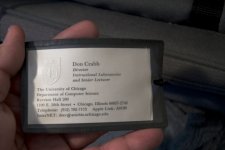
The machine was bought or used by a person at the University of Chicago. The business card in the bag tag even has an Apple Link I.D.! Pics attached are from seller, I did not have time to take my own. I really am not sure if the price I paid was too little or too much. I took a gamble, but I think this is a nifty addition to my collection. Or who knows, for the right item a trade later down the road.
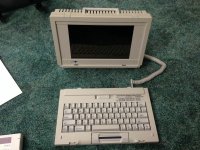
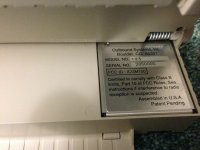
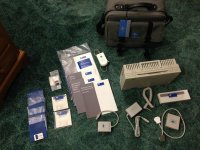
Its in REALLY good condition cosmetically. It appears that all the manuals and paperwork are present. I will probably take it apart for inspection before trying to boot it. Besides, its sadly missing two things. Power adapter and floppy drive. A manual is present for an external floppy, but he could not locate it. I asked him to let me know if he finds it. Machine is not very useful with it missing, especially if the hard drive is toast. I read these machines can be very picky when it comes to the right RAM, etc. I assume ROMs are in place, but I don't know for sure until I open it anyway.
The machine was bought or used by a person at the University of Chicago. The business card in the bag tag even has an Apple Link I.D.! Pics attached are from seller, I did not have time to take my own. I really am not sure if the price I paid was too little or too much. I took a gamble, but I think this is a nifty addition to my collection. Or who knows, for the right item a trade later down the road.
Very nice :O
For the record, I've always thought its funny that Outbound's logo has a kangaroo, yet they were a US based company, and the machines were never sold in Australia. At least I've never heard of anyone in Australia having one, anyway, nor have I ever seen one in person.
For the record, I've always thought its funny that Outbound's logo has a kangaroo, yet they were a US based company, and the machines were never sold in Australia. At least I've never heard of anyone in Australia having one, anyway, nor have I ever seen one in person.
Glad it went to someone here. He offered it to me as well but I can't beat a local pickup. Congrats!
I did some research on these and the member "trag" here has one and has been looking for the card that allow this to be used with a "zombie Mac" as he called it. It's a very interesting machine and a good collector piece for those who collect Mac clones. Definitely rare. So rare, in fact, that I didn't know what kind of value to put on it. Anyway, awesome machine if you can find or make a power supply for it. When you get it running, please take some pics!
I did some research on these and the member "trag" here has one and has been looking for the card that allow this to be used with a "zombie Mac" as he called it. It's a very interesting machine and a good collector piece for those who collect Mac clones. Definitely rare. So rare, in fact, that I didn't know what kind of value to put on it. Anyway, awesome machine if you can find or make a power supply for it. When you get it running, please take some pics!
From what I can tell it needs a whopping 19 volt supply, 1.5amp. I looked inside, reseated all connections and SIMMs. Has a 43MB hard drive. Not sure how much RAM, all slots full though. Capacitors all look good. I put in a new PRAM battery. This thing is just like the 9v on the Portable. But its always connected. It holds the "silicon disk" (RAM disk) image intact when the main battery is swapped. But since its always connected, if the main battery dies then this small lithium will drain quickly too. One reports says the main battery can die in as little as 24 hours when in standby! Pretty sure the main battery, still in box, is dead as can be. I will try to charge it when I find a charger.
I read up in the card, both online and in the manual. Interesting setup they devised. It basically extends the abducted ROMs in the Outbound to the Mac they were removed from. I am not sure if this card is needed for Target Disk Mode to work. I do have the SCSI adapter and cables. I have never seen one of these cards and they are different depending on the machine. Some interface to the motherboard, another drops into the expansion slot. Even still, one would need the cables which I am betting are even harder to find. I am guessing many made it to the dump. Think about it it. A Mac that would not boot with some weird cables coming out of the security lock port.
I will certainly take pics!
I read up in the card, both online and in the manual. Interesting setup they devised. It basically extends the abducted ROMs in the Outbound to the Mac they were removed from. I am not sure if this card is needed for Target Disk Mode to work. I do have the SCSI adapter and cables. I have never seen one of these cards and they are different depending on the machine. Some interface to the motherboard, another drops into the expansion slot. Even still, one would need the cables which I am betting are even harder to find. I am guessing many made it to the dump. Think about it it. A Mac that would not boot with some weird cables coming out of the security lock port.
I will certainly take pics!
My conquest, of sorts, just took on a certain creep factor. While deciding to Google the name and info on the attached business card, I came across this. And all the info on the card points in the right direction. Makes me more curious about the drive contents.
http://chronicle.uchicago.edu/000302/crabb.shtml
http://chronicle.uchicago.edu/000302/crabb.shtml
I think I used to own a copy of his System 7.5 book. Nice find!!!
Wow, he was way too young.
Ya, very young.
Does anyone know what the power input requirements are? 19 volts seems to be the consensus. But I am wondering if the adapter should output AC or DC. One bit of data says the 125 has a built-in rectifier. I am digging through power adapters I have on hand. I have an 18.5 volt 6 amp unit, but its DC. To be honest, I am not overly familiar with this sorta stuff. I planned on picking up one tomorrow anyway, but sorta want to tinker with this thing tonight if I can. I would really like to find a clear picture of the stock power adapter! But that is proving very, very difficult. And no, the machine itself does not have power requirements.
Does anyone know what the power input requirements are? 19 volts seems to be the consensus. But I am wondering if the adapter should output AC or DC. One bit of data says the 125 has a built-in rectifier. I am digging through power adapters I have on hand. I have an 18.5 volt 6 amp unit, but its DC. To be honest, I am not overly familiar with this sorta stuff. I planned on picking up one tomorrow anyway, but sorta want to tinker with this thing tonight if I can. I would really like to find a clear picture of the stock power adapter! But that is proving very, very difficult. And no, the machine itself does not have power requirements.
19v is a very common voltage.
laptops these days run at 19v, close 3 amps.
if you have a cheapo PC laptop, i bet the charger would work just fine. HOWEVER If it doesnt say on a tag anywhere on the machine what it supposed to take, then i wouldnt try anything until you find out what does...
laptops these days run at 19v, close 3 amps.
if you have a cheapo PC laptop, i bet the charger would work just fine. HOWEVER If it doesnt say on a tag anywhere on the machine what it supposed to take, then i wouldnt try anything until you find out what does...
Very nice find and with all the accesories needed!
Do let know how you get it powered/working.
I have not touched mine yet, other projects been on the way.
Do let know how you get it powered/working.
I have not touched mine yet, other projects been on the way.
Not sure if I will ever get it running. From what I can read, 19 volts is correct. And also the power adapter output needs to be AC, not DC. Rectifier converts to DC. But from my very basic understanding of rectifiers, which is really just diodes and capacitors, I would think I could power it using DC also.
Anyone know much about rectifiers? I know when supplying AC voltage (lets say 10 volts) its get multiplied by 1.41 to reach DC voltage. But if DC is already going in, I am not sure if there is an increase in voltage or not.
Now if I could even find the right adapter I would just go that route. I did finally find one and its priced at $70. Thats a bit more than I want to throw at a machine that may not even work. I guess I will see what the local battery store has in hand. Its very, very difficult to search eBay, Google or Amazon for an adapter that outputs AC.
Wow, Don Crabb's personal machine.
I have a copy of his Guide to System 7.5, quite a good read. RIP
I have a copy of his Guide to System 7.5, quite a good read. RIP
A good place for oddball power supplies is Marlin P Jones and Associates (http://www.mpja.com/). Lots of surplus ones of all sorts.
I looked. All DC varieties.
DC will work perfectly fine with an AC device. Its the other way around that you cant do.
Also it probably has a buck regulator so the slight drop in voltage will not matter.
Also it probably has a buck regulator so the slight drop in voltage will not matter.
Its alive (and well!). I decided to just try a 19v DC power supply. In theory it should work. And it did! And now it looks as if the Outbound itself was just the icing on the cake. See pics! I will have to dig through all of the files, but there seems to be about 2 years of work on here. I would assume this would not have been his primary work machine. But who knows. First thing will be to somehow get backups made.
But the machine seems to be working as it should. Looks like the SIMM cards are 1MB each. Not sure about the silicon disk as I did not format it.
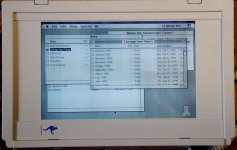
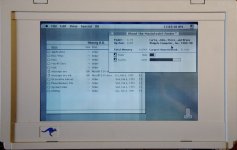
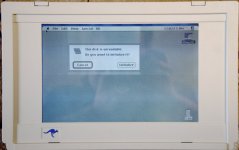
But the machine seems to be working as it should. Looks like the SIMM cards are 1MB each. Not sure about the silicon disk as I did not format it.
Nice! I saw one of these in person once long ago. I remember liking the "mouse-bar". Seemed like a better implementation than a trackball, but then again I don't know how much I would have liked it for long term use.
Didn't these come in more than one model? I seem to remember two different versions; guess I could take the time to google it.
I'd definitely get one of these in my collection if I ever ran across one - nice grab!
Didn't these come in more than one model? I seem to remember two different versions; guess I could take the time to google it.
I'd definitely get one of these in my collection if I ever ran across one - nice grab!
Well I am not liking the mouse bar thing. It seems like when you reach the limit going left or right it takes more effort to get all the way to edge of the screen. Hard to explain. Guess that is why attaching a mouse was an option! Its weird its a Microsoft mouse modified to work with the Outbound (label on underside says Outbound, etc.).
There were several models, two styles. The 125 is the first one. It could be ordered in different configurations but in the end was still a 125. The next style proved more popular and subsequently easier to find now. I think it came in 4 or 5 models with each model having a different processor speed and other small differences. Much more in line with how Apple produced their Macs.
I'm pretty sure it's just a plain old Microsoft Bus Mouse. However, the Bus Mouse is mostly forgotten now days.
The power supply was indeed 19V AC, about 2 Amps. The rectifier inside is a four diode full bridge. The port on the side of the machine is not a VGA port. If you attach a VGA monitor to it you will likely kill one of the diodes in the power supply. I had one like that once which I had to repair. Got the diode specification from Perfit back in the early 90s. I was not the person who connected the monitor, BTW. Since you have the manuals, you probably didn't need the warning, but it is such an enticing mistake to make.
Did you, perhaps, check with the seller to see if there was a Plus or SE that he obtained along with it? It sure would be nice to find an example of that docking card. Even if all I get to see is pictures from you. The cable for the docking card should be the same as the cable for the SCSI adapter, which is the same as the cable the external floppy uses.
SCSI target mode will work fine without the docking card. The two are not associated. BTW, the internal hard drive is an IDE device, strangely enough, which I think makes it the first Macintosh or clone to use an IDE drive.
If you install an OS on the silicon drive, you can then install new OSs on the hard drive by connecting the laptop to another Mac via LocalTalk, and then booting from the Silicon Drive. Risky though. If something goes wrong and you lose the silicon drive while the hard drive is unbootable, the machine is hosed unless you can get access to a floppy drive.
Welcome to the ranks of the Outbound Model 125 Laptop owners. They are a very cool example of technology from 1990.
The power supply was indeed 19V AC, about 2 Amps. The rectifier inside is a four diode full bridge. The port on the side of the machine is not a VGA port. If you attach a VGA monitor to it you will likely kill one of the diodes in the power supply. I had one like that once which I had to repair. Got the diode specification from Perfit back in the early 90s. I was not the person who connected the monitor, BTW. Since you have the manuals, you probably didn't need the warning, but it is such an enticing mistake to make.
Did you, perhaps, check with the seller to see if there was a Plus or SE that he obtained along with it? It sure would be nice to find an example of that docking card. Even if all I get to see is pictures from you. The cable for the docking card should be the same as the cable for the SCSI adapter, which is the same as the cable the external floppy uses.
SCSI target mode will work fine without the docking card. The two are not associated. BTW, the internal hard drive is an IDE device, strangely enough, which I think makes it the first Macintosh or clone to use an IDE drive.
If you install an OS on the silicon drive, you can then install new OSs on the hard drive by connecting the laptop to another Mac via LocalTalk, and then booting from the Silicon Drive. Risky though. If something goes wrong and you lose the silicon drive while the hard drive is unbootable, the machine is hosed unless you can get access to a floppy drive.
Welcome to the ranks of the Outbound Model 125 Laptop owners. They are a very cool example of technology from 1990.
It may be. It does have an Outbound label. But logic would say is just a regular mouse I suppose.
I've learned over the years to assume nothing when it comes to ports and hardware. I did read that damage can happen. The port is similar to the Mac Portable port. Digital out so to speak. Meant for an LCD maybe.
While I have the cable, there is no dock card. But the seller is seeing if there is a floppy drive, power supply and now a computer that may have be the Outbounds other half. Seller is not the original collector of these items, so he is checking with the person he got this from.
Okay, that is REALLY cool to know! I knew the drive was IDE, but the target mode I figured exclusive to the card. Now I know I can make a backup of the 40MB drive! Thanks!
Good info, but this drive will be left as is for now. I like the idea of keeping this one as Don had it. There is a LOT of stuff on here. While I am sure its just a small portion of his work, other items like the software are very interesting! I don't think it really adds value to the machine as much as it adds to the story!
Thanks! The more I read the more amazed I am by this tech. It has some really neat features only seen on later models. I like it! Think its a keeper!
This is the power adapter I used. I did swap output ends for one that was a proper fit into the outbound. Really any 19v DC adapter with at least 1.5 amps should work. Ideally you don't want an adapter that can supply more amperage than needed. If something shorts out, it could pull more power and do more damage.
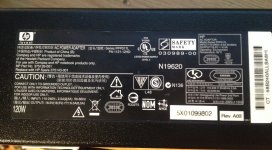
Found different model but same specs HP power supply, good candidate for power source. Hope to get mine running as well.
By the way, show the connector you made to the PSU?
By the way, show the connector you made to the PSU?
All I did was desolder the original cord. This had three contacts, ground, 19v and 6v DC. Replaced cord with a power adapter I found where the plug actually fir the Outbounds power input. This adapter came from a Seagate external hard drive. I donut fancy how thin the replacement cord is. But its not getting warm at all. I still intent to find an original power adapter if one ever turns up.
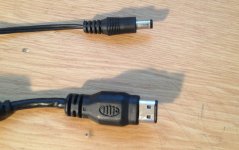
I don't have the info handy, but I've posted the dimensions of the plug somewhere. Perhaps in an old post here. Digikey sells (or sold) a compatible plug.
The funny connector for the floppy/SCSI/docking cable is a Hirose DX10, I think. Not sure about those last two digits. I have that written down at home too. 28 or 26 conductors.
Oh, and the keyboard battery can be replaced with two 'N' sized battery in series. The fit and voltage works.
I've only had the silicon disk up to 16 MB. One of these days it would be interesting to see if larger SIMMs are supported....
trag wrote:
The Laptop 125 uses a 5.5 mm outer diameter and 2.5 mm inner diameter connector for the AC power input. Actually, the inner diameter may be a tad smaller, but it's larger than 2.1 mm. Digi-Key part number CP-004B-ND should work.
^ Last I check though, the part is no longer available. But I am sure that is specific to the manufacturer. A little looking and the same plug should be able to be located at Digikey.
Yup, two 1.5V "N" cell batteries work fine. Cheap at $2/pack. This is even pointed out in the owners manual which surprised me.
As for RAM. I have a big pile of 30-pinn SIMMs. But the specs are not know. I will point out to anyone that reads this later on, use only specified RAM. I do not wish to test the claim, but the wrong RAM can scramble the EPROMs.
If something shorts, its a slippery slope from that point anyway...
What do you guys think of this, would it work if the connector would fit?
http://www.verkkokauppa.com/fi/product/0276/dfxtm/SlimCharger2-90W-TRAVEL-universaali-virtalahde-kannettaville#product-description
High-performance, ultra-slim universal power adapter for almost all notebook computers. A great solution for the power supply to replace the lost! LCD display that shows the voltage. 11 different connectors. Automatically detects the voltage of the connector. Comes with 2-pin Euro power cable, 3-pin UK power cable and 2-pin U.S. power cable. Size 144.5x 68 x 16.5 mm.
100-240V AC voltage
Stabilizes the flow and protects from power surges and short circuits
15/16/18/19/20V/24V loss, max 6000mA. 22/24V Max 5000MA.
11 pcs socket adapter (for example, Acer, Compaq, Dell, HP, Fujitsu-Siemens, IBM, Sony and Toshiba laptops).
Over-voltage and short-circuit protection
This would be handy otherwise as well.
http://www.verkkokauppa.com/fi/product/0276/dfxtm/SlimCharger2-90W-TRAVEL-universaali-virtalahde-kannettaville#product-description
High-performance, ultra-slim universal power adapter for almost all notebook computers. A great solution for the power supply to replace the lost! LCD display that shows the voltage. 11 different connectors. Automatically detects the voltage of the connector. Comes with 2-pin Euro power cable, 3-pin UK power cable and 2-pin U.S. power cable. Size 144.5x 68 x 16.5 mm.
100-240V AC voltage
Stabilizes the flow and protects from power surges and short circuits
15/16/18/19/20V/24V loss, max 6000mA. 22/24V Max 5000MA.
11 pcs socket adapter (for example, Acer, Compaq, Dell, HP, Fujitsu-Siemens, IBM, Sony and Toshiba laptops).
Over-voltage and short-circuit protection
This would be handy otherwise as well.
I don't see why that would not work. 6amps a juice is plenty and it can do the voltage. As always, grab a meter and test output before plugging in!