
If you are overclocking your 6100, better get it back to running the stock 60 or 66 Mhz. The card's 486 sits right on top of the 601 and heat is a big problem.
Download PC Setup 1.6.4 from Apple and install it. Then upgrade it to PC Setup 2.0 if you are running Windows 95. My card has the Vibra daughtercard, all Houdini IIs came with it. It does FM synth like any other SB16 card does, I don't recall it having a separate OPL3 though, so its likely the Creative Music Synthesizer clone chip. There is nothing obscure about it, just a miniaturized SB16. Also, install RAM on the card, it massively improves performance.
As for the original floppies, my card came with the following in the box.
-MS-DOS 6.22
-Windows 3.1
-Apple PC Setup
-Creative Labs Soundblaster 16 drivers
-DOS Drivers (CD-ROM, clipboard sharing, and Networking)
-Video card drivers (Chips and Technologies 65XXX series)
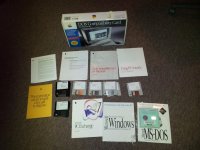
Download PC Setup 1.6.4 from Apple and install it. Then upgrade it to PC Setup 2.0 if you are running Windows 95. My card has the Vibra daughtercard, all Houdini IIs came with it. It does FM synth like any other SB16 card does, I don't recall it having a separate OPL3 though, so its likely the Creative Music Synthesizer clone chip. There is nothing obscure about it, just a miniaturized SB16. Also, install RAM on the card, it massively improves performance.
As for the original floppies, my card came with the following in the box.
-MS-DOS 6.22
-Windows 3.1
-Apple PC Setup
-Creative Labs Soundblaster 16 drivers
-DOS Drivers (CD-ROM, clipboard sharing, and Networking)
-Video card drivers (Chips and Technologies 65XXX series)