

Thread
Apple II+ Question
Just acquired an Apple II+ today along with a Disk II. I posted these questions in my conquest thread, but I figured it made sense to post them here too:
When I tried to load a couple of games, it said that it could not run them because the diskette required 64k of RAM. I was confused by this because this Apple II plus has the language card in it and therefore HAS 64k of RAM. Also one of the games (Oregon Trail) is one that I see all sorts of Apple II+s running on Youtube..
Also, sometimes when I turn on the power to the machine, the disk II's red light turns on and it sounds like it is working (whether there is a disk in there or not) and it never does anything.... When it does this, even the reset button doesn't do anything.
Thanks!
When I tried to load a couple of games, it said that it could not run them because the diskette required 64k of RAM. I was confused by this because this Apple II plus has the language card in it and therefore HAS 64k of RAM. Also one of the games (Oregon Trail) is one that I see all sorts of Apple II+s running on Youtube..
Also, sometimes when I turn on the power to the machine, the disk II's red light turns on and it sounds like it is working (whether there is a disk in there or not) and it never does anything.... When it does this, even the reset button doesn't do anything.
Thanks!
Sounds like there are some things to work out on that machine. It may have a language card, but it might not be connected properly (some have a jumper ribon cable that reaches down to the RAM area on the motherboard). Does yours? Is it seated properly? A picture would be a good idea here.
The drive should start up, seek, and rattle against the track 0 stop a bit, then settle in to a quiet spin until/unless it finds a disk to boot or you hit (ctrl) reset. If you're hitting ctrl-reset and it's not resetting, something is terribly wrong. If you're not hitting ctrl along with reset, that's the problem.
The drive should start up, seek, and rattle against the track 0 stop a bit, then settle in to a quiet spin until/unless it finds a disk to boot or you hit (ctrl) reset. If you're hitting ctrl-reset and it's not resetting, something is terribly wrong. If you're not hitting ctrl along with reset, that's the problem.
I wonder if a moderator could somehow merge the responses to this thread with the ones on the conquest thread. (Snip those out and paste them over here?)
Try the Apple without the Language card and see how it boots. But note this:
There are 9 RAM Chips on the Language card, while (3 rows of) 8 on the board. How is this? The 9th chip, is from the logic board. When you install the Language card, you remove the last chip on the last row and put it in the blank socket on the language card and the jumper cable from the logic board to the language card. When you remove the Language Card, you must remove the 9th RAM Chip from the Language card and put it back into the Logic Board. Then you will have a full 48K Apple II/II+; without it, you will only have a 32K Apple II/II+
There are 9 RAM Chips on the Language card, while (3 rows of) 8 on the board. How is this? The 9th chip, is from the logic board. When you install the Language card, you remove the last chip on the last row and put it in the blank socket on the language card and the jumper cable from the logic board to the language card. When you remove the Language Card, you must remove the 9th RAM Chip from the Language card and put it back into the Logic Board. Then you will have a full 48K Apple II/II+; without it, you will only have a 32K Apple II/II+
The language card appears to be fit in properly (I removed it and the ram chip it uses to plug into the machine) and replugged them in. Picture attached.
I will try to take a video of it booting with my ADTPro disk to show you what it does (it just kind of freezes).
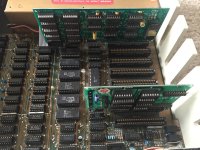
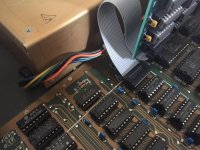
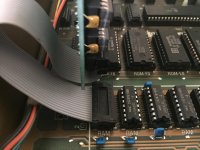
I will try to take a video of it booting with my ADTPro disk to show you what it does (it just kind of freezes).
As I suggested in the other thread the DOS 3.3 Master disk is a good one to use because it will actually throw up a message on the screen saying it's loading Integer Basic into the card on the first boot, and then once you're at a command prompt you can try switching languages between "INT" (for Integer) and "FP" (Floating Point, aka, Applesoft.) Running some simple programs in Integer basic (assuming it gets that far) might give you some idea if the problem is the RAM on the card.
Ok here is a video of what it does with "Oregon Trail." You'll see at first it says 64k needed. Than I restart and it tries to load it but freezes on the welcoming screen and then the disk drive stops spinning. I am able to reset the machine (silly me did not know you had to do "control reset") but it either tells me again that 64k of RAM is needed or it tries to load it and it freezes.
The video is here: https://drive.google.com/file/d/0B586B2iTIx9_UC1QbHhnZGRzems/view?usp=sharing (I got it down to a 9MB video)
The ADTPro video is located here: https://drive.google.com/file/d/0B586B2iTIx9_Wkpkd0dXZHQ0WFU/view?usp=sharing
It goes to the screen you see and then does nothing. Ctrl-Reset brings up some kind of prompt below that screen. The sound in the background is my wife spraying something, haha. Pardon the poor first person filming.
The video is here: https://drive.google.com/file/d/0B586B2iTIx9_UC1QbHhnZGRzems/view?usp=sharing (I got it down to a 9MB video)
The ADTPro video is located here: https://drive.google.com/file/d/0B586B2iTIx9_Wkpkd0dXZHQ0WFU/view?usp=sharing
It goes to the screen you see and then does nothing. Ctrl-Reset brings up some kind of prompt below that screen. The sound in the background is my wife spraying something, haha. Pardon the poor first person filming.
I will make a DOS 3.3 Master disk this evening and give it a try. Thanks for all of your help!
So I tried loading the DOS 3.3 disk. In the Apple IIc I have, it gives me the "loading Integer Basic" prompt. In the II+, it does nothing. It just spins the disk over and over, but the screen only reads "Apple II"... I tried moving the disk controller card into slot 7, to see if there was a problem with the disk connection, but still the same thing.
I wonder if the problem is with either the disk card or disk II drive? I purchased backups of both on eBay, so I will be able to test those when I get them...
I wonder if the problem is with either the disk card or disk II drive? I purchased backups of both on eBay, so I will be able to test those when I get them...
Same thing with the "APTest" program. Works on the IIc and I can run various diagnostics, but the II+ doesn't seem to do anything...
I would venture it's time to remove the language card and see it it'll be a 48k Apple II. Remember, you have to move that RAM chip from the card to the board where the cable is plugged in.
Got it. Which RAM chip on the card comes off and is there a trick to removing it? None of them *look* removable...
Never mind, I figured it out and got it off.
But then I was an idiot and I am fairly sure put the chip on the board backwards. I turned the machine on, heard a pop, the screen was all garbled, and the ram chip I replaced was HOT.
So... what did I kill by my stupidity
But then I was an idiot and I am fairly sure put the chip on the board backwards. I turned the machine on, heard a pop, the screen was all garbled, and the ram chip I replaced was HOT.
So... what did I kill by my stupidity
Switched the RAM chip direction, and it turned on fine to the "Apple ][" on the top of the screen. Machine seems to be doing the same thing. Disk just spins and spins and spins and CTRL-RESET doesn't do anything. If I cut the power and turn it back on, I get a garbled screen, the disk drive constantly spins, and CTRL-REST doesn't work.
You probably did indeed let the magic smoke out of that RAM chip. Live and learn.
If you're near Santa Clara last I checked Anchor Electronics carried 4116's. (I know I have a set of them in a tube myself somewhere.) Starting to think maybe this thing needs some more detailed poking.
If you pull the disk controller do you get a functional Applesoft prompt? I THINK the II ROM has enough of a self test to come up as a 32k machine with that chip missing.
If you're near Santa Clara last I checked Anchor Electronics carried 4116's. (I know I have a set of them in a tube myself somewhere.) Starting to think maybe this thing needs some more detailed poking.
If you pull the disk controller do you get a functional Applesoft prompt? I THINK the II ROM has enough of a self test to come up as a 32k machine with that chip missing.
Yes, without the disk controller I get the prompt (and the machine worked once I put that RAM chip in the right way. When it was in the wrong way, it got HOT, lol). I also get the prompt when the disk controller and disk II are installed (but without a disk put in)
So I did finally get it to load the ApTest program (the manual for which I found here: http://www.callapple.org/Members/soft/apple2/inhouse/ApTest.pdf) -- both when I had the RAM chip I may have broken installed and it taken out or the language card installed.
With the potentially killed RAM chip installed, it passed the 48k RAM test. The Disk Interface test also passed.
When I ran either the language card test or the "Integer ROM test," I got "ERR $D000" and that's it.
Does this mean one of the ROM chips is toast? If so does that mean the board is no good?
With the potentially killed RAM chip installed, it passed the 48k RAM test. The Disk Interface test also passed.
When I ran either the language card test or the "Integer ROM test," I got "ERR $D000" and that's it.
Does this mean one of the ROM chips is toast? If so does that mean the board is no good?
Failing the Integer Rom test would be expected behavior running a II+ without a language card. The difference between a plain II and a IIplus is, hardware revisions and stickers aside, that a Plus has AppleSoft ROMs in the onboard sockets while a II has Integer. (One of the functions of the language card is to enable a Plus to load Integer BASIC into the supplied RAM and switch it over the motherboard ROMs; without the card a Plus is incompatible with a fairly sizeable body of old II software.)
So... this is actually really encouraging, if the diagnostic is to be believed you have a working 48k Plus. The one hesitation I get is that didn't you say the system refused to boot DOS 3.3 without the language card installed?
So... this is actually really encouraging, if the diagnostic is to be believed you have a working 48k Plus. The one hesitation I get is that didn't you say the system refused to boot DOS 3.3 without the language card installed?
Hm. I don't recall. I will try it now. For some reason the APTest also wouldn't load in the past, but last night it did. I am not sure what I did to change it, but who knows. I shall report back shortly!
So it boots the Dos 3.3 master disk I made from the Apple IIc. I get the screen seen in the attached picture. Is there some prompt I should type?
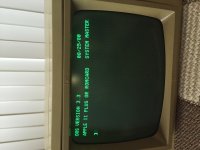
Typing "INT" (for Integer, as you recommended above) yields "Language not available." Typing "FP" does nothing, just gives me a new prompt.
Since the language card is mostly 74xxx chips, I would look at the card and note them down and start buying a few chips to swap out and test. They should be less than $1 a chip, so...
And you don't have too since the card seem to boot the machine, except for a couple PROM chips and a 4XXXX Chip, do the came on the Disk Drive Card - only replacing the 74xxx chips there too.
Gorgonops, you've been spot-on on the advice thus far.
- - - -
Edit - this is with or without the Language card?
It's normal if it is without the Language card.
Type (hope I got it right):
PRINT FRE (0)
If it's right, it should tell you how much RAM the Apple II is seeing - whether 16K, 32K or 48K.
(Even with the language card, it will not report the added 16K as the CPU thinks its ROM)
And you don't have too since the card seem to boot the machine, except for a couple PROM chips and a 4XXXX Chip, do the came on the Disk Drive Card - only replacing the 74xxx chips there too.
Gorgonops, you've been spot-on on the advice thus far.
- - - -
Edit - this is with or without the Language card?
It's normal if it is without the Language card.
Type (hope I got it right):
PRINT FRE (0)
If it's right, it should tell you how much RAM the Apple II is seeing - whether 16K, 32K or 48K.
(Even with the language card, it will not report the added 16K as the CPU thinks its ROM)
That would be normal, again, for a machine with no language card installed.
(History lesson:
As I mentioned earlier, there are two mostly incompatible BASICs for Apple IIs; the original "Integer BASIC" as written by Steve Wozniak and descended from the BASIC he wrote for the Apple I, which is fast but syntactically limited, and "AppleSoft Basic", a highly customized version of Microsoft's 6502 BASIC. (IE, it's a cousin of, say, Commodore BASIC, in that it's descended from the same codebase.) The motherboard of an Apple II (pre-IIe and later) has sockets that can hold *one* of them; to run programs written for the other BASIC the original solution Apple offered was a ROM card that stuck in the slot the language card goes in and actually had the ROMs for the other BASIC on it. However, around the time the IIplus became a separate "model" (rather than just a "II with AppleSoft installed) Apple also begin offering the language PASCAL for the II and since PASCAL wanted as much RAM as possible *and* running Pascal the memory space occupied by the BASIC ROMs was wasted anyway Apple came up with the "Language Card" with RAM instead of ROM on it. The advantage of having one over the ROM card is it lets PASCAL or machine language programs use almost 64K of RAM instead of 48K, *and* it can also double for the ROM card by loading the desired BASIC into it, so it quickly became the STANDARD configuration for a ][plus...
But, still, as you can see by the prompt you got when you booted DOS 3.3 it is still technically a valid configuration to *not* have one. It just means that, again, since you have "FP", aka, Applesoft, installed on your motherboard and no ROM card plugged in in place of the language card "INT" is indeed UNAVAILABLE.)
I think we're *pretty* convinced at this point that your system and disk drive basically work minus the language card; if you wanted to you could dig through the disk archives and look for some disks of AppleSoft programs or machine-language programs compatible with a 48k Plus and exercise it, but since it passes diagnostics I'm inclined to think you're good. So... the question is what's wrong with the card. I assume that if you move the chip back over to it and reinstall it you're again not able to boot; that is of course a pity because it would be great if we could run that diagnostic on it. Lacking that...
The *simplest* problem to diagnose would be the language card having some bad RAM on it. If you are feeling adventurous you could *very carefully* remove all the 4116s from the language card, assuming they're socketed, substitute them for one row of RAM chips on the motherboard, and see if you can still boot the diagnostic disk and run the memory test. If the test fails then you've found your culprit.
Before doing that, though, I would suggest *very* carefully cleaning the contacts for the cable that goes from the language card to the IC socket using some alcohol or contact cleaner, examining the socket the cable jumpers into to make sure it doesn't look corroded or worn, and maybe gently polishing up the card edge contacts with an eraser. I *think* the refresh and CAS/RAS signals for the RAM on the card are carried over to it by that cable and a bad connection could be making them "noisy" enough to cause errors. Worth a try, anyway.
Fascinating! Thanks for the info!
I am not sure i trust myself to remove things directly from the board without breaking them. Since you have mentioned that the RAM in question is available from a local store relatively cheaply, I think I may just pick up a number of chips and replace all the RAM chips on the language card to see if that does anything. I may also keep my eyes open for a cheap language card replacement. I assume (?) things like that come up relatively frequently on eBay?
Thanks for all of your patience! I am a true Apple II newbie, but I wanted to pick one up to start to learn some of this early technical stuff that formed the basis of the computer revolution.
I am not sure i trust myself to remove things directly from the board without breaking them. Since you have mentioned that the RAM in question is available from a local store relatively cheaply, I think I may just pick up a number of chips and replace all the RAM chips on the language card to see if that does anything. I may also keep my eyes open for a cheap language card replacement. I assume (?) things like that come up relatively frequently on eBay?
Thanks for all of your patience! I am a true Apple II newbie, but I wanted to pick one up to start to learn some of this early technical stuff that formed the basis of the computer revolution.
A simple ebay search I found several Language cards from $10 to $500 - go figure. There were a couple ROM Cards too. I figure the average is around $50, so start saving those pennies.
But there were "Apple II" Language Cards and "MicroSoft's Language Card" for the Apple II. They are basically the same 16K Ram Card but Microsoft made the other one. I would recommend the Apple one over the Microsoft one.
RAM would not cost that much, a couple dollars a chip depending on where you go.
But there were "Apple II" Language Cards and "MicroSoft's Language Card" for the Apple II. They are basically the same 16K Ram Card but Microsoft made the other one. I would recommend the Apple one over the Microsoft one.
RAM would not cost that much, a couple dollars a chip depending on where you go.
Try pressing down on all the chips on the Language Card. You should hear them crackle. That's OK.
Many many Apple II problems are solved by this method.
Many many Apple II problems are solved by this method.
Is there a useful tool for removing socketed chips? Using my hands and/or a pair of tweezers has caused me to bend some of the pins. I have bent them back but heavens knows if they work now...
I use a pencil and a flathead jeweler's screwdriver. I lay the pencil by the front and back of the socket and use it as a fulcrum for the jeweler's screwdriver to pry up against. Just take your time and pry up a tiny bit then switch to the other side and pry up a tiny bit and repeat until the chip comes off the socket. Basically you are wiggling the chip up tiny bit with each pry. If you pry it up all at once on one side, you will bend and even possibly break the pins off the chip.