
Thread
Went for a Heatsink came back with....
Well, I gritted my teeth, got out my MasterCard and paid Sonnet for a brand new dual 1.8GHz G4 7447A upgrade for my OS 9 MDD. It arrived today and I threw it in the box and put it through its paces. And while CodeWarrior is diskbound enough that Classilla builds only speed up modestly, apps like Virtual PC and MacShogo absolutely scream.  (This Mac was originally a dual 1.25GHz).
That said, this is not for everyone. First, it ain't cheap (I am fortunate enough to have a reasonably secure profession and be a slovenly bachelor). Second, installation is a minor pain and I was sweating bullets as I tried to click the CPU connectors together without bending any pins. Third, the speed improvement is best appreciated only in certain apps. Fourth, it gets HOT. Fifth, if you're running 10.0 through 10.3.4, you need to upgrade because it won't even boot those (only 9.2.2 and 10.3.5+ are supported).
But, life certainly does begin at 1833 MHz per CPU. And it sure is nice.
(This Mac was originally a dual 1.25GHz).
That said, this is not for everyone. First, it ain't cheap (I am fortunate enough to have a reasonably secure profession and be a slovenly bachelor). Second, installation is a minor pain and I was sweating bullets as I tried to click the CPU connectors together without bending any pins. Third, the speed improvement is best appreciated only in certain apps. Fourth, it gets HOT. Fifth, if you're running 10.0 through 10.3.4, you need to upgrade because it won't even boot those (only 9.2.2 and 10.3.5+ are supported).
But, life certainly does begin at 1833 MHz per CPU. And it sure is nice.
I posted a message to the LEM Swap list looking for a heatsink for frankenmac. A guy near me said he had one. When I went to pick it up he had three mac's and he just gave them to me. All work, on a side note I now know why the MDD is called the windtunnel. Not a bad haul for only a 40 mile drive for a heatsink
Mac number 1: A 466MHz DA with 768MB PC133 ram and a 20GB and 60GB HDDs
Mac number 2: A Dual 867MHz MDD wih 2GB of DDR RAM and 2x130GB HDDS
Mac number 3: Dual Core 2GHz G5 with 2GB of DDR2 RAM and 250GB and 320GB HDD's
Bonus a 17in ADC Studio Display
Don't mind the mess my three year old went crazy today.
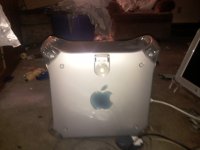
Mac number 1: A 466MHz DA with 768MB PC133 ram and a 20GB and 60GB HDDs
Mac number 2: A Dual 867MHz MDD wih 2GB of DDR RAM and 2x130GB HDDS
Mac number 3: Dual Core 2GHz G5 with 2GB of DDR2 RAM and 250GB and 320GB HDD's
Bonus a 17in ADC Studio Display
Don't mind the mess my three year old went crazy today.
lol i think you have the mac sickness.
Yeah I caught the fever lol,
I wish I could find all these people giving away Macs. 
Heck, I was talking with a teacher friend, and someone had recently given him a IIc and the monitor to go with it. No charge. It's like, where are these people?
Heck, I was talking with a teacher friend, and someone had recently given him a IIc and the monitor to go with it. No charge. It's like, where are these people?
Nice lot you attained there!
That's what usually happens to me, but I walk out with extra stuff anywhere I go. I went to the thrift store to get a tie for work, walked out with a dozen LP records!
That's what usually happens to me, but I walk out with extra stuff anywhere I go. I went to the thrift store to get a tie for work, walked out with a dozen LP records!
The patch announced by a third party with no connection to anybody with any real info about the G5... on April 1st, 2003 or 2004? 
I also would be very interested in seeing some performance numbers.
CineBench (if you have OS X installed on the machine) would be a very good place to start for comparisons between Macs, PCs, and the different types thereof. It does a graphics and a CPU test, which would be the things I'd most be interested in seeing (and which would be most effected by a CPU upgrade, or a swap in the graphics card...)
_________________
[Insert Cool Signature here!]
I also would be very interested in seeing some performance numbers.
CineBench (if you have OS X installed on the machine) would be a very good place to start for comparisons between Macs, PCs, and the different types thereof. It does a graphics and a CPU test, which would be the things I'd most be interested in seeing (and which would be most effected by a CPU upgrade, or a swap in the graphics card...)
_________________
[Insert Cool Signature here!]
OS X is no longer on this box. It originally booted 10.2.8 and I never bothered to upgrade, but it will not boot 10.2.8 with the 7447As installed (10.2 and 10.3-10.3.4 don't know how to initialize them), so while I'd be delighted to post benchmarks it will have to be OS 9 only. Just say which benchmark you'd like me to run. I think I have MacBench and SpeedRun around here somewhere.
Also, Quadraman, point me to these $800 quad G5s and I will buy one. (I'm not kidding around, I need a spare.)
Also, Quadraman, point me to these $800 quad G5s and I will buy one.
(I'm not kidding around, I need a spare.)I actually got somewhat close to booting OS 9 on my G5.
I put a full OS 9.2.2 install with the newest ROM I could find onto an IDE drive attached where the CD drive normally goes. I used Open Firmware to direct the G5 to boot from that system folder.
At this point you could even hold down Option and the Mac would report the OS 9 system as a valid boot system. If you tried to boot, the screen would turn a particular shade of grey for just a second, and then it would dump you back at the Option screen.
I believe that particular shade of grey may have been OS 9 attempting to boot.
Of course, the G5 is just too different for OS 9 to boot from, but it was an interesting experiment. I believe it's possible to get some of the first OS X only (non-G5) Macs to boot OS 9 using similar techniques.
_________________
Stop being so Complicated. Take a RISC.
http://www.adoptamac.com
I put a full OS 9.2.2 install with the newest ROM I could find onto an IDE drive attached where the CD drive normally goes. I used Open Firmware to direct the G5 to boot from that system folder.
At this point you could even hold down Option and the Mac would report the OS 9 system as a valid boot system. If you tried to boot, the screen would turn a particular shade of grey for just a second, and then it would dump you back at the Option screen.
I believe that particular shade of grey may have been OS 9 attempting to boot.
Of course, the G5 is just too different for OS 9 to boot from, but it was an interesting experiment. I believe it's possible to get some of the first OS X only (non-G5) Macs to boot OS 9 using similar techniques.
_________________
Stop being so Complicated. Take a RISC.
http://www.adoptamac.com
Ugh, those look pretty beat-up. I appreciate the link, but the pictures alone make me leery. I can replace the case easily enough, but it makes me wonder what kind of not-so-visible damage they've sustained, especially since the liquid cooling system is notorious for not tolerating abuse well. Thanks for the thought, however.
Mike's flash of grey implies that Open Firmware was trying to find the Toolbox file. I bet there needs to be some firmware patching to get any further, however. That would be really dicey territory.
Mike's flash of grey implies that Open Firmware was trying to find the Toolbox file. I bet there needs to be some firmware patching to get any further, however. That would be really dicey territory.