
Thread
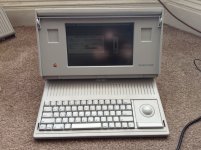
Finally, a working portable!
Finally i have my portable working!
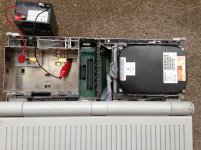
Just got it's logicboard back from it's 8,000 mile round trip to techknight (who i must thank for all the work he put in, removing all 32 ram chips not once, but twice!)
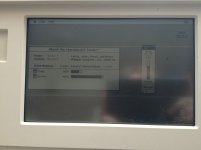
I put it all back together (amazingly i didn't loose any parts while it was sitting around disassembled), connected up a battery and hit a key on the keyboard and finally got a *bong* not followed by the chimes of death . However i still had messed up video, a bit of fiddling around revealed there was a break in the display cable, once i got the cable in to correct position it booted up absolutely perfectly which revealed that it had been decommissioned in 1998! I was very glad to see the 1mb ram card it came with works fine, i had a horrible feeling it was going to have a dead ram chip on it like the portables motherboard did
It still has a couple of lines across the screen which i'm not sure if they are dead rows of pixls or a artifact of the break in the display cable, but i can live with them
Next step is to get my SCSI2SD installed in this and give it a clean install of OS 6, just need to find a 34pin ribbon cable....
Just got it's logicboard back from it's 8,000 mile round trip to techknight (who i must thank for all the work he put in, removing all 32 ram chips not once, but twice!)
I put it all back together (amazingly i didn't loose any parts while it was sitting around disassembled), connected up a battery and hit a key on the keyboard and finally got a *bong* not followed by the chimes of death
. However i still had messed up video, a bit of fiddling around revealed there was a break in the display cable, once i got the cable in to correct position it booted up absolutely perfectly which revealed that it had been decommissioned in 1998! I was very glad to see the 1mb ram card it came with works fine, i had a horrible feeling it was going to have a dead ram chip on it like the portables motherboard didIt still has a couple of lines across the screen which i'm not sure if they are dead rows of pixls or a artifact of the break in the display cable, but i can live with them
Next step is to get my SCSI2SD installed in this and give it a clean install of OS 6, just need to find a 34pin ribbon cable....
I've got an iMac G5 here in the office with a few problems 
The board was replaced under the repair program a few years ago, but the power supply died after the program ended. I bought a new power supply.
When you boot the iMac G5, and only on a stone-cold boot (where the iMac is physically cold), the chime will play, but it will be interspersed with these strange screeching sounds. If the chime is 3 seconds long then I would say half of each second is screeching. I will post a recording once the iMac gets cold again.
Sometimes during this cold boot, it will kernel panic in the AirPort driver, but subsequent boots are OK.
I have ruled out almost every component except for the logic board. I even hooked up a speaker out of an old Power Mac 8100. The following items are definitely ruled out:
- Memory (tried several different sticks)
- PSU
- HD (two different HDs)
- Optical (unplugged it)
- Speakers
- Fans (unplugged them one by one while rebooting)
- AirPort (tried two different cards, and no card)
- Battery (reads 3.06V)
There appears to be no visibly leaking caps on the board, although some of them are the "+" topped brown caps which are the same kind that tend to leak.
I have been looping a 720p HD video on the iMac, and twice now the video randomly stopped playing and VLC froze up. I will try looping it in QuickTime in case VLC is just buggy.
Any advice would be welcome. The only option I see at this point is replacing all of the suspect "+" topped brown caps.
_________________
Stop being so Complicated. Take a RISC.
http://www.adoptamac.com
The board was replaced under the repair program a few years ago, but the power supply died after the program ended. I bought a new power supply.
When you boot the iMac G5, and only on a stone-cold boot (where the iMac is physically cold), the chime will play, but it will be interspersed with these strange screeching sounds. If the chime is 3 seconds long then I would say half of each second is screeching. I will post a recording once the iMac gets cold again.
Sometimes during this cold boot, it will kernel panic in the AirPort driver, but subsequent boots are OK.
I have ruled out almost every component except for the logic board. I even hooked up a speaker out of an old Power Mac 8100. The following items are definitely ruled out:
- Memory (tried several different sticks)
- PSU
- HD (two different HDs)
- Optical (unplugged it)
- Speakers
- Fans (unplugged them one by one while rebooting)
- AirPort (tried two different cards, and no card)
- Battery (reads 3.06V)
There appears to be no visibly leaking caps on the board, although some of them are the "+" topped brown caps which are the same kind that tend to leak.
I have been looping a 720p HD video on the iMac, and twice now the video randomly stopped playing and VLC froze up. I will try looping it in QuickTime in case VLC is just buggy.
Any advice would be welcome. The only option I see at this point is replacing all of the suspect "+" topped brown caps.
_________________
Stop being so Complicated. Take a RISC.
http://www.adoptamac.com
Congrats on the Portable! TechKnight is one of the masters of this dying art of Dead Mac Necromancy.
I think its the cable that's giving you problems, or a loose connector on the board.
I think its the cable that's giving you problems, or a loose connector on the board.
iMac G5's are strange creatures.
My iMac G5, has six leaking caps, a messed up whining Power Supply. And what would you know, it works pretty well! It freezes and stuff, but I don't know if that has to do with the caps. It's slow sometimes. You probably would want to swap the Mobo, or swap the caps.
_________________
iOwn: GrayBook 2GHZ (Main Laptop), iMac G5 1.6GHZ (Main Desktop), iBook 1GHZ, eMac700mhz, iMac350, iMac233, B&WG3400mhz, BWG3350MHZ, iBook466MhzGrayx2, iBook300Mhzblue, Performa6214CD, Mac512k, MacClassic2, MacIIcix2, PM8100/110, PowerBook150, Apple][e.
My iMac G5, has six leaking caps, a messed up whining Power Supply. And what would you know, it works pretty well! It freezes and stuff, but I don't know if that has to do with the caps. It's slow sometimes. You probably would want to swap the Mobo, or swap the caps.
_________________
iOwn: GrayBook 2GHZ (Main Laptop), iMac G5 1.6GHZ (Main Desktop), iBook 1GHZ, eMac700mhz, iMac350, iMac233, B&WG3400mhz, BWG3350MHZ, iBook466MhzGrayx2, iBook300Mhzblue, Performa6214CD, Mac512k, MacClassic2, MacIIcix2, PM8100/110, PowerBook150, Apple][e.
My iMac G5 had the same issue. I actuallyt had to get the logic board replaced twice within a 4 month period of the first failure. It could be that this board that you have now has also bit the bullet.
Mars478, the issues you're describing has to do with the capacitor problem. At this point, your best bet is to replace the caps yourself or have it done by someone that can.
Mars478, the issues you're describing has to do with the capacitor problem. At this point, your best bet is to replace the caps yourself or have it done by someone that can.
Congrats, the Portable is among the ones i have missing, i will like to have soon.
Thanks guys
Yeah the portable was one of the ones i never thought i would be able to get hold of, so i jumped at the chance to buy one. (even though it did need a hole lot of work (and money) to get going...)
Yeah the portable was one of the ones i never thought i would be able to get hold of, so i jumped at the chance to buy one. (even though it did need a hole lot of work (and money) to get going...)
A few years ago we had a few 1.6GHz 17-inch imac G5 systems at my high school, we took 'em to Vegas and had both of their boards replaced and the systems generally cleaned up. In a few weeks/months, one of them was back to generally misbehaving. A few months later I'd been told by the teacher to expect that the systems would be heading toward the proverbial "dumpster" of the school district. I haven't spoken with her very much since then.
Due to the nature of that program (Photoshop CS3/CS4 these days) and the way G5s are, the only PowerPC systems in active use are a powermac g3 that has a film scanner hooked to it, and the G5 at her desk.
We spent maybe $3700 if not more on that last-gen dualcore 2.3GHz G5, popped 6 or 7 gigs of ram into it, upgraded the graphics card to the nVidia 7800, and generally tricked it out. And a few months later, grabbed a 1.83GHz Core2 mac mini (GMA950) and were unsurprised but saddened to find out that it did most if not all of her desktop tasks better and faster than that G5 did. "But it's the server," I insisted.
And so it was.
My long-winded point is that iMac G5s have been for a long time, and continue to be odd creatures. Even if for whatever reason I got one that worked fine for free, I don't know how long I'd trust it to continue working fine.
Also, since you listed every single part in the machine except the motherboard, I'm going to go with Mars478 and Quad650 and go "It's probably time to either fix-again or replace-again that board."
Addition: Or the processor, I suppose the processors aren't socketed in any way though, so, "the board" would be the part you may want to look at replacing.
_________________
[Insert Cool Signature here!]
Due to the nature of that program (Photoshop CS3/CS4 these days) and the way G5s are, the only PowerPC systems in active use are a powermac g3 that has a film scanner hooked to it, and the G5 at her desk.
We spent maybe $3700 if not more on that last-gen dualcore 2.3GHz G5, popped 6 or 7 gigs of ram into it, upgraded the graphics card to the nVidia 7800, and generally tricked it out. And a few months later, grabbed a 1.83GHz Core2 mac mini (GMA950) and were unsurprised but saddened to find out that it did most if not all of her desktop tasks better and faster than that G5 did. "But it's the server," I insisted.
And so it was.
My long-winded point is that iMac G5s have been for a long time, and continue to be odd creatures. Even if for whatever reason I got one that worked fine for free, I don't know how long I'd trust it to continue working fine.
Also, since you listed every single part in the machine except the motherboard, I'm going to go with Mars478 and Quad650 and go "It's probably time to either fix-again or replace-again that board."
Addition: Or the processor, I suppose the processors aren't socketed in any way though, so, "the board" would be the part you may want to look at replacing.
_________________
[Insert Cool Signature here!]
I like the portables. I never even saw one in the flesh until I got one. Weird as that is the same story about the Apple /// I have.
I just noticed that the power supply caps in my mom's iMac G5 are starting to bulge, so she will be getting the new power supply, and the rest of the sick iMac will be chopped up for parts.
_________________
Stop being so Complicated. Take a RISC.
http://www.adoptamac.com
_________________
Stop being so Complicated. Take a RISC.
http://www.adoptamac.com
Should an iMac G5 be able to play a 720p video? Mine can barely play 480... I think there's not enough current getting to the proc so it's stuttering. Time to replace caps.
_________________
iOwn: GrayBook 2GHZ (Main Laptop), iMac G5 1.6GHZ (Main Desktop), iBook 1GHZ, eMac700mhz, iMac350, iMac233, B&WG3400mhz, BWG3350MHZ, iBook466MhzGrayx2, iBook300Mhzblue, Performa6214CD, Mac512k, MacClassic2, MacIIcix2, PM8100/110, PowerBook150, Apple][e.
_________________
iOwn: GrayBook 2GHZ (Main Laptop), iMac G5 1.6GHZ (Main Desktop), iBook 1GHZ, eMac700mhz, iMac350, iMac233, B&WG3400mhz, BWG3350MHZ, iBook466MhzGrayx2, iBook300Mhzblue, Performa6214CD, Mac512k, MacClassic2, MacIIcix2, PM8100/110, PowerBook150, Apple][e.
Neither had I, but then that's not too amazing since the portable was introduced 8 years before i was born
I don't think you're going to have great luck with a single 1.6GHz G5. Try making sure your Energy Saver settings are set to "Better Performance" and give it a go. Also keep in mind that the codec used to encode the video makes a difference. H.264 takes more horsepower to decode than other codecs, for instance.
Changing caps probably won't help you at all.
Peace,
Drew
_________________
Power to the PowerPC!
Changing caps probably won't help you at all.
Peace,
Drew
_________________
Power to the PowerPC!
Dying art? HA... this is just getting going!
yea, that was NOT fun.... Something I really dont wish to do again :-/
yea, that was NOT fun.... Something I really dont wish to do again :-/
HD video is not going to come out well on a single processor system. It's just too much data to be shuffled around. I tried a USB HDTV tuner dongle on a single processor system and it was unwatchable. The instructions stated that a fast multi processor or multi core CPU was required.
Well, when I get fed up with my portable, you might have your chance at it again, techknight! 
Glad you got it going! It must be nice to have a fully working portable, I'm still trying to get my backlit completely working again. Getting closer with every repair!
Glad you got it going! It must be nice to have a fully working portable, I'm still trying to get my backlit completely working again. Getting closer with every repair!
I was playing 720p video successfully on the iMac G5 before it was chopped. It was a 1.8 GHz model.
You will want to use VLC, which is faster than QuickTime due to the ability to disable the block filter. Go into the preferences and disable the H.264 loop filter, then play your 720p QuickTime video which will run flawlessly (other than a slight loss of perceived quality due to the lack of block filter)
_________________
Stop being so Complicated. Take a RISC.
http://www.adoptamac.com
You will want to use VLC, which is faster than QuickTime due to the ability to disable the block filter. Go into the preferences and disable the H.264 loop filter, then play your 720p QuickTime video which will run flawlessly (other than a slight loss of perceived quality due to the lack of block filter)
_________________
Stop being so Complicated. Take a RISC.
http://www.adoptamac.com
Nice work!
hmm... can't seem to get my portable to recognize my SCSI2SD,.
i'll have to go grab a hdd and try again....
EDIT: The 40MB drive out of my LC is seen just fine and the portable is more than happy to boot from it. can't see why it refuses to see the scsi2sd
i'll have to go grab a hdd and try again....
EDIT: The 40MB drive out of my LC is seen just fine and the portable is more than happy to boot from it. can't see why it refuses to see the scsi2sd
haha, of corse installing the jumper for termination would have helped
Seems my LCIII / 475 (can't remember which i initially tested the SCSI2SD on) isn't too fusssy about termination
Seems my LCIII / 475 (can't remember which i initially tested the SCSI2SD on) isn't too fusssy about termination
I think there's this guy on here that builds these awesome adapters with active termination who could've answered your question.
Oh wait, he did!


Oh wait, he did!
hehe I really should have known better there... For some reason i assumed that pin was for termination power to the bus.... i don't know why... my adapters aren't like that and i had had a really good look over the board before i assembled it
Oh well, it's absolutely screaming now even on my old slow SD card it boots 6.0.8 (from happy mac to desktop) in about 5 seconds
I really should have known better there... For some reason i assumed that pin was for termination power to the bus.... i don't know why... my adapters aren't like that and i had had a really good look over the board before i assembled itOh well, it's absolutely screaming now
even on my old slow SD card it boots 6.0.8 (from happy mac to desktop) in about 5 seconds