
Thread
EtherWave Mac/PB Adapter.....red light
Last year...as some people may rememberI bought an EtherWave Mac/PB Adapter
https://68kmla.org/forums/index.php?/topic/20368-etherwave-macpb-adapter-and-classic-mac/?hl=etherwave
I took me a while, but I got it working. Today I tried it again, after a shutdown of a year. To my disapointment it had a red light. It should be green. I'm not sure what is wrong, but my PowerBook doesn't see it anymore.
What could be wrong?
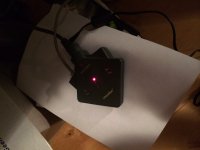
More info on the adapter:
http://atomictoasters.com/2010/12/guerrilla-networking-i-farallon-etherwave-for-macs/
https://68kmla.org/forums/index.php?/topic/20368-etherwave-macpb-adapter-and-classic-mac/?hl=etherwave
I took me a while, but I got it working. Today I tried it again, after a shutdown of a year. To my disapointment it had a red light. It should be green. I'm not sure what is wrong, but my PowerBook doesn't see it anymore.
What could be wrong?
More info on the adapter:
http://atomictoasters.com/2010/12/guerrilla-networking-i-farallon-etherwave-for-macs/
Mine will do this sometimes after being unplugged for a long time. Power cycle it after it's been red, should go green.
On occasion mine will not go green until it receives serial data from the Mac. This could also be why mine is so picky, so YMMV
On occasion mine will not go green until it receives serial data from the Mac. This could also be why mine is so picky, so YMMV
I rebooted... plugged and unplugged the power, but still no luck. The red light is still on and no connection to the PowerBook is possible.
Any suggestions what to do?
Any suggestions what to do?
Does this model have a power brick? if so, check that.
OK! Will do that! I now have a 5V adapter on it. Last year it was a different one....
What is the best poweradapter for this device? Anyone has the specs?
What is the best poweradapter for this device? Anyone has the specs?
my farallon one is 12VDC @ 500mA
Thanks. I do'n't think it helps. I changed it to an othr powerblock. 350MA and tried 6, 7,5, 9, 12 V. Still the red light....
Could it be the caps again? I had to change one last year. Maybe again a problem?
Could it be the caps again? I had to change one last year. Maybe again a problem?
BINGO! I have a green light! I changed power block again. I switched from 6V to 7,5 to 9V to.....12V and I had a green light.
This powerblock is 1000mA (18 Watt).
I see my PowerBook 100 "loud and clear".
Thanks for your help again!
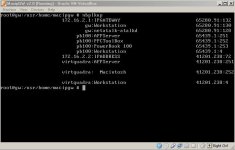
This powerblock is 1000mA (18 Watt).
I see my PowerBook 100 "loud and clear".
Thanks for your help again!
I had a feeling the AC adapter needed replaced.
Where did you get the MacIPGW server for vbox? I'd like to test that instead of relying on the built in one on the Etherwave that seems to be not working...BINGO! I have a green light! I changed power block again. I switched from 6V to 7,5 to 9V to.....12V and I had a green light.
This powerblock is 1000mA (18 Watt).
I see my PowerBook 100 "loud and clear".
Thanks for your help again!
nbplkup-pb.JPG
@6502
I'm trying to make some propaganda for my MacIPgw in my signature. But I think it is overlooked....
I have a special web site for the MacIPgw http://www.macip.net
You can download the virtual box image from there and read what to do. Basicly start the instance and folowup some IP changes...
You can also find much information in this post:
https://68kmla.org/forums/index.php?/topic/20832-macipgw-virtual-machine-for-tcpip-on-your-old-mac/?hl=macip.net
If you have any questions....please let me know! You could be my third world wide user of this solution!
I'm trying to make some propaganda for my MacIPgw in my signature. But I think it is overlooked....
I have a special web site for the MacIPgw http://www.macip.net
You can download the virtual box image from there and read what to do. Basicly start the instance and folowup some IP changes...
You can also find much information in this post:
https://68kmla.org/forums/index.php?/topic/20832-macipgw-virtual-machine-for-tcpip-on-your-old-mac/?hl=macip.net
If you have any questions....please let me know! You could be my third world wide user of this solution!
Stil one problem left......
I found out that only the right port of the adapter works. On the left I don't get a green light if I connect a network cable... Is this normal or is something broke?? If so..... would there be a change to fix it? Again....right port is working fine, but it is not a good feeling that only one port is working!
I found out that only the right port of the adapter works. On the left I don't get a green light if I connect a network cable... Is this normal or is something broke?? If so..... would there be a change to fix it? Again....right port is working fine, but it is not a good feeling that only one port is working!
probably wont without the correct driver?
No. Driver is not the problem. Just one port is not working. Or is it the daisy chain port?