
Thread
My first Powerbook 210 Duo
Just got this baby this morning 
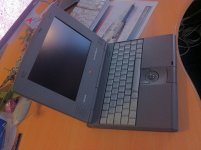
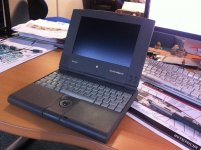
Very cute and in good shape. German Keyboard.
It started on the first try, VERY noisy Hd, and a rectangle of dead pixels on the bottom left of the screen ( which is more convenient than the usual PB150 screens upper right dead pixels rectangle … Otherwise Ok.
Then after two boots , stopped booting again and after the chime i get a 4 tones "Dah dee Da da" …?!
Looked around a bit and it seems it's = " 4 beeps = Bad checksum for the remainder of the boot ROM" .
is it fixable ?
Happy anyway, first time i see a Duo, pretty machine
Very cute and in good shape. German Keyboard.
It started on the first try, VERY noisy Hd, and a rectangle of dead pixels on the bottom left of the screen ( which is more convenient than the usual PB150 screens upper right dead pixels rectangle
… Otherwise Ok. Then after two boots , stopped booting again and after the chime i get a 4 tones "Dah dee Da da" …?!
Looked around a bit and it seems it's = " 4 beeps = Bad checksum for the remainder of the boot ROM" .
is it fixable ?
Happy anyway, first time i see a Duo, pretty machine
Recap time. Plus remove the keyboard and reseat your cards.
Grats, galgot. The light gray KBDs rock, I need to get one of those some day. I love my Duos!
If you haven't yet, pull the battery out and give 'er another rip.
.
If you haven't yet, pull the battery out and give 'er another rip.
.
Sounds to me that the memory expansion board inside got loose. Give it a while to rest and then try to turn on again. Opening the Duo (any Duo as they all share the same case) is a lot of trouble. You can just remove the keyboard with the 4 screws at the bottom of the case that lines up horizontally and the keyboard lifts up. There are two ribbon connectors holding the keyboard ribbon cable on the middle left by the palm rest.
The memory card is at the middle right of the board if you have one, the modem card is above that on the upper right if you have one, if not there will be a blank card for the reset button. Just push the memory card back into the connector slot.
This is a link for the service manual. http://tim.id.au/laptops/apple/powerbook/powerbook_200_series.pdf
The memory card is at the middle right of the board if you have one, the modem card is above that on the upper right if you have one, if not there will be a blank card for the reset button. Just push the memory card back into the connector slot.
This is a link for the service manual. http://tim.id.au/laptops/apple/powerbook/powerbook_200_series.pdf
Many thanks all for the tips.
Will try all that at home this evening.
Will try all that at home this evening.
:O Recap ! That's something i'll have to learn ...
Join the club, it looks like I've been forced to do my very first very soon. :-/
Congrats Gael,
Let us know, concerning keyboard, can you re-arrange keys to the usual AZERTY french style ?
Let us know, concerning keyboard, can you re-arrange keys to the usual AZERTY french style ?
Well, i tried :
- reset the PMU( holding back power for at least 30sec),
- booting without the battery,
- opening and booting with HD disconnected,
- booting with the memory expansion card removed (it was well seated when i opened the thing) ,
all this no joy. Still these 4 tones "Dah dee Da da"...
In the service manual (thanks Elfen) , at the symptom charts , it says :
"Hardware failure occurs (four-tone error chord sequence sounds after startup chord) :
1 Disconnect hard drive data cable and reboot system. If startup sequence is normal, reseat cable and retest.
[SIZE=10pt]2 [/SIZE]Replace hard drive.
3 If the system is connected to an external floppy drive, disconnect drive and reboot system. If startup sequence is normal, reseat cable and retest. "
Given i've tried booting without HD, and it was still Dahdeedada-ing, i think there is indeed a problem with the board :-/
when i have time i'll try swapping the HD with a good working one ( i have only one…), we'll see. Can't try with a floppy, no adapter nor extern floppy drive.
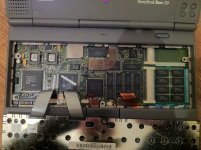
Here a pict of the inside :
@ Bibilit, Thanks Mate, don't know if i can remove individual keys and change places on these keyboards… Will check, but i don't want to break anything
indeed german keyboards are strange , no "@", how do they type mail addresses And the ¨ are only for Ü Ö and Ä … Can't type my name correctly
But i like the light grey color.
[SIZE=10pt] [/SIZE]
- reset the PMU( holding back power for at least 30sec),
- booting without the battery,
- opening and booting with HD disconnected,
- booting with the memory expansion card removed (it was well seated when i opened the thing) ,
all this no joy. Still these 4 tones "Dah dee Da da"...
In the service manual (thanks Elfen) , at the symptom charts , it says :
"Hardware failure occurs (four-tone error chord sequence sounds after startup chord) :
1 Disconnect hard drive data cable and reboot system. If startup sequence is normal, reseat cable and retest.
[SIZE=10pt]2 [/SIZE]Replace hard drive.
3 If the system is connected to an external floppy drive, disconnect drive and reboot system. If startup sequence is normal, reseat cable and retest. "
Given i've tried booting without HD, and it was still Dahdeedada-ing, i think there is indeed a problem with the board :-/
when i have time i'll try swapping the HD with a good working one ( i have only one…), we'll see. Can't try with a floppy, no adapter nor extern floppy drive.
Here a pict of the inside :
@ Bibilit, Thanks Mate, don't know if i can remove individual keys and change places on these keyboards… Will check, but i don't want to break anything
indeed german keyboards are strange , no "@", how do they type mail addresses
And the ¨ are only for Ü Ö and Ä … Can't type my name correctly But i like the light grey color.
[SIZE=10pt] [/SIZE]
Remove RAM. Try again. If all else fails, I MAY have a board...
Hi techknight, i've tried that yesterday evening... no success.
Funny it booted 2-3 times after i got it, then stopped. The HD was doing an awfull noise anyway, really loud , couldn't work with it more than 10 mn... so i thought that could be the problem.
But, will get a 270C soon
Funny it booted 2-3 times after i got it, then stopped. The HD was doing an awfull noise anyway, really loud , couldn't work with it more than 10 mn... so i thought that could be the problem.
But, will get a 270C soon
If you are just turning on the Duo with just the board, then it just needs a recap from the sounds of it.
Have you tried either freezing or heating up the motherboard with a hair dryer before turning it on? If it boot after this then it definitely needs a recap.
Have you tried either freezing or heating up the motherboard with a hair dryer before turning it on? If it boot after this then it definitely needs a recap.
What the heck is that H shaped blob of solder and wire next to the the LCD connector?
Aah you find that strange too ! Never seen another PB200 board before, so wondered if that was normal...
Look at the upper left , there is another metal wire soldered to two of the board connections, above the upper screw hole.
#Elfen, nope never tried that, will do.
Look at the upper left , there is another metal wire soldered to two of the board connections, above the upper screw hole.
#Elfen, nope never tried that, will do.
There's a howto somewhere on fixing the rubber rings(?) in key cap mechanism somewhere nnline, so they must be switchable. You could also go the down and dirty method using stickers and a couple of KCHR resource hacks in Resedit.@ Bibilit, Thanks Mate, don't know if i can remove individual keys and change places on these keyboards… Will check, but i don't want to break anything
indeed german keyboards are strange , no "@", how do they type mail addresses
But i like the light grey color.
https://68kmla.org/forums/index.php?/topic/11915-simple-resedit-pb-keyboard-hack/
The gray is killer, but they munged up the enter key. Do those boards have an extra key or is the vertical enter key a convention in Europe? I've studiously avoided that implementation since my first VT-101 layout KBD purchase, a MAC-101.
European keyboards seem to all have that vertical enter/return key.
I opened my Duo 210 and compared it with your pic, Galgot. There is a large ceramic "coil" L1 where you have that H-blob by the LCD connector and on the upper left where you have 4 pairs of solder pads and one set is connected I have a blank board. No solder pads, nothing there on my Duo 210.
Absolutely, if you weren't in France, I'd say something is rotten in the state of Denmark.
Is there a resistor on the pads in the upper left corner of the Duo 230? I'd say omething smells of an indescribably fugly overclocking of a 25MHz 210 board to 33MHz 230 spec.
A missing coil next to the LCD connector might explain some video problems as well.
.
A missing coil next to the LCD connector might explain some video problems as well.
.
To be in France , or not to be… it seems rotten anyway
Will ask the seller about that strange "customized" board.
And another one ! continuing the Duo saga , 270c this time :
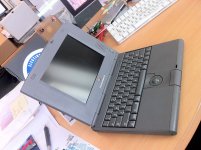
Beautiful Boot at first try… but but
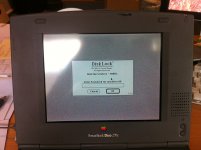
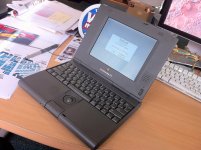
I was warned by the seller, that's why it was cheap. he didn't know the pass.
Tried the dubb passwords like "pass", "motdepasse", "123456"… ect… nope.
I can make 3 try at each boot, then it make an BZZZZ noise then shows the ? mark .
funny stuff. Will format the drive on another machine.
Beautiful
Boot at first try… but but I was warned by the seller, that's why it was cheap. he didn't know the pass.
Tried the dubb passwords like "pass", "motdepasse", "123456"… ect… nope.
I can make 3 try at each boot, then it make an BZZZZ noise then shows the ? mark .
funny stuff. Will format the drive on another machine.
You have a Duo Floppy Adapter? Boot from floppy and delete the extensions and its preferences.
Very pretty 270! Those were the hot machines at the ad agency I worked at in the 90s. All of the bigwigs had them so they could carry those rather than a "bulky" 540. We rank and file account executives just had Centris models, sigh.
But what? GREAT snag, it has a functional 2.5" SCSI HDD in it!And another one ! continuing the Duo saga , 270c this time . . .
Beautiful
Whether t'is nobler . . .
. . . never mind the bard, get your SCSI & SCSI Disk Mode cables and you can do whatever you want with the the drives without cracking the case. Meantime, swap the HDDs for practice.
Hast need of dockage methinks. ;D
You can likely crack this by replacing the disk driver. Just to pry and figure out whats on it.
Get a floppy drive and wipe it, or boot off floppy and remove the software lock.
Great conquest again Gaël, don't have any duo...congrats.
So tested the drives of the 210 and the 270c on a PB170. Both are Ok, only the one from the 210 is very very noisy...
The password protected one (from 270c) wouldn't mount, even when booting on a floppy. Hooked the 170 to a 1400c in SCSI,
and tried to mount the HD with diskSetup, but it would see the HD only to tell it could be initialized… so i did.
I have yet to install a Syst 7 , then put it back into the 270c. But enough for this evening
The password protected one (from 270c) wouldn't mount, even when booting on a floppy. Hooked the 170 to a 1400c in SCSI,
and tried to mount the HD with diskSetup, but it would see the HD only to tell it could be initialized… so i did.
I have yet to install a Syst 7 , then put it back into the 270c. But enough for this evening