
Thread
Whats happened to my iBook G4?
I put in my OS 10.4 install CD and.. this.
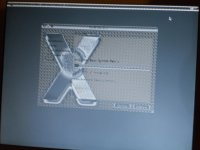
Its all in grayscale for some reason
Odd. Try a PRAM reset.
whats also strange is in the installer it won't recognize the touchpad it yells at me to plug in a mouse
also the machine will never play the start up chime. once I heard it for a breif moment than it stopped.
bad on-board RAM?
GPU/voltage regulator failure - press firmly down on the hand rest (you'll need to experiment) to see if you can get it to give more life.
I have a parts 12in g4 1.2GHz iBook if it is the GPU/VRM it works just missing the HDD. If you want it make me a offer
Why will it tell me to plug in a mouse though? The colors will work fine in startup manager...
do you have any other installers? Might be bad media
That might be true. I used a Mac OS X 10.4 install CD I could try others...
My iBook asked for a mouse with a 10.4 install disc. 10.5 didn't ask.
I am going to try a 10.5 install disc next
that is definitely a GPU fault. Seen it 1000 times. Strange one, but ive seen it. More common is all out corruption.
ive seen GPUs fail in odd ways. one of them being frozen picture and LCD fade to white with backlight still on.
ive seen GPUs fail in odd ways. one of them being frozen picture and LCD fade to white with backlight still on.
What I don't get is that when booting into target disk mode, start up manager, and open firmware the colors work fine. But just not in the installer for some reason. Guess I traded a nice computer for a broken machine  I guess I could see if I could bake the motherboard, but I gotta figure out how to take apart one of these. I heard they are very difficult to disassemble. I have also gotten Kernel Panics when I was loading the installer from the CD It said it couldn't find the CPU driver for Powerbook6,7 maybe I just have to use a different OS. I will see.
I guess I could see if I could bake the motherboard, but I gotta figure out how to take apart one of these. I heard they are very difficult to disassemble. I have also gotten Kernel Panics when I was loading the installer from the CD It said it couldn't find the CPU driver for Powerbook6,7 maybe I just have to use a different OS. I will see.Drivers probably trigger the GPU to do something other than display a framebuffer and into something that stressed it.
Thats why I'm going to try to install 10.5. I tried installing 10.4 on a USB flash drive and it did the same thing as when I tried with the DVD
Booting off a usb flash drive is very handy though.
I booted a Lubuntu 14.04 DVD and it looked a lot like the initial image. The menu bar and the icons on the desktop looked okay but the background was gibberish.
So I guess I should try different installation media I guess. The Leopard installation from USB failed and got stuck. Will find another Tiger DVD.
But in this installation the mouse pointer is the only thing thats ok
the GPU is bad. I just have a feeling.
there are multiple routines and calls that a GPU can make, and they take different paths in the core to render things. for example, drawing, sprite rendering, 2D rendering, 3D rendering, simple framebuffering are all different.
if you have stock installation media, and its not working, replace the logic board.
In a rare case, if the GPU shares its graphics RAM from the system RAM, try swapping the system RAM.
there are multiple routines and calls that a GPU can make, and they take different paths in the core to render things. for example, drawing, sprite rendering, 2D rendering, 3D rendering, simple framebuffering are all different.
if you have stock installation media, and its not working, replace the logic board.
In a rare case, if the GPU shares its graphics RAM from the system RAM, try swapping the system RAM.
Techknight is almost certainly correct. I'm approximately 97% certain. The only solution is to bake the motherboard or replace it. This type of failure was common in a few generations of iBook G4, and the Radeon varieties of iBook G3.
All iBooks use discrete GPUs, so replacing system RAM likely will not do anything for this particular issue.
All iBooks use discrete GPUs, so replacing system RAM likely will not do anything for this particular issue.
I have another possibility: I did install tiger on it and it barely displays any info on the graphics hardware, display settings are stuck at 1024 by 768 and at 256 colors, although in gray scale. Missing video driver? Where could I get one? I don't know where I could get an iBook G4 .kext file... Otherwise I guess I'm just probably avoiding the inevitable...
I will probably just open it up and bake it if I can open the damned thing...
It fixed itself. GPU is failing.
That's the unfortunate legacy of the iBooks, apart from the clamshells.
Unfortunately these days, GPUs are crap. I am sure there are quite a few good ones, but it seems in laptops they just dont hold up.
I got 2 2012 macbooks here with shot GPUs.
I got 2 2012 macbooks here with shot GPUs.
At least I got the 2005 iBook G4 1.42 Ghz with 512 MB of RAM and a 60 GB hard drive 
Well just be wary as the airport can fail, and cause kernel panics. That's one of my next projects is baking the iBook to fix that.
It's definitely the GPU. I had two machines with this fault back when they were new.