
Thread
Centris 650, mixed emotions
Hello everyone! First post here. Today I picked up a Centris 650 with Laser writer for $40. I was ecstatic, so I came home, plugged it in and.. Got the question mark icon. When I start the computer the hard drive starts up, but quickly turns back off again. These drives are Scsi right? I have a few IDE drives kicking around, so is there such thing as an adaptor? Also the lack of a cdrom drive is disappointing, which means I will have to try to find a USB floppy drive and some floppys. Also come to find out it didn't come with the cable for the laser writer. What type of cables are those?
I'm going to post a picture of my conquest below, thanks for your help guys!
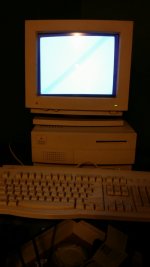
I'm going to post a picture of my conquest below, thanks for your help guys!
The hard drives are SCSI 3.5", 50 pin. If I recall someone did make an adapter for IDE drives, but it was pretty expensive. I think you'd be better off just picking up a used SCSI drive somewhere.
The laser printer cable is likely just an 8 pin serial cable. It will resemble the keyboard cable end, but with 8 pins. Depending on what model the laserwriter is, it might also have a parallel port or AAUI network port.
The laser printer cable is likely just an 8 pin serial cable. It will resemble the keyboard cable end, but with 8 pins. Depending on what model the laserwriter is, it might also have a parallel port or AAUI network port.
it may be worth it to get a 7.5 disk tools floppy image, image it to a floppy, and boot it up via that method. check out the hard drive with disk first aid if possible and see if it even shows up under the SC setup.
Cool find though. a shot of the board wouldn't hurt either... and you'll definitely need to replace the clock battery onboard.
I'm not sure if those had Maxell's or not, but those explode.
Cool find though. a shot of the board wouldn't hurt either... and you'll definitely need to replace the clock battery onboard.
I'm not sure if those had Maxell's or not, but those explode.
I bet its quantum. If so the heads are stuck. You can fix the drive if you are careful. ..
Yes it is a quantum hard drive techknight, do you have a link on how to unstuck the heads?
Superdos I am going to staples right now to buy some floppy and a USB floppy drive. I just found out this Centris has a 10BaseT nubus card installed too, I am a happy guy
P.s sorry for the bad quality photos
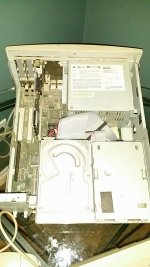
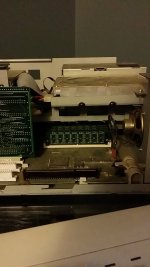
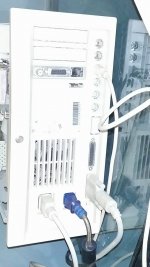
Superdos I am going to staples right now to buy some floppy and a USB floppy drive. I just found out this Centris has a 10BaseT nubus card installed too, I am a happy guy
P.s sorry for the bad quality photos
I love my Centris 650... Mine had a dead HD as well when I got it 
Its good that yours has a ethernet card. They can get online quite easily (for simple websites)
Its good that yours has a ethernet card. They can get online quite easily (for simple websites)
@techknight, I am also interested on how to fix the stuck heads. I have 2 Quantum HD that have the same problem. I thought they were dead but maybe not yet...
Thanks a lot!
Good catch MaritimerAbroad! It is a great computer!
I've had some level of success fixing quantum's, doing it this way.
https://68kmla.org/forums/index.php?/topic/23871-vintage-hd-stickysolutionlazymans-40mb-80mb-160mb-quantum-prodrive-els/?hl=quantum
https://68kmla.org/forums/index.php?/topic/23871-vintage-hd-stickysolutionlazymans-40mb-80mb-160mb-quantum-prodrive-els/?hl=quantum
We have a Staples nearby - do they still sell floppies?
Last time I went to staples I only saw CDs, DVDs, and flash drives but no floppies... Maybe its different where you live...
yup, Quantum hard drives are notorious for sticking...
Update on the Centris. I followed the directions on this link: https://www.youtube.com/watch?v=VepkXLCH3bM and I was able to get it to boot! It booted into 8.0. It had FinalDOOM on it and a few other interesting apps. The only thing is that the drive would only work for about 5-10 minutes. After about 5 boots, it stopped working altogether. I've ordered a 2GB drive off ebay, but I need floppies!
 I've been having the worst time finding floppies anywhere! I live north of Toronto an hour.
Unfortunately no
I've been having the worst time finding floppies anywhere! I live north of Toronto an hour.There's an eBay seller that sells a USB floppy drive with five floppies based in Canada, you may want to check that out. I bought mine from him, was $17. Drive was branded Toshiba but it was a high quality TEAC manufactured unit.
EDIT: here's the link: http://www.ebay.com/itm/USB-Floppy-Drive-Transfer-Between-Latest-Mac-and-Vintage-Mac-/151446673271?pt=US_Vintage_Computing_Parts_Accessories&hash=item2342ecd777
EDIT: here's the link: http://www.ebay.com/itm/USB-Floppy-Drive-Transfer-Between-Latest-Mac-and-Vintage-Mac-/151446673271?pt=US_Vintage_Computing_Parts_Accessories&hash=item2342ecd777
North of Toronto? I'm guessing you bought that Centris 650 that was listed on craigslist… Simcoe, right?
I sort of had my eye on that one, but it was just too far.
If you're looking for floppies around there, I'd just recommend that you buy them online on ebay or maybe here.
Alternatively, keep an eye out in thrift stores and garage sales.
I sort of had my eye on that one, but it was just too far.
If you're looking for floppies around there, I'd just recommend that you buy them online on ebay or maybe here.
Alternatively, keep an eye out in thrift stores and garage sales.
Yep, thats the one that I bought! It took me 50 minutes to drive there, because I am on the other side of Lake Simcoe, but it was worth it (in my mind at least, haha). Also I might go check out the 400 market today, they usually have good deals there.
Hmm, I tried making a System 7.5 Disk Tools disk from my Macbook air, I dd'd the files to a floppy from a box of floppies I got today at the market. $15 for 10 Memorex 1.4MB HD floppies. But they won't boot on my Centris! All I get it a Mac icon with a X after the machine spits out the floppy.
OS X can't make the floppies for a classic Mac, at least not modern OS X, without serious shenanigans. I downloaded the files on my Mac Pro, but took them to my iBook running OS 9.2 to actually write the floppies.
Could I do something similar in Basilisk or vMac?
Do you have access to a PC? I never had a problem writing HFS images on Windows via this trial software:
http://www.acutesystems.com/scrtm.htm
http://www.acutesystems.com/scrtm.htm
I have tried that on my Windows Vista PC, but it doesn't seem like Transmac can see my Floppy Drive. I made a book disk using clock.exe from macgeek.org, and it wants to start on my Centris. I see the happy mac for a quick second, but then my floppy drive ejects the disk and it goes back to the question mark.
just use basilisk II emu software, itll give you access to a FDD USB or whatnot. and you can use normal disk copy images and work it that way.
Other option is HFV explorer, it will work natively with HFS floppies. But I dont know if it runs on Mac.
Other option is HFV explorer, it will work natively with HFS floppies. But I dont know if it runs on Mac.
Hey techknight, thanks for those suggestions. I got it to work using Winimage, and I made a working 7.5 Disk Tools disk. The hard drive can't be verified or repaired with Disk First Aid. But that got me to thinking, so I opened up a System 7.0.1 image file, copied the TeachText application to the 7.5 Disk Tools image file, Deleted the Disk First Aid app, and wrote it to a floppy. I now have a 1.4MB bootable System 7.5 Word Processor
Now.. would there be a way to make a bootable floppy, that had networking support and a basic browser (text, or otherwise. Even ftp would be good.)
Edit: Also, is there a way so that when I load up my modified Disk Tools disk that I can load the system into ram and free up the floppy drive?
Now.. would there be a way to make a bootable floppy, that had networking support and a basic browser (text, or otherwise. Even ftp would be good.)
Edit: Also, is there a way so that when I load up my modified Disk Tools disk that I can load the system into ram and free up the floppy drive?
There's a few write-ups on the internets as to how to set up a RAMdisk. I used to do it with a 7.5 disk tools disk on my powerbook 180 way back, and a RAMdisk, I'd have it make a 2MB RAMdisk at boot, copy the files over and reboot off it. worked great.
as far as other files... I think you'd need to make a 7.1 (possible for the 650?) bootdisk to get the necessary space for TCP/IP, the Ethernet extension, MacTCP, etc.
there's quite a few things you need in order to get on the internet with System 7.
also, someone once told me sticking a hard drive in a bag that's had the air sucked out of it, into a feeezer overnight and then immediately dropped into the machine may yield some sort of result. but try at your own risk, because it seems like one of those snake-oil hard drive methods that has varying success. it may be possible to grab stuff off the 'dead' drive with a 7.5 install on the new 2GB drive (assuming you do *just* a 7.5 disk tools copyover) once you do that... there's other methods though.
as far as other files... I think you'd need to make a 7.1 (possible for the 650?) bootdisk to get the necessary space for TCP/IP, the Ethernet extension, MacTCP, etc.
there's quite a few things you need in order to get on the internet with System 7.
also, someone once told me sticking a hard drive in a bag that's had the air sucked out of it, into a feeezer overnight and then immediately dropped into the machine may yield some sort of result. but try at your own risk, because it seems like one of those snake-oil hard drive methods that has varying success. it may be possible to grab stuff off the 'dead' drive with a 7.5 install on the new 2GB drive (assuming you do *just* a 7.5 disk tools copyover) once you do that... there's other methods though.
Staples stopped selling floppies last year unfortunately.
Fortunately you can get them through fedex for free:
http://www.fedex.com/us/fcl/pckgenvlp/ordersupplies/
Sign in to your account, go to "Other Electronic Shipping Supplies" then click "Show all" on the right side of the titlebar, the "Transmission Recovery Diskette" is what you want to order.
You could fit MacTCP and 7.0, but any network applications would be a tough squeeze. Problem is it's a 650 and they aren't supported. Neither would 6.0 be...
Hey guys, so my quantum drive arrived in the mail today. It is model RZ28. I bring it in from the post, and let it warm up for a bit. But when I plug it in, a green led flashes for a split second, and all I see is an amber led. Some googling tells me that it is a fault led. There is no hard drive spinning at all. This Centris sure is turning into a money pit very fast.
Try this software:
http://www.macdisk.com/mden.php
I have no experience with it, but its worth a shot.
Also, where did you get the System 7 image from?
http://www.macdisk.com/mden.php
I have no experience with it, but its worth a shot.
Also, where did you get the System 7 image from?
Hey thanks for the software! I've been itching to get this ugly Vista off of my PC haha, I only had it there because of the floppy drive. I got the System 7 image from the ftp at BetaArchive forums. Every System image is on there, and even specific models (With the enablers, I'm assuming).