
Thread
Preventing failures in the LC 575 and 580
link!
i have never seen one of these on ebay - at least over here.
whatcha reckon it will go for - anyone have one of these?
anyone actually used one of these?
interesting.....
_________________
540c Server & FTP Link
Remember it is supposed to be fun!
i have never seen one of these on ebay - at least over here.
whatcha reckon it will go for - anyone have one of these?
anyone actually used one of these?
interesting.....
_________________
540c Server & FTP Link
Remember it is supposed to be fun!
I do so love my two LC "Twins". I practically grew up with them. Grandma worked at an elementary school on a local military base, and once they were deemed obsolete and going to be junked, I saved them from the landfill. They were my first Mac loves and started my journey into 68k rescues.
Today they both work perfectly, though I am concerned about eventual failures. Occasionally, the 580 doesn't want to turn on. The 575 joins in on that some times as well. I usually check their boards regularly and all the caps look good. I wonder if I should go ahead and replace the original caps. When these two were in the school, they ran near constantly. I keep the 575 at home and play with it every now and then (though my cats enjoy climbing across it) and the 580 helps me with the computer repair business I work at. The battery in both seem to have dried. I replaced the battery in the 580, but it doesn't seem like it did anything. It still doesn't hold a date or time.
So, anyways, I'm contemplating recapping and maybe looking at the 580's power board. The CRT can take a long time lighting up sometimes if it's not wanting to put up a fight to power on in the first place. Could be normal, but I don't remember it originally taking so long to light up back in the day. What components in these two are the most likely to fail?
Today they both work perfectly, though I am concerned about eventual failures. Occasionally, the 580 doesn't want to turn on. The 575 joins in on that some times as well. I usually check their boards regularly and all the caps look good. I wonder if I should go ahead and replace the original caps. When these two were in the school, they ran near constantly. I keep the 575 at home and play with it every now and then (though my cats enjoy climbing across it) and the 580 helps me with the computer repair business I work at. The battery in both seem to have dried. I replaced the battery in the 580, but it doesn't seem like it did anything. It still doesn't hold a date or time.
So, anyways, I'm contemplating recapping and maybe looking at the 580's power board. The CRT can take a long time lighting up sometimes if it's not wanting to put up a fight to power on in the first place. Could be normal, but I don't remember it originally taking so long to light up back in the day. What components in these two are the most likely to fail?

yeah those machines , including the CC can take a few seconds to light up.
i noticed the G3 AIO's those take a bit to light up too!
but The LC 5XX and the Color Classic if those have not had caps replaced, it needs to be done.
even if they are not dripping , if you look closely at the where the leads come out, ( once you remove the caps )
there is almost always corrosion... or wetness around the spot where the lead exits the cap.
i noticed the G3 AIO's those take a bit to light up too!
but The LC 5XX and the Color Classic if those have not had caps replaced, it needs to be done.
even if they are not dripping , if you look closely at the where the leads come out, ( once you remove the caps )
there is almost always corrosion... or wetness around the spot where the lead exits the cap.
Recap the logic boards first. Save up for analog board parts to replace, like the caps in the PSU. Of course, a hard drive in each, and max the RAM.
I think that would be it.
I think that would be it.
yeah - that was never a good PR move really was it.
considering how sort lived and infamous the machine was, it really should go for a fair bit, you kinda know that it wont tho eh?
_________________
540c Server & FTP Link
Remember it is supposed to be fun!
considering how sort lived and infamous the machine was, it really should go for a fair bit, you kinda know that it wont tho eh?
_________________
540c Server & FTP Link
Remember it is supposed to be fun!
Then home is where the 580's logic board will go. Once I get home and settled in, I'll work on getting these caps off and see if there might be any corrosion hidden under them.
Took the caps off the 580 and it was all clean. No issues from the looks of it.
The 575 however... Powdery yet sticky gunk under all of the caps, some more than others. I also realized that it has an expansion card that I'm not entirely sure what it does :O How did I not notice this the other times I took the board out?
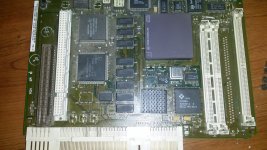
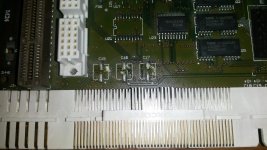
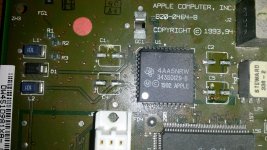
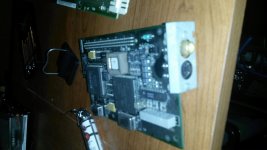
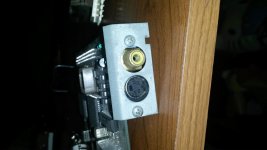
The 575 however... Powdery yet sticky gunk under all of the caps, some more than others. I also realized that it has an expansion card that I'm not entirely sure what it does :O How did I not notice this the other times I took the board out?
Yup, you got them off just before they started to go and destroy things.
Just in time.
BTW - from the looks of it, that card is a LC Version of Computer Eyes. Its a card that allows you to connect a video camera to it and record images and movies. Thing is, you need the software for it. I may have it but that means going to the storage facility to go get it. Also, I have the NuBUS version of it. Don't know if the software will work for your which is a PDS version.
Word of warning! Do not connect a mouse or keyboard to that 4-pin S-Video Port! It looks like an ADB port but it is not! One of those pins is 12V to power the camera! ADB has 5V. And the lines are crossed and not in the same places, so plugging in a mouse or keyboard to it will FRY IT CRISPY and maybe even fry your logic board too!
BTW - from the looks of it, that card is a LC Version of Computer Eyes. Its a card that allows you to connect a video camera to it and record images and movies. Thing is, you need the software for it. I may have it but that means going to the storage facility to go get it. Also, I have the NuBUS version of it. Don't know if the software will work for your which is a PDS version.
Word of warning! Do not connect a mouse or keyboard to that 4-pin S-Video Port! It looks like an ADB port but it is not! One of those pins is 12V to power the camera! ADB has 5V. And the lines are crossed and not in the same places, so plugging in a mouse or keyboard to it will FRY IT CRISPY and maybe even fry your logic board too!
I never would've guessed it was to connect a camera. I wonder what use this card had in an elementary school back in the mid 90s. Guess I'll have to try and look a little more into this strange card.
Many schools were given cam-video cards to be part of the Schools on Web66 Information Highway Exchange Program which included video-chat like C-U-See-Me program. It was supposed to put schools on the internet and have them and their teachers collaborate with each other and each school to build its own websever (most of them on Macs) to showcase their works and put up various services like chat rooms, email and student pages. It never really took off, with many schools going off in their own directions with school web pages and that's it.
good tip Elfen
You may be able to use Adobe Premiere to gain access to that video capture card.
Seems like what all the schools around here are trying to delve in to. As far as I'm aware, these two were the only Macs in the school. I never knew of any peripherals other than the keyboard and mouse that have ever been connected to it. Maybe at one time an old IBM printer? I'm not really sure. I kinda remember a really old printer but I never recalled it working. Regardless, finding a camera that's compatible with this card seems like a fun adventure, but a pretty tricky one.
The Web66 project is supposed to be here: http://web66.coled.umn.edu . But I have not been able to connect to it all day today. The Archive.org link for their first page explains it what they were trying to do: Put schools on the web with their own equipment and networks. Here's the link: https://web.archive.org/web/19961119112228/http://web66.coled.umn.edu/
To believe I was part of that madness... Those were the days! *Fist Pumps* BOYAH!
To believe I was part of that madness... Those were the days! *Fist Pumps* BOYAH!