
Thread
Savvio SCA drives in a 6500?
Here is an adventure trip for you.
I have a couple of those 36GB and 72GB savvio drives that everyone is using to replace in their 68Ks.
Well, I wanted to stick a 36GB in my 6500 as a backup drive from the main IDE drive. Problem. it doesnt like those drives.
When I was running 8.6, it seemed to be touch and go. it would startup just fine, and see the drive. BUT. every time I would shut down, and start back up, it would freeze at the mouse cursor until I unplugged the drive.
Also, if I reset pram, and power it on only by the rear power button, it would startup. Odd...
Installed OS9, now it freezes during startup with the drive installed. I have to remove the drive in order for it to boot.
tried my 72GB drive, and the other 36GB drive, same thing. Very odd.
Tried a terminated adapter and it made no difference as I figured it would not. I installed the drive in the bay where a zip would normally go, and there is a terminator in the cable.
Are PPC machines just incompatible with these drives? has anyone else tried it?
i have one in my 6100 and it works great. 8.6
i have one in my 7500, /w G3 cpu upgrade and it works great, Mac OS 9
i have one in my 7500, /w G3 cpu upgrade and it works great, Mac OS 9
well its not liking this 6500, and I am not sure why.
Newer SCA drives dropped support for the older SCSI buses. Some machines simply can't see the drives anymore while others have really hit-and-miss support.
The nice thing about the Savvio drives, at least the ST973401LC (73.4GB) and the ST936701LC (36.4GB), is that their datasheet specifically says that they support legacy SCSI modes.
Savvio.pdf
Savvio.pdf
but I am beginning to wonder if it doesnt support every part of older SCSI modes, because of the freezing in the PM6500. These drives work great in my 68Ks. I didnt try any other powerPC systems, I only have 2 others which is a 6100 and a TAM.
It's possible they have some kind of weird SCSI implementation that the drive maker didn't consider.
its certainly possible. But I was hoping if someone had a 6400/6500 handy with one of these drives, if they could test it to make sure its not just me.
WAG: The Savvio's draw a lot of power. If your PSU and MoBo are on the edge of tipping over the edge due to capacitor degradation, adding a Savvio will give it a good hard shove.***
Zips have minimal power requirements. Try removing the ZIP, boot drive and any cards installed and to if that makes a difference when booting from a CD and installing an OS on the Savvio itself.
*** Caution: in need sleep or coffee. YMMV
.
Zips have minimal power requirements. Try removing the ZIP, boot drive and any cards installed and to if that makes a difference when booting from a CD and installing an OS on the Savvio itself.
*** Caution: in need sleep or coffee. YMMV
.
edit: Had some coffee:
I didn't even notice who asked the question, you've probably checked the power output/requirements. My boards aren't in the original containers, but I have do a 6360 with a 6500 board in it if it's not the original. I can give that a try if nobody beats me to it. I'm off the next couple of days.
I didn't even notice who asked the question, you've probably checked the power output/requirements. My boards aren't in the original containers, but I have do a 6360 with a 6500 board in it if it's not the original. I can give that a try if nobody beats me to it. I'm off the next couple of days.
I have a 6400, I can try, maybe later today, in the mien time try it in your 6100, it will work great.
Does the SCS to 50 pin scsi had have proper termination for the high bits?
http://en.wikipedia.org/wiki/Parallel_SCSI#Mixing_Wide_and_Narrow
Both narrow and wide SCSI devices can be attached to the same parallel bus. All the narrow SCSI devices must be placed at one end and all the wide SCSI devices at the other end. The high half of the bus needs to be terminated in between because the high half of the bus ends with the last wide SCSI device.
https://www.datastoragecables.com/scsi/scaadapters/SM-031.html SCA adapter with proper termination must be last device on scsi cable
Yea, I dont think so. the ebay adapters have NO termination, and max1zzz adapter only has half-ass termination.
Whats so half ass about the termination on my adapters?
I'm wondering about the Zip drive on those boxex. ISTR something cutious about its position on the internal chain, possibly having to do with termination?
@ max: I was going to ask the same thing, but forgot. I've got some of the OWC(?) terminators for comparison. Have yours got all 16 resistors?
@ max: I was going to ask the same thing, but forgot. I've got some of the OWC(?) terminators for comparison. Have yours got all 16 resistors?
the D8 through D15 doesnt appear to be terminated. Just D0 through D7 which is used in small narrow SCSI.
I see the resistors for the 8 signals, and the 8 data bits. But I see 4 more on each side. Not sure what those are for.
SCA is 16 bits wide so you only need to terminate 8 pins to make it narrow
Pics I've collected:
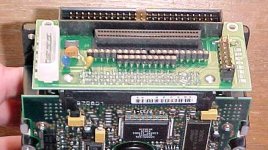
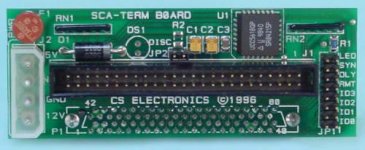
I didn't find a pic of my OWC Adapter, but it has three removable Resistor Packs (8pin) to control termination for its 50pin connector. It doesn't have the internal Wide SCSI connector as in the top pic, so one resistor pack (the only 10pin pack) is soldered to the PCB. This would be the "neck-down" termination converting SCA to the Narrow 50pin SCSI Bus.
If Max revises his adapter to include this resistor pack, that'd be the other AssCheek, or so I would surmise.
edit: I'm curious as to the considerable number of extra resistors. Would that be for addressing and control lines overlapping the two termination configurations?
.
Yea, I dunno. All I know is, it doesnt work. neither the terminated, nor the non-terminated in my PM6500. Must be a weird SCSI implementation, or its asking the drive to go into wide mode, and its not on a wide bus. Why that would be, i dunno. maybe the presence of a newer SCSI manager on the PM6500.
D8 -> D15
 SMT Resistors where used there as there wasn't space for another resistor pack without making the board bigger (And Thus too big to fin into a Pizza Box LC).
The original revision (aka modified Chinese adapter) of my adapters didn't have the extra 8 bits terminated. But all the ones i have ever sold do (even the modified Chinese ones that i sold do)
My WAG is that it's likely to be the ridiculous cable harness in the FuglyTowers. If I can find time, I'm trying to pack stuff up, not tear stuff down :
I'd like to test the 64/500 MedusaMess against the one in my 6360 to see if that's the limiting factor.@ max: good to hear you implemented those data line resistors. It's been a long time and I sort of stopped following your project after I'd cleaned out OWC's inventory. Now my question would be those "extra" termination resistors in the dual connector adapter pic, on my single connector OWC adapter and their function.
.
Don't worry max, I don't think your adaptors are half-ass.
I think they are great.
I think they are great.
lol. I see how it is. Maybe that was a bit harsh. 
Anyway, I think its a SCSI implementation issue. his adapter didnt work either. Even after supplying termination power, and removing the in-cable terminator.
Anyway, I think its a SCSI implementation issue. his adapter didnt work either. Even after supplying termination power, and removing the in-cable terminator.
I'm packing up the SE/30 and IIcx stuff for the time being. I'll be hooking up The DEC/6500 and the BenchMac6360 during one of my breaks from downsizing/storageroomization. I'll try one of the OWC terminators with each MoBo and Cable Harness in the four configurations.
I'm with you on your guess that it'll likely not work. It makes more sense that Apple borked something in their half-assed SCSI implementation when they wedged their entirely broke-assed IDE implementation into the SCSI I/O structure for that series. They pretty much never did anything right the first time around back then.
I'm with you on your guess that it'll likely not work. It makes more sense that Apple borked something in their half-assed SCSI implementation when they wedged their entirely broke-assed IDE implementation into the SCSI I/O structure for that series. They pretty much never did anything right the first time around back then.
Speaking of which, how and where in the box were you installing the diminutive beast? Were you trying to run the Savvio off the Zip Drive cable, dd you install another connector in between or are you tapping the CDROM connection?
The ZIP was optional, did the insta-towers ship with a termination on the CD, on the end of the Zip Cable or what? Was it a user installable upgrade of installed by Qualified, Certified only kind of deal?
That entire Performa era gives me the heebiejeebies. The 6360 was a refurb and I knew exactly what I was getting the rest of the line was spaghetti coded for individual retail outlets so you couldn't do price matching. Crazy-Eddie-Macs ( <- look, no BumpyCaps! ;D ) would be the perfect slanderous name for Performa Bundling, nobody could beat Eddie's prices on ANTHING, because they had their own special model numbers on EVERYTHING . . . bat rastards!
its on the same bus as the CDROM. There is a terminator in-line on that cable, tried it with and without termination.
Is the CD ROM also attached at the same time? For some reason I'm thinking the bus could only handle one device.
OK, got the extra MedusaMess from the gladly departed 6500 in my hands. The Zip cable is a 10" M-F Extension plugged into a connecter between what looks like a permanently installed IDC Terminator and the funky cold swap CD "socket-thingy." I tore the DEC6400 down and it has the same configuration. How could I forget this kinda cabling kluge crap?
So I unplug the Zip Extension and plug an adapter directly into the main cable or onto the end of the Zip pigtail?
So I unplug the Zip Extension and plug an adapter directly into the main cable or onto the end of the Zip pigtail?
I doubt it. does the same thing if I use my external enclosure, and hook it up to the DB25. Plus if this were true, then the Zip drive expansion accessory would have never worked.
very interesting thread so far.
Yeah . . . it got me to finally tame the cable monsters residing the HackStation and put BenchMac6360 back into battery after months and months (AND MONTHS) of procrastination. I'll be going straight to testing a 73GB Savvio on the external SCSI bus with full-on OWC Termination. If that doesn't work, backward compatible UltraSCSI was well and truly borked by Apple in the Performa era tradition.
I hate to say but my beige G3's hate SCSI hard drives. Even Apple branded. Don't know why but they just kinda don't play nice.
My 8600 is picky as well, the 18.6Gb drive in it only works with my actively terminated adapters. On the older somewhere between actively and passively terminated adapters it refuses to work. It sees the drive but will freeze in the boot process. With a actively terminated adapter it boots just fine.
Well I have your adapter, and it absolutely does not work. I dont have an 18GB. only a 36, and a couple of 72s.
Yeah, I stuck the UltraSCSI card into the (previously Beige Desktop) BorgMacG3™ spawn of the 7600MetalMiniTower™ after it ate the (too large) boot partition of the HDD from my comatose QS'02. I never tried running them off the G3's SCSI after that fiasco, they were for backup/recovery ops. SCA drives work very nicely in their native mode over a PCI inbterface card.
__________________________________________________________________________
This thread just killed a good bit of my day with tangential playtime. I dragged what's always struck me as about a 12lb. extra height ZFP HDD enclosure off the display. The full height 5.25" boat anchor within died of stiction long ago, but I haven't been able to get rid of it for sentimental reasons . . .
. . . so i figured it'd make a great external enclosure for a pair of striped Savvios. Getting these Big@$$ suckers apart is probably fairly straightforward if you remove the warranty voiding stickerage, but that needed to be intact for my purposes. a lot of twisting of screwdrivers in the appropriate slots and pounding the rip claws of a framing hammer into the cracks with a large ball peen hammer did the trick. What's left is a really nice, cooling finned, black painted cast aluminum enclosure that's shock mounted to the silver steel (white metal?) mounting frame surround. }
Lots more stuff got dragged out, organized and packed away in the process, so it's a net plus and it's on to testing!
It's all in the termination after all. SCSI Probe Saw something. TattleTech 2.81 told me exactly what it was and I used Drive Setup for the first time ever.
Formatted capacity: 68.34GB
PowerMac 6360/6400 Series
G3 400MHz
OS 9.0
Formatted capacity: 68.34GB
PowerMac 6360/6400 Series
G3 400MHz
OS 9.0
I'll go shove a 6500 board in there to double check. 
You lost me, Not sure what your doing. your all over the place. lol.
What else is new? ;D The Savvio works a treat in the 6360/6400, but it's NOT all in the termination.
I swapped in the 6500 board and fired it up, but it hung at the appearance of the cursor. I let it sit like that for a while and then cut power to the Savvio in the external box. It immediately booted the rest of the way no problem at all.
I powered up the external drive and it failed to mount, but I had normal computer function otherwise. SCSI Probe didn't see the Savvio at all this time, but TatteTech was able to tell me about it again. When I started up Drive Setup it poleaxed the system as soon as it began to look for available drives.
All indications are that Apple borked something in the SCSI implementation on the way to 50MHz bus goodness for the series. Go figure?
Exactly. thats the same issue that I am running into.
It's not a real computer, it's a Performa! :
Oh.. it gets better....
I decided to put a USB card in it, it came in today. Soon as I did that, now the IDE hard drive is acting goofy. it was freezing at the happy mac.
Started up from CD, and realized the partitions were all corrupt, failing to mount with a -127 error of some sorts. Seemed the partition volume names were all upper/lower case every other character. Odd...
Drive setup failed the initialization. So i pulled and reinserted the motherboard, and tried another initialization. No issues yet...
Ugh, I really hate this thing. HATE it..
. . . and it's unspeakably ugly too! ;D
It doesn't like modification. It hates change.
Naa, looks dont bother me.
I like the design; its visually appealing, at least in pictures.
my 6400 with a 250mhz 6500 mb in it now, works great. its got 2 IDE hard drives in it... a 4gb and a 6gb.
It has a Firewire card and USB card too. Worked just as good with the 180mhz 6400 board.
its funny when jt makes fun of the way they look, but i think they look pretty good, and the SUBwoofer in mine
sounds good, its real tight and hits pretty hard.
It has a Firewire card and USB card too. Worked just as good with the 180mhz 6400 board.
its funny when jt makes fun of the way they look, but i think they look pretty good, and the SUBwoofer in mine
sounds good, its real tight and hits pretty hard.
How do I get USB working? I have Mac OS 8.6 installed and its not seeing my USB sticks.
I downloaded the USB mass storage support 1.3.5 and it says not for your computer error.
Edit: Nevermind, i got it. had to install the D-USB card support first, then manually install the mass storage driver using the restore IMG process...
Seeing my 4GB USB microdrive
I downloaded the USB mass storage support 1.3.5 and it says not for your computer error.
Edit: Nevermind, i got it. had to install the D-USB card support first, then manually install the mass storage driver using the restore IMG process...
Seeing my 4GB USB microdrive
I've got a couple of Tempo Trios for my Performas, haven't really tried them yet though. They're probably from the time Sonnet made the cache slot Crescendos for these systems. From the PowerMasc x600 series on, the Mac was starved for slots until the DA finally got an extra one. ATA somethingorother, USB & FW all on one card with a good Video Card in the other slot ought to work nicely.
I run the 6360 at maxres in grayscale so the 8bit output looks gooood! ;D
edit: OMG, you're running it without Sonnetization? 9 runs fine on mine!
.
I run the 6360 at maxres in grayscale so the 8bit output looks gooood! ;D
edit: OMG, you're running it without Sonnetization? 9 runs fine on mine!
.
Ok well first I am going to ask have you recapped the power supply and boards? We are talking twenty years old here. They were "performas" the affordable for everyone line.
Bad caps=ghost in the machine
Bad caps=ghost in the machine
True.. but.. mine is a power Macintosh. Not a performa. I am Not sure what the difference is but that's what it says on the tag.
and I've already been through the capacitors one step ahead of you.
Difference is that Apple killed the Performa brand and rebadged it as a Power Mac.
I have the same or similar experience with a 72gb savvio and terminated adapter, although it's inside of a B&W G3 450. I'm using a PCI SCSI adapter which the brand name is lost on me at the moment, but neither OS 8.6 or 9.2.2 are able to mount the drive. (or Panther for that matter).
What happens for mine, is that the system boots just fine, but does not mount the drive. When I open up the included SCSI probe utility, system freezes with the spinning cursor. I can ctrl+apple+esc to close the program, and go back to whatever I was doing, but that happens with, startup disk chooser, Disk Utility, etc. Anything that polls the bus will freeze.
What happens for mine, is that the system boots just fine, but does not mount the drive. When I open up the included SCSI probe utility, system freezes with the spinning cursor. I can ctrl+apple+esc to close the program, and go back to whatever I was doing, but that happens with, startup disk chooser, Disk Utility, etc. Anything that polls the bus will freeze.
Interesting, I never tried using them on the internal bus of my G3, I was doing file transfers from an ATA card to an UltraSCSI card to recover/back up over size partitions the G3 chewed up.
IIRC, Apple was rolling the SCSI controller into the I/O ASICs at the time. If we hit the DevNotes, we can probably trace the beginning of these problems to development of a specific ASIC. Apple "fixed" the problem by dropping SCSI from the B&W G3.
In that time frame, nobody was running expensive server drives off onboard SCSI. It would have been a huge waste of money.
@ markyB86: PowerMac was there from the beginning for main line offerings, but I can't think of a Performa that transitioned to PowerMac offhand, the other way around was the norm. The history of the Performa would be an interesting article to find somewhere or compile, especially the tweaking of numbered bundles for different retailers.
Performa was their name for retail channel computer/software bundles dating from the 680X0 LC-Quadra era and into the PowerPC era. I don't know just how many different numbers/names Apple screened onto the bezels of the 62xx and 52XX Road Apple PPCs, but there were a lot and were based on only the software bundles for different retailers.
.
The difference appears to be one silly MegaHertz, a bus multiplier bump to match the 25% bump from 40MHz to 50MHz system board?
6500:
The O’Hare IC is connected to the
PCI bus and uses the 33 MHz PCI bus clock.
The O’Hare IC includes circuitry equivalent to the IDE, SCC, SCSI, sound, SWIM3 . . .
6400:
O’Hare IC is connected to the PCI bus and uses the 32 MHz PCI bus clock.
Beige G3s use the Heathrow ASIC for SCSI.
Dunno, it's a mystery. :
I have a SCSI lvd card in a powermac G4 I think it boots and runs fine. I'll try and dig it out and get specifics.