Thread
Crackle and tons of nasty SMOKE! Mac 512Ke).
I had finally gotten my old Mac 512Ke together after a mildly successful floppy reapir, and after about 1 hour of use it started going crackle crackle and then a whole lot of DENSE NASTY SMELLING WHITE SMOKE... woah! I pulled the plug immediately.
opened her up, and cant seem to find any burned capacitors on the ANALOG BOARD just from a quick look. Have yet to check the logic board. Which caps of analog and logic board are common suspects? If there is a re-cap guide for compact Macs please point me to it (I cannot find it, but I read plenty references to it on this forum!)
Thanks!
opened her up, and cant seem to find any burned capacitors on the ANALOG BOARD just from a quick look. Have yet to check the logic board. Which caps of analog and logic board are common suspects? If there is a re-cap guide for compact Macs please point me to it (I cannot find it, but I read plenty references to it on this forum!)
Thanks!
its fine.. the ac filter cap blew.. you can still run it with out that cap, it burns up and then it becomes open.
or if it smokes some, it will eventually stop. and you can just keep using it.
or if it smokes some, it will eventually stop. and you can just keep using it.
Okay I see. I'm going to replace it. I assume it is C 37 in my international board. Attached is a picture, I think I see a crack.
Most replacement guide to say to use a Y spec capacitor. This one is labeled as X spec however.
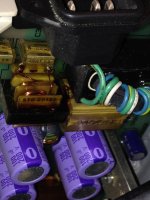
Most replacement guide to say to use a Y spec capacitor. This one is labeled as X spec however.
Yup, you got it 
yeah its to keep switching psu noise from going back into the power.
Some people have fancy circuit breakers, and they could pop from it.. but most people are fine. I have a couple machines I run, a 512k / Apple IIe that i still run after those blew. I have a whole drawer of those filter caps, my personal stuff has been getting neglected.
Some people have fancy circuit breakers, and they could pop from it.. but most people are fine. I have a couple machines I run, a 512k / Apple IIe that i still run after those blew. I have a whole drawer of those filter caps, my personal stuff has been getting neglected.
Do you have a spare You want to get rid of?
Where do you guys recommend shopping for capacitors...? From my international board, it looks like I will need a 0.47uF X-type polypropylene metalized capacitor. (C37)
Also while at it it looks like C33 and C36 are smaller, but same type, and would be wise to replace... those are Y-type 4700pF.
Anyone have a link to the handy excel sheet with replacement guide for common compact Mac caps?
Also while at it it looks like C33 and C36 are smaller, but same type, and would be wise to replace... those are Y-type 4700pF.
Anyone have a link to the handy excel sheet with replacement guide for common compact Mac caps?
Just hit mouser.com they are pretty good.
i don't have those smaller ones in stock right now, you should change those too, they look like they are ready to blow as well.
i don't have those smaller ones in stock right now, you should change those too, they look like they are ready to blow as well.
Ok, I think these are the best replacements. What do you think uni?
http://www.digikey.com/scripts/DkSearch/dksus.dll?Detail&itemSeq=162607639&uq=635536740540146454&CSRT=6333285681771440465
http://www.digikey.com/scripts/DkSearch/dksus.dll?Detail&itemSeq=162607642&uq=635536740540146454&CSRT=6333285681771440465
http://www.digikey.com/scripts/DkSearch/dksus.dll?Detail&itemSeq=162607639&uq=635536740540146454&CSRT=6333285681771440465
http://www.digikey.com/scripts/DkSearch/dksus.dll?Detail&itemSeq=162607642&uq=635536740540146454&CSRT=6333285681771440465
for some reason the links are not working for me.
Strange. I just double checked and they work fine for me 
Search digikey.com for parts:
PME271YA4470MR30
PME271M647KR30
Search digikey.com for parts:
PME271YA4470MR30
PME271M647KR30
what is wrong with these over at mouser?
71 cents vs 3.78
http://www.mouser.com/ProductDetail/Kemet/R46KI347000N0M/?qs=sGAEpiMZZMv1cc3ydrPrF512ADDNLQZJFjA1FVEOIUQ%3d
http://www.mouser.com/ProductDetail/Kemet/R413F147000M1M/?qs=sGAEpiMZZMv1cc3ydrPrF512ADDNLQZJ0Yjzq%2flnmrI%3d
51 cents vs 1.26
71 cents vs 3.78
http://www.mouser.com/ProductDetail/Kemet/R46KI347000N0M/?qs=sGAEpiMZZMv1cc3ydrPrF512ADDNLQZJFjA1FVEOIUQ%3d
http://www.mouser.com/ProductDetail/Kemet/R413F147000M1M/?qs=sGAEpiMZZMv1cc3ydrPrF512ADDNLQZJ0Yjzq%2flnmrI%3d
51 cents vs 1.26
Uni: Hrmmm... so those you posted are Metallized Polypropylene Film. The ones I posted are Metallized Paper Film. I think the original ones are paper, no?
The price for the same part (all else equal) is about the same on both places. I think Digikey ships cheaper to me that's all...
The price for the same part (all else equal) is about the same on both places. I think Digikey ships cheaper to me that's all...
yeah i'd get the mouser ones, they will work great, Don't you think Polypropylene would be better then paper?
uni: I don't really know what the difference would be between the paper and the poly ones. If anyone knows the correct type, please chime in!
You're better off going with the poly ones. They will hold up better over time.
I second that recommendation. Poly over paper. Always.
Thanks.
Do you all recommend full crt and large capacitor discharge prior to replacing these small caps?
Been searching for over an hour... I cannot find any proper instructions on the procedure to remove Analog board for re-capping. (mac %12Ke, specifically, or any similar compact Mac). I figure I have to discharge CRT first, but then wonder about what steps need to be taken to safely handle the Analog Board prior to (and after) removal. I'm particularly concerned about handling of the Flyback transformer and the larger caps on the A/B.
Any pointers to videos or instructions highly appreciated.
Any pointers to videos or instructions highly appreciated.
These paper caps are typically safety rated (for failure mode, this is what the "X" or "Y" or "X2" means), and the poly ones frequently aren't rated the same way. Be cautious.
http://www.kemet.com/Lists/Filestore/EvoxRifaRFIandSMD.pdf
http://www.kemet.com/Lists/Filestore/EvoxRifaRFIandSMD.pdf
Crap that's a long read! I had ended up buying both types, using the X and Y ratings of the original paper caps.
Looks like using the poly caps is risky since I'm now unsure of their ratings. Might just use the paper ones. Thanks for the heads up.
Looks like using the poly caps is risky since I'm now unsure of their ratings. Might just use the paper ones. Thanks for the heads up.
Bear
I just checked my poly caps and they are labeled X2 and Y2 just the same as the paper caps. I think they should be just fine.
I just checked my poly caps and they are labeled X2 and Y2 just the same as the paper caps. I think they should be just fine.
Are you worried about specifically removing the board or about handling it when recapping? Removing it is pretty darn easy, there are only about 3 screws holding it in place as well as the ground screw. Once the CRT is discharged and the plug removed there are only a few other plugs to remove, generally easier to remove the plug from the analog board end opposed to the end of the CRT cap board etc. Then just remove the motherboard cable and it can be removed. Hold the board at the edges and you should be fine.
I cannot give you any pointers when recapping as I have not done so myself, I am pretty sure once discharged you should be good to go. If there isn't a need to touch anywhere then don't, only the places you need to, I think you will be fine otherwise.
I cannot give you any pointers when recapping as I have not done so myself, I am pretty sure once discharged you should be good to go. If there isn't a need to touch anywhere then don't, only the places you need to, I think you will be fine otherwise.
I was concerned about removing the board specifically. But now I realize I can recap without removing it.
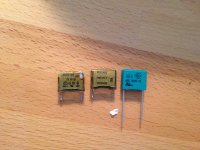
I ended up replacing the capacitors with Polys. I still need to fix the floppy drive before I boot her up, I hope these capacitors are similar spec!