
Thread
Powerbook PRAM battery upgrade
Using a ADC to DVI cable with a DVI to HDMI cables gives no Image
I searched info on google and came to http://www.applefritter.com/node/22078
I searched info on google and came to http://www.applefritter.com/node/22078
Quote
jbob30
Just in case anyone needs this same information, I found the answer to my problem. After researching the pinouts of ADC, DVI, and HDMI connectors, I found there were two pins available in the DVI and HDMI connectors, which were not available in the ADC connector. They are on pins 14 and 16 in the DVI connector and pins 18 and 19 on the HDMI connector. They are +5v and "Hot Plug Detect". Since these are not available on the ADC connector what I did to fix it was strip back the DVI to HDMI cable on the DVI end, and then take apart the DVI end of the ADC to DVI adaptor. I then ran a jumper wires from pins 14 and 16 of the DVI adaptor to pins 14 and 16 of the DVI end of the DVI to HDMI cable. I plugged the cables in and booted up and both monitors were detected and auto set to the proper resolution. I have a great picture on both now. Anyway, I just thought I would pass the info on.
Folks...
I was looking up the Panasonic battery that was the original PRAM battery in my
Powerbook A1095 M9422LL/A. It was made by Panasonic and it's model number is CGL3032. I could not find it any place. But I did learn the specs on it. It is 3.2mm thick and is 140mAh, 3.7 volts and is a Li ion battery.
After a lot of digging around, I found a replacement battery. It is called LIR3032. But in my searching, I found yet another battery that is the same size and spec as the original, but it is rated at 200mAh. It even comes with solder tabs to make it really easy to swap out your old PRAM battery. I have not found a good price for this battery, but here is an example:
http://www.ebay.com/itm/300990106311
I can see no reason to buy the replacement board along with a PRAM battery. I think I would rather buy a fresh 200mAh battery and solder it into my PRAM board whne I remove the dead battery.
Anyone know of a cheaper source of the above battery? It is a tad high at $20.
jack
I was looking up the Panasonic battery that was the original PRAM battery in my
Powerbook A1095 M9422LL/A. It was made by Panasonic and it's model number is CGL3032. I could not find it any place. But I did learn the specs on it. It is 3.2mm thick and is 140mAh, 3.7 volts and is a Li ion battery.
After a lot of digging around, I found a replacement battery. It is called LIR3032. But in my searching, I found yet another battery that is the same size and spec as the original, but it is rated at 200mAh. It even comes with solder tabs to make it really easy to swap out your old PRAM battery. I have not found a good price for this battery, but here is an example:
http://www.ebay.com/itm/300990106311
I can see no reason to buy the replacement board along with a PRAM battery. I think I would rather buy a fresh 200mAh battery and solder it into my PRAM board whne I remove the dead battery.
Anyone know of a cheaper source of the above battery? It is a tad high at $20.
jack
You can buy the PREM battery assembly - and then just update the battery if you like. Something like this:
http://www.powerbookmedic.com/Apple-Powerbook-Battery---G4-Aluminum-15-PRAM-p-16754.html
jack
http://www.powerbookmedic.com/Apple-Powerbook-Battery---G4-Aluminum-15-PRAM-p-16754.html
jack
Hey this card Works!
It didn't at first, but that turned out to be a driver issue. Even though I have 9.2.2 installed it was still running the 2.4 Nvidia drivers. I updated it to 3.5.2 and it fired right up using the DVI connection.
HOWEVER! Here is where it gets weird.
I connected my second DVI monitor to the ADC port using the Formac ADC to DVI adapter and for no apparent reason the G4 wont even turn on, no lights nothing. I had to disconnect the ADC adapter and leave the G4 unplugged for 5 minutes and then reconnect power (without the ADC connection) to get it to turn on.
What the heck is that all about?
So it looks like a common problem where the G4 will not power on when using the ADC connection unless you are using an ADC monitor, I can plug the ADC to DVI adapter into the mac while it is running and it turns off. Seems to be looking for a voltage.
I am reading through the following blog covering the topic, hopefully there is an answer in thee somewhere. http://hints.macworld.com/article.php?story=2005040811124189
I tried taking the battery out and also hitting the PMU button, no luck. I am positive that when any ADC connector is attached to a Geforce 4 MX card when installed if the certain mac G4's, the mac is told to stop and wait for a return signal from the ADC monitor. In absence of that signal it just sits there like an old lump of coal. I tested this with a couple of older ADC Geforce cards I have and the problem did not manifest itself. Since I can make the problem happen on demand by simply plugging in an ADC to DVI adapter by its self with no DVI cable attached, that tells me that the adapter shorts across a couple of pins telling the video card to look for a voltage on another pin. I am going to attack the adapter with my ohm meter to see if indeed there are a couple of shorted pins, or if a pin shorts to ground that should not otherwise being doing so.
I imagine you guys already know this, but now I do also.
Could the solution be as simple as this for the ADC problem http://themacelite.wikidot.com/pins-3-and-11
Could the solution be as simple as this for the ADC problem http://themacelite.wikidot.com/pins-3-and-11
It says in the diagram that pins 3 and 11 relate to the power state. Their reasoning is that some of the later AGP cards will cause the no post condition if you dont interrupt those two pins, so I am thinking the same reasoning applies in my case. Even though my G4 will post if there is no ADC connection, it stands to reason that it uses the same bus to communicate a 24V / no 24V state when an ADC connection is made, even if it is just an adapter. So I am going to try this scotch trick and report back in a few days. At the moment I am using the DVI output from the Geforce4 MX32 card for one of my monitors and the DVI output from the ATI 7000 PCI card for my second monitor.
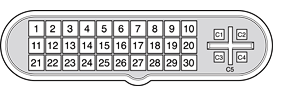
Pin Signal name Pin Signal name
1 25 V Supply 16 TMDS Data1/3 Shield
2 25 V Supply 17 TMDS Data3–
3 LED 18 TMDS Data3+
4 TMDS Data0– 19 DDC CLock
5 TMDS Data0+ 20 Clock Return
6 TMDS Data0/5 Shield 21 USB Data+
7 TMDS Data5– 22 USB Data–
8 TMDS Data5+ 23 USB Return
9 DDC Data 24 TMDS Data2–
10 Vsync 25 TMDS Data2+
11 25 V Return 26 TMDS Data2/4 Shield
12 25 V Return 27 TMDS Data4–
13 Soft Power 28 TMDS Data4+
14 TMDS Data1– 29 Clock+
15 TMDS Data1+ 30 Clock–
ADC Pinout 10 x 3
VS DVI 8x 3
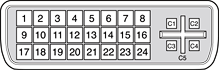
I am thinking about modding DVI to DVI cables to make a ADC to DVI (rebuilding every pin of it) because on the ADC the 1/2, 11/12 and 21/22 pins are optionals. 1/2 are +25, 11/12 are "return" of the 25 volts and 21/22 is the "extra" usb for ADC monitors.
Maybe those Apple engineers were thinking on when ADC monitors and cables would be scarce, after all. I were thinking before browsing the schemes that we would need to use 2 DVI cables to make the ADC pinout, but are not esential.