

Serial Ports:
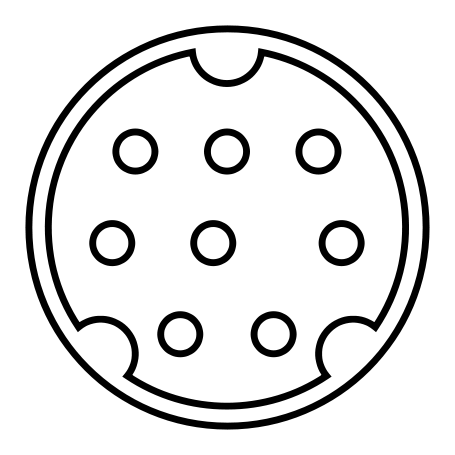
The 9600 has two built-in serial ports: the modem port and the printer port. With these you’ll be able to get the Mac Daddy of midi interfaces, the almighty Opcode Studio 5LX. You absolutely WILL NOT get better midi timing with any USB G3/G4 or any USB interface in general. I’m not knocking USB here necessarily — there have been many talks about the speed of midi over USB as compared to the serial protocol, it’s just that the Studio 5LX itself has some wicked speed optimization programming going on on the inside of it, and it just so happens to use serial ports. The Opcode guys really knew what they were doing, and the Studio 5LX proves it.
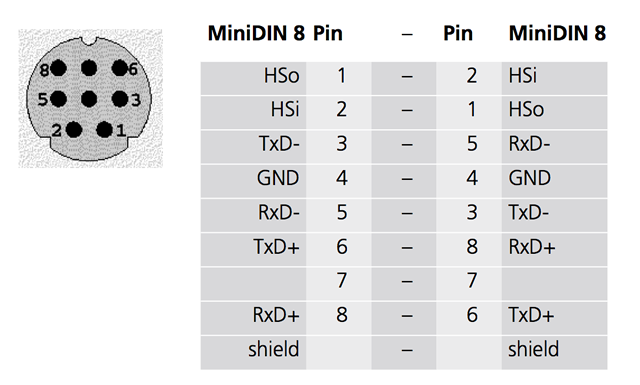
Serial cables and serial devices use different pinouts for various reasons, so it’s of utmost importance that you choose the correct cables for your serial MIDI interfaces. A lot of the cables on Ebay and online computer hardware stores offer the same 8-pin mini-DIN serial cables as the ones that you want, but the wiring or pinout most likely won’t be correct. Usually you’ll come across straight-through instead of the ‘crossover’ pinout variety that we need. Straight-through is pin 1 to 1, pin 2 to 2 and so on. The correct crossover pinout is in the picture below:
Like with ADB cables, you’re going to find that serial cables are usually too short. To solve this problem, I bought a quantity of six serial cables with the correct pinout (in case I get some future 9600s), plus some serial extension cables, plus some standard, longer serial cables. There is a catch here, however.
The proper crossover pinout serial cables I got were about 5 feet in length, and the other cables I got were rather long (10’ extenders and 15’ standard serial cables). The catch is that both the extender cables, AND the standard cables both have a straight-through pinout. I know I said to not use these, but the reason this works is that if you have at least ONE crossover pinout cable in the chain somewhere, the wiring/pinout is corrected at that point. That means you’re free to run straight-through from there on out (since the wiring has already been corrected at another point in the chain).
It doesn’t matter if you plug the crossover cable into your midi interface, or if you plug it into the 9600. As long as it’s corrected once at least somewhere in the chain, you’re good. I was unable to locate long crossover pinout cables, and I was also unable to locate crossover pinout extension cables so it left me with doing what I said above. In case you do find crossover pinout extension cables someday, make sure to not use two crossover pinout cables in one chain as that would actually reverse the wiring that you tried to correct in the first place.
The 9600 has two built-in serial ports: the modem port and the printer port. With these you’ll be able to get the Mac Daddy of midi interfaces, the almighty Opcode Studio 5LX. You absolutely WILL NOT get better midi timing with any USB G3/G4 or any USB interface in general. I’m not knocking USB here necessarily — there have been many talks about the speed of midi over USB as compared to the serial protocol, it’s just that the Studio 5LX itself has some wicked speed optimization programming going on on the inside of it, and it just so happens to use serial ports. The Opcode guys really knew what they were doing, and the Studio 5LX proves it.
Serial cables and serial devices use different pinouts for various reasons, so it’s of utmost importance that you choose the correct cables for your serial MIDI interfaces. A lot of the cables on Ebay and online computer hardware stores offer the same 8-pin mini-DIN serial cables as the ones that you want, but the wiring or pinout most likely won’t be correct. Usually you’ll come across straight-through instead of the ‘crossover’ pinout variety that we need. Straight-through is pin 1 to 1, pin 2 to 2 and so on. The correct crossover pinout is in the picture below:
Like with ADB cables, you’re going to find that serial cables are usually too short. To solve this problem, I bought a quantity of six serial cables with the correct pinout (in case I get some future 9600s), plus some serial extension cables, plus some standard, longer serial cables. There is a catch here, however.
The proper crossover pinout serial cables I got were about 5 feet in length, and the other cables I got were rather long (10’ extenders and 15’ standard serial cables). The catch is that both the extender cables, AND the standard cables both have a straight-through pinout. I know I said to not use these, but the reason this works is that if you have at least ONE crossover pinout cable in the chain somewhere, the wiring/pinout is corrected at that point. That means you’re free to run straight-through from there on out (since the wiring has already been corrected at another point in the chain).
It doesn’t matter if you plug the crossover cable into your midi interface, or if you plug it into the 9600. As long as it’s corrected once at least somewhere in the chain, you’re good. I was unable to locate long crossover pinout cables, and I was also unable to locate crossover pinout extension cables so it left me with doing what I said above. In case you do find crossover pinout extension cables someday, make sure to not use two crossover pinout cables in one chain as that would actually reverse the wiring that you tried to correct in the first place.