

Thread
G3 airport card
I'm getting an eMac, Airport and cards, one for the eMac and one for my B&W G3. On opening the G3 I'm not clear on where to put the airport card. It's one of the early G3's if that helps.
All help appreciated.
All help appreciated.
Your B&W G3 doesn't directly support an Airport card from Apple, hence no obvious place to put it. You'd have to get a PCI Adaptor, like this one from Farallon and one of their 802.11b (technical term for Airport) cards. It doesn't work with apple's airport card. You'll have to return that one, unless you're planning on getting a machine that supports it.
Sorry to be the bearer of bad news.
Sorry to be the bearer of bad news.
Can you connect a Graphite Base Station via ethernet cable to the B&W instead of using a PCI adaptor?
Quote:
|
Originally posted by OzarkMtn: Can you connect a Graphite Base Station via ethernet cable to the B&W instead of using a PCI adaptor? |
for that setup, i think you can connect both the base station and the B&W to a hub/switch and set the base station to do NAT/DHCP.
Quote:
|
Originally posted by ilukas: for that setup, i think you can connect both the base station and the B&W to a hub/switch and set the base station to do NAT/DHCP. |
That should work fine. You'd just have to make sure the connection you were trying to share can handle that set-up. Some broadband connections have to be connected directly to the router (in this case, the Airport BS) in order to function.
In my case, I use a Linksys Router to do the PPPoE connection to my DSL server (handling the assignment of IP addresses) and I have the ABS connected to it providing a wireless connection to the laptops, but no IP or NAT services.
so basically I hook the G3 up to the BS with ethernet cable, the BS is connected to a router with cable which is plugged into the Cable modem?
Can you tell I'm new at this?
Thanks,
Nat
Can you tell I'm new at this?
Thanks,
Nat
Quote:
|
Originally posted by nat: so basically I hook the G3 up to the BS with ethernet cable, the BS is connected to a router with cable which is plugged into the Cable modem? Can you tell I'm new at this? Thanks, Nat |
since you are getting a new airport BS (right?), there is one LAN port and one WAN port.
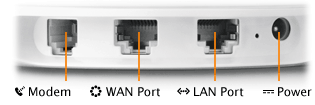
plug the modem into the WAN port, then plug the G3 into the LAN port. all set and ready to go now.
if you have more computers to wire to the BS, get a switch and plug it into the LAN port, then plug the computers into the switch.
ok, got my new eMac and from what I've read and understood from you good folks this is what I need to do, let me know if I'm completely off base please:
To setup BS without airport card (or am I off base already?):
Plug an ethernet line into the G3 ethernet port and into the BS Lan. Plug the Cable Modem into the Wan on the BS. Run the setup utility (OS X) and configure the BS using the G3 settings.
Disconnect the G3.
Start the eMac and configure it to join exising wireless network (the newly configured BS). Then if I want I can use the ethernet cable to plug into the G3 without an airport card to join the lan? Hadn't planned on doing that but just curious...
thanks for all your help.
nat
To setup BS without airport card (or am I off base already?):
Plug an ethernet line into the G3 ethernet port and into the BS Lan. Plug the Cable Modem into the Wan on the BS. Run the setup utility (OS X) and configure the BS using the G3 settings.
Disconnect the G3.
Start the eMac and configure it to join exising wireless network (the newly configured BS). Then if I want I can use the ethernet cable to plug into the G3 without an airport card to join the lan? Hadn't planned on doing that but just curious...
thanks for all your help.
nat
Quote:
|
Originally posted by nat: ok, got my new eMac and from what I've read and understood from you good folks this is what I need to do, let me know if I'm completely off base please: To setup BS without airport card (or am I off base already?): Plug an ethernet line into the G3 ethernet port and into the BS Lan. Plug the Cable Modem into the Wan on the BS. Run the setup utility (OS X) and configure the BS using the G3 settings. Disconnect the G3. Start the eMac and configure it to join exising wireless network (the newly configured BS). Then if I want I can use the ethernet cable to plug into the G3 without an airport card to join the lan? Hadn't planned on doing that but just curious... thanks for all your help. nat |
sounds like you've got it right. You don't have to disconnect the G3 at any point, though.
As for the eMac, you should be able to configure it easily using the airport setup assistant.
Just to throw a little confusion into the mix (sorry!) I want to remind you that the B&W does not support AirPort with OS X. I have had my B&W on my home Airport Network with OS X using the Cisco Aironet 350 Series PCI card with Adapter. Works like a charm, and is easy to set up. You don't need the Cisco Access Point to use the PCI card, which is good because the AP is monsterously expensive, like 3X the price of Apple's AirPort Base Station. The PCI card and Adapter is not cheap, but it's a solid piece of kit and the only game in town to make your B&W work with AirPort and OS X.
I'd get an ABS Snow with the Cisco Aironet 350. It's not very expensive and has both 128-bit WEP and LEAP out of that combo.
I'm looking for a way to do something like this too. I have a B&W and an airport card, but no adapter. I know Apple makes this product to make "older imacs" work with Airport cards. So there's no equivalent for PCI? There are a host of these adapters for pcs. I hate to buy an entire new (and expensive) card and adapter. Is there any way around that?