Home Forums PowerBook 190 strange behavior
PowerBook 190 strange behavior
· Hardware · 37 posts · Apr 26, 2015 — Jan 21, 2023 View original thread ↗
Hi folks, it's me again! My usual "luck" has brought me a PowerBook 190 in mint condition that was supposed to be working, but actually it isn't. Let me explain.

I found this PowerBook on eBay Germany a couple of weeks ago, the pictures showed it was working and it was cheap enough that I decided it would be my first 68k PowerBook. 

When it first arrived I tried to turn it on, but to my deepest sadness it didn't do anything. Absolutely no sign of life, except for the green light in the upper corner that told me at least current was flowing from the power supply. 
I left it alone for about an hour with the battery unplugged, then tried again to turn it on, and this time it worked! I actually managed to boot it a few times without a hitch, both with and without battery. The chime was crystal clear and the display worked perfectly,  so I put it back happily into my collection with the battery inserted. 

A couple of days later I decided to show it to a friend of mine, and again it decided not to turn on. Also removed the battery with no difference whatsoever - I also noticed that apparently the battery is leaking, as there are some very small traces of acid on the contacts. 
Now it doesn't boot at all, and sometimes - but only sometimes - I hear a strange noise like a scratching sound when I plug it to the power supply. The green light does still come on at times (not always), but that's about it.

So, what's going on here? Does it need new caps? Is it salvageable? 

Thanks! :)
 

Its salvageable. The 190 needs to be taken apart and and cleaned out first. The case where corrosion is found can be cleaned with  baking soda rub down and rinsed out with water and then alcohol. The power supply circuit (the part under the track pad between the hard drive and battery) should be cleaned like a regular board - acetone and then alcohol. The battery is toast.

Talk with td4dotnet, he restored a PB190 with simillar if not worst condition than yours. His thread is on:

https://68kmla.org/forums/index.php?/topic/23620-pb190-acid-attack-victim/

Thanks Elfen! 
Next week I'll have an exam break at university, so I hope I'll have a couple of days to give this little boy some care.

Seems like a reasonably easy fix, at least I hope so! 

The 190/5300 are notorious for having the power connector lose connection with the motherboard. Give that a check as well next time you open it up.

The 190/5300 are notorious for having the power connector lose connection with the motherboard. Give that a check as well next time you open it up. 
I agree with that, the 190/5300 have a tiny pin connector, and should be soldered back most of time.

I also had a 5300 with that strange behaviour, will only boot when the reset switch on the back was pressed down....

Too bad you "HAD" that 5300, Bibilit. Not only is there problems with the power connection on the 190/5300 but sometimes when the battery leaks, the PSU Area (under the trackpad) is affected and needs to be cleaned up and some areas resoldered. It depends on how big the leak was.

Thanks for all the suggestions!

I think I'm going to have a look at it this friday, I'll keep you updated with my findings!

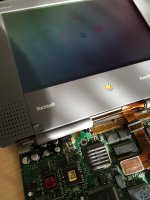
A brief update: today I had the chance to get it apart.

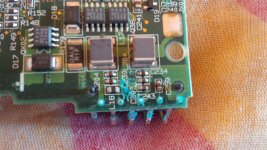
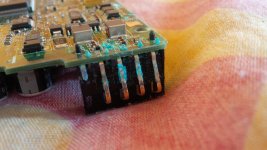
I can't see major damage to the logic board, however the battery acid has destroyed one of the battery contacts and also seems to have spread to a few resistors in the power supply circuit area. Nothing else seems affected. Perhaps a trace or two have been corroded away?

IMG_20150510_191257.jpg

IMG_20150510_191439.jpg

IMG_20150510_191637.jpg

Scrub it down with baking soda and a tooth brush to eliminate the rust. Wear rubber gloves and a a face mask, you do not want the stuff to touch your skin.

Wash down with alcohol and then acetone and alcohol again.

The board looks OK from the photographs The connection/broken pin can be replaced with a thin piece of stiff wire.

Finally had some time to look at this boy. 
I tried Elfen's suggestion and scrubbed the board with alcool and a toothbrush, but it doesn't seem to have made any difference. I also cleaned the internal structure just in case, but to no avail.
The symptoms are pretty much the same: if I plug the power supply first, I hear a scratching sound coming from the speaker, but the green light doesn't turn on. If I unplug and replug it, however, this time the green light turns on and I still hear the scratching sound - but the system simply ignores the power button. 
Resetting the machine with the reset button on the rear seems to produce similar effects.

I've now tried cleaning the board with both acetone and alcool - will report back as soon as it dries up.

The acetone+alcool combination seems to have produced some effect, but I'm not sure if this is to be interpreted as a positive progress or a bad sign.

Apparently, the system now *seems* to try a boot: it chirps rhythmically and sometimes lights up the screen accordingly to the rhythm, however still no sign of success.

I'm not really sure if having gone from a no-sign-of-life situation to some chirping madness is actually good, or if things are getting worse...

I uploaded a video to show the defect.

It's trying to boot. It sounds like it is not getting enough voltage to the board.

Q: Is the battery in when you turn it on? Try turning it on without the battery.

Also check that the memory cards (if any) are in snug in place. You can also remove the keyboard and turn it on with the reset switch in the back.

check the input voltage from the AC adapter to make sure it isnt falling. If it seems stable, assuming your DMM will see the transients. Dont use a cheap 10 dollar meter they wont see the transients, they are junk. You need a good fluke or equivalent. 

Once you know the power input is good, then most likely the DC-DC board is toast. youll need to fix/replace it. 

Once you know the power input is good, then most likely the DC-DC board is toast. youll need to fix/replace it. 
Unfortunately on the 190/5300, the DC-DC board is part of the motherboard and can not be removed to be replaced like on a Wallstreet G3 or other Powerbook. If needed it needs to be fixed - some how. Outside of checking traces and replacing parts, the area is very tight to work in.

And this is where your memory fails you. 

the 5300 has a DC-DC board. 

The 190, That I am unsure of. 

And this is where your memory fails you. 

the 5300 has a DC-DC board. 

The 190, That I am unsure of. 
I have both my 5300 and 190 apart on my lap. You're right. The 5300 has a separate DC-DC board, but the 190 has its DC-DC board as part of the motherboard. I thought the 5300 has the DC-DC Board as part of the mother board like the 190. (I also see that the DC-DC board needs to be recapped though it still works.)

Yep, DC-DC board is specific to the PowerBook 5300... Unfortunately the 190 has got the power circuitry directly on the logic board.
I'm not sure what could be wrong there except maybe a broken trace somewhere.
I'll see if I can find a way to check the power supply, but I'm more keen to suspect some kind of failure in the power circuitry for some reason...

the flub-flub-flub is not a broken trace. its either a bad capacitor, shorted capacitor, or shorted load somewhere on one of the rails. You will need to measure resistances to ground to test for this. 

I'm just shaking my head on this because looking at the 190 power area on the last pict Sherry H. posted and having seeing it on my 190, that is a tiny area to recap. No way one is getting a soldering iron to fit there.

But I'll ask this stupid question since I have been thinking about doing it on my Duo's and their power area is similar to the 190's; can a SMT/SMD Ceramic or Tantalium cap replace the larger caps in the DC-DC Power area? When I recap, I overrate the caps, putting in a 20V or 25V cap instead of a 15V if it fits. In most cases I done it, they do fit. Only in the LC power supply did I find larger overrated caps to be too big to do a recapping with.

It is not advisable to use ceramic capacitors in DC-DC switching circuits to replace electrolytics. Tantalum is ok. 

Ceramics will vary their capacitance based on the applied voltage. Since the voltage is a ripple, the capacitance will ripple with it, creating odd and strange effects. This will also wreck havok in the feedback circuit that regulates the output, exacerbating the problem. 

Ceramics are usually designed to decouple the inductance of the power supply output, while electrolytics decouple the resistance of the power supply output. 

Also, you dont hand-solder those capacitors down with a wand. 

You have to use solder-paste, and reflow new ones in place of the old ones. 

spectra_refurb_11.gif.acdc1dcb987e8e52fe0251dc6ea321ec.gif


Too bad you "HAD" that 5300, Bibilit. Not only is there problems with the power connection on the 190/5300 but sometimes when the battery leaks, the PSU Area (under the trackpad) is affected and needs to be cleaned up and some areas resoldered. It depends on how big the leak was.
Yes, the previous owner left the battery in the bay for too long, and the leaking was really bad, the 5300 worked for a while though.

Then the hinges started to break off the soft plastic screen surround support, i repaired those but soon after it happened again... in the end i kept it as spares and found a far better one.

I had a broken pin also...

It is not advisable to use ceramic capacitors in DC-DC switching circuits to replace electrolytics. Tantalum is ok. 

- - - - - - - - - -

Also, you dont hand-solder those capacitors down with a wand. 

You have to use solder-paste, and reflow new ones in place of the old ones. 
So Tantalums are OK? I'll keep that in mind.

I do use solder paste, so depending on the task and cap physical sizes, lets see how it goes. I'll try it out on a busted up Duo230 first.

I recapped a couple of PB Duo, it is not that hard. I used a soldering pencil with a tiny tip,  no hot air required.

The best way to go is SMD electrolytic, if possible smaller in diameter, they make the job easier

Remember that the Duo MiniDock is also filled with the same kind of caps

IMG_3259.jpg

This was my first recapped Duo 230 Logic Board

Also, if I remember correctly, the caps are the same type as the ones you find inside an early SE/30.

Looks nice Ferrix!

Had time to look at this boy more closely today.

I've washed the board completely over again, and now it's really shiny clean - unfortunately no luck with the problem.

So I've decided to do a few measures - I don't know anything about how this thing works or what are the best places to look for voltages, but I tried anyway.

The AC power supply is giving out a nice 23,6V stable as a rock. I've analyzed the group of 7 capacitors near the battery connector: the top two and the two on the left have voltages rising and falling between 6V and 10V, the two on the right between 5,5V and 6,5V, and the one on the bottom between 7V and 11V.

I also noticed that the two capacitors ranging between 5,5V and 6,5V seems to get a lot hotter to touch than the others.

Where should I look for the voltage rails? Or the resistance to ground? Is there some known schematics for this board?

Thanks!

When I did mine taking them all off and putting in 1 by 1 worked well for me.

And I did that with a radio shack special 3 years ago , I'm pretty sure that makes me crazy also lol.

Macdrone, what was wrong with your board? Was it exhibiting similar problems?

No but the battery area looked like yours so just to be safe it was worth it while apart to do it.

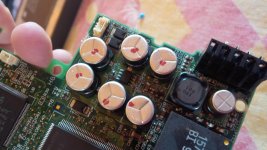
I decided to take a few resistance measures between the pads of the capacitors in the battery area of the logic board. 
Among the top 6 capacitors, the two on the left and the two on the top show values ranging from a few hundred to a few thousand kOhms, increasing over time as they charge up - however, the two on the right actually show an almost inexistent electrical resistance. I believe they may be at fault here, they may have leaked or shorted internally and now the two pads are electrically bridged, resulting in the boot failure I'm experiencing. 
Does this makes sense at all? 
I think it's time to attempt a recap...

mp.ls