Home Forums One more SE/30 saved ! But strange HDD behavior
One more SE/30 saved ! But strange HDD behavior
· Troubleshooting · 34 posts · May 19, 2015 — Jun 27, 2015 View original thread ↗
Hello,

I'm new to the forum and Macintosh. I recently bought a non working SE/30 on eBay that came with a nice surprise in the form of a (hopefully working) network card.

-Turned it ON... Nothing (nice Simasi pattern)

-Opened it, all capacitors had leaked.

-Recapped the board, first time I soldered since middle school.
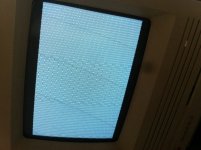
image.jpg

-Still Nothing... but as C9 pads and nearby traces were destroyed by corrosion it wasn't surprising.

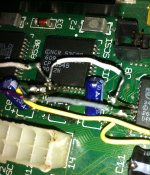
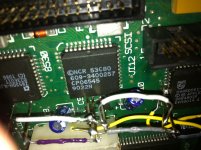
Using the schematics I slowly checked all traces around the SCSI chip and found 3 disabled (D28, D29, D30) between UJ11, UI12 and UG12.

-I soldered wires between the chips pads, it wasn't easy nor aesthetic but it worked:
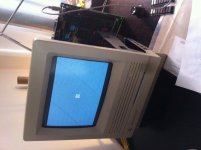
image.jpg

-Still the image was only half displayed so I checked the traces between the video chips and surprisingly found that it was the problem described by genie_mac.

https://68kmla.org/forums/index.php?/topic/19821-mac-newbie-se30-vid-probnot-another-one/?hl=se30
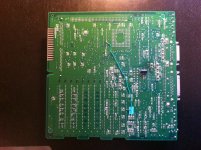
image.jpg

Now I'm the proud owner of an almost working SE/30.

Sadly the system boot up on the HDD only when half of the RAM is removed.

Also the Disk is not seen by Apple HD Setup but Disk First Aid was able to perform a test on it and found errors.

Now I'm in need of your expertise.

What do you think, is the RAM, the HDD, the SCSI chip or something else the cause of this behavior ?

With symptoms like that how is voltage?

ATX connector measured voltages are -4.98V (6), -10.47V (7), +5.28V (12,13), +12.62V (14)

Molex disk connector voltages are 12.71V and 5.08V

;)

so -12 is too low and +12 is two high,  and what are they without the ram?

The voltages above were the ones coming from the pwr supply.

With the RAM they are -5V (6), -11.77V (7), +5.04V (12,13), +12.71V (14)

Molex are 12.33V and 5.05V

RAM was maybe just a coincidence because today it wont boot on the HDD no matter what.

Time to check traces between the SCSI IC and the SCSI header. They break at the IC. 

I checked all traces going to/coming from the SCSI IC, they are fine.

You try another known good working drive? I would hope so. 

Otherwise, did you check the DMA lines that bounce between the SCSI IC, GLU, and VIA? 

I'm Back.

I tried with two different drives, but as they are old I cannot trust them.

So I bought a new one from maccaps.com thus the delay in my answer.

Same problem with the new disk, the disk starts, make some noise first but quickly does a ticking noise (one tock every 3 sec) but nothing else happen and the computer does not boot on it ( :?: screen)

Again the Disk is not seen by Apple HD Setup.

I also checked all the connections of the UI12 chip.

can you show us a picture of the scsi chip on your main board?

one time.    lol out of all the SE/30 boards i have recapped,  was the actual scsi chip bad.   but it was the same situation, the pad's metered out good... i flowed on a new scsi chip and it worked!

Sure
 
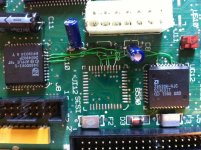
photo 1.JPG
 
I apologize for the unorthodox soldering as I realized only afterwards that I should have used smaller wires.
But everything is connected.

photo 2.JPG

WoW...that's one original soldering technique there!

-

ive done a bit of heavy jumping on boards, but I rekon you should take off all what you have done, clean the board a few times, and re start with much smaller wire. Its worth the wait to get some fine wire to work with.

Your solder connections are very rough!

-

there are so many uncovered wires its just an accident waiting to happen.

-

best of luck with it

Oh dear gosh.....

Some times, you just got to say "Phucket! It works!"

Now that you got it working, you can go back when you are up to it and replace the thick wires with thinner ones.

Oh dear gosh.....
lol

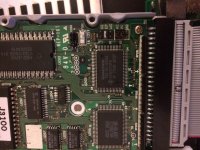
Removed the chip with Chip Quik and used 30 AWG wires. Just have to wait for a new IC now.

photo 3.JPG

good job man!   :D

now your taking ozyman - good clean job -

-

onwards!

This is great work! A much major improvement!

Why was the scsi chip removed? There is a fuse (F2 and F3 right there!) that sometimes blows and makes your SCSI bus look dead.

Check the fuses with a multimeter.

Those are polyfuses. they are supposed to blow, and self-reset. 

would you believe I worked in Boruns electronics in mahon, cork , Ireland, and we made trimpots, network resistors and those fuses.

I never knew at the time that the network resistors were in macs or the polyfuses. I don't know if the polyfuses in the macs were from boruns though

-

the brother worked up in apple in hollyhill in cork as well........he was in debug. He told me his job was debugging the se/30 that were just built. He brought me in there on a tour of the factory

Still cant forget the pick and place machine building the boards....the speed of the thing......the solder bath...........

I remember the place being so white...clean.......looked like a great place to work. Last time he was down I showed him and se30 board and after 20/30 years he could tell me what each chip did......was well impressed

-

he said to keep and eye out on the boards I have for the initals POK. He said that every time he fixed a board he signed it.

-

and here I am 20/30 years later a complete mac head...............funny the way things happen!!

that is quite an interesting story!

would you believe I worked in Boruns electronics in mahon, cork , Ireland, and we made trimpots, network resistors and those fuses.

I never knew at the time that the network resistors were in macs or the polyfuses. I don't know if the polyfuses in the macs were from boruns though

-

the brother worked up in apple in hollyhill in cork as well........he was in debug. He told me his job was debugging the se/30 that were just built. He brought me in there on a tour of the factory

Still cant forget the pick and place machine building the boards....the speed of the thing......the solder bath...........

I remember the place being so white...clean.......looked like a great place to work. Last time he was down I showed him and se30 board and after 20/30 years he could tell me what each chip did......was well impressed

-

he said to keep and eye out on the boards I have for the initals POK. He said that every time he fixed a board he signed it.

-

and here I am 20/30 years later a complete mac head...............funny the way things happen!!
weh hey!

and techknight doesn't even like computers :)

I remember before 9/11 meeting a guy from that area who also worked for Apple, Falen. He commented how he loved the 5300ce (which I had out at Barnes & Noble Coffee Shop at the time) and that he used to build them and other laptops along the line. But between food and family, he could never afford to get one until after he moved to the states.

don't want to be hijacking this thread elfen. Sure the brother got me an SE from the place. I was the only one in my city, of my age with a mac (that I knew of).

Ha! So was I to some extent. People remember me as the first one in the 'hood to own a computer!

But like you said, lets not hijack... So...

TechKnight - I knew there was mention of the SCSI Fuse somewhere. But it is on the Mac II, which the SE30 came out sometime later and uses the same fuse. See Page 233 of Dead Mac Scrolls. What is funny is Page 177, where the same problem is for the SE & SE\30 but references the SCSI Chip as the problem, it says "Also see prior entry" but there is none for the SCSI Problem. On Page 234, where is references the problem as the SCSI Chip for the Mac II also says "Also see prior entry" where the fuse is referenced. So the page for the fuse on the SE & SE\30 is missing.

I remember this because I've repaired a few of those fuses by replacing them. If they are polyfuses that self-repair, they must have gotten such a surge that they were blown to Hades!

Ozymandias - got the SCSI Chip yet? I want to see this mad puppy howling.

polyfuses will open up permanently if the current flowing through far exceeds the maximum rating, itll blow the reed apart. 

Back again everyone,

I received the new chip today and soldered it. Then I checked all the connections again just to be sure.

First try using the new HDD I bought, it did the exact same thing as before.

Then I tried with the old HDD and it started several times.

The system boots up after exactly 25 sec each time, don't know of its normal.

Could it be a jumper config issue with the new Disk? What should be the jumpers config on the SCA to CSI 50 pins adaptor to match this one:

image.jpg

Booting on a Mac takes time. I noticed that on my systems with a SSD, that there is a 20 second or so pause between the "Welcome to Mac" sign and the first extension loading. And some extensions also take time to load up as well.

What system are you loading? And what type of drive is on the pic above? It looks like it is on SCSI Address 6 which should not be a problem but it takes a few seconds for the mac to find it as it counts up the scsi id's to find a drive. If you remove the jumpers on A1 and A2, the Mac should find it faster.

Another question - is the system folder on that drive blessed?

mp.ls