

MacApp 2.0b5 UDialog Release Notes
MacApp 2.0b5 UDialog Release Notes
Macintosh · 1988 · PDF
| Filename | MacApp_2.0b5_UDialog_Release_Notes.pdf |
|---|---|
| Size | 2.04 MB |
| Year | 1988 |
| Source | Apple Computer |
| Subsection | developer / MacApp / MacApp_2.0b5 |
| Downloads | 3 |
Enjoying MacTrove?
Anonymous downloads are free and unlimited.
Create a free account to track favorites,
contribute metadata corrections, and join the
community chat.
Reader
Loading…
OCR / Text contents
MacApp 2.0b5 UDialog
Release Notes
Russ Wetmore
Overview
This document describes the classes that make up MacApp's "dialog" implementation. These classes primarily consist
of a set of view classes that implement the kinds of views one often sees in Macintosh dialogs. (These views can be
used in any MacApp window, regardless of whether you consider it a dialog.) The new classes can be created from resource templates.
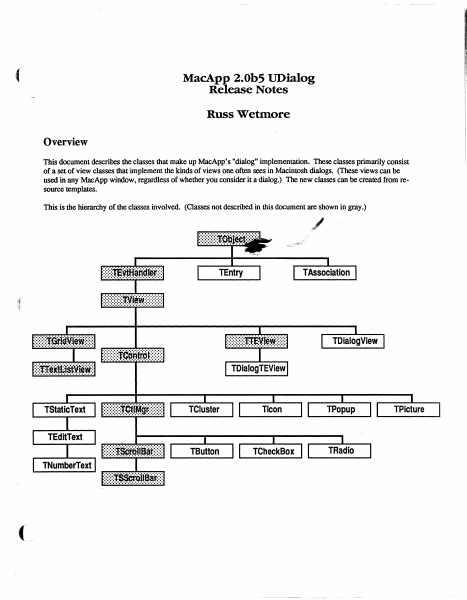
This is the hierarchy of the classes involved. (Classes not described in this document are shown in gray.)
TEntry
Global Constants
Choices
mOKHit
mCancelHit
mButtonHit
mCheckBoxHit
mClusterHit
mEditTextHit
mIconHit
mListItemHit
mListScrollBarHit
mPictureHit
mPopupHit
'.i~adioHit
!>1hStaticTextHit
.III
l!lIJiiGcrollBarHit
~VSCrOllBarHit
mEditTabKey
mEditReturnKey
mEditEnterKey
mPatternHit
mControlHit
1:
2:
3:
4:
5:
6:
7:
=
8:
= 9:
= 10:
= 11;
= 12;
13;
14;
15:
16;
= 17:
18;
19;
= 20:
View Template Identifiers
kNoIdentifier
kNoTemplate
kNoResource
..
,
=
-1;
-1;
Miscellaneous
kYesButton
kNoButton
kPreferColor
kControlOn
kRedraw
kDontRedraw
kFrame
ChrOO
Chr1F
kMaxTEWidth
Wed, Aug 3,1988
= 1:
= 3:
= TRUE;
TRUE:
= TRUE:
= FALSE:
[adnLineTop, adnLineLeft,
adnLineBottom, adnLineRight):
CHR(O):
CHR($lF):
$2BO;
©1988 Ii Apple Computer
2
,t
Global Types
IDType
= ResType;
adornPieces
adnLineTop,
adnLineLeft,
adnLineBottom,
adnLineRight,
adnDummy,
adnOval,
adnRRect,
adnShadow ) ;
Draw a line at the top of the extent.
Draw a line on the left side of the extent.
Draw a line at the bottom of the extent
Draw a line on the right side of the extent.
Placeholder (replaces adnPatFill).
Do a FrameOval using the extent
Do a FrameRoundRect using the extent
Draw drop-shadows against framed selections.
CntlAdornment
SET OF adornPieces;
ControlCharSet
SET OF ChrO 0 .. ChrlF ;
Used by TEdi t Text for allowable control chars.
Global Routines
PROCEDURE InitUDialog;
This routine initializes the UDialog unit. It must be called before any of the view classes in this unit can be
created from • view' resources.
FUNCTION NewTemplateWindow (viewRsrcID: INTEGER;
itsDocument: TDocument): TWindow;
This routine creates a new Twindow (or descendant) from the • view' template with the given resource ID.
PROCEDURE RegisterType (typeName: Str255; protoObj: TObject);
This routine registers the given object (which can be an instance of any descendant of TObject) for use by
TEvtHandler and its descendants when creating views from a template.
The TEntry Class
This class is used by TAssociation to form a very basic and cheap text item dictionary mechanism whose main use will
be substitution of text in dialog-type window items. This class will be instantiated for each key string and its replacement
that is desired in a dialog. A list of these entries is kept by a TAssociation. It is a simple subclass of TObject.
To duplicate the present function of ParamText, you'd use ." 0 '. f " 1 '. ." 2 f • and ." 3 • for the fIrst four key strings.
(
Wed. Au…
Showing first 3,000 characters of 50,912 total. Open the full document →