
Tesler UI Standards Addenda
Tesler UI Standards Addenda
Lisa · 1981 · PDF
| Filename | Tesler_-_UI_Standards_Addenda_19810215.pdf |
|---|---|
| Size | 0.81 MB |
| Year | 1981 |
| Subsection | development_history / memos |
| Downloads | 4 |
Enjoying MacTrove?
Anonymous downloads are free and unlimited.
Create a free account to track favorites,
contribute metadata corrections, and join the
community chat.
Reader
Loading…
OCR / Text contents
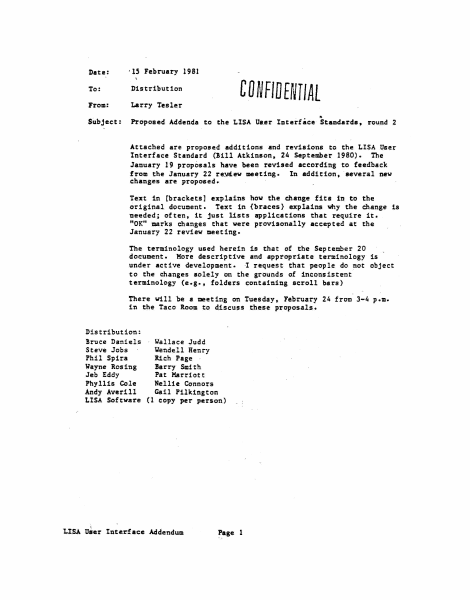
Date:
' lS February 1981
To:
Distribution
From:
Larry Tesler
Subject:
Proposed Addenda to the LISA Uur Interface Standards, round 2
CD NFID EfVIIAL
..
Attached are proposed additions and revisions to the LISA User
Interface Standard (!ill Atkinson, 24 September 1980). The
January 19 proposals have been reviled according to feedback
from the Ja'tluary 22 re!J(ew meeting. In addition. several new
changes are proposed.
Text in [brackets] explains how the change fits in to the
original de>cument. Text in {braces) explains why the change is
needed; often, it just lists applications that require it.
11 0K" marks changes
that were provisonally accepted at the
January 22 review meeting.
The terminology used herein is that of the September 20
document. More descrip tfve and appropriate terminology is
under active development. I request that people do not object
to the changes solely on the grounds of inconsistent
terminology (e.g., folders containing scroll bars)
There vUl be a meeting on Tuesday, February 24 from 3-4 p.m.
in the Taco Room to discuss these proposals.
Distribution:
!ruce Daniels
Wallace Judd
Steve Jobs
Uendell Henry
Phil Spira
Rich Page
;Jayne Rosing
Barry Smith
Jeb Eddy
Pat Harriott
Phyllis Cole
Nellie Connors
Andy Averill
Gail Pilkington
LISA Software (1 copy per person)
LISA User Interface Addendum
Page l
2. MOUSE AND CURSOR {to avoid too many shapes} OK
(replace il'i~dle paragraph about cursor changes by: l
The cursor may take on different shapes to indicate its current
function. To give the user additional varning of what will happen when
the button is pressed, additional feedbac:k may be given u long as it is
definitely noticeable without being annoying. For.example. uhen the
cursor is over a scroll arrow (section 19), the box around the arrow
could fill in black While the button was up. and the arrow itself could
fill in black while the button was dovn.
The Terminology Committee (a joint co11UDittee of Publications, Marketing.
and Softvare.) will specify the cursor shapes as well as other user
feedback. The soundness of thei·:f' choices will be verified by user
tests.
[delete last sentence about motion of the u:icuse with the button upJ
3. POINTING; CLICKING; DRAGGING WITH THE HOUSE {clarification) OK
(add: 1
The 1/2 second is measured from the release of one click t:o the press of
the next click.
5. MEMORY {correction} OK
A LISA computer will have at least 256 {not 128] K.bytes of main memory.
of which 32K is dedicated to the display.
14. THE ACTIVE FOL.DER {to be more obvious to user} OK
One folder is distinguished by its title tab being displayed in inverse
video [not a thicker outline}, and by having tvo or more {not just twol
light gray scroll bars. {rest unchanged]
1.5. MAKING A FOLDER ACTIVE (to clarify and to agree with section 29} OK
[add:]
When a folder first becomes active, it is brought in 19front" of all other
folders so that nothing obscuTe111 it. Later. however, ·1t may be obscured
by the Dialog…
Showing first 3,000 characters of 13,608 total. Open the full document →