
Atkinson LISA User Interface Standards
Atkinson LISA User Interface Standards
Lisa · 1980 · PDF
| Filename | Atkinson_-_LISA_User_Interface_Standards_198009.pdf |
|---|---|
| Size | 0.84 MB |
| Year | 1980 |
| Subsection | development_history / memos |
| Downloads | 4 |
Enjoying MacTrove?
Anonymous downloads are free and unlimited.
Create a free account to track favorites,
contribute metadata corrections, and join the
community chat.
Reader
Loading…
OCR / Text contents
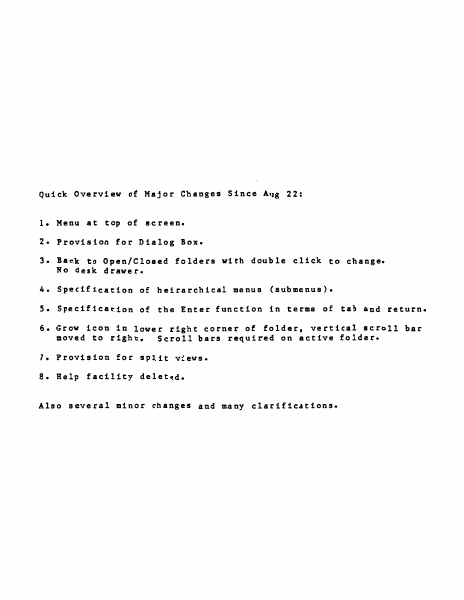
Quick Overview of Major Changes Since Aug 22:
1. Menu at top of screen.
2. Provision for Dialog Box.
3. Back to Open/Closed
No desk drawer.
fold~rs
with double click to change.
4. Specification of heirarchical menus (submenus).
S. Specification of the Enter function in terms of tab and return.
6. Grow icon in lower right corner of folder, vertical scroll bar
moved to right.
Scroll bars requi~ed on active folder.
7. Provision for split views.
8. Help facility deleted.
Also several minor changes and many clarifications.
TABLE .QI. CONTENTS
o. Introduction
• • • • • •
• •
• • •
• • • • • • • • • • •
• • • •
2. Mouse and Cursor • • • • • • • • • • • •
3. Pointing, Clicking, and Dragging •
• •
4. Keyb card • • • • • • • • • • • • • • • •
s. Memory • • • • • • • • • • • • • • 6. Mass Memory
• • • • • • • • • • • • •
7. Initialization •
• •
• • • • •
• •
8. In Everyday Operation • • • • • • • • •
9. What the Screen Looks Like • • • • • • •
••••••••••••••
10. Folders
•
11. Basic Folder Appearance • • • • • • • •
1 • Display
.
12.
13.
14.
15.
16.
1 7.
18.
19.
20.
21.
22.
23.
24.
25.
2 6.
2 7.
28.
29.
30.
31.
3 2.
33.
34.
35.
3 6.
3 7.
38.
39.
40.
41.
42.
43.
44.
45.
46.
4 7.
48.
49.
so.
51.
• •
• •
• •
• •
• •
• •
• • •
• • •
• • •
• • •
• • • • •
. '
•
•·
•
• • • •
• • • • •
• • • • •
• • • •
• • • • •
• • • • •
•
• • • • •
• • • • •
• • • • •
• • • • •
. . • .. . . ..
•
•
• •
• •
• •
• •
Open and Closed Folders
••• • •••• •
The System Font
•••••••••••• •
The Active Folder • • • • • • • • • • • •
Making a Folder Active •
• •
• • • •
Moving a Folder
•• . • • • • • •
• • • •
Growing the Active Folder , • • • • • • • •
Scrolling
••••••••••••••• •
How to,Scroll
• • • • • • •
•
Split Views
• • •
• ••••••••• •
The Selection • • • • • • • • • • • • • •
Visibility of Operations on Selections • •
Marking a Selection • • • • • • • • • • •
The Menu Bar
• • • • • • • • • • • • • •
Making a Menu Choice • • • • • • • • • • •
Menu Items that Do Nothing • • • • • • • •
Contents of the Menu.Bar and Menus • • • •
Making Menu Choices From the Keyboard
• •
The Dialog Box
•••••••••••• •
Text Editing Philosophy
• •
• •• •
Typing Printing Characters • •
• ••
•
Keys that Alter the Meaning of Other Keys
Shift
• • • • •
• •
• • • • • • • •
Alpha Lock • • • • • • • • • • • • • • • •
Apple Key
• • • • • • •
• • • • • • •
Code
• • • • • • • • • • • • • • • •
•
Repeating Keys • • • • • • • • • • • •
•
Type Ahead • • • • •
• • •
• •
•
Backspace
•••• • • • •
• • •
•
The Backspace Buff er • •
• •
•
•
Tab
• •
• • •
• • •
• • •
• •
Return • • • • • • • • • • • • • • • • • •
the Edit Menu
• •
• • • • • • •
• • •
Cut
• • •
• •
• • • • • • •
• • • •
Paste
•
• • •
• • • • • • • • •
Copy • • • • • •
•.
• • • • • • •
Undo
• • • • • • •
• •
• • • • • •
Utility Documents and Folders
• • • • • •
The Scrap
••• • • • • • •
• •
• • •
The Abbreviation Folder
• •
• • • • • •
The User Profile Folder
• • • • • • • • •
... ..
• •
• •
• •
• •
•
•
•
•
•
.....
• • • •
• • •
• • • •…
Showing first 3,000 characters of 39,339 total. Open the full document →