

07 Phrase File Document
07 Phrase File Document
Lisa · PDF
| Filename | 07_Phrase_File_Document.pdf |
|---|---|
| Size | 0.56 MB |
| Source | Apple Computer |
| Subsection | toolkit_3.0 / Package_2_Examples |
| Downloads | 9 |
Enjoying MacTrove?
Anonymous downloads are free and unlimited.
Create a free account to track favorites
and contribute metadata corrections.
Reader
Loading…
OCR / Text contents
.Phrase Fi Ie Document
Purpose of this Docu.ent:
Understanding what a phfase file is and how you use it to set up your menus
and Alerts.
Introduction:
Phrase files are used by ToolKit applications to store written
communication with the user in a place that allows it to be changed without
regenerating the program that uses that written material. One important
use of phrase files is to allow menus and alerts to
translated to
another language without the application that uses them being changed.
This makes it easy to internationalize a ToolKit application. Host of the
information in a ToolKit phrase file is the menus and alerts used by that
application.
b'
Each ToolKit specific application must have its own phrase file to describe
the menus and alerts that are used in that application. The ToolKit has a
phrase file for the generic application. It is called PABC (it is the file
TKIPABC.text on your boot volume). PABC contains all the alerts that are.
generated by the generic application. It also contains standard menus,
like the FilelPrint men~ that can be included in the list of menus in a
specific application's phrase file. All specific application phrase files
must include the generic application phrase file.
Phrase files are generated using the Workshop editor. If the name of your
specific application is 'FooSam', it will consist of at least the files:
MFoOSam.text (Main Program)
UFooSam.text (Clascal Interface)
UFooSam2.text (elascal Implementation)
PFooSam.text (Phrase file for this application)
The easiest way to start editing a phrase file is to change an already
existing one, like a phrase file from a ToolKit sample application.
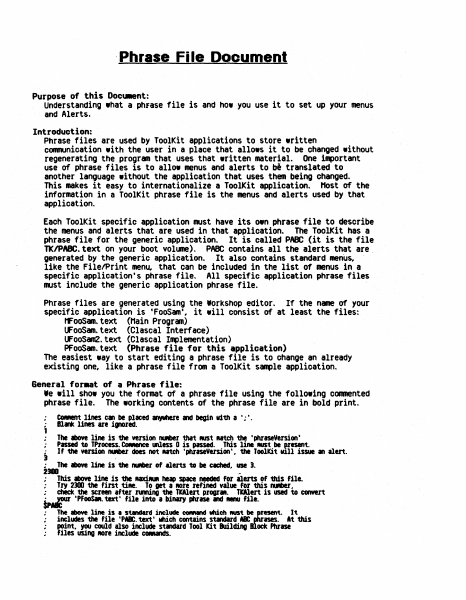
General for.at of a Phrase file:
Ie will show you the fonmat of a phrase file using the following commented
phrase file. The working contents of the phrase file are in bold print.
•
CO_ent lines can be placed If¥'hele and begin vi'th a';'.
•
The above line is the version IUIber tha't MISt utch the 'phraseVersion'
Passed to TProcess. CONIlnee &Ness 0 is passed. This line MISt be F-esent.
If the version IUIber does not AItCh 'phraseVersion'. the Toolkit vl11 issue an alert.
1 Blank lines are i.,..red.
•
;
J
:
2_
.
The above line is the IUIber of alerts to be etched.. use 3.
~
This above line is the uxillUR heap space needed for alerts of this file.
• Try 2300 the fint tile. To get a fIOre refined value for this fUIber ..
; chick the screen after nmina the TWert progrll.. TWert is used to convert
tp~ ·PFooSM. text' file into a binary phrase and . . . file.
•
:
•
•
#
The above line is • s~d include COfIMnd wch RUSt be~esent.
includes the file 'pa. text' web contains standard a
point.. Y(KI could also include standard Tool Kit Building
files using ROre include CCNands.
It
At this
ock Phrase
ISIS.
1.
lisIIIIrftl
;
,
;
;
;
.
.
.
The tbOYt two 11ntS should IIVIYS be '1000', theft the naM of your .,llCltlGn
., ~ Mnt it soelled in ~ to the user. Other applic.tion .lerts cen
be 1ncluded below here, …
Showing first 3,000 characters of 20,667 total. Open the full document →