
Monitor 11.2 Release Notes Sep82
Monitor 11.2 Release Notes Sep82
Lisa · 1982 · PDF
| Filename | Monitor_11.2_Release_Notes_Sep82.pdf |
|---|---|
| Size | 0.09 MB |
| Year | 1982 |
| Subsection | pascal_monitor |
| Downloads | 2 |
Enjoying MacTrove?
Anonymous downloads are free and unlimited.
Create a free account to track favorites,
contribute metadata corrections, and join the
community chat.
Reader
Loading…
OCR / Text contents
'To:
From:
Date:
Subj:
Lisa Users
Rich Page
September 23,1982
Monitor Release 11.2
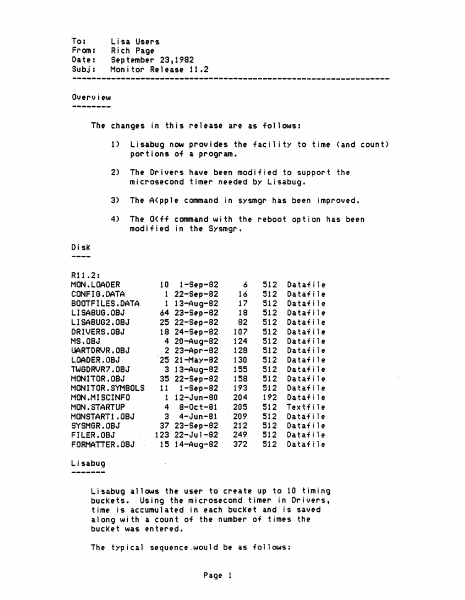
Overview
The changes in this release are as follows:
1)
Lisabug now provides the facil ity to time (and count)
portions oT a program.
2)
The Drivers have been modified to support the
microsecond timer needed by Lisabug.
3)
The A(pple command in sysmgr has been improved.
4)
The O(fT command with the reboot option has been
modiTied in the Sysmgr.
Disk
R11 .2:
MON.LOADER
CONFIG.DATA
BOOTFILES.DATA
LISABUG.OBJ
LISABUG2.0BJ
DRIVERS.OBJ
~IS. OBJ
UARTDRVR.OBJ
LOADER.OBJ
TWGDRVR7.0BJ
MONITOR.OBJ
MONITOR. SYMBOLS
MON.MISCINFO
MON.STARTUP
MONSTARTI .OBJ
SYSMGR.OBJ
FILER.08J
FORMATTER.OBJ
10 I-Sep-82
1 22-Sep-82
1 13-Aug-82
64 23-Sep-82
25 22-Sep-82
18 24-Sep-82
4 20-Aug-82
2 23-Apr-82
'25 21-May-82
3 13-Aug-82
35 22-Sep-82
11 1-Sep-82
1 12-Jun-80
4 8-0ct-81
3 4-Jun-81
37 23-Sep-82
123 22-Jul-82
15 14-Aug-82
6
16
17
18
82
107
124
128
130
155
158
193
204
205
209
212
249
372
512
512
512
512
512
512
512
512
512
512
512
512
192
512
512
512
512
512
Datafile
Datafile
Datafile
Datafi1e
Datafile
Datafi1e
Datafi1e
Datafile
Datafi1e
Dataf 1e
Dataf 1e
Dataf 1e
Dataf 1e
Textf 1e
Dataf le
Dataf 1e
Dataf 1e
Dataf le
l,isabug
------Lisabug allows the user to create up to 10 timing
buckets. Using the microsecond timer in Drivers,
time is accumulated in each bucket and is saved
along with a count of the number of times the
bucket was entered.
The typical sequence.would be as follows:
Page 1
1) Enter the debugger for a given process and create
one or more timing buckets (with the TB command).
2) Set a break point to stop execu'tion at some point.
3) Go.
4) When the breakpoint is reached print the timing
summary (with the PT command).
5) Use the End Timing command to remove all buckets.
The new commands are as follows:
BT expr
The Begin Timing specifies the process number.
If the Begin Timing command is not given the
current process is assumed. A process number
of zero can be used to indicate domain O.
TB addrl addr2
A Timing Bucket is created from addrl to addr2.
PT
Print Timing summary.
printed as follows:
There are five columns
1) Bucket number
2) Total time in this bucket
3) Number of times this bucket was entered
4) Starting address for this bucket
5) Ending address for this bucket
End Timing prints tne timing summary and removes
all of the timing buckets.
KB expr
Kill Bucket can be used to remove a single bucket.
RT
Reset Times will reset the timing and count tables
leaving the current definition of the bucKets intact.
NOTES:
1) All addresses are in the same process.
2) The process number is defined by either the BT
command or the first TB, PT, KB or RT command.
If the process number is not given in the BT
command the current process is assumed.
Sysmgr
The Sysmgr has been modified so that the connection
with the Apple is more rel iable. To establ ish the
Page 2
connection with the Apple do the following:
1) Type ~A~
2) Type ~y~
3) Boot the Apple with either
the …
Showing first 3,000 characters of 3,345 total. Open the full document →