
MacWorksPlusInstall
MacWorksPlusInstall
Lisa · PDF
| Filename | MacWorksPlusInstall.pdf |
|---|---|
| Size | 0.72 MB |
| Subsection | sun_remarketing |
| Downloads | 3 |
Enjoying MacTrove?
Anonymous downloads are free and unlimited.
Create a free account to track favorites,
contribute metadata corrections, and join the
community chat.
Reader
Loading…
OCR / Text contents
Updating to MacWorkstPre-Release version 1.0.18
Update Includes:
+ One MacWorks boot disk (unrecognizable at Mac desktop)
* One 400k updatg diskette that includes:
- Install program
- SUNtrol Version 1.5
- System 3,2 Finder 5.3 (not to be copied to hard disk)
+ These instructions
System Requirements:
* Lisa or Mac XL
+ Minimum 1 Meg RAM
+ 400K/800k disk rive
+ Apple's System 4.2, Finder 6.0
or System 6.02, Finder 6.1
Introducing MacWorks Plus
The MacWorks Plus gives you the compatibility of the current versions of the Macintosh operating
systems including system 6.03, 6.0.2,4.2 and finder 6.1, 6.0. If you have had previous versions
of MacWorks Plus, this new version will give much needed enhancements to the original code.
Enhancements such as increased compatibility with programs, floppy disk format, disk copying,
networking as well as increased error recovery capabilities and much more.
To Install...
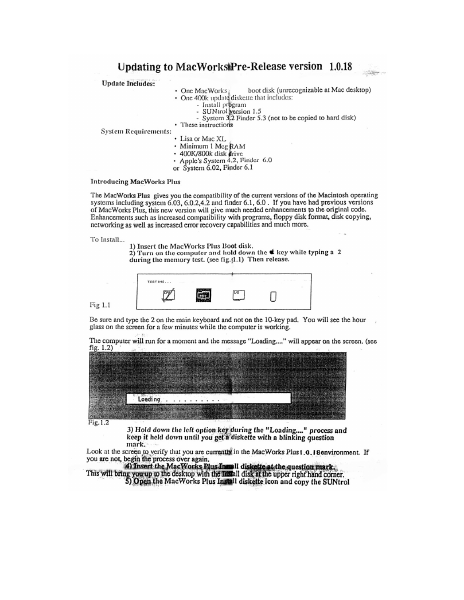
1) Insert the MacWorks Plus Boot disk. .
2) Turn on the computer and hold down the € key while typing a 2
during the memory test. (see fig.{1.1) Then release.
TESTING. ..
2meaia
Fig 1.1 ;
Be sure and type the 2 on the main keyboard and not on the 10-key pad. You will see the hour
glass on the screen for a few minutes while the computer is working.
The computer will run for a moment and the message “Loading...” will appear on the screen. (see
fig. 1.2)
* Loadi ng
3) Hold down the left option key during the "Loading..." process and
keep it held down until you get # diskette with a blinking question
mark,
Look at the screen to verify that you are currently in the MacWorks Plus1.¢.1@environment, If
you are not, begin the process over again,
‘)Insert ic Wor Hl di e. question mark.
This will ; myn ees iam dake upright and ea
‘Open.the MacWorks Plus Ingtill diskette icon and copy the SUNtrol
1.5 icon to the system folder on the hard disk.
After the copy is ”
6) Double click on MacWorks Elus maenl program:
The progam wil sn begin and the first screem you see pean yor thet this program cc ies
bee : rio System to.thé hil disk and asks you.on which device you to
ave it 5
7) Select the device that you wish to install the Macworks Plus on.
or
select “Cancel” if you wish to cancel.
If you only have one hard disk connected, “Internal Hard Disk” will be your only choice other then
“Cancel”.
The next screen will ask if you want to “Update”, “Tnitialize” or “Cancel”.
The Initialize option will completely reformat your hard disk. A reformat will crase the entire hard
disk. For aa ar of this update, we suggest you update.
}) Choose “ Update”
If you choose to initialize, the uter will rentind you that the disk is about to be erased and will
give you a second chance to cancel
The process of updating will take a few minutes. After the update has completed you will be given
the option to "Continue" back to the finder or to "Shut Down" and restart the m: ¢ under
1.0.14. We su; that you shut down.
9) Select "Shut down"
From this point you can turn …
Showing first 3,000 characters of 5,161 total. Open the full document →