
XENIX Lisa 2 Text Processing Reference May84
XENIX Lisa 2 Text Processing Reference May84
Lisa · 1984 · PDF
| Filename | XENIX_Lisa_2_Text_Processing_Reference_May84.pdf |
|---|---|
| Size | 10.09 MB |
| Year | 1984 |
| Subsection | xenix |
| Downloads | 3 |
Enjoying MacTrove?
Anonymous downloads are free and unlimited.
Create a free account to track favorites,
contribute metadata corrections, and join the
community chat.
Reader
Loading…
OCR / Text contents
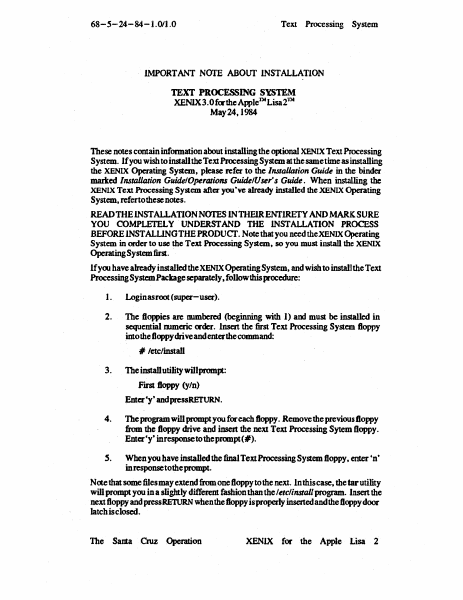
68-5-24-84-1.011.0
Text Processing System
IMPORTANT NOI'E ABOUT INSTALLATION
TEXT PROCESSING SYSTEM
XENlX3.0 fmthe Apple'J:\I Lisa 2J:\I
May24,I984
These notes contain information about installing the optional XENlX Text Processing
System. lfyou wish to install the Text Processing System at the same time as installing
the XENIX Operating System, please refer to the Installation Gui~ in the binder
maIted Installation Guide/Operations Guide/User's Guide. When installing the
XENIX Text Processing System after you 've already installed the XENIX Operating
System, refertothesenotes.
READ THE INSTALLATION NOTES INTHElRENflRETY AND MARK SURE
YOU COMPLETELY UNDERSTAND THE INSTALLATION PROCESS
BEFORE INSTALUNGTHE PRODUCf. Note that you needtheXENIX Operating
System in order to use the Text Processing System, so you must install the XENIX
Operating System first.
lfyru have already installed theXENIX Operating System, and wish to install the Text
Processing System Package separately, follow this procedure:
I.
Login as root (super-user).
2.
The floppies are mnnbered (beginning with 1) am must be installed in
sequential numeric mder. Insert the first Text Processing System floppy
into the floppy drive and enter the command:
# letc/install
3.
The install utility willprompt:
First floppy (yIn)
Enter'y· andIKssRETURN.
4.
The program will prompt you for each floppy. Remove the previous floppy
from the floppy drive and insert the next Text Processing Sytem floppy.
Enter'y· inresponsetotheprcmpt(#).
S.
When you haveinstaUed the final Text Processing System floppy, enter 'n'
in response tothe prompt.
Note that some fiJesmay extend from one floppy to the next. In this case. the tar utility
will prompt you in a slightly different fashion than the /etclinstall program. Insert the
next floppy and press RETURN when the floppy is properly inserted and the floppy door
latch is closed.
The SantaCruz Operation
XENlX for the Apple Lisa 2
The XENIX™
Text Processing System
Text Processing Guide
TM
for the Apple Lisa 2
The Santa Cruz Operation, Inc.
Information in this document is subject to change without notice and
does not represent a commitment on the part of The Santa Cruz
Operation, Inc. and Microsoft Corporation. The software described in
this document is furnished under a license agreement or nondisclosure
agreement. The software may be used or copied only· in accordance
with the terms of the agreement.
@The Santa Cruz Operation, Inc., 1984
@Microsoft Corporation, 1983
The Santa Crull Operation, Ine.
500 Chestnut Street
P.O. Box 1900
Santa Cruz, California 95061
(408) 425-7222 -TWX: 910-598-4510 SeD SACZ
UNIX is a trademark of Bell Laboratories
XENIX is a trademark of Microsoft Corporation
Apple., Lisa 2, and ProFile are trademarks of Apple Computer Inc.
Release: 68-5-24-84-1.0/1.0
Contents
1
1.1
1.2
1.3
1.4
I .5
J.6
2
2.1
2.2
2.3
2.4
2.5
3
3.1
3.2
3.3
3.4
4
4.1
4.2
4.3
4.4
4.5
4.6
4.7
4.8
4.9
4.10
4.1 I
4.12
4.13
4.14
4.15
TextProcessi…
Showing first 3,000 characters of 498,783 total. Open the full document →