
Thread
Macintosh Family Hardware Reference book(s)
I got a copy of Macintosh Family Hardware Reference yesterday. It looks like a great book, but now I'm more confused than ever about how it differs from Guide to the Macintosh Family Hardware. I had thought that GttMFH added coverage of the SE and Macintosh II that MFHR lacked, but MFHR covers those. So maybe GttMFH is basically the same book, just with some minor corrections and updates?


I've got TIttMF, MFHR & GttMFH2E and bought them in reverse order, the last two very recently. I haven't had time to scan and post it as yet, but check out p.xxvii of your new book, it gives a GREAT overview of the History, Coverage and the order in which to start on a basic understanding of all facets of the Mac.
Now that I've worked my way back to the root level of Y2K+11 Macintosh Insanity, I think I'll start reading the series in order . . .
. . . from cover to cover! 8-o
MUAHAHAHAHAAAAAAAAAAAAAAAAAAA!!!!!!!!!!!!!!!!!!!!!!!!!!!!!!!!!!!!!! }

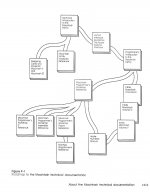
I offered to read MFHR as a bedtime story to my 8-year-old daughter, but she declined.
:lol:
Until my son went to Kindergarten, he thought MacPaint WAS a Computer Game! }
He was SOOOO excited when I got him the "new SuperPaint Game" and was beside himself when I got a PC with a decent color monitor and KidPix!
Needless to say, he was somewhat miffed when he discovered my little dis-information campaign! :
But developing his art talents got him into the LaGuardia Specialized High School for Fine & Performing Arts as backup for his acceptance at Stuyvesant! :approve:
He also got a 5 year ride for Pre-Med/Genetics on an Art Grant for a two degree B.S/B.A. pre-med/genetics fine & arts combo! [ ] ]'>
] ]'>
. . . prolly couldn't get away with that lil' charade today! :-/
. . . but you can TRY!!!! :lol:
Until my son went to Kindergarten, he thought MacPaint WAS a Computer Game! }
He was SOOOO excited when I got him the "new SuperPaint Game" and was beside himself when I got a PC with a decent color monitor and KidPix!
Needless to say, he was somewhat miffed when he discovered my little dis-information campaign! :
But developing his art talents got him into the LaGuardia Specialized High School for Fine & Performing Arts as backup for his acceptance at Stuyvesant! :approve:
He also got a 5 year ride for Pre-Med/Genetics on an Art Grant for a two degree B.S/B.A. pre-med/genetics fine & arts combo! [
] ]'>. . . prolly couldn't get away with that lil' charade today! :-/
. . . but you can TRY!!!! :lol:
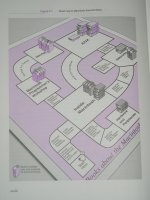
Sorry about the crappy pic, I'll swap in a better one or a scan when I've got time.
I was upset when my copy of Technical Introduction to the Macintosh Family Second Edition arrived with a different cover than expected, but today i realized that what I thought I'd ordered was the four year older First Edition.
no worries, it's on its way as of today, meanwhile, I figured RoadMap2 was in order, along with updating with the ISBN info for the entire series now that bbraun has started that project.
Trash80, do you have access to higher resolution copies of both your images above?
The new one should be the high res image. I discovered the QS'02's PSU poopage when I tried to fire it up to tweak the pic. I'll see if I can get the scanner to work, last time I tried the dang HP AIO wouldn't do a dang thing because the ink cartridge was out of date . . .
. . . that's just plain stoopid!

The original image used to be something like 1024 x 1280 or summat. I can never get the full size images to show up on this machine, just on a 'puter that doesn't have the preview in the browser cache(?) . . .
. . . full image never opens up on the Pavilion. (from which I've uploaded the pic)
edit:
note: the graphic itself is a gray box, but each book title should be black .txt on a white panel.
. . . feel free to upload the attachments to my original posts and delete this interchange. I wonder if there's a problem with the uploads feature. Quite often only the previews seem to be showing up for other member's images as well. I was assuming that the images were small, as sometimes seems to be the case. Is it on my end or a possibly general problem?
. . . that's just plain stoopid!
The original image used to be something like 1024 x 1280 or summat. I can never get the full size images to show up on this machine, just on a 'puter that doesn't have the preview in the browser cache(?) . . .
. . . full image never opens up on the Pavilion. (from which I've uploaded the pic)
edit:
note: the graphic itself is a gray box, but each book title should be black .txt on a white panel.
. . . feel free to upload the attachments to my original posts and delete this interchange. I wonder if there's a problem with the uploads feature. Quite often only the previews seem to be showing up for other member's images as well. I was assuming that the images were small, as sometimes seems to be the case. Is it on my end or a possibly general problem?
Excellent, thankyou!
I'll leave this thread as-is, but
Images added as requested.
I will also upload the new images in the Periphs Project.
/ETA/ ran into the same issue as you with images being resized. I'll link to your imageshack for now, and ask The Boss for a workaround.
I'll leave this thread as-is, but
Images added as requested.
I will also upload the new images in the Periphs Project.
/ETA/ ran into the same issue as you with images being resized. I'll link to your imageshack for now, and ask The Boss for a workaround.
Here's the workaround:
Images are uploaded to the server as full-size. Resizing happens in Javascript, at the browser end, when rendering the page. The fullsize image is downloaded to the browser *before* rendering.
So, one of the two following works, depending on your browser:
• Open the image in a new tab; or
• Turn off Javascript for 68kmla.org (using NoScript in Firefox, for example), *then* open the image in a new tab.
Images are uploaded to the server as full-size. Resizing happens in Javascript, at the browser end, when rendering the page. The fullsize image is downloaded to the browser *before* rendering.
So, one of the two following works, depending on your browser:
• Open the image in a new tab; or
• Turn off Javascript for 68kmla.org (using NoScript in Firefox, for example), *then* open the image in a new tab.
This only appears to be a problem for the uploader. Your attachments opened up fine for me when you posted them and didn't work for you. Same deal for me when I uploaded them. IIRC, they always open up at work where I'm never logged in. I imagine they'll work fine if I log out on this 'puter as well, I'll try it in another thread after I find my password. Opening in a new tab never works check that out for yourself in this thread.
Gremlins.
Gremlins.