

You need pictures, you got pictures. I can take some with a test pattern displayed as well if that would help.
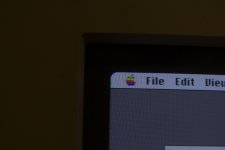
So starting with the upper left corner, you can see the fringing near the top corner of the raster, near the apple menu:
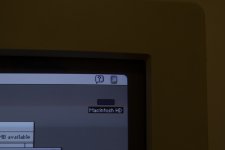
And then the upper right corner... there seems to be no folding in this image, but it does show the "tilt" to the image... I think:
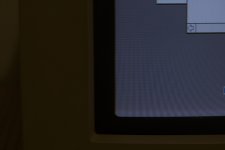
Now we've got the lower left with the red and yellow:
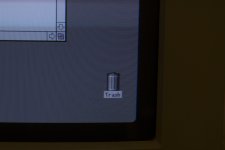
Finally, the lower right which shows the blue fringing along the right edge of the raster throughout the lower half of the display:
Now I forgot to mention earlier that I can get one side in adjustment (let's say the blue fringe on the right). But then the fringing on the left is worse, and so right now I have the pots dialed in to a "midpoint" somewhat. Both sides have fringing- but it's better than having one side of the display noticably worse than the other (at least in my opinion)
Thanks for your quick reply and some "food for thought"!
So starting with the upper left corner, you can see the fringing near the top corner of the raster, near the apple menu:
And then the upper right corner... there seems to be no folding in this image, but it does show the "tilt" to the image... I think:
Now we've got the lower left with the red and yellow:
Finally, the lower right which shows the blue fringing along the right edge of the raster throughout the lower half of the display:
Now I forgot to mention earlier that I can get one side in adjustment (let's say the blue fringe on the right). But then the fringing on the left is worse, and so right now I have the pots dialed in to a "midpoint" somewhat. Both sides have fringing- but it's better than having one side of the display noticably worse than the other (at least in my opinion)
Thanks for your quick reply and some "food for thought"!