
I made some screenshots to clarify the setup of the virtual machine.
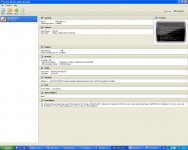
First picture is on the third machine I tested on. A Windows XP Home edition. An old simple machine with a Broadcomm 440x network card.
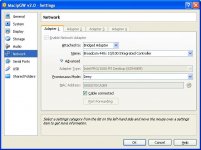
Second picture shows that you need a Bridged adapter.
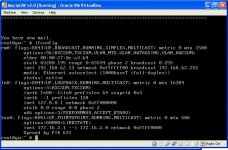
Third picture is that you see how your network cards are setup ( automaticly) by the MacIPgw virtual machine. Login as root with password macipgw.
Give the command ifconfig
And you will see. Please give what you see or make a picture.
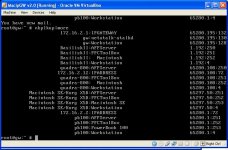
Forth picture shows what I see if I give the command nbplkup on the virtual machine. Here you can actualy see the other Macintosh and gateway and 172.16.2.12 IP address of my Quadra, connected with Open Transport 1.1.1 by manual MacIP configuration.
My network has a straight forward setup. My router is 192.168.62.1, connected by its WAN to the internet. All computers startup with DHCP and get IP addresses in the range 192.168.62.2 - 192.168.62.100. The virtual machine now has 192.168.62.13. The Macintosh part get IP adresses in the 172.16.2.0 range.
First start with testing only from macintosh to MacIPgw virtual machine. Try a Telnet to 172.16.2.1 or gw.macip.net from your old Mac. If that works we can connect it to the Internet with some changes on your Internet router.
First picture is on the third machine I tested on. A Windows XP Home edition. An old simple machine with a Broadcomm 440x network card.
Second picture shows that you need a Bridged adapter.
Third picture is that you see how your network cards are setup ( automaticly) by the MacIPgw virtual machine. Login as root with password macipgw.
Give the command ifconfig
And you will see. Please give what you see or make a picture.
Forth picture shows what I see if I give the command nbplkup on the virtual machine. Here you can actualy see the other Macintosh and gateway and 172.16.2.12 IP address of my Quadra, connected with Open Transport 1.1.1 by manual MacIP configuration.
My network has a straight forward setup. My router is 192.168.62.1, connected by its WAN to the internet. All computers startup with DHCP and get IP addresses in the range 192.168.62.2 - 192.168.62.100. The virtual machine now has 192.168.62.13. The Macintosh part get IP adresses in the 172.16.2.0 range.
First start with testing only from macintosh to MacIPgw virtual machine. Try a Telnet to 172.16.2.1 or gw.macip.net from your old Mac. If that works we can connect it to the Internet with some changes on your Internet router.