
Hi MacJunky,
Thank you for your email.
I think the situation is like this.
You can connect from your LocalTalk only machine to the MacIPgw. That's great because 99% of the work is done.
The only point is now to test DNS and configure your main router so that it can find your 172.16.2.x network.
Testing DNS. Login on the MacIPgw with root and password macipgw
Type in: nslookup
You will get a kind of shell like this >
Type in: server 172.16.2.1 (then hit enter....)
Type in: mac.macip.net (then hit enter....)
It will resolve like this:
Non-authorative answer:
Name: mac.macip.net
Address: 172.16.2.2
If this works, your DNS is OK.
Then for the router part. Look at my router as example. In Advanced I can add a static route. You tell your router( I guess with IP adress 192.168.0.1.. could be different) that he can find a route to the 172.16.2.x network on your MacIPgw virtual machine. In your case the 192.168.0.83
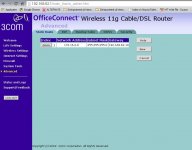
Network Address Subnet Mask Gateway
172.16.2.0 255.255.255.0 192.168.0.83
Now all your computers in your internal network kan find your LocalTalk only mac and the other way around.
Test it and let me know.
You can also test in only for your windows PC by adding a static route
in the cmd prompt:
Test it with:
route ADD 172.16.2.0 MASK 255.255.255.0 192.168.0.83
You now can ping to 172.16.2.2...BUT only when a TCP/IP application is running, like Fetch (FTP) or NSCA Telnet.
If it works you can set a persistant route by this:
route -p ADD 172.16.2.0 MASK 255.255.255.0 192.168.0.83
I hope you get it working!! It is nice to surf the Internet on a only LocalTalk connected Mac!!!
I hope you continue testing... you are almost there.. and you are the first person on earth really using it ( besides myself )
Thank you for your email.
I think the situation is like this.
You can connect from your LocalTalk only machine to the MacIPgw. That's great because 99% of the work is done.
The only point is now to test DNS and configure your main router so that it can find your 172.16.2.x network.
Testing DNS. Login on the MacIPgw with root and password macipgw
Type in: nslookup
You will get a kind of shell like this >
Type in: server 172.16.2.1 (then hit enter....)
Type in: mac.macip.net (then hit enter....)
It will resolve like this:
Non-authorative answer:
Name: mac.macip.net
Address: 172.16.2.2
If this works, your DNS is OK.
Then for the router part. Look at my router as example. In Advanced I can add a static route. You tell your router( I guess with IP adress 192.168.0.1.. could be different) that he can find a route to the 172.16.2.x network on your MacIPgw virtual machine. In your case the 192.168.0.83
Network Address Subnet Mask Gateway
172.16.2.0 255.255.255.0 192.168.0.83
Now all your computers in your internal network kan find your LocalTalk only mac and the other way around.
Test it and let me know.
You can also test in only for your windows PC by adding a static route
in the cmd prompt:
Test it with:
route ADD 172.16.2.0 MASK 255.255.255.0 192.168.0.83
You now can ping to 172.16.2.2...BUT only when a TCP/IP application is running, like Fetch (FTP) or NSCA Telnet.
If it works you can set a persistant route by this:
route -p ADD 172.16.2.0 MASK 255.255.255.0 192.168.0.83
I hope you get it working!! It is nice to surf the Internet on a only LocalTalk connected Mac!!!
I hope you continue testing... you are almost there.. and you are the first person on earth really using it ( besides myself
)