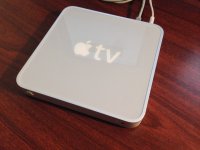
Haha, nope, I added that on from my collection. The original Apple TV is a nice-looking little box; if you took an older Mac mini and squashed it flat, then reversed the colors of the plastic on the top (grey background, white text/logo), you have an Apple TV. The little thing is actually amazingly simple to take apart - after taking out a few torx screws, the whole thing pops apart. Nothing that I have found is glued in any way, making it a pleasant break from many modern Apple devices.
I took a few pics for those of you that might not be familiar with the original Apple TV, who have one and might be interested in some of these modifications, and for those of you that just enjoy looking at ripped-apart Apple hardware

Pic 1: This is just a top view of the little guy. Like I said, it's basically a squashed old Mac mini.
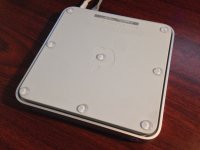
Pic 2: Showing the feets on the bottom. The Apple TV has a large rubber pad, much like an older mini or an AirPort Extreme. The rubber pad doesn't hold on there all that well once it's been removed, so it's simple to take off again.
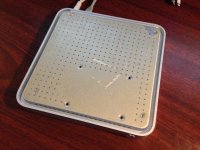
Pic 3: This is the actual bottom. Note the four screw holes towards the bottom right; these are to mount the HDD, which screws onto the bottom plate. Since I have a bare SSD board in there, they are unused.
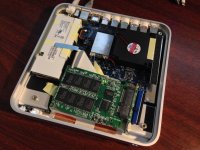
Pic 4: Inside the Apple TV. The large white block is the internal 40-something watt PSU. You can see all the RCA-style connectors out the back for video out, as well as the HDMI, 10/100 ethernet, and USB 2 ports. HDMI is the only video-out method that Mac OS X recognizes, and it works perfectly; the composite ports have been reported to occasionally work, but they only give a black and white picture. Happily this device has a full-size powered USB 2 port that OS X recognizes perfectly, making it trivial to hook up almost anything. You can also see the small internal fan; this fan is mounted on three rubber nubs and simply blows air around the bottom side of the logic board. It uses a standard AirPort card; it originally had an N-capable card in it, but since I don't use the wireless capabilities of my server, I swapped it for the G card in my old MacBook to give the laptop faster wifi. Front and center is the SSD and its SATA-->PATA adapter. The CPU and CPU are on the other side of the logic board, pressed against the top of the Apple TV. The top is a large sheet of thick aluminum with the plastic top glued to it; it acts as the primary heat spreader for the computer. When it's under high load, it can put out a decent amount of heat, but still nothing approaching what a "real computer" might.
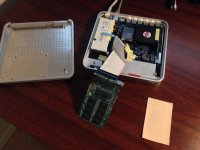
Pic 5: Just all the parts, spread out a bit so you can see.