

Thread
Looking for the MacPaint "Woodcut" file

I'm sure I have it. I'll post it to mobile me / iCloud or whatever it's called, but first I have to:
1. Dig deep in the closet for my big box of old floppies and find MacPaint.
2. Dig out and fire up some old Mac with a floppy drive and find the picture.
3. Get it on the network and copy the file to a modern Mac, but not so modern that it doesn't do AppleTalk.
4. Send the file to my public folder.
So it may take a day or so. I'll post back when it's on line.
1. Dig deep in the closet for my big box of old floppies and find MacPaint.
2. Dig out and fire up some old Mac with a floppy drive and find the picture.
3. Get it on the network and copy the file to a modern Mac, but not so modern that it doesn't do AppleTalk.
4. Send the file to my public folder.
So it may take a day or so. I'll post back when it's on line.
Here's a web-based copy:
http://www.folklore.org/StoryView.py?project=Macintosh&story=MacPaint_Gallery.txt
but you'll need to convert it back to pict format for MacPaint.
http://www.folklore.org/StoryView.py?project=Macintosh&story=MacPaint_Gallery.txt
but you'll need to convert it back to pict format for MacPaint.
OK. Took many tries before I found a chain of Macs that could read a 400K disk and write to mobile me. 520c floppy -> HD -> ethernet -> Cube (OS9) -> reboot Cube (OS X) -> Mini -> internet. Things that didn't work included 128K (upgraded) which couldn't AppleTalk with OS 9, Wallstreet whose Finder crashed and trashed the HD when the 400K floppy was inserted in the drive, and a couple of other miscarriages. 
So the file along with other early MacPaint files, including several Thunderscan'd images, is here:
https://public.me.com/henryspragens in 68K Mac Software/MacPaintGraphics/japan
I'd forgotten that the first MacPaint didn't have scroll bars on the paint window to move around a large image. We think of scroll bars as always part of the Mac interface.
So the file along with other early MacPaint files, including several Thunderscan'd images, is here:
https://public.me.com/henryspragens in 68K Mac Software/MacPaintGraphics/japan
I'd forgotten that the first MacPaint didn't have scroll bars on the paint window to move around a large image. We think of scroll bars as always part of the Mac interface.
It's a MacPaint "pict" file. Open it with MacPaint, or on a modern Mac, select it in the Finder and hit the spacebar or use Preview. Not many modern apps support the old file formats. Tried to open one of your old MacWrite docs lately? The only reason Finder supports pict is Steve wanted to show that Snow Leopard could still display the first Mac docs, and he used QuickLook to show the Woodcut picture at WWDC a couple of years ago. Preview won't open a MacDraw pict or a MacWrite doc.


A long time ago, I emailed Susan Kare to ask if she actually still had the Japanese lady. She replied that she no longer had the file, despite a cropped version of it existing on her website, http://kare.com. The above user whose "me" site was no longer active sent me a copy of the MacPaint file entitled "japan" which appeared to be the real deal. Now a GIF, "woodblock" as it's titled in ads and on the MacPaint manual, is finally here in its pixel-perfect Susan Kare-style. Even though the Japanese lady is copyrighted to Apple Computer, Inc., disseminate it! But please give any archival credit to Henry Spragens who had the foresight to keep the original file and transfer it.

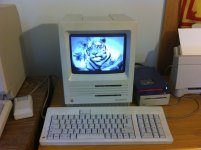
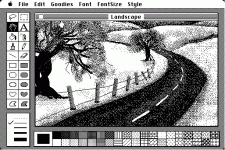
Here's the tiger one. (png for reference.) The MacPaint file is in the attached zip.
I can't find the Landscape one.

Tiger macpaint file.zip
I can't find the Landscape one.
Tiger macpaint file.zip