Thread
Franken Mac 8600 First Look
So I was checking on some floppies that I have, in my SE/30. One may have been dirty? Now my floppy drive has failed, I fear.
I now keep getting an error that the floppy disk is unreadable and needs to be initialized. I tested a number of known good disks, creating fresh ones on my 7600 and they all failed in the SE/30. Once I ejected them from the SE/30 and tested them again in my 7600, they were unreadable there as well, but at least I could reformat them. Trying to reformat on the SE/30 led to an error that the disk is defective, which isn't true.
Well, I took the drive apart and cleaned the heads carefully following instructions. Swapped the heads with alcohol. Lubed the drive while I was at it. After reassembly, no change in floppy read behavior.
so, can one dirty disk hose my Superdrive? Any hints on how to fix this auto inject floppy drive?
Thanks!
Posted here for the first time are pictures of my Franken Mac 8600 hack.
It's not fully complete. I need some drive bezels to make it look just right, and I need a port cover for the back. I also need to wire up the front power button and LED. But after that, it will be 100% complete!
Anyway, enjoy the pictures!
http://www.ppcmla.com/gallery/v/hacks/8600/
The Mac consists of an 8600 case, an MDD power supply, a Digital Audio motherboard, a QuickSilver dual 1 GHz G4 CPU module, and a G5 OEM (AGP 8x OEM, modified for AGP 4x) Radeon 9600 Pro.
I've also got an SGI 1600SW (via multilink adapter) and an Apple Multiple Scan 20 monitor running off the Radeon. Currently it has 512 MB of RAM (another 512 MB is being "borrowed" by my wife for her DA with QuickSilver 933 MHz G4 CPU), Sonnet Tempo Trio with a pair of 200 GB Maxtor 7200 RPM disks and a Western Digital 7200 RPM 250 GB disk. Via FireWire, I've got an additional Maxtor 7200 RPM 200 GB disk.
It's a pretty sweet machine if you ask me.
Peace,
Drew
_________________
Power to the PowerPC!
ive seen this before. The heads get magnetized. Try demagnetizing the heads.
Two ways this happens, well 3. one is poor storage near large magnets. speakers, etc.
Other ways include the disk flap being magnetically charged, or something going wrong with the head bias circuitry putting a strong DC bias on the head, therefore magnetizing the head. bad capacitors will do this, in the drive.
Sounds like your Bournes Filter failed, that is, if the heads are OK, the only thing that could do this is the Bournes Filter.
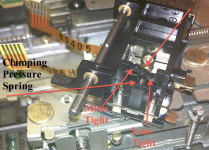
Take out the heads and open it slightly as if you were about to clean it, and look at the spring the top head rests on. If it perfectly flat? If it is, then its the Bournes filter of SWIM Chip and I'm betting on the Bournes Filter. Those things fail if you look at them the wrong way.
Techknight can be right too. Got a head demagetizer? I have not seen one since the 1980s, though it still might be in my bedroom - lol!
The DA G4s cost me about $100. That was a real steal. I bought it with an "as-is" 2002 Quicksilver that had undiagnosed problems. I needed a power supply and motherboard, and I figured at least one of the three components would be good. And even at $100, that was a deal. PSU goes for about $75 - $100 on eBay, mobos are $50 - $75, and dual G4s cost upwards of $150.
I came out on the positive side with a power supply and dual G4 CPU module.
There are no issues using the dual CPUs on the DA board except the requirement for the extra 12 V (which I stole from a hard drive power connector).
Peace,
Drew
_________________
Power to the PowerPC!
I came out on the positive side with a power supply and dual G4 CPU module.
There are no issues using the dual CPUs on the DA board except the requirement for the extra 12 V (which I stole from a hard drive power connector).
Peace,
Drew
_________________
Power to the PowerPC!
Sorry I didn't see this earlier. The 12V connects to the fourth "leg" on the QuickSilver CPU module. Basically, once you screw down the QuickSilver CPU module on a Digital Audio, you'll notice that only three of the posts will make contact with the daughtercard. Where the 4th post is on the QuickSilver, there is no post on the DA. This 4th post carries 12V from the motherboard to the daughtercard.
So to add the extra 12V, you must tap a 12V line from the PSU such as one of the yellow hard drive power cables. I use a short bolt and nut through the fourth hole on the CPU module and either fasten the bare wire directly to this or use one of those fancy electical connection pieces that crimp onto the end of the wire and add a little washer that you can place under the bolt.
I hope that's the information you need. If not, I'll see about taking some pictures of it.
Peace,
Drew
_________________
Power to the PowerPC!
Yeah, I don't even get to the point of being able to write to the disk. As soon as I put a disk in, I am told it's unreadable. If I try to format in the SE/30, it farts out a borked disk.
Will any tape head demagnetizer work? Or are they not all equal? Thanks again!
Will any tape head demagnetizer work? Or are they not all equal? Thanks again!


I think deer steak is trying to do a case conversion. He wants to put a DA board into a B&W case which is significantly more possible for the hobbyist than putting a DA or QS CPU on a B&W motherboard.
On the other hand, the DA G4 and up had four PCI slots and an AGP slot for a grand total of five expansion slots. The B&W only has room for four (4) expansion slots without significant case modifications worse than what is required by an 8600 (which has room for six! slots).
What are your plans, deer steak?
Peace,
Drew
_________________
Power to the PowerPC!
thought id throw in my 'thumpense' worth here.
bening a musician , I had to de-magnetize recording heads a good few years ago. The gadget was called a degausser if memory serves
I don't know if the next part was necessary but the procedure was to never switch the degausser on next to anything magnetic (disc drives, heads etc etc). The instructions said
to leave the room, go outside, switch it on, then goto the heads in question and just hold the degauser next to the head.
The degausser emits random magnetic fields, so being close to a harddrive would not be a good idea.
But as I said, it was 20 years ago, and I could be wrong. But worth checking out , just to be sure.
Sorry for the confusion.
i have a B&W with a 700 mhz sonnet upgrade 1 gig of ram with 10.4.x. the machine feels slow. the sonnet upgrade reduced the bus speed to 66 mhz. So i am looking for a cool upgrade path. I love the B&W case and I am not willing to give up on it yet. I have realized that the zif processor mobos will not get me where i want to go. this means i need a sawtooth through quicksilver mobo but which one? i would like to keep as much of the B&W as possible hard drives, memory, PSU, graphics card. I know that I could use any of the motherboards for the g4 "except yikes" with a 3rd party processor and make it fast. I would like something >700 mhz and you can get quicksilver processor at a good deal on e-bay sometimes. if possible I would like to use a stock apple processor like alk did.
My goal is to use the new stlye (sawtooth) processor card in my B&W
I am willing change out the psu if it makes a better machine in the end.
michael
Ah hah! That clears it up.
I would drop in a 2x AGP G4 motherboard such as a Sawtooth or GigE board. The CPU modules used on G4s (except the Yikes!) will not work with a B&W motherboard. The 2x AGP boards have three PCI slots and 1 2x AGP slot for a grand total of 4 slots. Which is also conveniently the same number of slots on the case for your B&W.
You might still need the back panel plastics and metal from a G4 to make a seamless fit, though.
Other than that, you should be able to use everything else that was stock on your B&W (even the graphics card). Of course, a 2x AGP card provides a huge improvement over PCI graphics...
I'm also not certain of the power requirements. You may need to do some hacking on the B&W PSU to mate it up to your G4 motherboard, and all G4 motherboards need between 24v and 28v (as alluded to by bunsen) on one pin. You could just drop in a Sawtooth PSU while you're at it, too.
By the time you're done with all this, you'll probably have paid as much as it would have cost to just buy a Sawtooth G4. So I'd actually recommend you do that and just swap the B&W plastics for the grey plastics of the G4.
Peace,
Drew
_________________
Power to the PowerPC!
You can search ebay or Amazon, but you are looking for something like this (one of many from Amazon):
http://www.amazon.com/Universal-DEMAGNETIZER-Cassette-Recorder-Track/dp/B003ZKLP4W
Put it on the top of the heads without pressing down, turn it on and pull up and in a away slowly in a increasing spiral motion. Should take 30 seconds to do.
They come in many shapes and sizes.
http://www.amazon.com/Universal-DEMAGNETIZER-Cassette-Recorder-Track/dp/B003ZKLP4W
Put it on the top of the heads without pressing down, turn it on and pull up and in a away slowly in a increasing spiral motion. Should take 30 seconds to do.
They come in many shapes and sizes.

I have been studying the psu differences between the g4 models.
and found this page
www.outofspec.com/frankenmac/wire.shtml
the mobo after sawtooth require a 28v.
in addition
the cpu module requires the added 12v to the 4th leg to quicksilvers
so Alk It appears that i could put a sawtooth mobo into my b&w add the 12 v to the 4th leg to cpu module from quicksilver and it should work.
i agree on the money could be spent as cheap on a complete sawtooth. But whats the fun in that.
Now I am kind of at a loss. The good news is the other floppy drive from the 7600 works fine when attached to the SE/30, so I guess that rules out the Bourns filter being bad. I tried the degmagnetizer and while it was truly a very exciting moment in my life, the result was no change. I cleaned the heads again just to make sure. If anyone has any other ideas, I would appreciate it!
Thanks
Thanks
I found a detailed set of directions for converting an ATX supply for a DA motherboard.
He suggests using the front panel power board from a B&W G3 for the 28V supply. I have one, but I'm probably going to save it for my B&W motherboard. I'm planning to use a Powerbook PS (24V). The frankenmac site you linked suggests 24V will be OK. I may be able to tweak the PB PS to give a couple more volts.
I would like to use a DC-DC step-up converter off a 12V line, but I can't find one cheap and powerful enough.
I would also recommend using an ATX cable extender, so you can swap out your ATX supply simply should it ever die.
Apparently you can get away with just connecting the ATX +5V standby lead to that input. Details from Applefritter.
you remove the heads,
To do this you take out 2 screws, the ones holding the round bar in place and it pulls right out.
carefully pulling out the top and bottom head flexible cables, with some tiny electronics needle nose pliers.
There is the spring (top and bottom) head clamping adjustment adjustment perch (3 positions), i usually adjust the spring to the next highest perch. increasing tension.
and usually it works fine.
Working with dad long ago fixing Macs and learning a lot from him, I have to ask, where are these "tension screws?" I have never seen screws on the head of the floppy drive to do adjustments with. Mind if possible to post up a pic of it? Are they part of the newer drives found in PowerPCs with the black doorways?
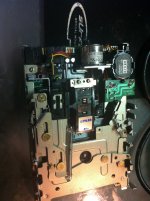
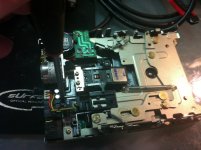
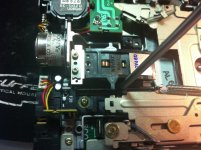
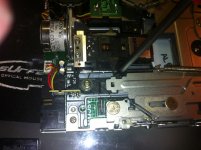
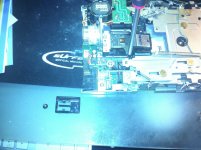
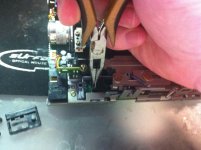
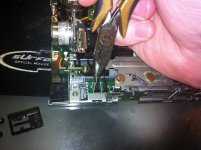
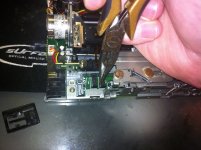
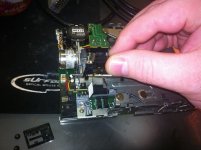
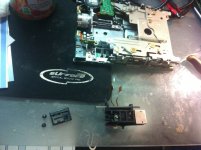
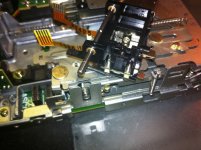
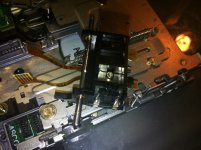
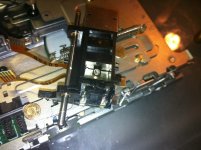
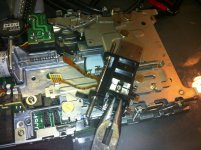
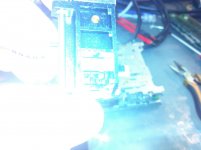
So that is the back close to the bottom of the heads with the head flipped over up-side-down. I remember being told not to ever touch that area and two screws that hold down the top head to the assembly (can be seen in third picture in your post) or I would throw off the alignment permanently.