
Thread
radeon 9200
Saturday I went out to a local recycler thinking I could snatch up some more vintage Macs for less than $40 a piece (got an SE/30 and some IBM 5150s for $18 each). I talked to someone inside about purchasing some of the older Macs they had, and he proceeds to take me into the warehouse so I could pick what I wanted and he could price them out. I picked an SE and SE/30, so I could get an idea of how they priced them. I waited 45 minutes for him to wipe off the dirt and send pictures to his boss. I went inside and he was on the phone with his boss, and I could hear what he was saying on the phone: "$250 now or they are going on eBay tomorrow". When he put the phone down, he promptly said he wouldn't take anything under $250 for ONE SE with SEVERAL marks, scuffs, scratches, adhesive marks, and rust on the case. Did I also mention there was no hard drive? He also said that he would add the mouse and keyboard for $350. I told him I would be lucky to get $40 for the systems as they were, and he told me, "Thanks for looking." I asked him if he wanted to take my number, in case he didn't sell them for that price. He said he would rather take a hammer to them, and then I left. Obviously, I will not be returning. Since I have visited them three times, they might think they have some kind of value since I have always looked at the same systems the three times I went. The way they were talking on the phone, I think they said something along the lines of, "This guy comes in here trying to rip us off so he can go to eBay and make a fortune! Let's ask something ridiculous and he might not come back."
On a brighter note, I left there and saw a neighborhood having a community garage sale. I decided to take a look, even thought it was 1:00, someone might have something they just want to get rid of. As usual, I always ask people if they have any vintage computers they are willing to sell. Most people take my number or actually go inside to see what they might have. One lady comes out of her house and says she has an old iMac, and has me come inside to take a look. I go inside and am greeted by a G3 iMac! That is a big score, considering the garage sales around here are pretty stale, with VCRs, office furniture, and the occasional $35 10" color CRT with digital converter box. I have been to hundreds of garage sales, and only two have turned up G3 iMacs, both of which are in my stash.
On an even brighter note, I went on eBay and spent $60 + $30 to ship for a boxed SE with accessories, manuals, and disks.
Enough rambling, let's get to the restoration!
The iMac wiped down very nicely with rubbing alcohol. I get the 70% Kroger brand, it comes in spray bottles and I keep several of them in my work area. There were some adhesive remnants on the sides of the case, and Goo Gone works wonders on this stuff!
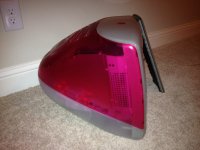
The outside is clean, but who knows whats on the hard drive! I decided to put it in my hard drive eraser (old PC tower with IDE cables sticking out the drive bays) in case it got mixed in the resale pile if I upgrade. Heres how to do this:
Take this screw out
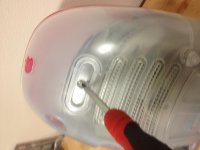
Unlatch the clips on the side with a flathead screwdriver. Be careful not to ding up the plastic!
[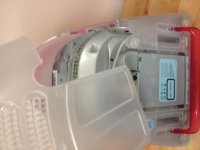
Get at these wires and disconnect them all
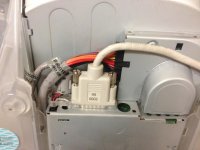
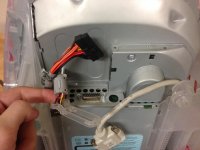
Take these screws out
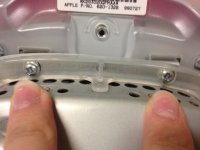
Grab this assembly by the handle and pull straight up, careful not to pinch the wires.
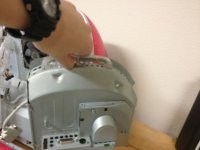
Here's the guide I used to get the hard drive out:
https://www.ifixit.com/Guide/iMac+G3+Model+M4984+Hard+Drive+Replacement/1563
IMPORTANT! When you try to lift up the hard drive, you must lift the entire drive by the front AND back. There are four points holding the drive caddy in the motherboard/drive assembly. You must push the drive in, and lift up on all four corners! This will save you a lot of frustration!
While the hard drive is in the eraser, let's get all that dust and keyboard gunk out of the keyboard! First take reference of where the keys are. Just take a picture of the entire keyboard. Notice the dust in-between those keys! ICK! Before I did this, I got out the air compressor and blasted dust out of the logic board and fans. I also went in with a toothbrush dipped in alcohol to scrub the L/B and fan.
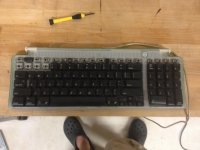
The keys just pop off with a small flathead screwdriver. Be sure to hold one hand over them so you can catch them before they shoot off and roll under the table! The larger keys have a metal bracket under them, so take extra caution not to bend or lose them.
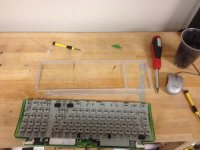
You need something to soak the keys in, a regular party cup will work fine. Now put a few drops of dish soap in the bottom and fill it with hot water. You want to be very careful not to let the keys fall in the drain. Hold your hand over the top and shake vigorously, again being careful not to splash water everywhere or wash the keys down the drain. Make a small hole in-between your fingers and drain the water, then refill and keep shaking. Repeat until there are no more suds and the keys are clean and don't smell of cheap perfume or cigarette smoke.
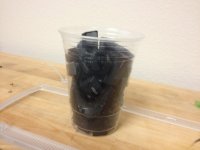
Lay them on a towel and let them air dry, compressed air will just scatter them across the room. If you leave them in the cup they will not thoroughly dry.
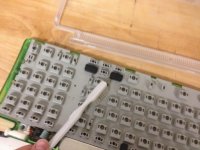
Take the key-less keyboard, and spray with alcohol. Take your toothbrush and scrub out all the grime.
If you want to clean the casing, take a VERY small flathead screwdriver and try to pull the clips back, so you can clear the hooks. The hooks do NOT move, and you are most likely going to break a clip, but they can be easily fixed with a dab of superglue.
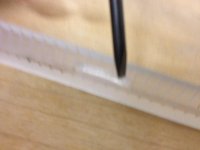
Here are the keyboard disassembly instructions: http://www.sterpin.net/uk/usbkeyboarduk.htm
Thanks HAL2001!
Now we will observe the Maxell battery, hoping it will not explode anytime soon.
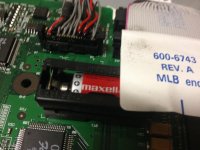
Just follow these in reverse, re-key the keyboard, let everything thoroughly dry, and fire it up! You have a clean iMac G3, and the final step is to install OS X 10.3. 10.4 came on a DVD, and this only has a CD drive.
Here is my current setup, temporary as I am working on a few of the machines. $18 Macintosh SE/30 on the left, awaiting eject motor and already recapped (HORRAY on my first successful recap!). The middle is the machine we just restored, had at the cost of $20 with the lime keyboard. Ironic that the woman who sold it to me bought it at a garage sale for $20. The right is a boxed iMac DV Green with accessories, disks, and manuals for $10 at a moving sale.
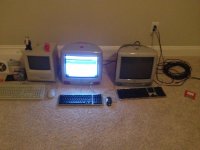
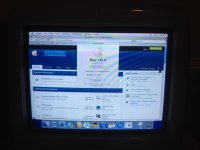
Might want to upgrade the RAM sometime soon...
And the keyboard is clean and has no more dust on it
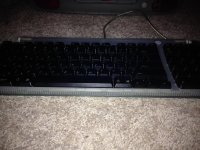
I took these pictures at night, so they aren't great. I tried to do the best I could.
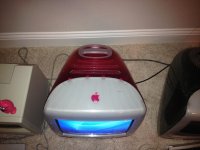
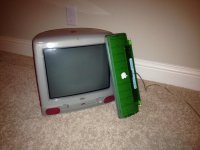
Overall, it looks good, however there are some splotches/scuffs on this side. It is very hard to see on camera, and they are unnoticeable in low light. This being a blurry picture doesn't help.
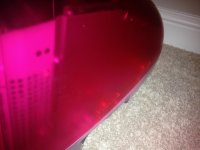
The splotches and this mark on the top are the only things that didn't clean up. Overall, it is a very nice system in great condition.
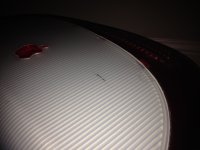
And there we have it! A beautiful G3 iMac with lime keyboard, had at the cost of $20! I've seen these go on eBay for $20-50 depending on what they are, but shipping is the deal killer. Those things are heavy!
On a brighter note, I left there and saw a neighborhood having a community garage sale. I decided to take a look, even thought it was 1:00, someone might have something they just want to get rid of. As usual, I always ask people if they have any vintage computers they are willing to sell. Most people take my number or actually go inside to see what they might have. One lady comes out of her house and says she has an old iMac, and has me come inside to take a look. I go inside and am greeted by a G3 iMac! That is a big score, considering the garage sales around here are pretty stale, with VCRs, office furniture, and the occasional $35 10" color CRT with digital converter box. I have been to hundreds of garage sales, and only two have turned up G3 iMacs, both of which are in my stash.
On an even brighter note, I went on eBay and spent $60 + $30 to ship for a boxed SE with accessories, manuals, and disks.
Enough rambling, let's get to the restoration!
The iMac wiped down very nicely with rubbing alcohol. I get the 70% Kroger brand, it comes in spray bottles and I keep several of them in my work area. There were some adhesive remnants on the sides of the case, and Goo Gone works wonders on this stuff!
The outside is clean, but who knows whats on the hard drive! I decided to put it in my hard drive eraser (old PC tower with IDE cables sticking out the drive bays) in case it got mixed in the resale pile if I upgrade. Heres how to do this:
Take this screw out
Unlatch the clips on the side with a flathead screwdriver. Be careful not to ding up the plastic!
[
Get at these wires and disconnect them all
Take these screws out
Grab this assembly by the handle and pull straight up, careful not to pinch the wires.
Here's the guide I used to get the hard drive out:
https://www.ifixit.com/Guide/iMac+G3+Model+M4984+Hard+Drive+Replacement/1563
IMPORTANT! When you try to lift up the hard drive, you must lift the entire drive by the front AND back. There are four points holding the drive caddy in the motherboard/drive assembly. You must push the drive in, and lift up on all four corners! This will save you a lot of frustration!
While the hard drive is in the eraser, let's get all that dust and keyboard gunk out of the keyboard! First take reference of where the keys are. Just take a picture of the entire keyboard. Notice the dust in-between those keys! ICK! Before I did this, I got out the air compressor and blasted dust out of the logic board and fans. I also went in with a toothbrush dipped in alcohol to scrub the L/B and fan.
The keys just pop off with a small flathead screwdriver. Be sure to hold one hand over them so you can catch them before they shoot off and roll under the table! The larger keys have a metal bracket under them, so take extra caution not to bend or lose them.
You need something to soak the keys in, a regular party cup will work fine. Now put a few drops of dish soap in the bottom and fill it with hot water. You want to be very careful not to let the keys fall in the drain. Hold your hand over the top and shake vigorously, again being careful not to splash water everywhere or wash the keys down the drain. Make a small hole in-between your fingers and drain the water, then refill and keep shaking. Repeat until there are no more suds and the keys are clean and don't smell of cheap perfume or cigarette smoke.
Lay them on a towel and let them air dry, compressed air will just scatter them across the room. If you leave them in the cup they will not thoroughly dry.
Take the key-less keyboard, and spray with alcohol. Take your toothbrush and scrub out all the grime.
If you want to clean the casing, take a VERY small flathead screwdriver and try to pull the clips back, so you can clear the hooks. The hooks do NOT move, and you are most likely going to break a clip, but they can be easily fixed with a dab of superglue.
Here are the keyboard disassembly instructions: http://www.sterpin.net/uk/usbkeyboarduk.htm
Thanks HAL2001!
Now we will observe the Maxell battery, hoping it will not explode anytime soon.
Just follow these in reverse, re-key the keyboard, let everything thoroughly dry, and fire it up! You have a clean iMac G3, and the final step is to install OS X 10.3. 10.4 came on a DVD, and this only has a CD drive.
Here is my current setup, temporary as I am working on a few of the machines. $18 Macintosh SE/30 on the left, awaiting eject motor and already recapped (HORRAY on my first successful recap!). The middle is the machine we just restored, had at the cost of $20 with the lime keyboard. Ironic that the woman who sold it to me bought it at a garage sale for $20. The right is a boxed iMac DV Green with accessories, disks, and manuals for $10 at a moving sale.
Might want to upgrade the RAM sometime soon...
And the keyboard is clean and has no more dust on it
I took these pictures at night, so they aren't great. I tried to do the best I could.
Overall, it looks good, however there are some splotches/scuffs on this side. It is very hard to see on camera, and they are unnoticeable in low light. This being a blurry picture doesn't help.
The splotches and this mark on the top are the only things that didn't clean up. Overall, it is a very nice system in great condition.
And there we have it! A beautiful G3 iMac with lime keyboard, had at the cost of $20! I've seen these go on eBay for $20-50 depending on what they are, but shipping is the deal killer. Those things are heavy!
i got a quicksilver some time ago and it came with os 10 installed but no os 9 . This week I put on os9 on it only to find that there is no support for os9 at the ati site. the machine wold crash after startup. i did find that is would run with extensions off or if you pulled the ati acceleration extension files to the desk top it would boot and run. i did find a site that had an copy of the ati software that fixed the problem finally. FYI


he more than likely went to web archive and went to the old ATI site.
or he is talking about a totally different site. if he is he should post the site where he got it from
_________________
Beige G3 AIO:
Rev B rom, Rev 2 mobo, G3 466mhz, 448mb ram, WD 120gb HDD, Pioneer DVR-110D, ATI Radeon 7000, USB PCI, OS 9.2.2 and OS X 10.4.8
or he is talking about a totally different site. if he is he should post the site where he got it from
_________________
Beige G3 AIO:
Rev B rom, Rev 2 mobo, G3 466mhz, 448mb ram, WD 120gb HDD, Pioneer DVR-110D, ATI Radeon 7000, USB PCI, OS 9.2.2 and OS X 10.4.8
That's pretty reassuring. There's a 100% chance that the site to which he refers is on the Internet. Cool.
Now if we could just narrow that down a bit, and possibly document its location, or duplicate that file in such a way that it could be easier for others to find too.
_________________
[Insert Cool Signature here!]
Now if we could just narrow that down a bit, and possibly document its location, or duplicate that file in such a way that it could be easier for others to find too.
_________________
[Insert Cool Signature here!]
If you ever get a matching Strawberry keyboard, I'll have your Lime one!
Very nice, by the way! I have one myself, but I haven't had much of a chance to do much to it. It needs a good cleaning and a new hard drive (it appears to power on and work fine otherwise when booted from a FireWire drive).
c
Very nice, by the way! I have one myself, but I haven't had much of a chance to do much to it. It needs a good cleaning and a new hard drive (it appears to power on and work fine otherwise when booted from a FireWire drive).
c
i did a google on ATI retail updates and a few places popped up
http://www.google.com/search?num=30&hl=en&client=safari&rls=en&q=ATI+Retail+Update&btnG=Search
also web archive pulled up this
http://web.archive.org/web/20050212132639/www.ati.com/support/drivers/mac/macos-jan-2005-update.html
but if you click on to download, it takes you to AMD/ATI site but they are fresh out of drivers for Mac OS 9
_________________
Beige G3 AIO:
Rev B rom, Rev 2 mobo, G3 466mhz, 448mb ram, WD 120gb HDD, Pioneer DVR-110D, ATI Radeon 7000, USB PCI, OS 9.2.2 and OS X 10.4.8
http://www.google.com/search?num=30&hl=en&client=safari&rls=en&q=ATI+Retail+Update&btnG=Search
also web archive pulled up this
http://web.archive.org/web/20050212132639/www.ati.com/support/drivers/mac/macos-jan-2005-update.html
but if you click on to download, it takes you to AMD/ATI site but they are fresh out of drivers for Mac OS 9
_________________
Beige G3 AIO:
Rev B rom, Rev 2 mobo, G3 466mhz, 448mb ram, WD 120gb HDD, Pioneer DVR-110D, ATI Radeon 7000, USB PCI, OS 9.2.2 and OS X 10.4.8
how big would the disk image be, cause there has to be software on them that isn't in the driver updates (like some lacked the ATI display's). i looked allot for the driver disk for a Radeon card but cant find them online ( or i was looking in the wrong place)
_________________
Beige G3 AIO:
Rev B rom, Rev 2 mobo, G3 466mhz, 448mb ram, WD 120gb HDD, Pioneer DVR-110D, ATI Radeon 7000, USB PCI, OS 9.2.2 and OS X 10.4.8
_________________
Beige G3 AIO:
Rev B rom, Rev 2 mobo, G3 466mhz, 448mb ram, WD 120gb HDD, Pioneer DVR-110D, ATI Radeon 7000, USB PCI, OS 9.2.2 and OS X 10.4.8
It would be helpful if someone uploaded the latest version of the ATI OS 9 drivers (are yours the newest ones?). I know that some of you have them as it's been discussed before, but I could never find any that I could be sure were the right ones (and don't want to risk installing the wrong ones) and no-one seemed to want to upload them. As long as they're under 100 MB (which they definitely should be), you can just put them on RapidShare.com for us 
_________________
Main system: custom C2D 2.66GHz tower/4GB RAM/2600XT 512 MB/500GB HD/XP Pro x86+Vista Business x64
Main Mac: Beige G3 minitower (Sonnet G4 500MHz/640 MB DVD/USB/Radeon 32 MB/OS 9.2.2+10.4.11)
_________________
Main system: custom C2D 2.66GHz tower/4GB RAM/2600XT 512 MB/500GB HD/XP Pro x86+Vista Business x64
Main Mac: Beige G3 minitower (Sonnet G4 500MHz/640 MB DVD/USB/Radeon 32 MB/OS 9.2.2+10.4.11)
For what it is worth, the ATI Universal Installer (covers at least the Rage 128) is already on this here server. What's the point of having bandwidth if we don't use it, eh? 
http://www.ppcmla.com/downloads/ATI_Universal_4.2.sit.hqx
I'm working on the drivers that came with my Radeon 9200. Stay tuned. If I can dig up the ROM updater, I'll post that, too.
Peace,
Drew
_________________
Power to the PowerPC!
http://www.ppcmla.com/downloads/ATI_Universal_4.2.sit.hqx
I'm working on the drivers that came with my Radeon 9200. Stay tuned. If I can dig up the ROM updater, I'll post that, too.
Peace,
Drew
_________________
Power to the PowerPC!
It basically makes ever ything faster, and a few of the Pro Apps require it.
Your system is already running CoreImage, it's just that with an actual CI-capable card, it runs the CI tasks on the GPU, not the CPU, thus speeding *everything else* up as well as speeding the graphics up.
_________________
[Insert Cool Signature here!]
Your system is already running CoreImage, it's just that with an actual CI-capable card, it runs the CI tasks on the GPU, not the CPU, thus speeding *everything else* up as well as speeding the graphics up.
_________________
[Insert Cool Signature here!]
If you are still looking for the Radeon 9200 driver for OS 9, I've made it available from the PPCMLA downloads. This is the driver that came on the CD with the card. I think there was an update in 2004, but I can't really remember anymore, and I can't find any copies to download anyway.
http://www.ppcmla.com/downloads/ATI_Radeon_9200_-_OS9.sit.hqx
Peace,
Drew
_________________
Power to the PowerPC!
http://www.ppcmla.com/downloads/ATI_Radeon_9200_-_OS9.sit.hqx
Peace,
Drew
_________________
Power to the PowerPC!
the OS does use CI some, you'll really notice it if you have dashboard enabled though, that's the biggest offender. It also makes a HUGE difference in apps like Aperture, which are very very heavily reliant on CoreImage. They'll work if you don't have a CI GPU, but what that does is put *all* of those calculations off onto the CPU, which slows everything else down too.
But I suppose it only really matters if you know you've got a lot of CI-heavy apps.
_________________
[Insert Cool Signature here!]
But I suppose it only really matters if you know you've got a lot of CI-heavy apps.
_________________
[Insert Cool Signature here!]
I did find the driver after much searching. A gamer posted it for down load problem solved.
the 9200 card that is in my quicksilver is in a pci slot. When i check the about this mac it says that quartz extreme not supported under displays should it not be running does the lcd screen have to be quartz capable?
the 9200 card that is in my quicksilver is in a pci slot. When i check the about this mac it says that quartz extreme not supported under displays should it not be running does the lcd screen have to be quartz capable?
Quartz Extreme doesn't work with PCI cards by default. Some people claim that QE improves performance when enabled with a compatible card, others claim overall system degradation or destabilization.
Anyway, Apple doesn't support QE with PCI cards even if the card's chipset supports QE. You can enable it yourself by tweaking some text files, or you can use the handy dandy PCI Extreme tool. Note, however, that many people report serious problems after enabling QE for PCI cards on OS X 10.4.3+, so use caution if you are on Tiger.
Reports of success (or lack thereof) with Quartz Extreme enabled for PCI cards
DownloadPCI Extreme
Peace,
Drew
_________________
Power to the PowerPC!
Anyway, Apple doesn't support QE with PCI cards even if the card's chipset supports QE. You can enable it yourself by tweaking some text files, or you can use the handy dandy PCI Extreme tool. Note, however, that many people report serious problems after enabling QE for PCI cards on OS X 10.4.3+, so use caution if you are on Tiger.
Reports of success (or lack thereof) with Quartz Extreme enabled for PCI cards
DownloadPCI Extreme
Peace,
Drew
_________________
Power to the PowerPC!
What are your goals? Pretty much anything that isn't the Rage 128 supports Quartz Extreme. The only cards that work with Core Image are the Radeon 9600 and Radeon 9800. It is possible to flash other PC-destined cards (like the Nvidia GeForce FX5200) to work with Macs, and they will support CI okay. It is also possible to obtain the cast-off 8x AGP cards from G5s that support CI and hack them physically to work in the QuickSilver.
That said, if you have reasonable means, then invest in anything better than a Radeon 9000. If you are pinched for cash, look for a cast-off from an MDD G4 or something like that. The stock card (GeForce 4MX, I think) isn't awful, either. It'll probably do everything you want to do (except support Core Image).
Peace,
Drew
_________________
Power to the PowerPC!
That said, if you have reasonable means, then invest in anything better than a Radeon 9000. If you are pinched for cash, look for a cast-off from an MDD G4 or something like that. The stock card (GeForce 4MX, I think) isn't awful, either. It'll probably do everything you want to do (except support Core Image).
Peace,
Drew
_________________
Power to the PowerPC!
ATI has Radeon 9200 drivers for Mac OS 9.2.2 for their PCI card, of course. I suspect they will work with flashed AGP cards, but I don't know from experience. The Radeon 8500 and 9000 should work fine in 9.2.2 with Apple's ATI drivers.
It is really unlikely that you'll see all the benefit of a 9600 or 9800 on a QuickSilver, anyway. The bottlenecks there will likely be in the CPU, not the video card. So the higher-end stock cards (GeForce 4MX, etc) are a pretty good match for whatever you are likely to want to do on a QuickSilver anyway. I'd stay away from the GeForce 2MX, though. And the Radeon 7500 seems to perform about as well as the GF4MX.
Peace,
Drew
_________________
Power to the PowerPC!
It is really unlikely that you'll see all the benefit of a 9600 or 9800 on a QuickSilver, anyway. The bottlenecks there will likely be in the CPU, not the video card. So the higher-end stock cards (GeForce 4MX, etc) are a pretty good match for whatever you are likely to want to do on a QuickSilver anyway. I'd stay away from the GeForce 2MX, though. And the Radeon 7500 seems to perform about as well as the GF4MX.
Peace,
Drew
_________________
Power to the PowerPC!